19.08.2026
Отличное место для владельцев магазинов на OpenCart! Классные разработчики!


 19.08.2026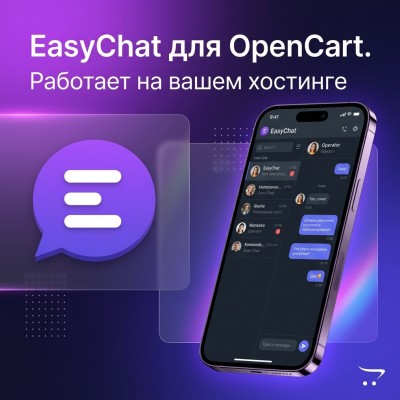
Buyers no longer write only through the feedback form on the website. One client asks a question in chat, the second writes in Telegram, the third comes from Avito, the fourth asks on VKontakte, and the fifth waits for an answer through the form on the product page. While there are few requests, everything can be kept in mind. But when the store begins to grow, the usual problem appears: there are messages, there are customers, there is interest in the goods - but some applications are still lost. Let's figure out exactly where online stores on OpenCart and ocStore lose hits and how to organize work so that the operator does not have to constantly switch between tabs, phones and applications.
The most common mistake is to assume that all buyerswill write to one channel.
In practice, a store may have several points of contact at once:
Each channel can be useful in its own right. The problem begins when they work separately from each other.
The operator openedstore admin, but did not open Avito. I answered in Telegram, but forgot about the chat on the site. I saw a question about a product, but didn’t understand what kind of ad we were talking about. I read a message from my phone and then didn’t mark it as processed. The client wrote again, but in a different channel, and the communication history was lost.
As a result, a store can spend money on advertising, SEO, product cards, unloading and promotion, but lose customers at the simplest stage - the response.
At first glance, it seems that there is nothing complicated: install Telegram, open Avito, enable mail, add a chat to the site - and we respond.
But problems quickly arise in daily work.
If there are several people working in a store, it becomes difficult to understand:
Without a single queue, requests begin to be duplicated or, conversely, remain unanswered.
The client could first ask about delivery on the website, then write about the product on Avito, and later check availability via Telegram.
Foroperator these are three different messages. For business - the same buyer.
If the story is not collected in one place, the operator starts the conversation anew each time: “Hello, how can I help you?” Although the client has already explained what he needs, what product he is looking at and what conditions are important to him.
This is especially noticeable in stores that work with Avito or a large catalog of products.
The client writes: “And the memory is DDR3 or DDR4?”
If the operator does not see the product card, he has to separately search for the advertisement, check the characteristics, open the catalog or correspondence. This takes time and increases the risk of error.
For salesNot only the correspondence itself is important, but also the context:
Not all requests are the same. One client simply clarifies the characteristics. The other one is already ready to place an order. The third one is waiting for a response on delivery. The fourth one writes again because they didn’t answer him.
If all the messages are in different places, it is difficult to quickly figure out where to respond first.
For a small store, it is not necessary to immediately implement a large CRM. But a basic message processing system is still needed.
A good option is single panel, where the operator sees all active requests regardless of the channel.
Ideally, the operator should have one workstation:
|
Customer → channel → message → product → story → response |
And not five different windows:
|
Admin + Avito + Telegram + VK +mail |
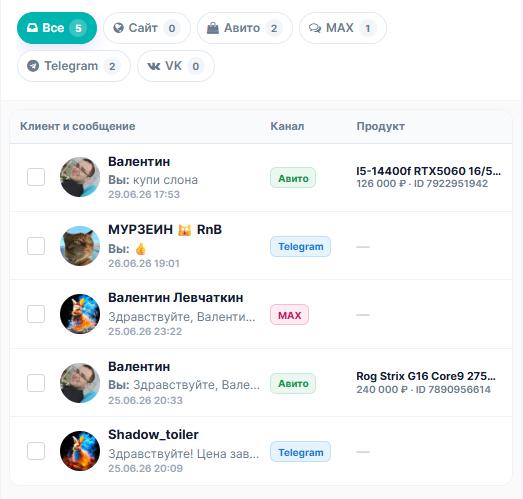
All requests fall into one list:
The operator sees which dialogues are new, which are already in progress, which are awaiting a response, and which can be closed and sent to the archive.
Each message must have a clear source: website, Avito, Telegram, VK, MAX or another channel. This helps you understand what style is best to respond in and where the client came from.
For example, in the site chat you can give a link to place an order, and in Avito the client often expects a quick short response to a specific ad.
If a client writes about a product, it is important for the operator to immediately see:
This saves time and helps avoid confusion, especially if the store has a lot of similar products.
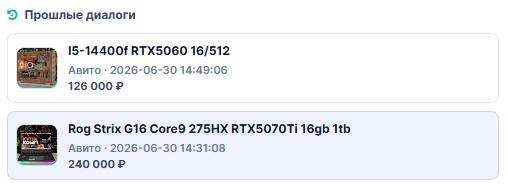
It is useful to see not only the current dialogue, but also past requests.
|
The client already wrote yesterday about MSI |
Such a story helps to conduct a conversation calmer and more accurately. The client does not need to repeatthe same thing, and the operator does not look like a person who does not remember anything.
If there are several employees in the store, you need simple statuses:
It is also useful to designate a responsible operator. Then it is clear who is responsible for the appeal and to whom it was transferred.
Most of the questions are repeated:
For such situations, quick answers are convenient. They save time and help you respond in a consistent manner.

The owner of a small store or manager does not always sit at the computer.
If a client writes in the evening, on a weekend or on the road, a regular web admin will not help. You need to receive a notification on your phone andrespond quickly if necessary.
For this, the operator’s mobile application or at least push notifications about new calls is useful.
Avito is different from regular chat on the site. On the website, the client writes more often to the store’s general chat. On Avito, a client usually writes about a specific ad.
The same buyer can open several advertisements and write for each:
If such dialoguesjust adding them to a general list, the interface quickly becomes overloaded. But if you show the product context carefully, it becomes easier for the operator:
|
Vanyok Ivanov |
The operator immediately understands what product the question is about and can answer without unnecessary transitions.
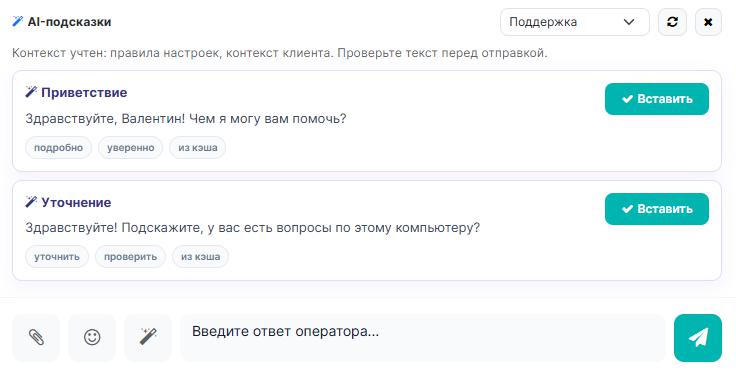
AI in store support does not have to completely replace the operator. In practiceAnother scenario is often more useful: AI helps the operator respond faster.
He can:
For example, if a customer asks, “Is this laptop DDR3 or DDR4?” - AI can look at product data or a knowledge base and offer the operator a ready-made answer.
|
⚠ Important rule AI should not itself promise discounts, delivery times, product availability or individual conditions if these data are not confirmed. Such questions are best referred to a live operator. |
Let’s say a client writes from Avito: “Hello, is the memory DDR3 or 4?”
A good system should show the operator not just the text of the message, but all the useful information:
|
Client: Vanek Ivanov |
Then the operator can:
If the client writes again later, the history will already be saved.
Write down where clients actually come from: website, Avito, Telegram, VK, MAX, email, calls. Often at this stage it becomes clear where messages are most often lost.
Even if there are two people in the store, it is useful to agree on who responds in the morning and evening, who responds to requests from Avito and the website, and whocan answer difficult questions about who has the right to close dialogues. Without responsible contacts, requests will still be lost.
Minimum set: greeting, product availability, delivery, payment, guarantee, return, discount, closing the dialogue and transfer to the operator.
Templates should not sound robotic. It is better to write in simple language, as a normal seller answers.
If the store is open only from 10:00 to 18:00, phone notifications are very important.
Check:
Useful to check:
This helps not only to respond faster, but also to improve the store itself: product cards, delivery descriptions, guarantee, FAQ and ordering.
If the store has 1-2 requests per day, you can start with simple notifications. A single panel becomes really necessary when the number of requests exceeds 5-10 per day, several operators are involved in the work, sales are carried out not only through the website, but also through Avito, customers contact through different communication channels, regularly ask questions about specific products, it is necessary to save the history of correspondence, respond to messages from the phone, and also control the speed of processing requests and the quality of work with applications.
The more channels there are, the less the “let’s just watch all the apps” scheme works.
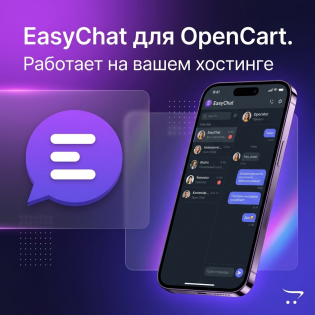
For such tasksyou can use the module EasyChat.
This is a self-hosted chat and message aggregator for an online store on OpenCart. The module is installed on your hosting, and correspondence is stored on the store side.
The main idea is to collect requests in one interface:
This approach is convenient for stores that do not want to pay a monthly subscription for regular chat, but want to have a normal system for processing requests.
Web chat can be used as a basic entry point, and the mobile app and push notifications help ensure that calls aren't missed when the agent is away from the computer.
In the LiveOpenCart catalog you can select modules that help close different parts of this task:
If a store actively communicates with customers, it is better to consider such modules not separately, but as a single system: the client wrote, the operator saw, quickly responded, recorded the agreement and brought the buyer to the order.
For an online store, not only advertising, SEO and a convenient catalog are important. The important moment is when the buyer is already interested and writes a question.If you answer quickly and to the point, the question can turn into an order. If the message is lost, the client will simply go to another seller. Therefore, it is useful for a modern store on OpenCart to have a single workplace for requests: website, Avito, messengers, operators, history, product context and mobile notifications. It doesn't have to be a complex CRM. Often a properly configured chat and a single message panel are enough. The main thing is that no client is left unanswered.