News and articles
Identification of ru domains through State Services - what needs to be done before September 1, 2026

Any operations with the domain will be possible only after identification through State Services. This is a legal requirement and cannot be ignored.


Best-selling templates and extensions in March 2026

Best-selling templates and extensions in March 2026: LiveYML, GigantFilter, Automatic notifications in Max, Revolution template.


A selection of new modules for Opencart for March 2026

New for March 2026: GigantFilter, Coupon on the product page, MAX notifications, OpenCart Anti-Virus.


Discounts on modules and templates in March

Current discounts on payment modules, uploads to Yandex, modules from Serbulenko and opencart-cms.ru, Unishop2 template and GigantFilter.


How to Install and Set Up Google Analytics or Yandex Metrica Counter

The easiest way to add Google and/or Yandex counter codes to your store on OpenCart.
How to Install and Set Up Google Analytics or Yandex Metrica Counter

You can install the Google Analytics code or Yandex Metrica counter code by going to the "Analytics" section in your website's admin panel. There are other ways to add the code to your site, but we won't discuss them as they are too complicated for inexperienced OpenCart users and require modifying the engine's code, which is not the best solution.

To embed the Google Analytics or Yandex.Metrica counter code in the OpenCart admin panel, follow these steps:

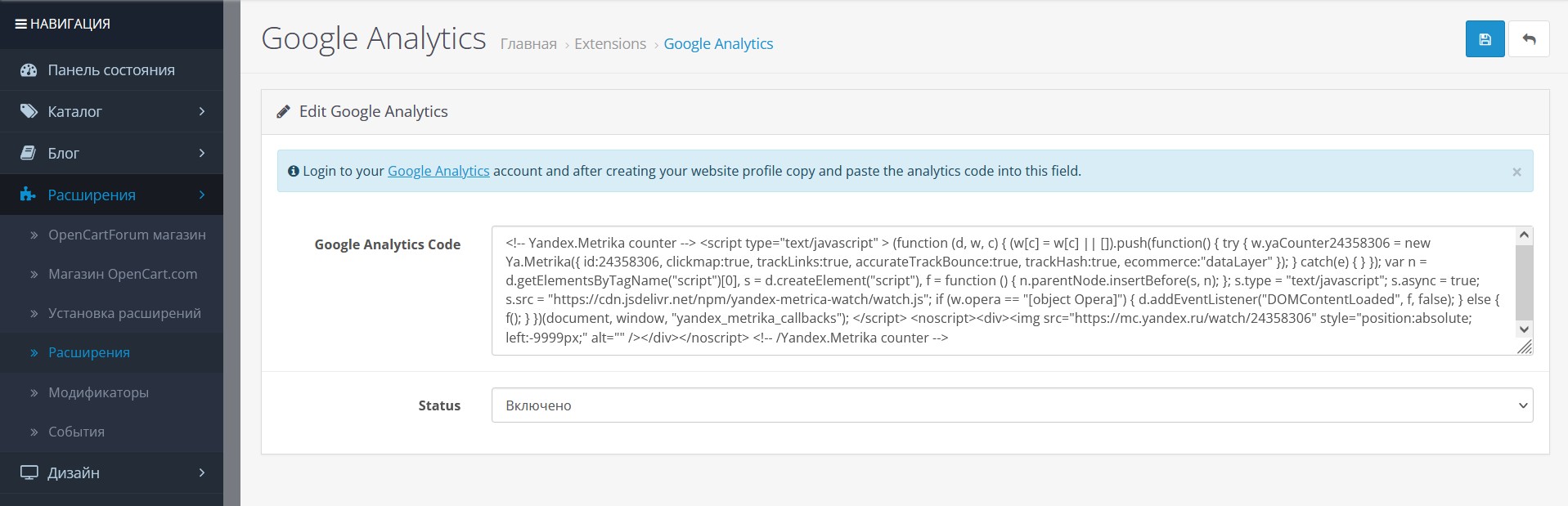
  • Go to the "Extensions" section in the admin panel.
  • In the dropdown menu, select "Statistics" (in some versions, this may be called "Analytics").


  • Click the "+" button next to "Google Analytics" to activate the module.
  • Find the row with your store's name and click "Edit" next to it.
  • In the "Google Analytics Tracking Code" field, paste the code copied from your Google Analytics or Google Tag Manager account and/or Yandex.Metrica.

  • Set the module status to "Enabled."
  • Save the changes.
  • Now the code is added to all pages of your website.

To verify, follow these additional steps:
  • Open any page of your website in a browser.
  • Press the F5 key to refresh the page.
  • Then press Ctrl+U to open the page's source code in a new browser tab.
  • Press Ctrl+F to open the search field.
  • Type "google" or "yandex" into the search field.
  • You will see the counter code.

Recommended to view


Yet, no one has left a comment to the entry.
Leave a comment text_write_hint