Очень удобный магазин,кто работает с платформой Opencart.
Заказывали модуль, при оплате предоставили быстро документы,модуль а также консультацию по установке.
One-page checkout for OpenCart: delivery via Yandex.Maps, pickup points and ApiShip, invoice for legal entities, order confirmation email and Telegram notification, and Federal Law 152-FZ consent. Analysis on real store screens.
This is the module's author's story: why we took on the OpenCart shopping cart, what we changed, and what we learned from stores already using the module. All images below are real screens, not mockups: most are from live stores, and the invoice, email, and notification were captured on our test store with fictitious companies. Some typos and demo products are visible; we didn't touch them.
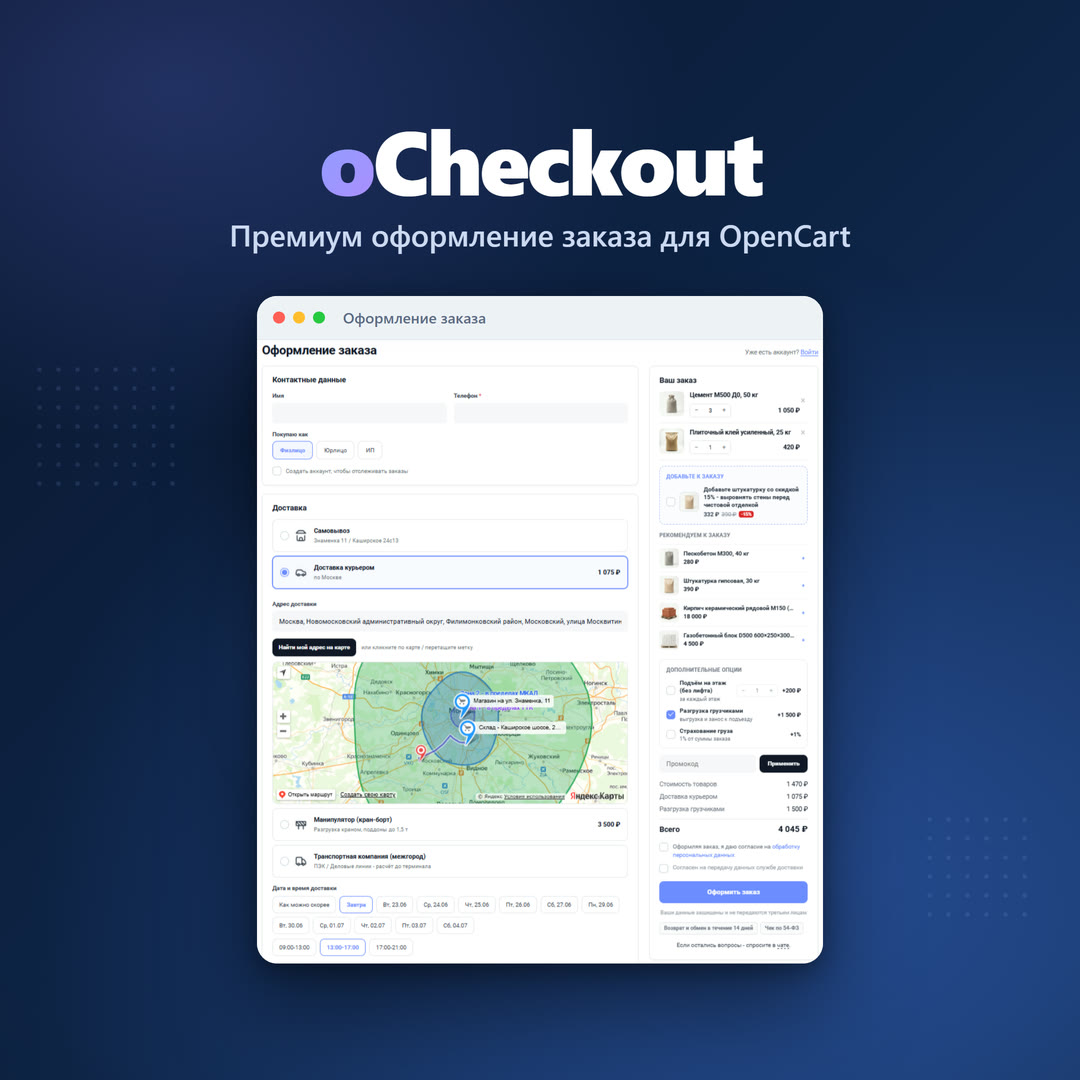
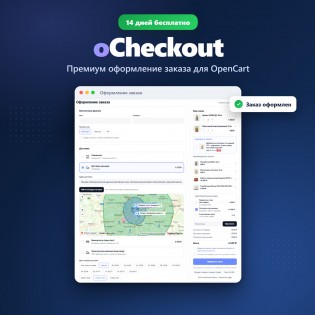
This is what a building materials store's checkout looks like on oCheckout: contacts, delivery with a card, time slots, order summary, and upsells all on one screen.
Where it all began
The standard checkout process in OpenCart consists of six panels. The customer opens the first, fills out the form, clicks "Continue," waits for the checkout to reload, then opens the second, and so on six times. At each step, they see neither the total cost nor the order details. If, at the fourth step, it turns out that shipping costs more than they expected, they simply close the tab.
We looked at this in the webvisor of several stores. The picture is the same everywhere: almost everyone gets to the first panel, and significantly fewer get to the payment button. People abandon the process not because they changed their minds, but because it's too long and it's unclear how much more remains.
One page instead of six steps
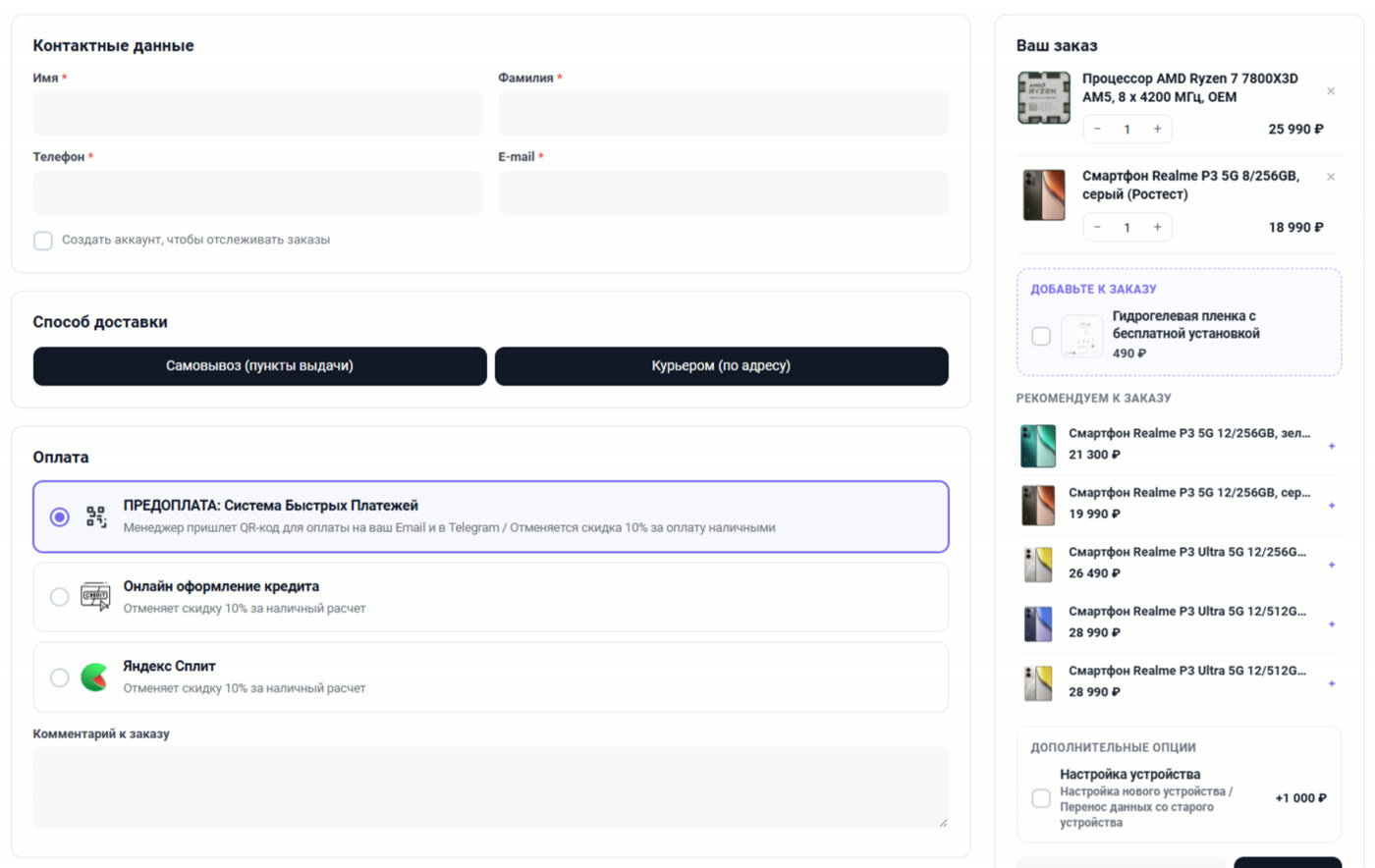
Here's the checkout counter at an electronics store. On the left are contact information, delivery method, and payment details, on the right is the order details. The customer sees everything at once: a processor for 25,990 rubles, a smartphone for 18,990, three payment methods, and two delivery buttons. No "step 3 of 6."
Electronics store. Delivery options are limited to two buttons, "Pickup (pickup points)" and "Courier (to address)." Payment is labeled with the store's words, and a summary with upsells and recommendations is on the right.
Note the captions under the payment methods: "The manager will send a QR code for payment to your email and Telegram," "Cancels the 10% discount for cash payments." This isn't our text; the store added it in its settings. Standard OpenCart doesn't support this: the payment method only has a name.
The page address doesn't change; it remains the same index.php?route=checkout/checkout. All your links, counters, and goals in Metrica continue to work.
Everything is recalculated on the fly
This is the most inconspicuous and most important part of the module. In the same screenshot of the electronics store, the summary on the right shows a checkbox for "Hydrogel film with free installation, 490 ₽" and an option for "Device setup, +1,000 ₽." The buyer checks the box, and the total below changes immediately, without rebooting. They choose a different delivery method—the calculation is recalculated. They enter a promo code—the calculation is recalculated.
This is not based on customer magic, but on an honest recalculation. The module re-runs for each change.Collects three blocks on the server: delivery, payment, and summary, and replaces them on the page. The state is stored in the same session keys as the standard cart. This leads to an important conclusion: all your delivery, payment, and totals extensions continue to work as before. We don't rewrite anything for ourselves; we give them the same session and display their responses.
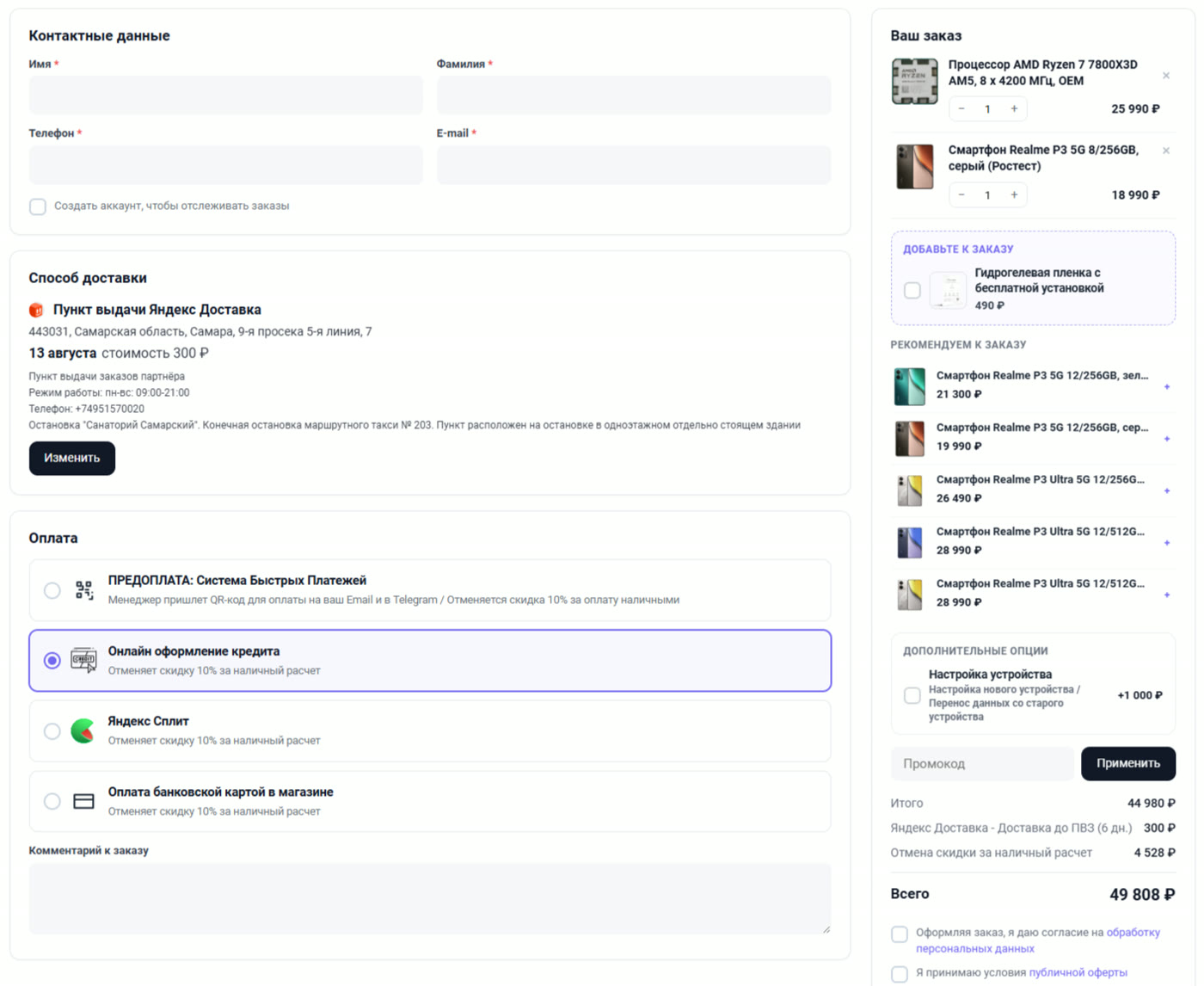
A good example is on the following screen: the line "Cancellation of cash discount, 4,528 ₽" in the summary. The store offers a 10% discount for cash, and in the module settings, each payment method has its own discount or surcharge, with any name, in the "Total" section. The buyer switched to "Online loan application," the line appeared, and the total was recalculated. Under the payment methods, the store clearly stated why: "Cancellation of the 10% discount for cash."
Pickup point selected: address, date "August 13th," price 300 ₽, opening hours, and directions. The summary on the right now shows a delivery cost of 300 ₽ and a "Cancel cash discount" surcharge for the selected payment method. The total has been recalculated to 49,808 ₽.
Delivery: map, zones, and time slots
This is where we spent the most time, because Russian delivery isn't a one-click process.
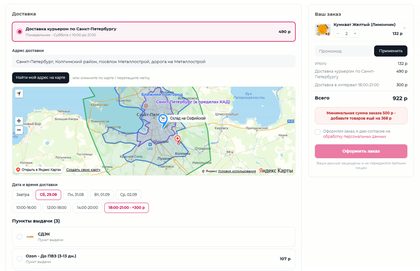
A store in St. Petersburg delivers by courier throughout the city and suburbs. The map shows delivery zones, two of which are labeled "St. Petersburg (within the Ring Road)" and "Near Suburbs," and a warehouse marker on Sofiyskaya Street. The customer places a dot or enters an address, and the module determines the zone and calculates the price: 490 rubles. Below the map are slots: tomorrow, Saturday, Monday, time intervals, and an evening interval of "6:00 PM - 9:00 PM" with a 300-ruble surcharge. Below are three more pickup points, including "Ozon - To Pickup Point (3-13 days), 107 rubles." href="/image/data/Articles/2026/09/ocheckout-02-dostavka-po-karte.jpg" rel="ocheckout-gallery" target="_blank" title="Delivery by zones on Yandex.Map and time slots in oCheckout">
St. Petersburg store: delivery zones are shown on the map, evening slots are more expensive, and in the summary, the module reminds you that the minimum order amount is 368 rubles short.
Look at the pink box in the summary: "Minimum order amount is 500 rubles - add products worth another 368 rubles." This is the rule the store has set in its settings. The customer doesn't have to scroll all the way to the end to learn about the restriction: the tooltip is located right above the "Place order" button.
You can draw as many zones as you like, each with its own price and free delivery threshold. If there are no zones, the price is calculated based on the distance from the nearest warehouse, adjusted for road curvature. Beyond the radius limit, the method with your text disappears.
Pickup points and carriers in one window
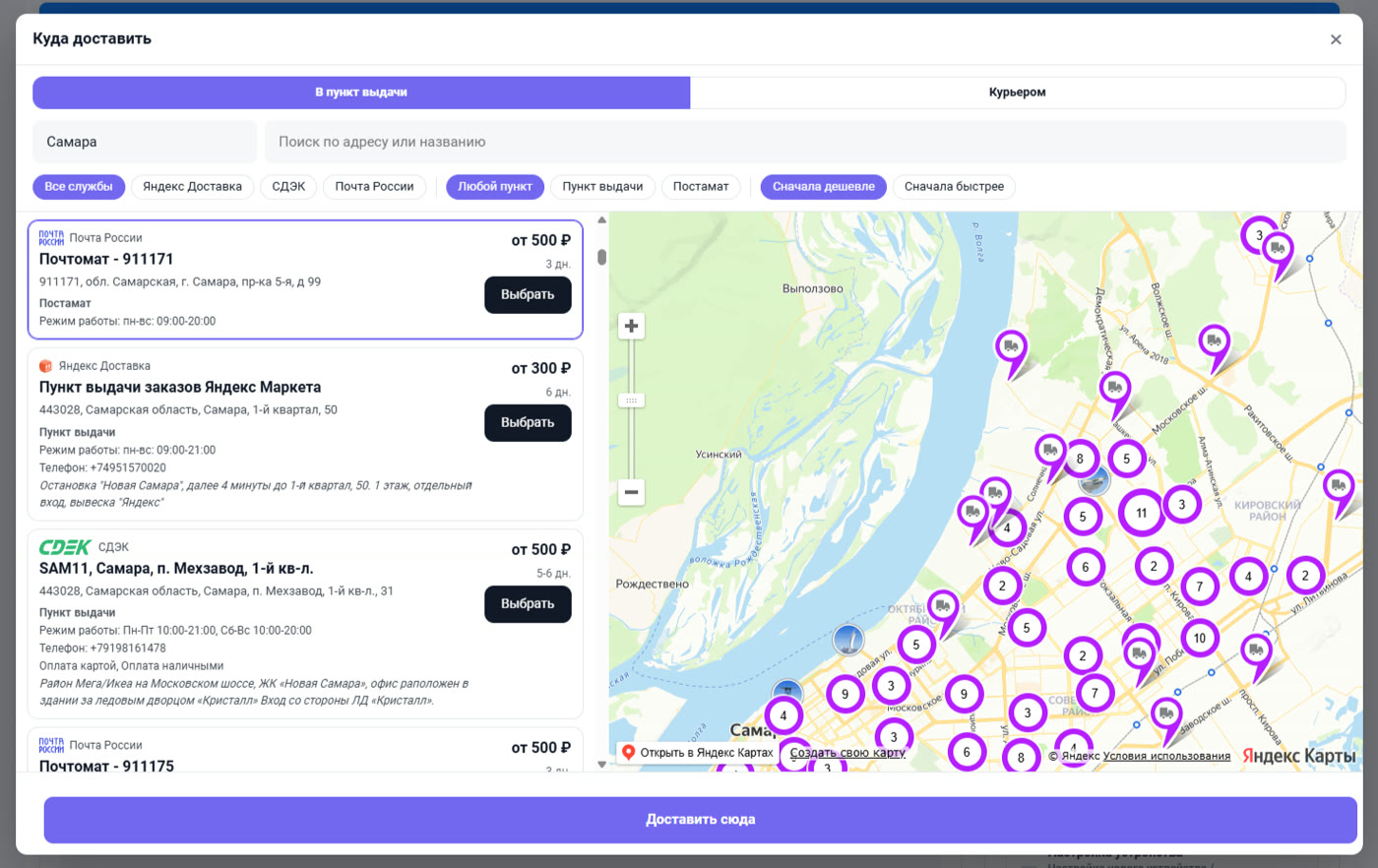
The electronics store has ApiShip enabled: one contract and one token instead of separate integrations with each service. The buyer clicks "Pickup (pickup points)" and is presented with the "Delivery to" window. It includes city, address search, filters by service (Yandex Delivery, SDEK, Russian Post), and by location type (Pickup"Pickup", "Postamat") and sorting "Cheaper First" or "Faster First".
Samara, "To Pickup Point" tab. Russian Post parcel terminals from 500 ₽ in 3 days, Yandex Delivery from 300 ₽ in 6 days, SDEK from 500 ₽ in 5-6 days. On the right is a map with point clusters.
Each card shows the actual price and delivery time to that specific location, not "from 300 rubles in the region." The price is calculated on the server at the buyer's address once for all services at once, so switching filters doesn't wait for anything.
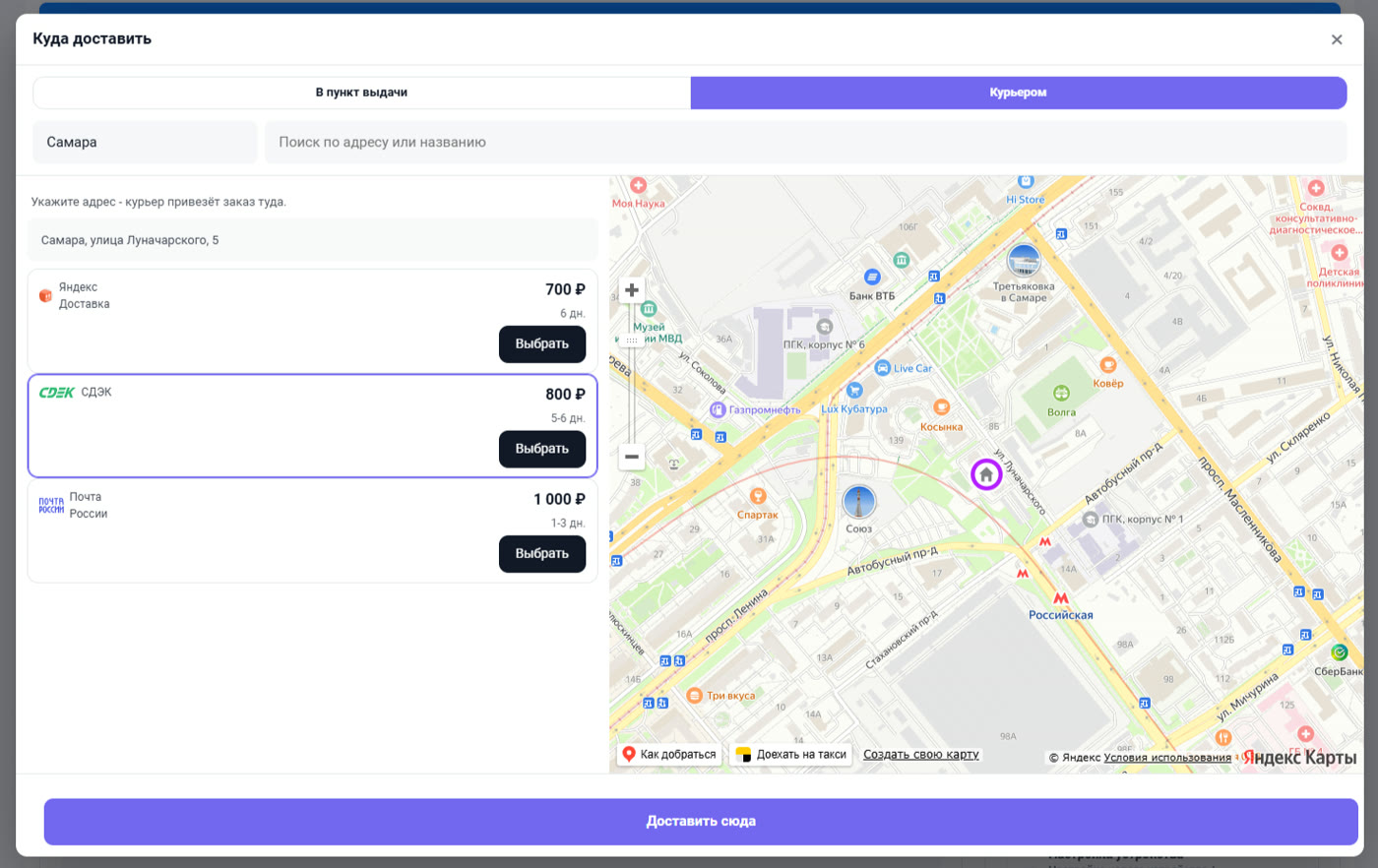
The second tab of the same window, "Courier." The buyer enters the street and house number, the marker appears on the map, and three services quote a price for door-to-door delivery: Yandex Delivery 700 rubles for 6 days, SDEK 800 for 5-6 days, Russian Post 1,000 for 1-3 days. Then the buyer decides what's more important, price or speed.
The "Courier" tab: the address "Samara, Lunacharskogo Street, 5," a map pin, and three carriers with price and door-to-door delivery time.
If you already have SDEK or 5Post modules installed
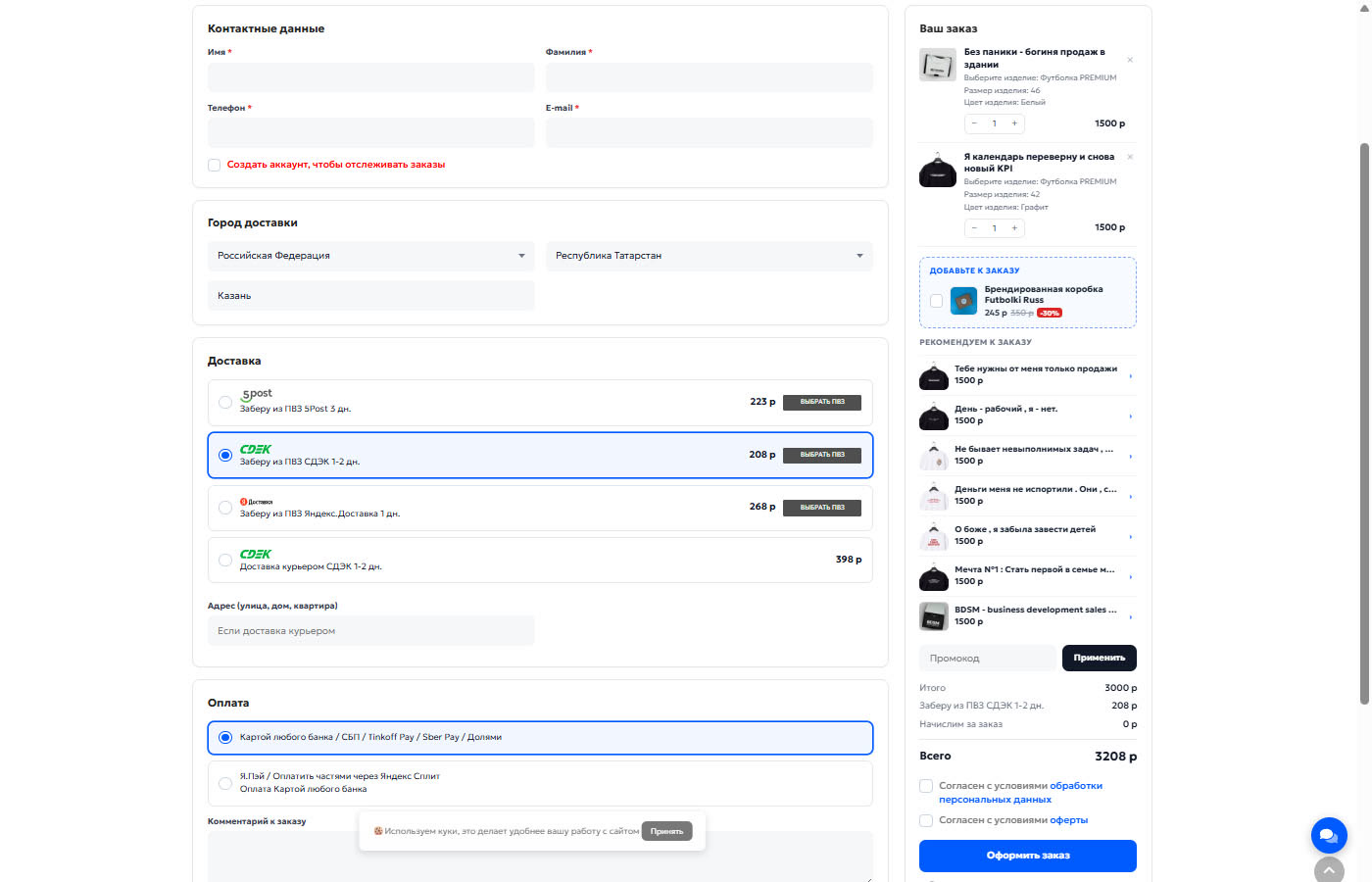
Not everyone is ready to move to ApiShip; many have had separate carrier modules set up for a long time. We've taken this into account. Here's a T-shirt store from Kazan: they have third-party modules for 5Post, SDEK, and Yandex.Delivery. All four methods are visible at the checkout with their prices: 223, 208, 268, and 398 rubles. Each pickup location has a "SELECT PICKUP STATION" button.
T-shirt store. Delivery methods come from third-party modules; oCheckout only displays them and adds option buttons. The summary shows products with options (model, size, color), the "Branded Box" upsell with a 30% discount, and recommendations.
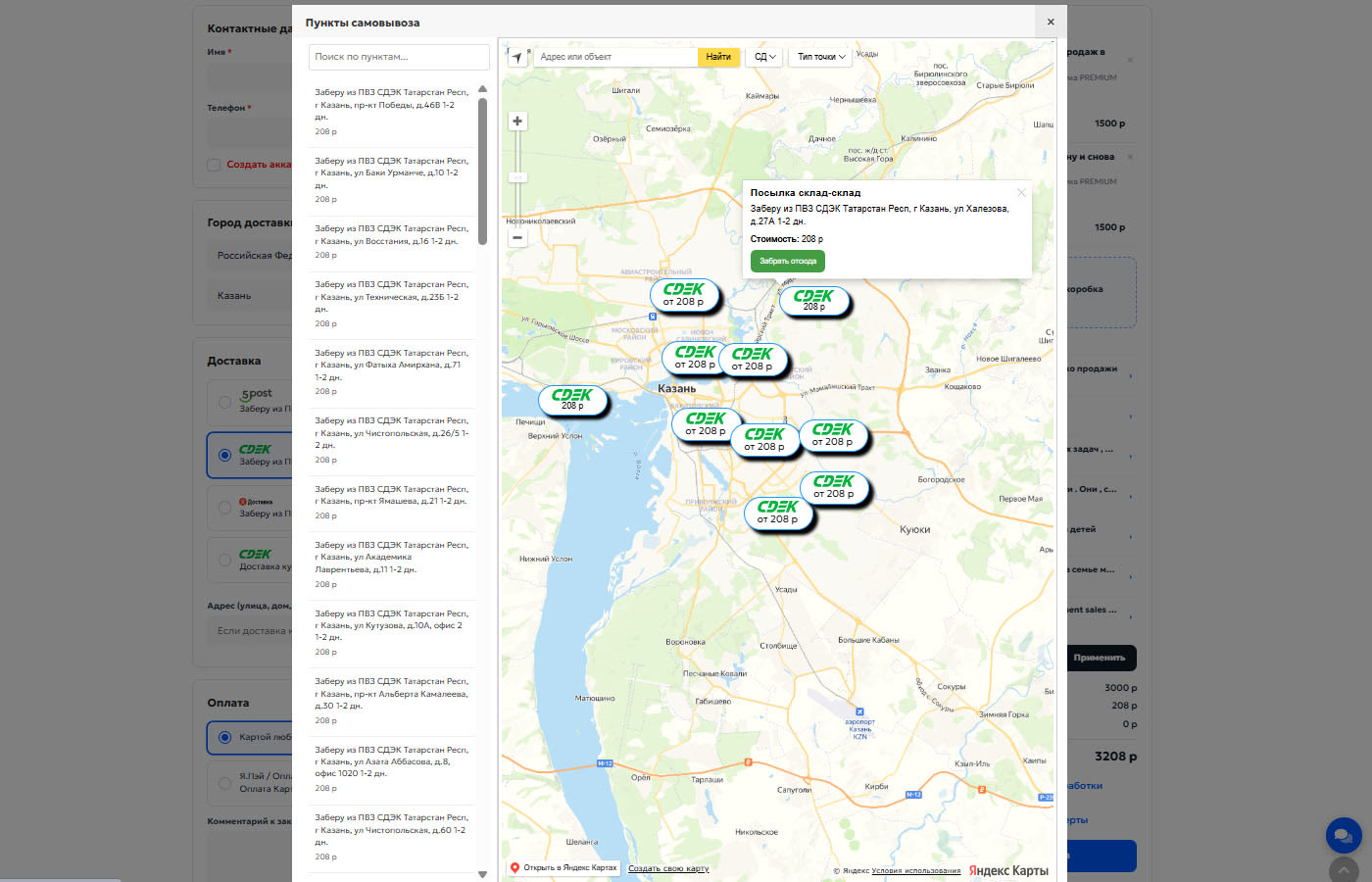
The "SELECT PICKUP STORE" button opens the SDEK module window with its map and list. We don't write a second integration or request a second key; we simply call their function from our checkout. The order and invoice then follow their usual path.
The "Pickup Points" window of the third-party SDEK module, opened from oCheckout: a list of pickup points in Kazan, markers with prices "from 208 rubles" on the map, and a balloon with a "Pick up from here" button.
Legal entities, sole proprietors, and accounts
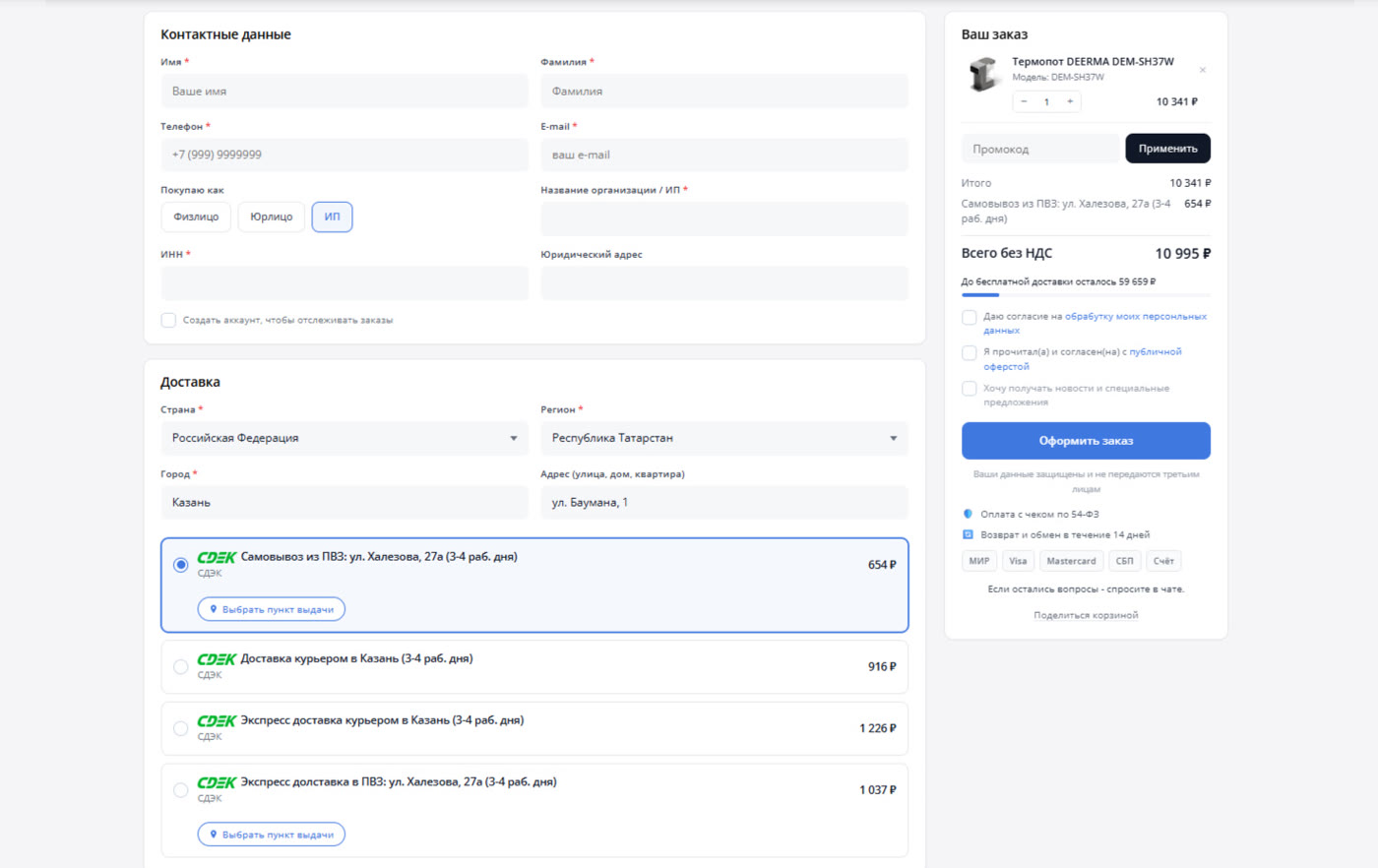
If you sell to businesses, the "Buying as: Individual / Legal Entity / Sole Proprietor" toggle saves you and the buyer a lot of back-and-forth. The home appliance store below enabled it directly in the contact information. The buyer selected "Sole Proprietor," and the form displayed "Organization Name / Sole Proprietor," "Taxpayer Identification Number," and "Legal Address." For individuals, these fields are not displayed at all.
Household appliance store. The "Individual Entrepreneur" taxpayer type has been selected, and the TIN and legal address have appeared. The "Total without VAT" summary shows the "₽59,659 left until free delivery" progress bar, three separate consent forms, and icons for accepted cards.
For legal entities, autofill by TIN is enabled via DaData: the user enters ten digits, and the module inserts the name, checkpoint, and address. An invoice is generated at the checkout, with your details and order items, including product options.
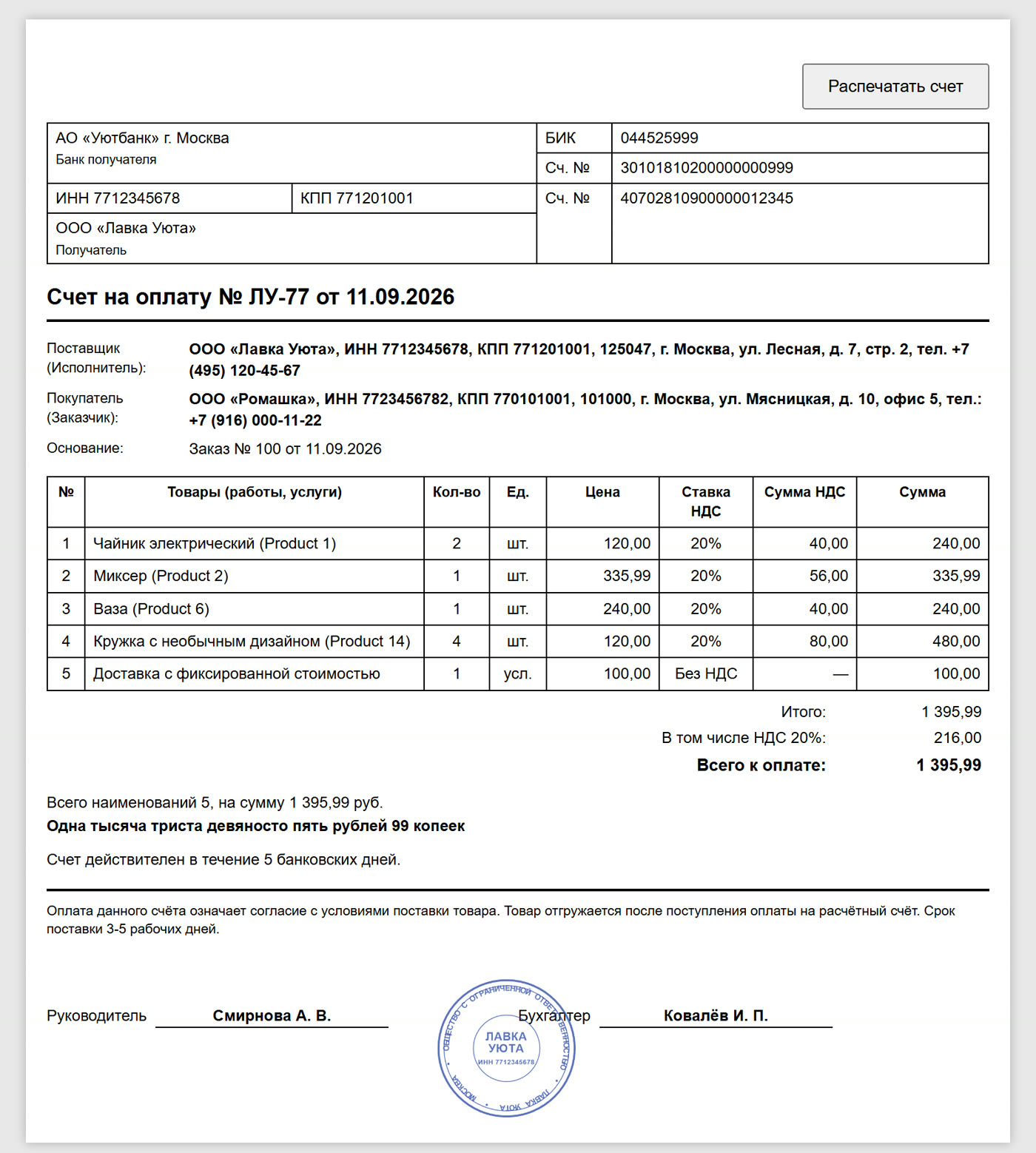
This is the invoice a customer received in our test store immediately after clicking "Place Order." It shows the seller and buyer details, the reason, a table of items with delivery on a separate line, VAT for each line, the amount in words, the expiration date, and a stamp. The module takes the VAT rate from the product tax classes, so delivery without VAT is printed as "Without VAT" rather than spread across all lines. The invoice number is assigned its own counter with your prefix. The link to it opens without logging into your account, and you can simply forward it to your accountant.
Invoice No. LU-77 at the test store: seller and buyer with TIN and KPP, order items, delivery on a separate line, VAT by line, amount in words and stamp. The companies in the screenshot are fictitious.
This screen also shows several small details that the store enabled in the settings: a "Free delivery remaining" bar with progress, a "Payment with receipt under Federal Law 54-FZ" line, "Returns and exchanges within 14 days," and MIR, Visa, Mastercard, SBP, and "Account" icons. This is a trust block, and the store itself collects its components.
What adds to the average check
The checkout is the last place where the customer is ready to add something. This is visible three times on the screens above.
Upselling. At the electronics store, it's "Hydrogel film with free installation, 490 rubles" in the "Add to order" box. At the T-shirt store, it's "Branded Futbolki Russ box, 245 rubles instead of 350 rubles, 30% off." One checkmark, the item is in the cart, the total is recalculated.Recommendations. The "Recommended for Order" block with plus signs. The electronics store has five smartphones from the same line, and seven T-shirt designs.
Additional Services. "Device setup, +1,000 ₽" for electronics. Lifting to the floor, unloading, and insurance for building materials. Each, with its own price or percentage of the total, is added to the order as a separate line item.
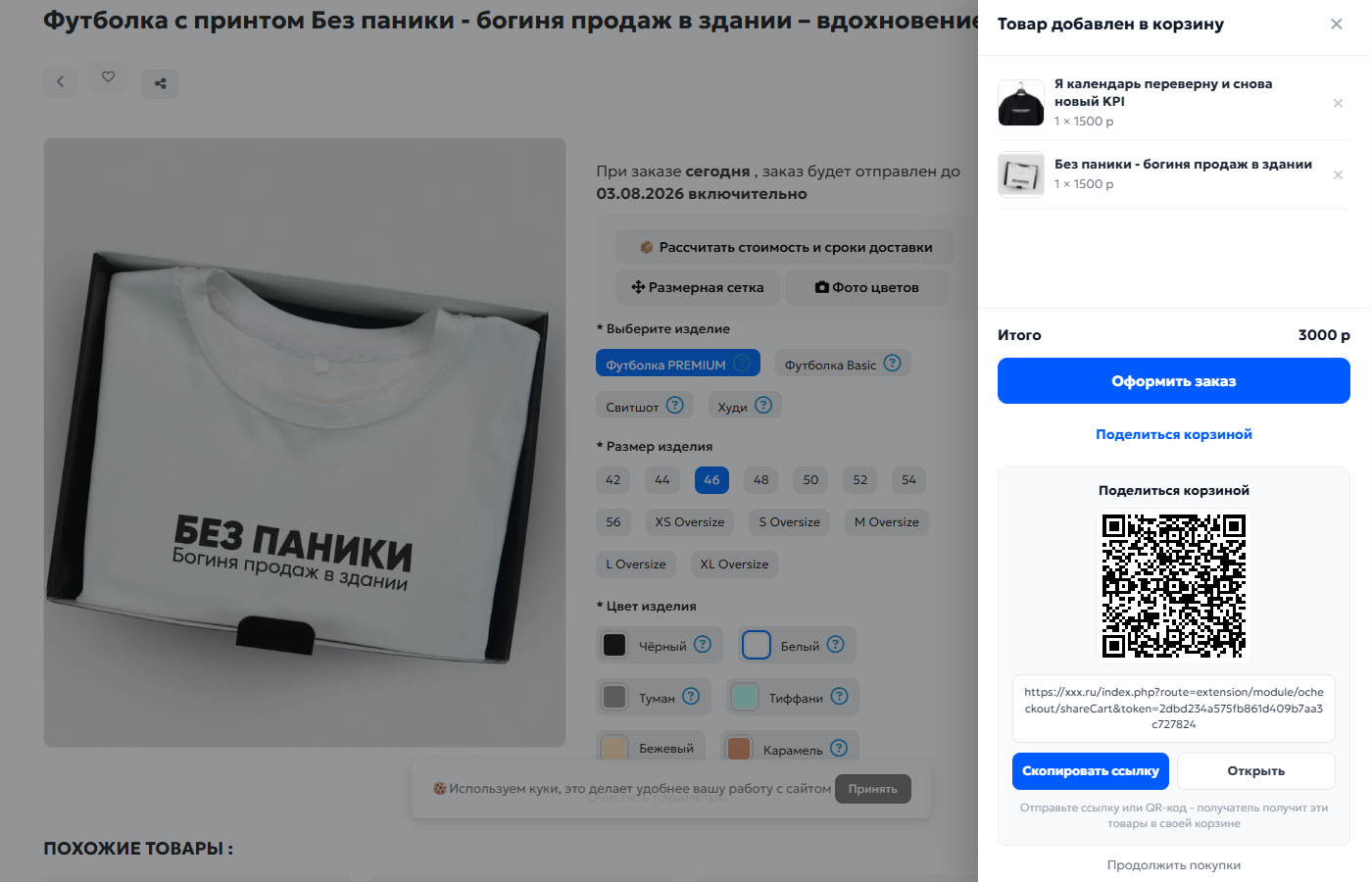
There's also a "Share Cart" option. The buyer fills the cart, clicks the button, and receives a link and QR code. Anyone who opens the link will see the same items in their cart. Stores use this to coordinate orders with accounting or family.
A T-shirt store's side cart with a "Share Cart" button: QR code, link, "Copy Link," and "Open."
An order confirmation email you're not ashamed to show off
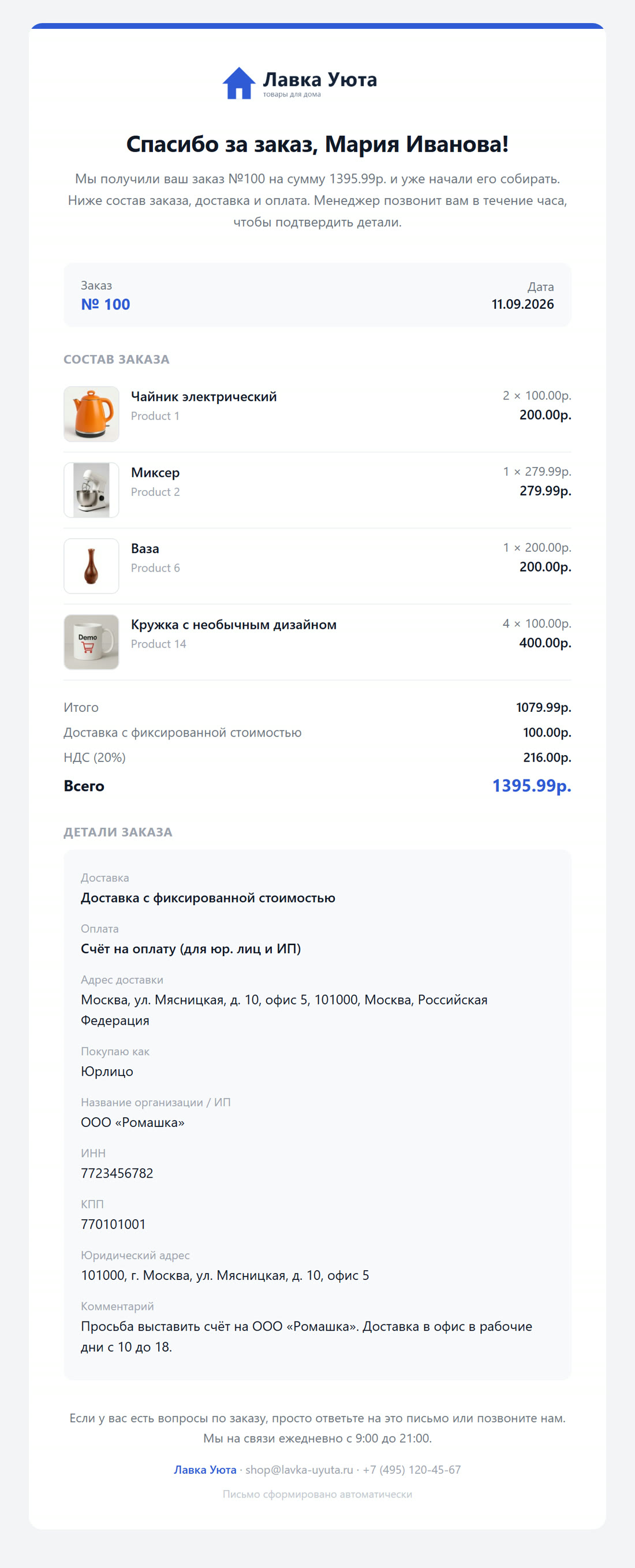
The standard OpenCart order confirmation email looks like a table from 2010 and breaks in half of all email clients. We made our own. This is the same email to the buyer with the same test order: logo, heading, and introduction with your text and placeholders like name and amount, order details with images and options, summary, delivery, payment, address, company details, and a comment.
The email text is edited in the admin panel for each language. There's also a preview of the last real order and a test send to yourself. The color of the top bar and links is taken from the accent color of the checkout, so the email and the website look consistent. The email is composed using tables with inline styles and is clearly marked with a light theme; otherwise, Gmail in dark mode would recolor the card background and the text would disappear.
Order notification for order #100 on the test store: logo, address by name, order contents with images, summary, delivery and payment, legal entity details, buyer's comment, and store contact information below.
Order notification in Telegram
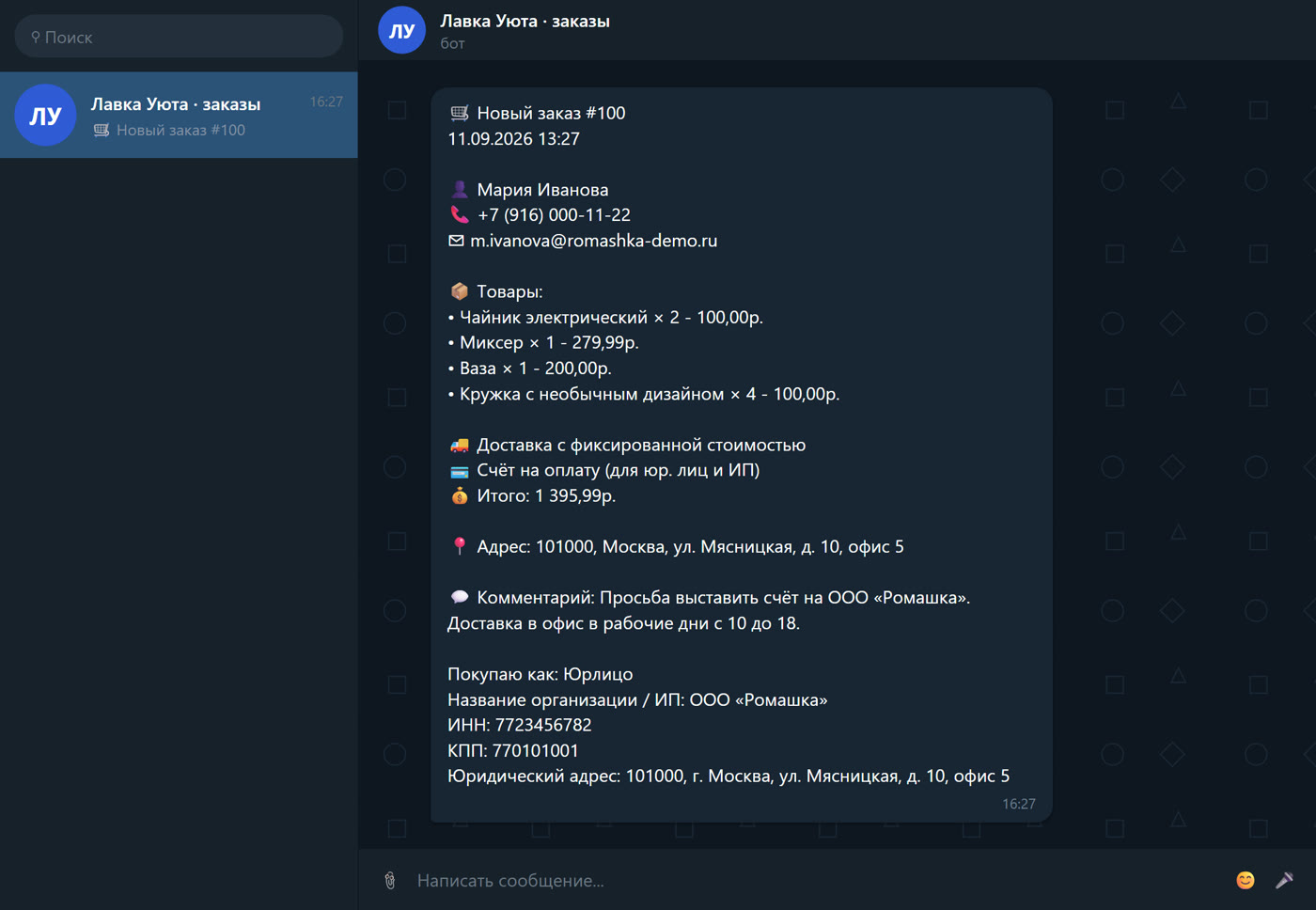
The manager rarely logs into the admin panel, but their phone is always nearby. The module can send a new order to Telegram or Max immediately after placement: you specify the bot, chat, and fields in the settings. Below is the notification text for the same order #100, exactly as it was compiled by the module. The following items are included using checkboxes: number and date, buyer and contacts, products with options, price and quantity, delivery, payment, amount, address, comment, and company details.
Order notification #100. The message text was compiled by the module, the chat window was drawn for clarity: the test store does not have its own bot.
While taking this screenshot, we found and fixed a minor issue: the legal entity details were included in the notification twice, once in the field block and once in the comment where the checkout adds them for the standard order page. Now the email, its preview, and the notification remove them from the comment in the same way.
152-FZ without a separate module
Consent to the processing of personal data is not just a checkbox in a form. If an audit occurs, you need to show who agreed, when, and with what text.
The screens above show two or three consents: "I consent to the processing of my personal data," "I have read and agree to the public offer," and "I want to receive news and special offers." Each store configures these separately: text, link, mandatory or not. The module keeps a log: date, order number, email, phone number, IP, browser, and a snapshot of the text the person saw at that time. If you edit the text, the old entries will retain their edited version. The log is viewed in the admin panel and exported to CSV.
How to set it up
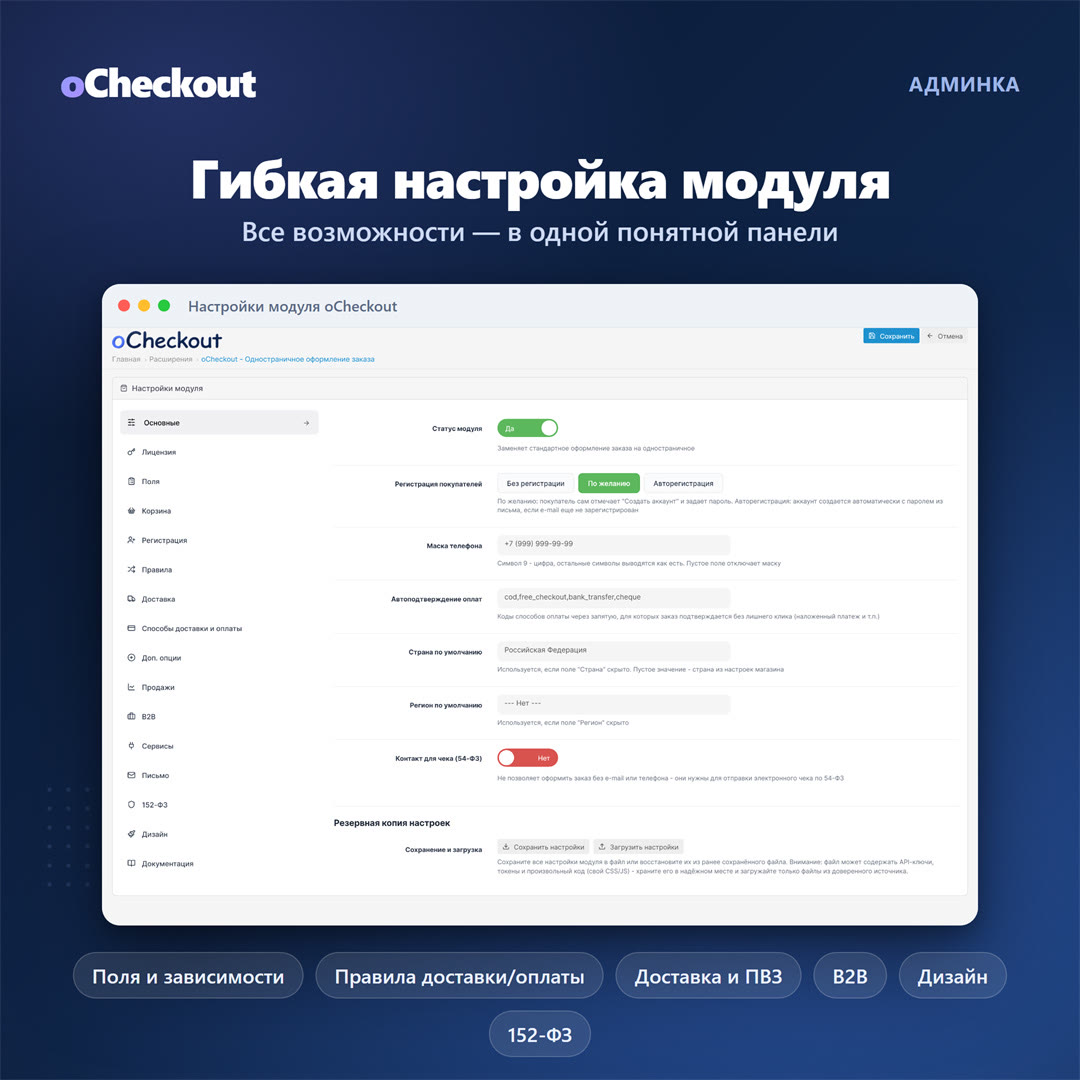
All settings in one panel, sixteen tabs on the left: fields, cart, registration, rules, delivery, delivery and payment methods, additional options, sales, B2B, services, letter, 152-FZ, design, documentation. Documentation is built into the admin panel, with its own documentation for each tab.
First settings tab: status, registration mode, phone mask, automatic payment confirmation, receipt contact for 54-FZ, settings backup.
It's installed as a regular ocmod archive, leaving core files untouched. The module connects to an OpenCart event and overrides the output of the standard cart controller. Disabling it returns the standard cart, and nothing breaks. The layout is custom and responsive, and on a phone, the dashboard collapses into a single line with the total. ... The most useful features in the module emerged not from the development plan, but from requests. Three stories that changed the code.
"The button doesn't work, the order isn't being created." The store claimed the checkout was dead. In reality, every single order was created, but it simply remained without a status, and OpenCart hides such orders from the default list. Over the course of a month, 97 live customers accumulated, unseen by the owner. The cause turned out to be email: the store's SMTP password had failed, and the OpenCart mail library threw an exception in response to a server failure, which occurred during the order status change. No one caught it, the request failed, the buyer received an error page instead of a response, and the button silently did nothing. Now the status change is a complete failure: the email isn't sent—the reason is recorded in the log, but the order still receives a status and is visible in the admin panel.
"Orders come with"Empty address." The store requested that the address field be made mandatory. It turned out that it wasn't mandatory: customers selected a point on the map, the map filled in the city and street, and the module cleared the fields it considered hidden before saving. The address disappeared after the user had entered it. We only discovered this after placing an order on their website and checking what was stored in the database.
"Half the cities don't have delivery prices." Store on ApiShip: prices are calculated in Novosibirsk and Omsk, but not a single rate is available in Kazan and Chelyabinsk. We tried two dozen cities and found a pattern: ApiShip doesn't recognize some cities if you submit a name without a type. "Kazan" - zero rates, "city of Kazan" - 1,640 rubles for SDEK and 442 rubles for Yandex. Now, after receiving an empty response, the module asks again for the city type. For cities where everything was already calculated, no extra query is made.
We're not just saying this for show. A module of this size can't be written once and then shut down. Installation and configuration assistance is included in the price, and we investigate requests like these down to the root cause, not just "something's wrong with your hosting."
Who needs this?
The benefits are most apparent where the design is more complex than a couple of fields: delivery within the city and across Russia, pickup points, wholesalers and legal entities near retailers, additional services, pickup from multiple locations. Construction materials, furniture, appliances, wholesale catalogs, products with installation. If you have three products and one nationwide delivery for a fixed price, the standard shopping cart is likely sufficient. We don't think everyone needs a module. a class="imagebox" href="/image/data/Articles/2026/09/ocheckout-11-odin-modul.jpg" rel="ocheckout-gallery" target="_blank" title="oCheckout: One module instead of multiple extensions">
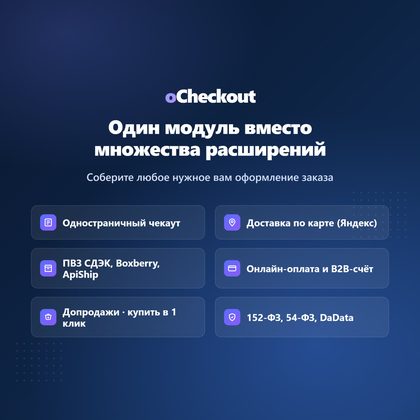
What one module covers: single-page checkout, card delivery, pickup points and ApiShip, online payment and invoicing for legal entities, upselling and one-click purchases, Federal Law No. 152, Federal Law No. 54, and DaData.
In Brief
oCheckout consolidates the checkout process into a single screen, recalculates shipping and payment without reloading, and covers features that OpenCart doesn't offer out of the box for Russian stores: a map with zones and pickup points, carriers via ApiShip, legal entities with an invoice, a consent log under Federal Law No. 152, and upselling at the checkout. At the same time, it doesn't rewrite the core or interfere with your extensions, as you can see in the T-shirt store screens.
You can view the demo storefront and demo admin panel; they're open. For questions about customizing your store, please contact the author; we'll answer them ourselves.


 09.10.2026