Your shopping cart is empty!

Import - Export of Catalog and Products - Scrapesmart Catalog Import Opencart
Price: free

Additional from the author:
Author: GeorgyM
Write to the author
Need paid help? Contact the site administration
Opencart version:
Need paid help? Contact the site administration
Opencart version:
LiveStore 3.*OCStore 3.*OpenCart 3.*
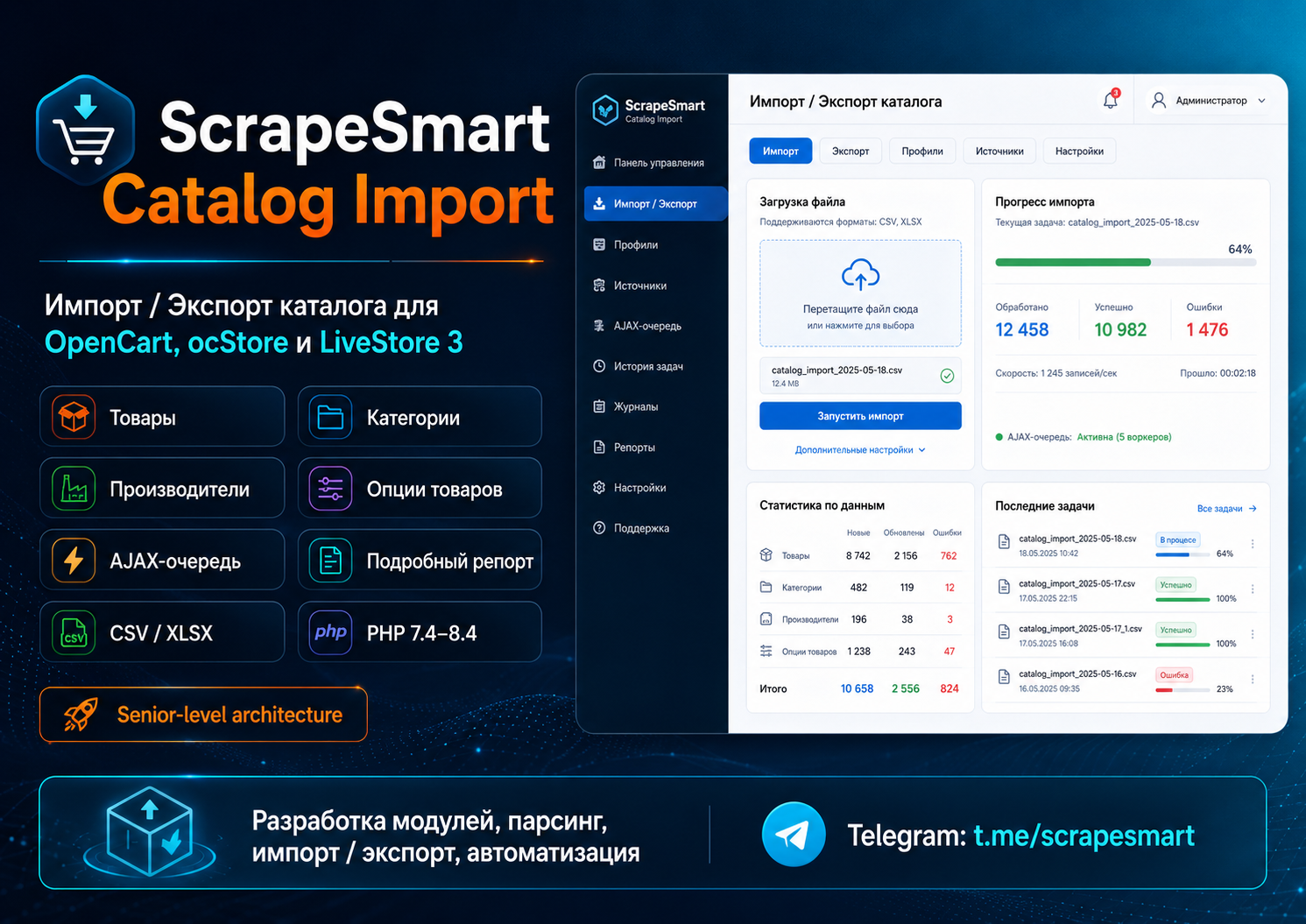
ScrapeSmart Catalog Import - catalog import and export for OpenCart / ocStore / LiveStore 3
ScrapeSmart Catalog Import - module for bulk import, update and export of an online store catalog on OpenCart 3, ocStore and LiveStore.
The module helps to quickly load products, categories, manufacturers and product options from CSV files, update existing data, create new records and monitor the results through a detailed report.
The module is suitable for stores with a large catalogue, regularly updating price lists, downloading goods from suppliers, transferring data between sites and automating routine work with the catalogue.
Key Features
The module allows you to import and update:
Products
AJAX queue without 504 Gateway Timeout
Import is performed not with one long PHP request, but through the AJAX queue.
This reduces the riskerrors like:
The file is first parsed into a queue, after which the data is processed in small batches. The screen displays the processing progress and detailed results for each line.
You can see:
Detailed report after import
After starting the import, the module shows a detailed report:
Examples of statuses:
This is convenient for debugging large price lists and understanding what data was actually changed.
Import Modes
The module supports different operating scenarios:
Test mode allows you to test a CSV file without making changes to the database.
This is useful before downloading a large price list or updating a combat catalog.
Key fieldsto search for records
You can use different keys for products:
For example, if the key is selected
If the product is found, it will update.
If not found and adding mode is selected, it will create a new one.
For categories you can use:
For manufacturers:
Data formats
CSV format for products
Example of a basic CSV for products:
Main fields:
Categoriesin product CSV
The category can be specified by:
Or several categories through a separator:
If there is no category, the module can create it automatically.
Additional images
Additional images can be specified via
Product attributes
Attributes can be transmitted in one column:
Format:
Example:
Multilingual fields
The module supports columns indicating the language ID:
Example fields:
Where
CSV format for categories
Example:
Main fields:
Example of a category tree:
If category creation is enabled, the module will create the missing tree levels.
CSV format for manufacturers
Example:
Main fields:
If a manufacturer already exists, the module can update it.
If it doesn't exist, create a new one.
CSV format for product options
Options can beimport in two ways.
1. Detailed format
One CSV line = one option value for a product.
Example:
Main fields:
This format is best suited for accurately updating large price lists.
2. Compact option format
One CSV row = one product option with all values.
Example:
Value format:
Supported options:
Example:
Text options
For text types
Example:
Fields:
Export data
The module supports CSV export by sections:
Export can be used as a template for subsequent import: upload data, change the required fields and load back.
Recommended operating procedure
Who is the module suitable for?
The module is suitable for:
Compatibility
ScrapeSmart Catalog Import - module for bulk import, update and export of an online store catalog on OpenCart 3, ocStore and LiveStore.
The module helps to quickly load products, categories, manufacturers and product options from CSV files, update existing data, create new records and monitor the results through a detailed report.
The module is suitable for stores with a large catalogue, regularly updating price lists, downloading goods from suppliers, transferring data between sites and automating routine work with the catalogue.
Key Features
The module allows you to import and update:
Products
- product name;
- model;
- SKU;
- price;
- quantity;
- status;
- image;
- additional images;
- description;
- SEO-data;
- manufacturer;
- categories;
- attributes;
- multilingual fields.
- category name;
- parent category;
- category tree;
- description;
- SEO-data;
- status;
- sort;
- link to the store.
- manufacturer name;
- creation of new manufacturers;
- update existing;
- linking manufacturers to goods.
- creating global options;
- create option values;
- linking options to products;
- updating quantity of values;
- updateprices;
- update price prefixes;
- weight update;
- option mandatory update;
- type support
select
,
radio
,
checkbox
,
image
,
text
,
textarea
,
file
,
date
,
time
,
datetime
.
AJAX queue without 504 Gateway Timeout
Import is performed not with one long PHP request, but through the AJAX queue.
This reduces the riskerrors like:
504 Gateway Time-out
Maximum execution time exceeded
The file is first parsed into a queue, after which the data is processed in small batches. The screen displays the processing progress and detailed results for each line.
You can see:
- how many rows processed;
- how many products were created;
- how many updated;
- how many are missing;
- how many errors were found;
- which lines were not imported and why.
Detailed report after import
After starting the import, the module shows a detailed report:
String
Key
Product ID/ category / manufacturer
Status
Action
Message
Examples of statuses:
created   - record created
updated - entry has been updated
linked - the post is linked to an existing one
duplicate - double skipped
error - processing error
skipped - line skipped
This is convenient for debugging large price lists and understanding what data was actually changed.
Import Modes
The module supports different operating scenarios:
Update and add
Only update
Just add
Test mode
Test mode allows you to test a CSV file without making changes to the database.
This is useful before downloading a large price list or updating a combat catalog.
Key fieldsto search for records
You can use different keys for products:
_ID_
_MODEL_
_SKU_
_NAME_
For example, if the key is selected
_MODEL_, the module will search for products by model.
If the product is found, it will update.
If not found and adding mode is selected, it will create a new one.
For categories you can use:
_ID_
_NAME_
_CATEGORY_
For manufacturers:
_ID_
_NAME_
Data formats
CSV format for products
Example of a basic CSV for products:
_ID_;_MODEL_;_SKU_;_NAME_;_PRICE_;_QUANTITY_;_CATEGORY_;_MANUFACTURER_;_IMAGE_;_STATUS_
;SKU-001;ART-001;Test product 1;1500;10;Catalog > Section 1;Allegri;catalog/demo/product1.jpg;1;SKU-002;ART-002;Test product 2;2500;5;Catalog > Section 2;Allegri;catalog/demo/product2.jpg;1
Main fields:
_ID_            – product ID
_MODEL_           – product model
_SKU_             – SKU / article number
_NAME_           – product name
_PRICE_           - price
_QUANTITY_       – quantity
_CATEGORY_        – category or category path
_MANUFACTURER_ - manufacturer
_IMAGE_          – main image
_IMAGES_          – additional images
_DESCRIPTION_ - description
_META_TITLE_ - meta title
_META_DESCRIPTION_ - meta description
_META_KEYWORDS_ - meta keywords
_SEO_KEYWORD_ - SEO URL
_STATUS_          – product status
_SORT_ORDER_      - sort order
Categoriesin product CSV
The category can be specified by:
_CATEGORY_
Catalog > Furniture > Tables
Or several categories through a separator:
_CATEGORY_
Catalog > Furniture|Catalog > Promotions
If there is no category, the module can create it automatically.
Additional images
Additional images can be specified via
|:
_IMAGES_
catalog/demo/img1.jpg|catalog/demo/img2.jpg|catalog/demo/img3.jpg
Product attributes
Attributes can be transmitted in one column:
_ATTRIBUTES_
Specifications:Material=Metal|Specifications:Color=Black|Dimensions:Height=1200 mm
Format:
Groupattributes:Attribute name=Value
Example:
Characteristics:Material=Metal
Specifications:Color=Black
Dimensions: Height=1200 mm
Multilingual fields
The module supports columns indicating the language ID:
_NAME_LANG=1_;_NAME_LANG=2_;_DESCRIPTION_LANG=1_;_DESCRIPTION_LANG=2_
Product in Russian;Product in English;Description in Russian;Description in English
Example fields:
_NAME_LANG=1_
_NAME_LANG=2_
_DESCRIPTION_LANG=1_
_DESCRIPTION_LANG=2_
_META_TITLE_LANG=1_
_META_TITLE_LANG=2_
_META_DESCRIPTION_LANG=1_
_META_DESCRIPTION_LANG=2_
_META_KEYWORDS_LANG=1_
_META_KEYWORDS_LANG=2_
Where
1,
2- this is
language_idfrom OpenCart.
CSV format for categories
Example:
_ID_;_PARENT_ID_;_CATEGORY_;_NAME_;_DESCRIPTION_;_META_TITLE_;_SEO_KEYWORD_;_STATUS_;_SORT_ORDER_
;0;Catalog > Furniture;Furniture;Category description;Furniture buy;mebel;1;10
;0;Catalogue > Fasteners;Fasteners;Category description;Fasteners buy;krepleniya;1;20
Main fields:
_ID_             – category ID
_PARENT_ID_        – ID of the parent category
_CATEGORY_         – category path
_NAME_            – category name
_DESCRIPTION_ - description
_META_TITLE_ - meta title
_META_DESCRIPTION_ - meta description
_META_KEYWORDS_ - meta keywords
_SEO_KEYWORD_      – SEO URL
_IMAGE_           – imagecategories
_STATUS_          – status
_SORT_ORDER_ - sort order
Example of a category tree:
_CATEGORY_
Catalog > Furniture > Tables
If category creation is enabled, the module will create the missing tree levels.
CSV format for manufacturers
Example:
_ID_;_NAME_;_SEO_KEYWORD_;_SORT_ORDER_
;Allegri;allegri;10
;Samsung;samsung;20
;LG;lg;30
Main fields:
_ID_          – manufacturer ID
_NAME_       – manufacturer’s name
_SEO_KEYWORD_ - SEO URL
_SORT_ORDER_ - sort order
If a manufacturer already exists, the module can update it.
If it doesn't exist, create a new one.
CSV format for product options
Options can beimport in two ways.
1. Detailed format
One CSV line = one option value for a product.
Example:
_PRODUCT_ID_;_OPTION_;_OPTION_TYPE_;_OPTION_REQUIRED_;_OPTION_VALUE_;_QUANTITY_;_SUBTRACT_;_PRICE_;_PRICE_PREFIX_;_WEIGHT_;_WEIGHT_PREFIX_
30;Color;select;1;Red;10;1;500;+;0;+
30;Color;select;1;White;5;1;0;+;0;+
30;Size;select;1;Small;10;1;0;+;0;+
30;Size;select;1;Large;3;1;700;+;0;+
Main fields:
_PRODUCT_ID_              – product ID
_PRODUCT_MODEL_           – product model
_PRODUCT_SKU_             – product SKU
_OPTION_ID_               – global option ID
_OPTION_                – option name
_OPTION_TYPE_             – option type
_OPTION_REQUIRED_         - required option: 1 or0
_OPTION_VALUE_ID_         – ID of the option value
_OPTION_VALUE_            – value name
_OPTION_VALUE_IMAGE_ - value image
_OPTION_VALUE_SORT_ORDER_ - sorting the value
_QUANTITY_              – quantity
_SUBTRACT_              – subtract from stock: 1 or 0
_PRICE_                 – price of the value
_PRICE_PREFIX_            – price prefix: + or -
_POINTS_                – points
_POINTS_PREFIX_           – points prefix
_WEIGHT_               – weight
_WEIGHT_PREFIX_           – weight prefix
This format is best suited for accurately updating large price lists.
2. Compact option format
One CSV row = one product option with all values.
Example:
_PRODUCT_MODEL_;_OPTION_;_OPTION_TYPE_;_OPTION_REQUIRED_;_OPTION_VALUES_
SKU-001;Color;select;1;Red{qty=10;price=500;prefix=+}|White{qty=5;price=0;prefix=+}
SKU-002;Size;select;1;S{qty=10;price=0}|M{qty=5;price=300}|L{qty=2;price=500}
Value format:
Name{qty=10;price=500;prefix=+;sort=1}
Supported options:
qty - quantity
subtract - subtract from the warehouse
price - price
prefix - price prefix
points - points
weight - weight
sort - sorting
image - image of the value
Example:
Red{qty=10;subtract=1;price=500;prefix=+;sort=1}
Text options
For text types
text,
textarea,
file,
date,
time,
datetimethe option value works differently.
Example:
_PRODUCT_ID_;_OPTION_;_OPTION_TYPE_;_OPTION_REQUIRED_;_VALUE_
30;Comment to the order;text;0;Enter a comment
30;Installation date;date;0;
Fields:
_OPTION_          – option name
_OPTION_TYPE_ - type text / textarea / file / date / time / datetime
_OPTION_REQUIRED_ - mandatory
_VALUE_           – default value
Export data
The module supports CSV export by sections:
Products
CategoriesManufacturers
Product options
Export can be used as a template for subsequent import: upload data, change the required fields and load back.
Recommended operating procedure
- Make a database backup.
- Import manufacturers first.
- Then import the categories.
- Then import the goods.
- After this, import product options.
- The first launch should be done in test mode.
- Checkdetailed report.
- Run real import.
Who is the module suitable for?
The module is suitable for:
- online stores with a large catalogue;
- stores that regularly receive price lists from suppliers;
- transfer of goods between sites;
- update balances and prices;
- creating a category structure;
- mass updating of product cards;
- loading options and characteristics;
- automation of work with the catalogue.
Compatibility
OpenCart 3
ocStore 3
LiveStore 3
PHP 7.4–8.4
CSV UTF-8
Distribution method:
Free
Opencart version:
LiveStore 3.*OCStore 3.*OpenCart 3.*
PHP verision:
PHP 7.4PHP 8.0PHP 8.1PHP 8.2
Activation:
Not required
Getting files:
On site, in the personal account
Protection system:
No
VQmod:
No
Ocmod:
Yes
Events:
No
Uploaded:
06.06.2026
Updated:
15.06.2026
Viewed:
1813
Write a review
Your Name:Your Review: Note: HTML is not translated!
Rating: Bad Good
Enter the code in the box below:
To download this free product, you do not need to order it, just log in.


