Your shopping cart is empty!

“Widgets on Home” (MultiWidget) for Opencart Control Panel
25 sales
Price: 450 ₽
Author: Константин (brest001)
Write to the author
Sales: 32 (Average rating 0 на основании 0 отзывов)
Need paid help? Contact the site administration
Opencart version:
Sales: 32 (Average rating 0 на основании 0 отзывов)
Need paid help? Contact the site administration
Opencart version:
OpenCart 2.3OpenCart 3.*OCStore 2.3LiveStore 3.*OCStore 3.*
Widgets on the Home page (MultiWidget) for the Opencart Control Panel.
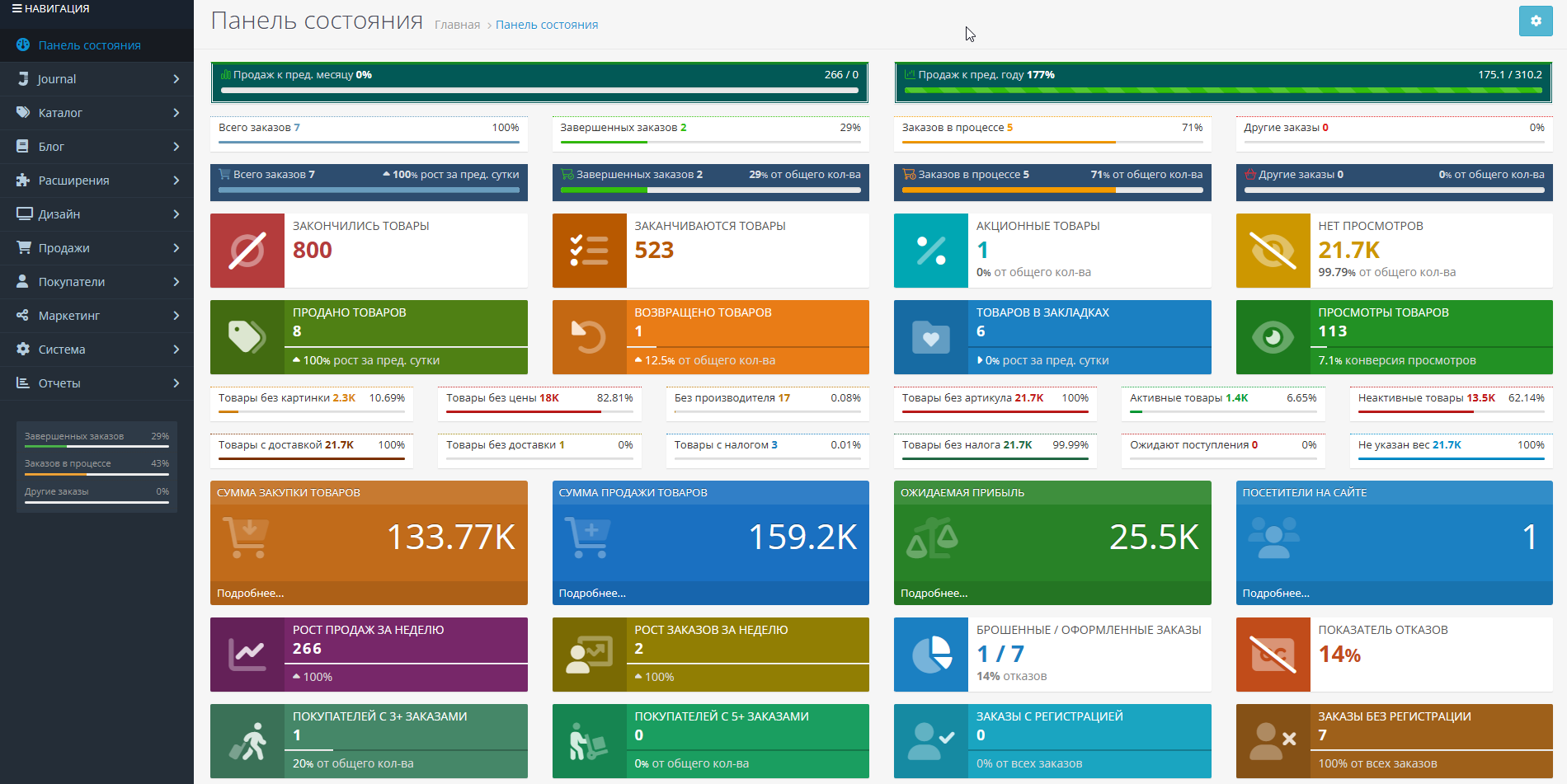
Displays a lot of useful summary and statistical information in a compact or expanded form in the admin panel on the main page (Control Panel) with customization of color, text, and much more. etc. without editing files.
There are 2 types of widgets in the module:
* Widget display is configured for each user group separately. Rights to view and edit the module are automatically granted to the group of the user who installed the module (usually the Administrators group). When setting up the module for other user groups, you need to add viewing and editing rights to extension/dashboard/multiwidget.
* Ability to save and restore settings from a file, load default settings.Standard widget settings: Width, Status, Sorting order.
Additionalsettings for simple widgets:
Demo:
1) control panel
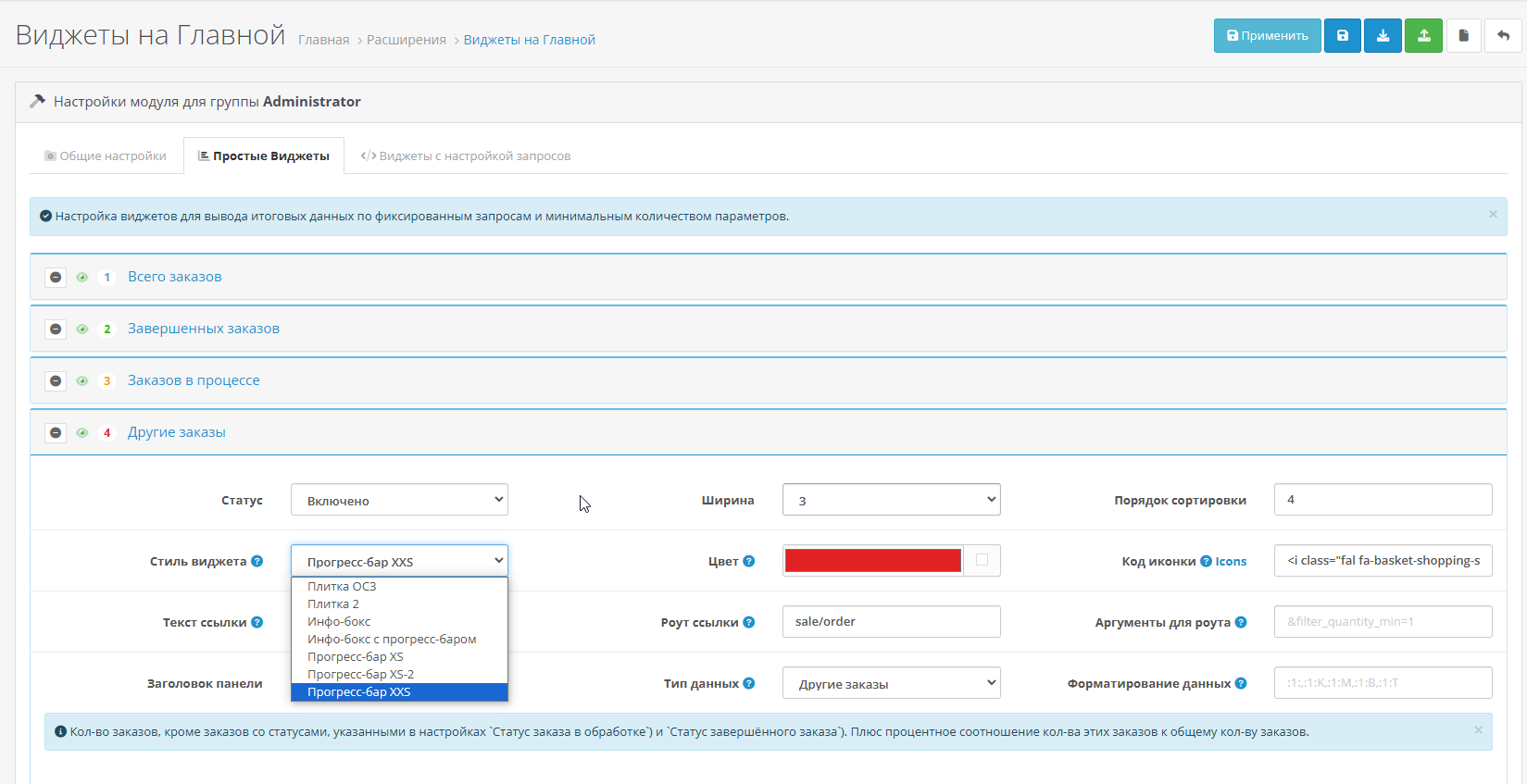
2)module settings
Login/password: demo/demo
Compatibility: CMS based on Opencart2.3.* - 3.0.*, PHP 5.6-7.4.
Installation:
Keyissued by automatically at your request!
License Agreement for the use of the module “Widgets on Home (Multiwidget)”
Displays a lot of useful summary and statistical information in a compact or expanded form in the admin panel on the main page (Control Panel) with customization of color, text, and much more. etc. without editing files.
There are 2 types of widgets in the module:
- Simple, with fixed (28+) queries (can be configured quickly and easily).
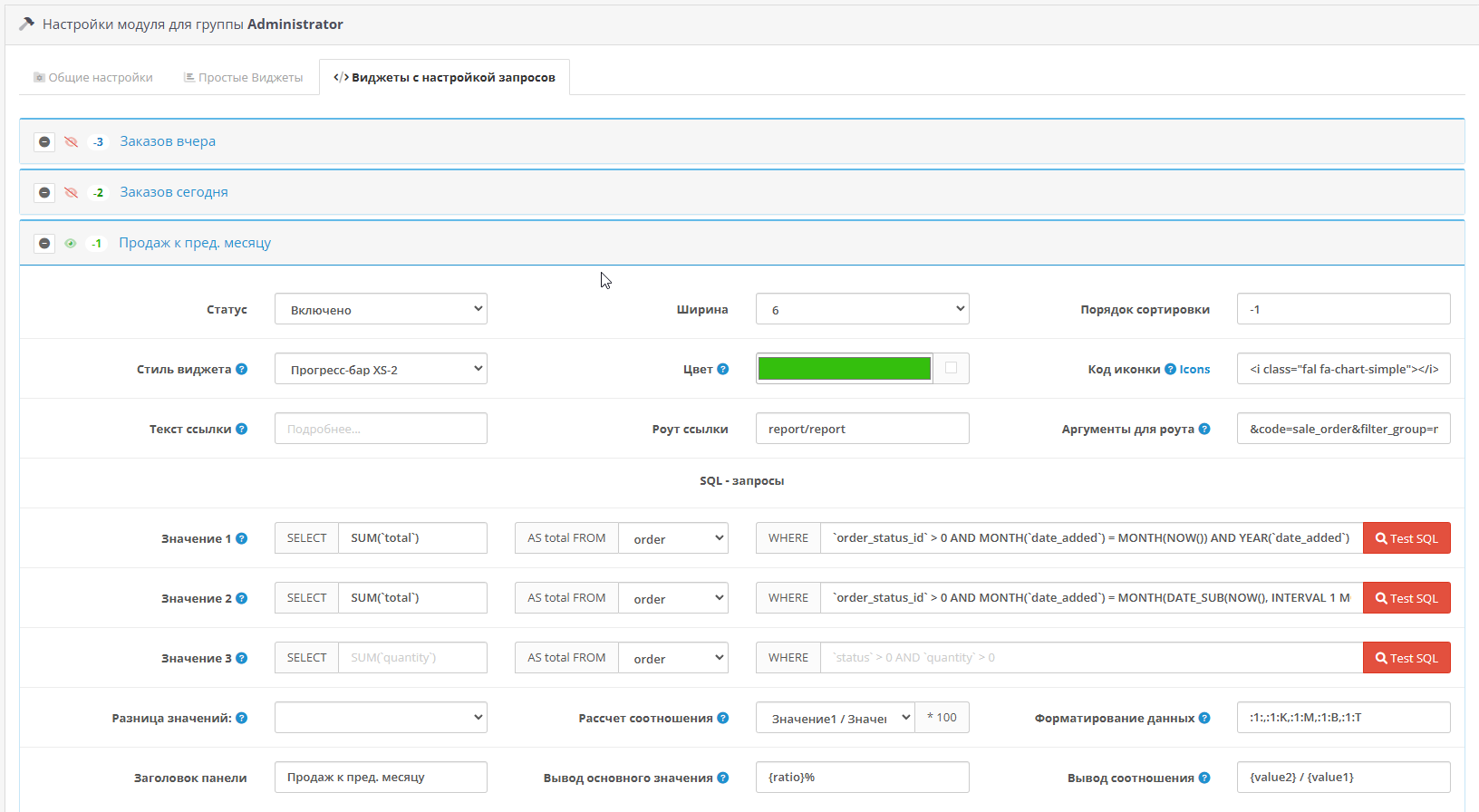
- Widgets with configurable sql queries. It’s more complicated here, but you can customize the output of very different useful information (which is often not enough in standard opencart modules) without editingfiles.
* Widget display is configured for each user group separately. Rights to view and edit the module are automatically granted to the group of the user who installed the module (usually the Administrators group). When setting up the module for other user groups, you need to add viewing and editing rights to extension/dashboard/multiwidget.
* Ability to save and restore settings from a file, load default settings.Standard widget settings: Width, Status, Sorting order.
Additionalsettings for simple widgets:
- Widget style (currently 6 ready-made styles are available, including opencart)
- Color (setting the background and/or text color, depends on the widget style)
- Code icons (any available in the fontawesome v.6.1.0 library)
- Link for More details (text, route, arguments (i.e. we go where we need and can immediately filter the data))
- Panel title
- Data type (currently 28 available (or 30, if the purchase price is used) of fixed requests)
- Data formatting (text on the left/right, rounding rules).
- Standard: 'Total orders', 'Total sales', 'Total customers', 'Online visitors'
- Additional for fixed requests: 'Orders in process', 'Completed orders', 'Other orders', 'Total sales', 'Total customers', 'Customers with 1+(3+,5+) orders (+ percentage of the total number, i.e. the indicator by which we see how many customers return (make repeat orders))', 'Number of product items', 'Number of units of goods', 'Number of units of goods', 'Amount of sales of goods', 'Amount of sales of goods', 'Items sold', 'Items returned', 'Items bookmarked', 'Item views (view conversion)', 'Items returned', 'Ordersyesterday', 'Orders today'. If the system uses a purchase price (the `cost` field in the goods table), you can additionally display: 'Amount of purchase of goods', 'Expected profit'.
- three sql queries, for each a data sample from 5 tables is available (order, product, order_product, customer_online, customer_wishlist)
- setting up obtaining the difference in values (for further calculations and/or displaying data in widget)
- setting up the calculation of the percentage of received data
- main value output template
- output templateratios.
- Sold (in amount) to the level of last month (we see the dynamics of achieving indicators for a certain period, periods are easy to change (applies to all similar widgets))
- Sold to the level of last year
- Increase in sales for the week
- Increase in the number of orders for the week
- Abandoned / Completed orders (+ percentage of refusals)
- Rejection rate (%)
- Orders with registration (+ percentage of the total number, i.e. what percentage of orders are made by registeredusers)
- Orders without registration (same as the previous paragraph)
- Products are out (number of product items)
- Products are running out (number of product items)
- Orders yesterday (by default disabled)
- Orders today (disabled by default)
Demo:
1) control panel
2)module settings
Login/password: demo/demo
Compatibility: CMS based on Opencart2.3.* - 3.0.*, PHP 5.6-7.4.
Installation:
- Through the menu "Extensions-Install extensions" - install the modifier dashboard_multiwidget.ocmod.zip
- In Extensions-Modifiers, click the "Update" button
- 3 In Extensions-Extensions, select the extension type "Status panel". Install and configure the "Widgets on Home" module.
* When you first enter the module settings, you will be redirected to the license activation page, where there are detailed instructions; everything is done in a few clicks - the key is sent automatically.
* After activation, the first time you enter the module settings, the default settings are loaded to demonstrate the capabilitiesmodule and ease of setting up the necessary widgets. We looked, turned off what was unnecessary (deleted), left what we needed, customized it (color, location, etc.). All.
* Widgets are configured for each user group separately. Rights to view and edit the module are automatically granted to the group of the user who installed the module (usually the Administrators group). When setting up a module for other user groups, you need to add rights to view and edit extension/dashboard/multiwidget.
Keyissued by automatically at your request!
License Agreement for the use of the module “Widgets on Home (Multiwidget)”
- The “Widgets on Home” module is distributed on an “as is” basis. Purchasing a product means agreement with the current functionality of the module.
- The functionality of the module is guaranteed in standard hardware and software environments available to the author for testing at the time of publication of the current version of the product. However, due to the unlimited number of options for the hardware and software environment and interactions with other software products, the author cannot guarantee the unconditional functionality of the modulein all cases, but is interested in solving emerging problems. If for any reason it is impossible to ensure the guaranteed (i.e., corresponding to the conditions specified in the guarantee) functionality of the module, a refund to the buyer is possible using the technical support service of the selling site.
- Installation, configuration, change or expansion of the functionality of the module for specific technical specifications are not part of the mandatory services (paid or free) provided upon purchase module.
- By purchasing one copy of the product, you get the right to receive all subsequent updates of the module for free and unlimited use simultaneously of on one main domain and on onetest domain. The test domain must be specified explicitly (for example, test.site.ru), be the technical domain of the hoster, or its test purpose must be clear from the name of the site (for example, testsite.ru). Recognizing a domain as a test domain is the right of the author.
- At any time, you can change both the main and test domains without restrictions, having previously deactivated the current license. The procedure for independently transferring a license to another domain is indicated in the letter that comes to your Email when you receive a license key.
- Technical support is provided only to legal and bona fide users of this product who comply with the terms of this license agreement.
- Module"Home Widgets" is protected by copyright laws, is a commercial product and may not be distributed in any form anywhere without the written consent of the author. Author and developer of the module Konstantin Kornelyuk.
- The module uses security technology that prevents unauthorized use of the product. Attempts to circumvent the protection used are illegal.
- In case of boorish communication, unfounded demands or accusations, violation of this license agreement by publishing a biased review or slander, the developer has the right to revoke the license with the termination of support and updates.
- The author reserves the right to change the terms of this agreementat your own discretion insofar as it does not relate to the purchased current version of the product.
- By purchasing the module, you fully accept the terms of this agreement.
Distribution method:
AllPaid
Opencart version:
OpenCart 2.3OpenCart 3.*OCStore 2.3LiveStore 3.*OCStore 3.*
PHP verision:
PHP 5.6PHP 7.0PHP 7.1PHP 7.2PHP 7.3PHP 7.4PHP 8.0PHP 8.1
Activation:
Manually, via request in the module
Getting files:
On site, in the personal account
Protection system:
IonCube
VQmod:
No
Ocmod:
Yes
Events:
No
Uploaded:
08.05.2024
Updated:
16.05.2025
Viewed:
5767
Sales:
32
Write a review
Your Name:Your Review: Note: HTML is not translated!
Rating: Bad Good
Enter the code in the box below:
Файлы будут доступны после покупки


