Your shopping cart is empty!

Delivery date and time: intervals, order limit per day, surcharge for urgency

Price: 1 500 ₽ 2 000 ₽

Author: nikifalex
Write to the author
Sales: 2 (Average rating 0 на основании 0 отзывов)
Need paid help? Contact the site administration
Opencart version:
Sales: 2 (Average rating 0 на основании 0 отзывов)
Need paid help? Contact the site administration
Opencart version:
LiveStore 3.*OCStore 3.*OpenCart 3.*OCStore 2.3
The buyer chooses the day and interval, the store controls how many orders it will actually take away. The filled interval closes itself.
Who needs
To everyone who carries their own courier and whose car does not physically carry more than N orders per interval: food and water, ready-made food, flowers and cakes, furniture and appliances with lifting, shops with their own delivery throughout the city.
What is the difference from the “delivery date” modules
They ask the buyer for a date and leave it at that. The manager still sorts out an overloaded day: he calls clients and reschedules deliveries “to the day after tomorrow, sorry.”
This module calculates capacity. If there are as many orders in an interval as specified, the interval itself disappears from the selection.
Whatcan
The interval is visible wherever the delivery method is shown
The selected time is added to the delivery method in the order itself:
Delivery by courier (14.08.2026, Evening 18:00–22:00)
Therefore, it automatically ends up in the letter to the buyer, in the invoice and invoice, in the list of orders and inuploads to 1C, CRM and delivery services - without editing a single template. If desired, the interval can be written in a comment to the order or stored only in the module table.
Works with one-page checkouts
In the standard ordering process, the block appears on its own. For third-party checkout (oCheckout, FastCheck, “Simple Order”, MaxyStore and the like), the CSS block selector is specified in the settings, after which insert a calendar: the module will wait for it to appear and be built in, even if the checkout does not draw the markup immediately. The choice of interval is saved by your own request and does not depend on how someone else's checkout works with the cart.
The calendar is written in pure JavaScript, without jQuery UI, moment and datepickers - there will be no version conflicts with the store theme.
Honestbehavior in controversial situations
Technical details
Module version: 1.0
What's new in version 1.0
First version.
Who needs
To everyone who carries their own courier and whose car does not physically carry more than N orders per interval: food and water, ready-made food, flowers and cakes, furniture and appliances with lifting, shops with their own delivery throughout the city.
What is the difference from the “delivery date” modules
They ask the buyer for a date and leave it at that. The manager still sorts out an overloaded day: he calls clients and reschedules deliveries “to the day after tomorrow, sorry.”
This module calculates capacity. If there are as many orders in an interval as specified, the interval itself disappears from the selection.
Whatcan
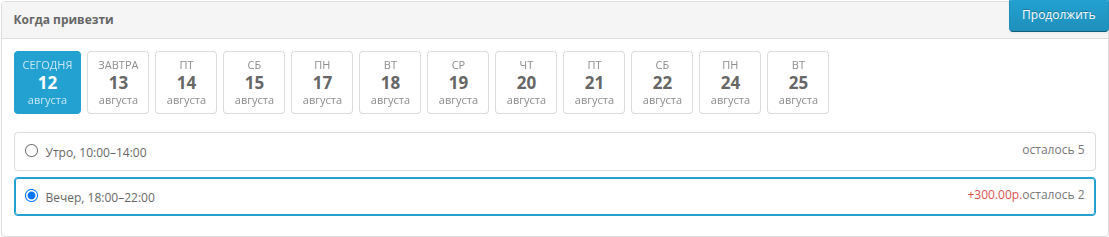
- Calendar in checkout - day and interval, different intervals for each delivery method.
- Limit of orders for the interval - “there are no places” instead of a promise that the store will not fulfill.
- Preparation period - an interval that begins earlier than the order is collected is not offered.
- Order cut-off - “placed after 15:00 - delivery from the next day.”
- Additional payment for the interval - amount or percentage of delivery, as a separate line in the order totals.
- Date exceptions - holidays,inventory, special capacity days.
- Remaining places next to the interval - you can show it, you can hide it.
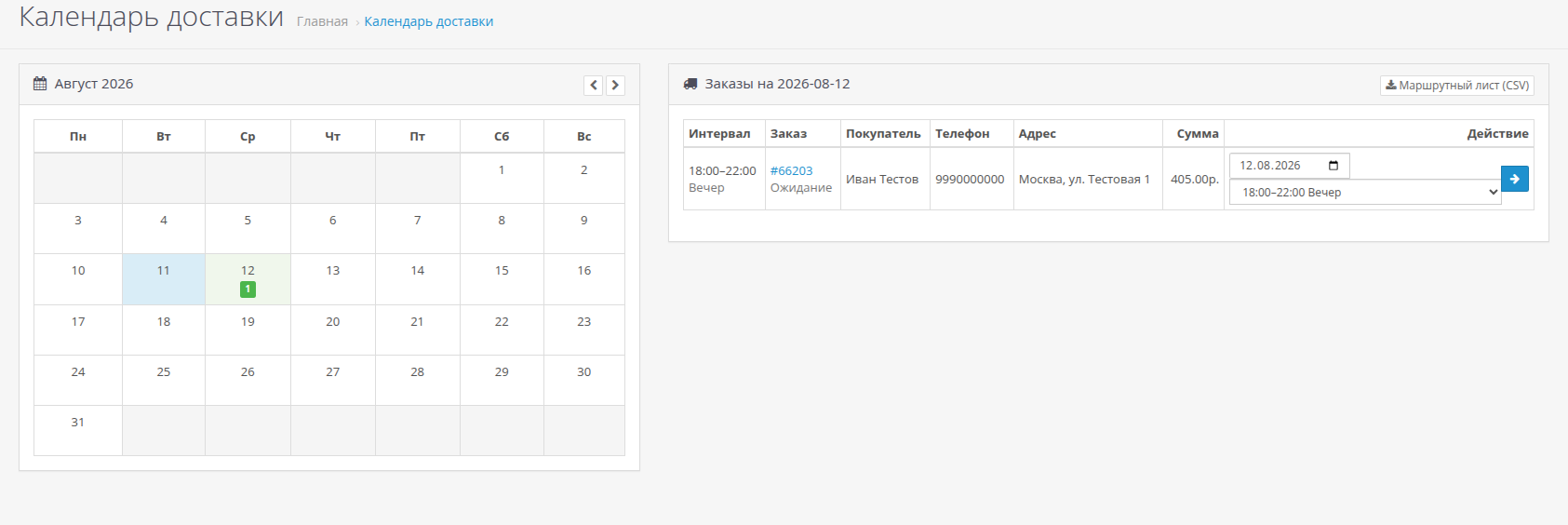
- Delivery calendar in the admin panel - month with loading, daily orders by intervals, order transfer.
- Routing sheet in CSV - time, phone, address, amount: what the courier needs.
The interval is visible wherever the delivery method is shown
The selected time is added to the delivery method in the order itself:
Delivery by courier (14.08.2026, Evening 18:00–22:00)
Therefore, it automatically ends up in the letter to the buyer, in the invoice and invoice, in the list of orders and inuploads to 1C, CRM and delivery services - without editing a single template. If desired, the interval can be written in a comment to the order or stored only in the module table.
Works with one-page checkouts
In the standard ordering process, the block appears on its own. For third-party checkout (oCheckout, FastCheck, “Simple Order”, MaxyStore and the like), the CSS block selector is specified in the settings, after which insert a calendar: the module will wait for it to appear and be built in, even if the checkout does not draw the markup immediately. The choice of interval is saved by your own request and does not depend on how someone else's checkout works with the cart.
The calendar is written in pure JavaScript, without jQuery UI, moment and datepickers - there will be no version conflicts with the store theme.
Honestbehavior in controversial situations
- The place in the interval is kept by the buyer until he completes the order (30 minutes by default), and is released if he leaves.
- If space runs out at the time of checkout, the order is still created and is highlighted in red in the calendar: losing a paid order is worse than overloading the courier at one point.
- Time is calculated in the time zone of the store, not the buyer or server.
- There is no schedule for the delivery method - the module is silent and does not require anything: the store should not get up due to an empty schedule.
Technical details
- OpenCart 3.0.x, ocStore3.0.x
- The kernel is not corrected: the storefront works on events, the ocmod patch only adds a menu item and a tab on the order card
- Russian and English languages, multilingual names of intervals
- Multi-store support
- Open source, no ionCube
Module version: 1.0
What's new in version 1.0
First version.
Distribution method:
Paid
Opencart version:
LiveStore 3.*OCStore 3.*OpenCart 3.*OCStore 2.3
PHP verision:
PHP 7.0PHP 7.1PHP 7.2PHP 7.3PHP 7.4PHP 8.0PHP 8.1PHP 8.2PHP 8.3
Activation:
Automatic
Getting files:
On site, in the personal account
Protection system:
Custom
VQmod:
No
Ocmod:
Yes
Events:
Yes
Uploaded:
12.08.2026
Updated:
27.08.2026
Viewed:
424
Sales:
2
Write a review
Your Name:Your Review: Note: HTML is not translated!
Rating: Bad Good
Enter the code in the box below:
Файлы будут доступны после покупки


