Your shopping cart is empty!

Affiliate Shortcode Blocks - 80+ options for advertising blocks for affiliates with ERID, TIN
Price: 690 ₽

Author: timofeev.code
Write to the author
Sales: 2 (Average rating 0 на основании 0 отзывов)
Need paid help? Contact the site administration
Opencart version:
Sales: 2 (Average rating 0 на основании 0 отзывов)
Need paid help? Contact the site administration
Opencart version:
OCStore 3.*OpenCart 3.*
WATCH DEMO
The module can be evaluated live without installing anything:
Demo: all templates on one page
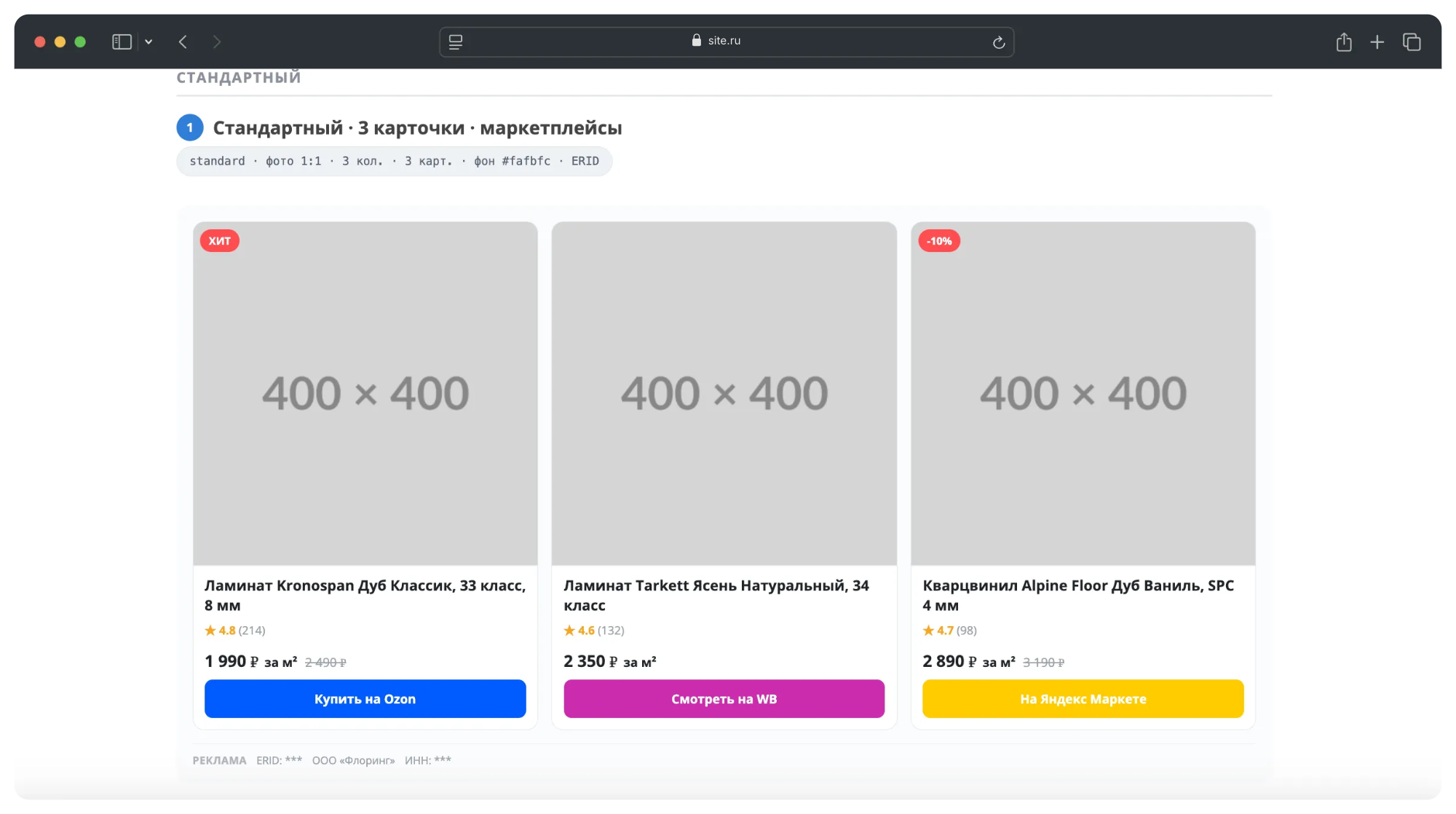
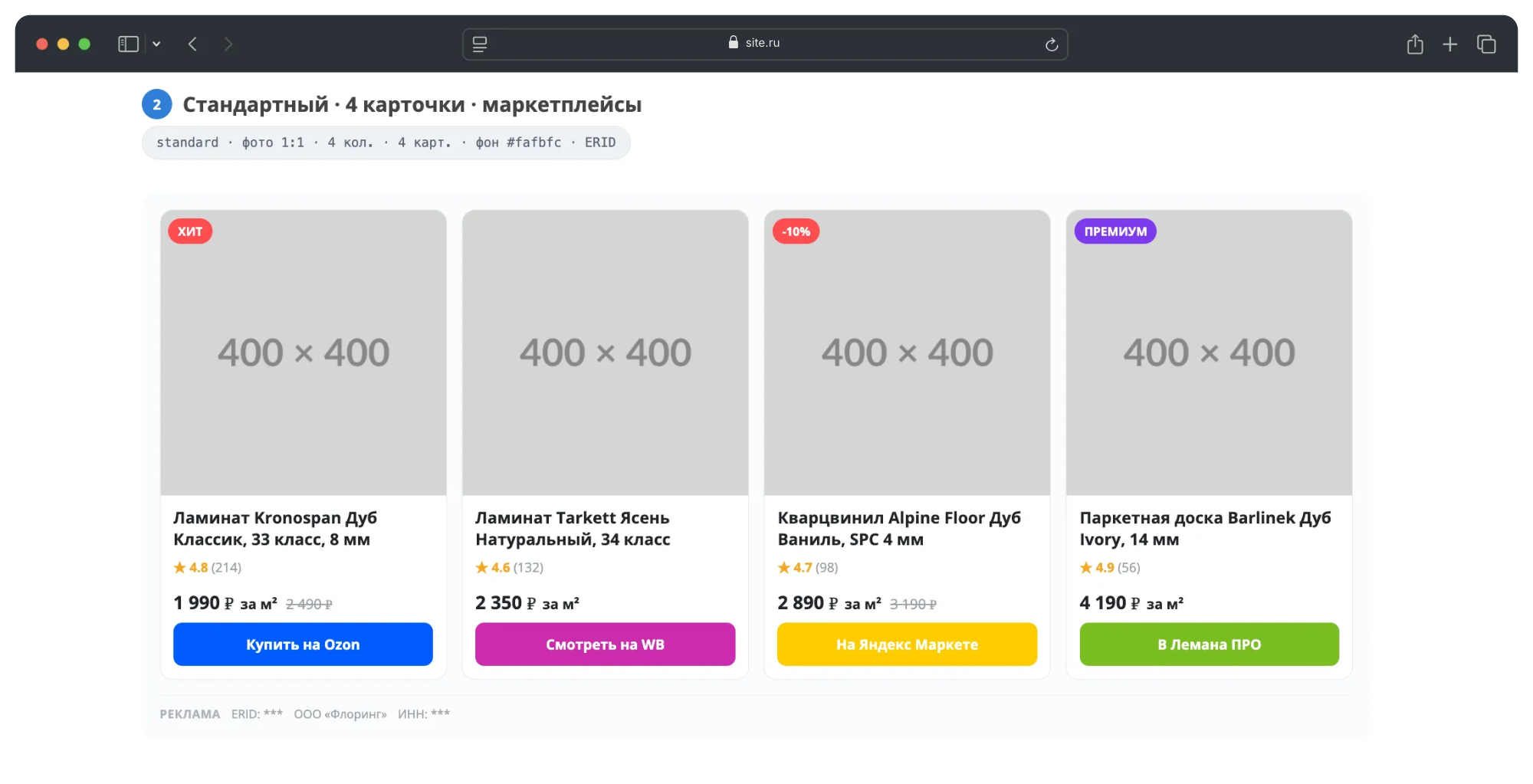
The demo page contains 15 ready-made blocks - five display templates, light, dark and off backgrounds, automatic branded colors of buttons for marketplaces, units of measurement for prices and the “Advertising” marking. The page is responsive: open it on your phone to see how the blocks rearrange on a narrow screen.
PURPOSE
The store has traffic, but it is not profitable to carry the entire assortment yourself. It’s easier to give some positions to partners and earn money on transitions. The same with review articles, collections and brand pages: advertising is appropriate there, but compiling it manually in HTML takes a long time, and the resulttravels around on mobile phones and gets lost when the template changes.
A separate problem is labeling. Advertising on the site requires the “Advertising” tag with the ERID, advertiser data and TIN. Setting this manually for each block is inconvenient and easy to forget.
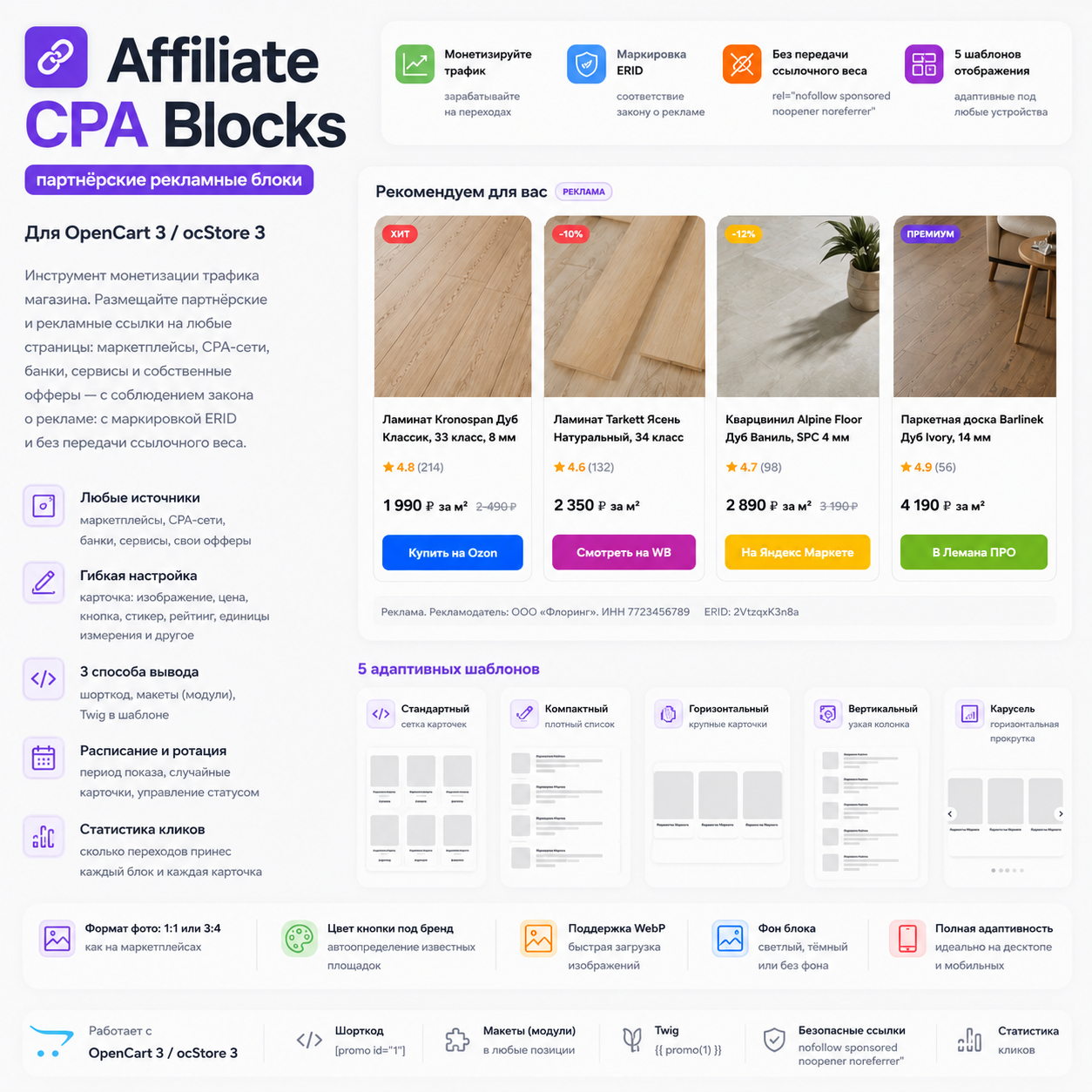
Affiliate CPA Blocks solves both problems. Advertising units are created in their own panel: card = link, image, title, price, button. The finished block is inserted anywhere on the site using a shortcode, through layouts or from a theme template. The marking is specified once per block and is displayed automatically.
SUITABLE FOR
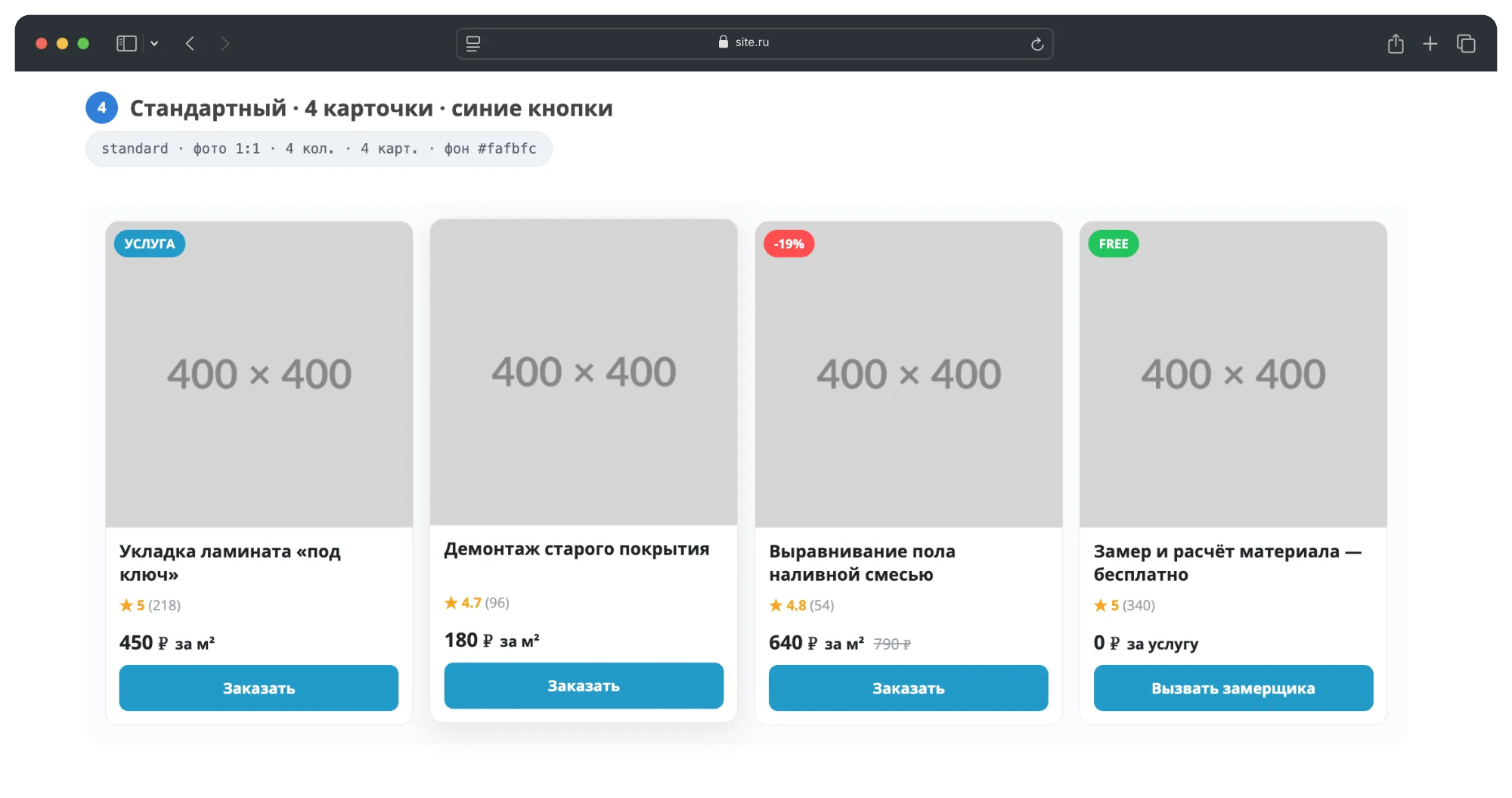
- For stores working with affiliate programs of marketplaces and CPA networks: earnings from clicks on items that are not in stock. - Content projects at the store - reviews, selections,blog articles that require accurate monetized delivery of goods. - For those who sell advertising space to third-party advertisers: ERID / advertiser / TIN marking is provided at the creative level. - Stores with services and positions that are calculated in square meters, linear meters, cubes, sets: the unit of measurement is set on the card.
AD BLOCKS
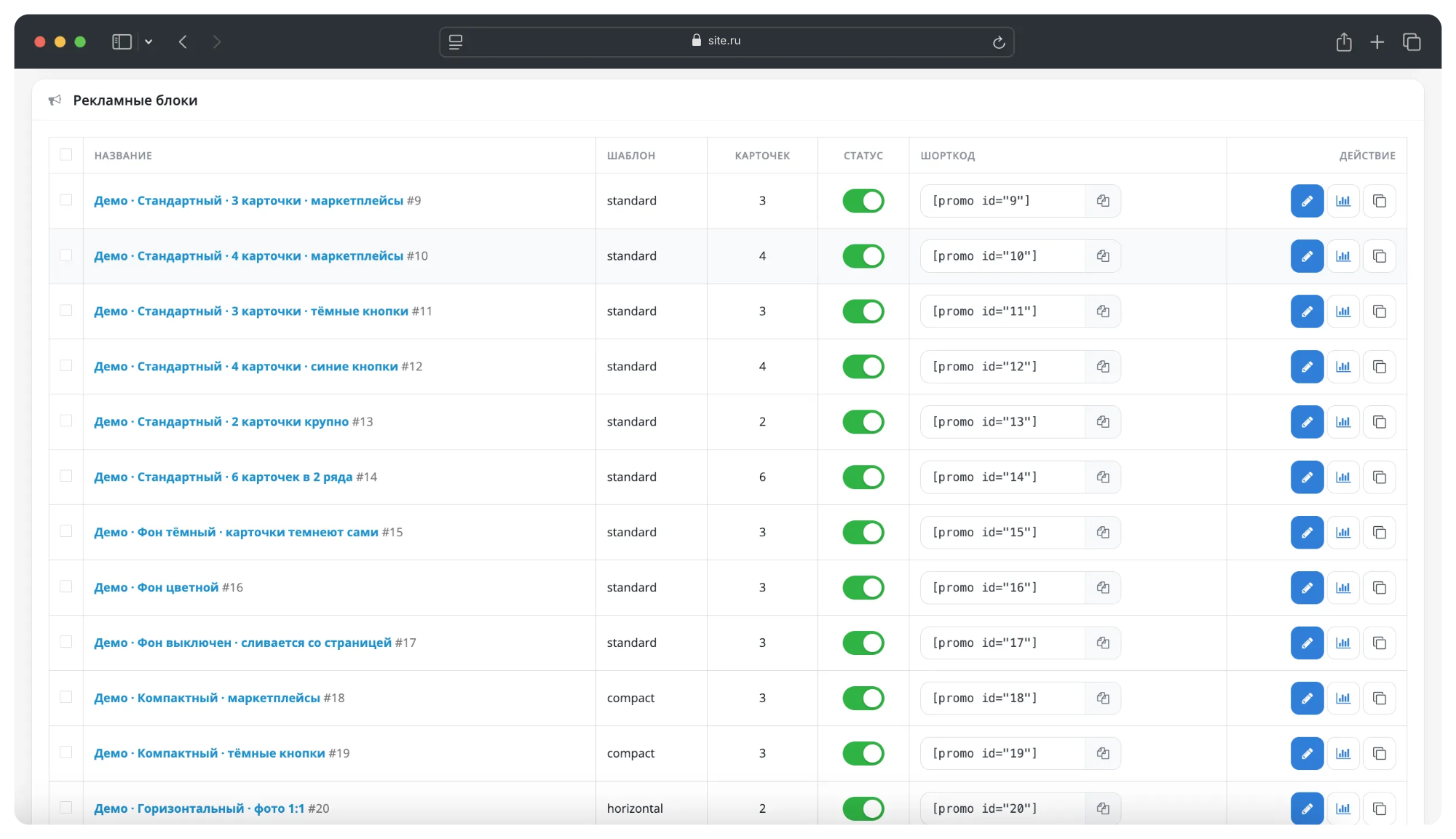
A block is a set of cards with general display settings. Block management is placed in a separate section of the admin panel; a separate settings page for each layout position is not required.
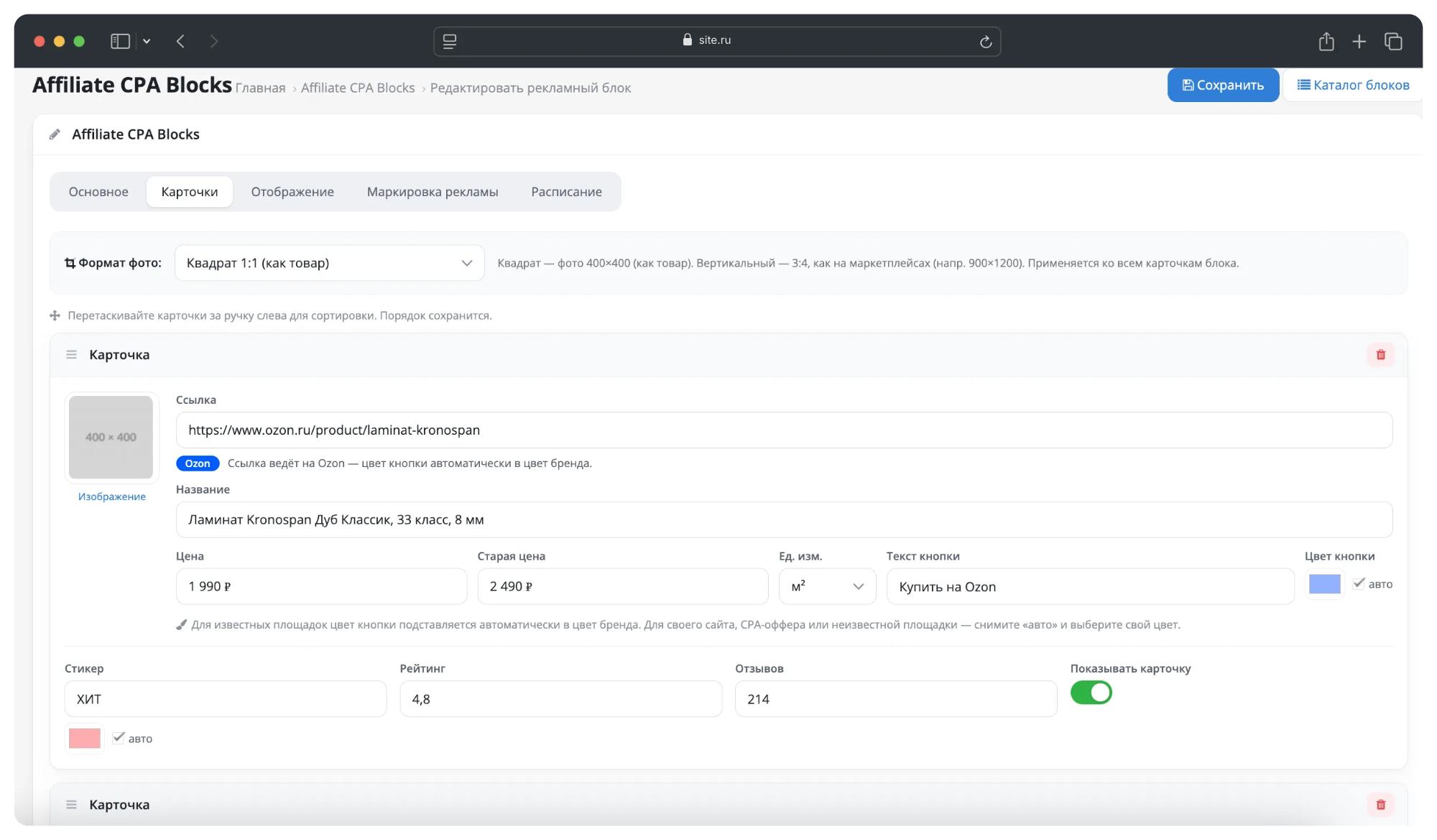
Card fields: link, image, title, price, old price, unit of measurement, button text, button color, color sticker, rating, number of reviews, display switch.
- Auto-detection of a site using a link.For well-known platforms (Ozon, Wildberries, Yandex Market, DNS, Citylink, VseInstrumenty, Lemana PRO, AliExpress, Amazon, eBay), the button color is set to the brand color. For CPA offers and own links, the color is set manually. - The order of cards can be changed by dragging and dropping. - Images are selected by the standard OpenCart file manager, WebP format is supported. - The unit of measurement is displayed next to the price: “1,990 ₽ per m²”, “per lin. m", "for a service" and others.
DISPLAY TEMPLATES
Five ready-made templates, each adapted for mobile devices:
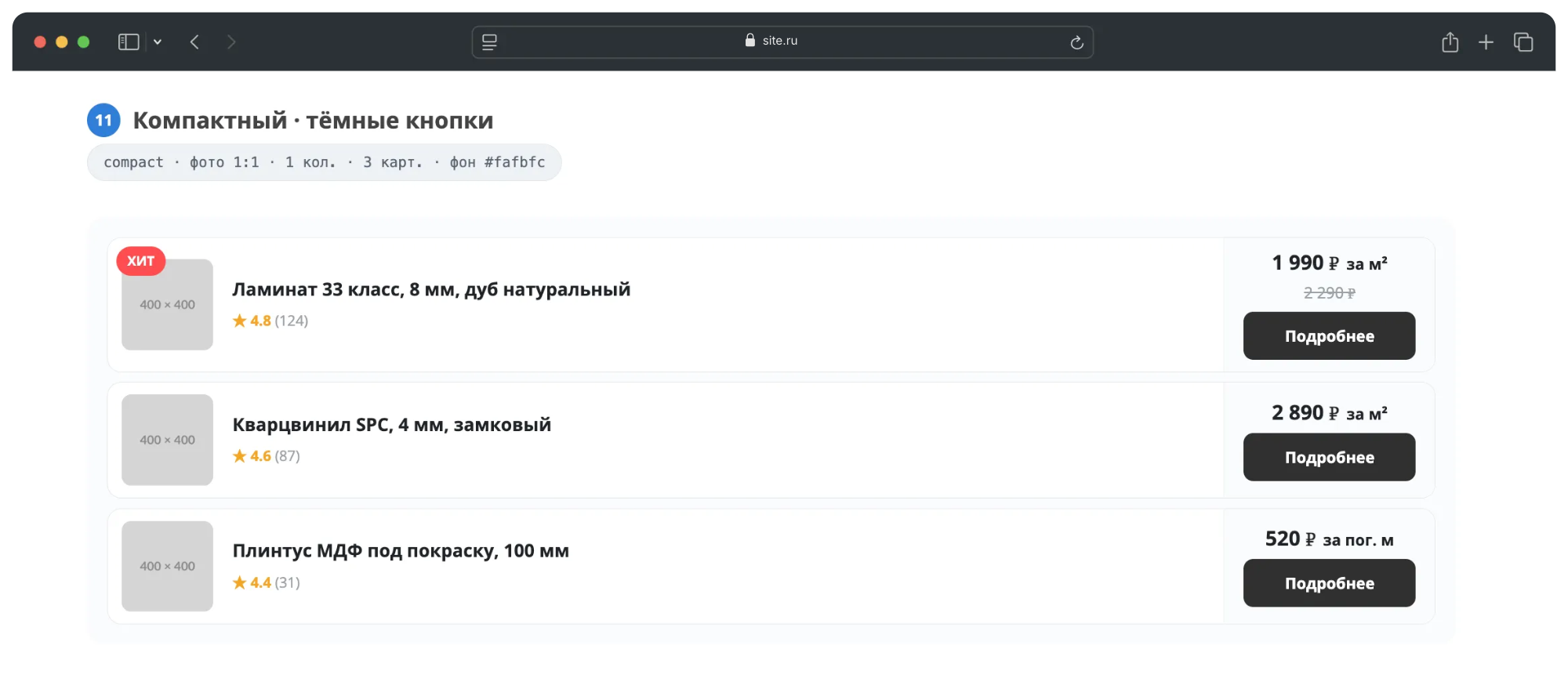
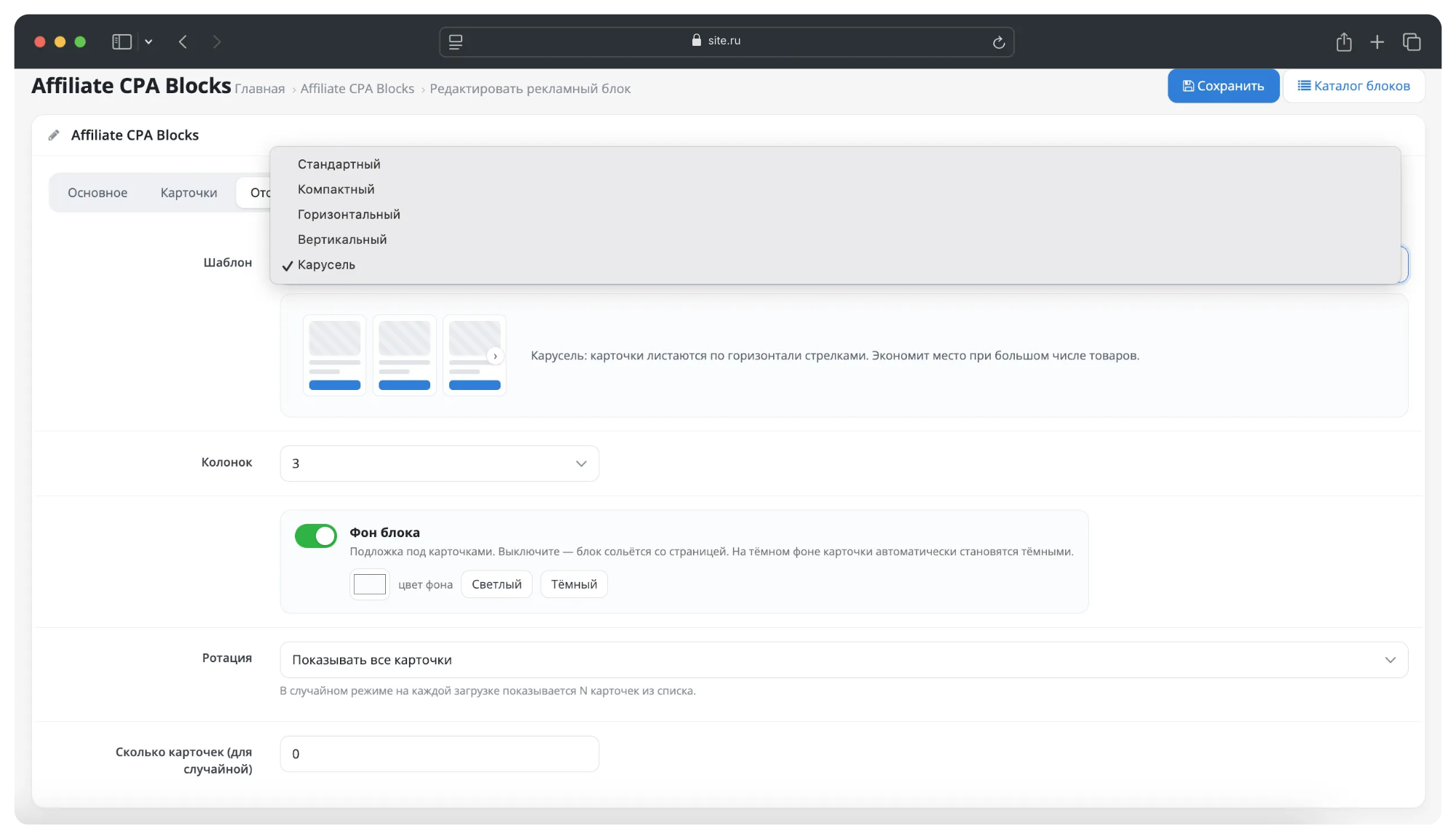
- Standard - a grid of cards, the number of columns is customizable. - Compact - dense list for bottlenecks and sidebars. - Horizontal - large accent cards; on mobile it is rebuilt into tiles according totwo in a row. - Vertical - one narrow column for the sidebar. - Carousel - horizontal scrolling with a large number of positions.
The photo format is selected at the block level: square 1:1 or vertical 3:4, as on marketplaces. The selected proportion is respected in all templates and at all resolutions, images are not distorted.
The background of the block can be configured separately: it can be turned on and off with a switch, the color can be selected arbitrarily. When the background is dark, the cards automatically switch to a dark design - the contrast is maintained without manual adjustment. With the background turned off, the block blends into the page.
OUTPUT METHODS
1. Shortcode - [promo id="1"] in the description of a product, category, information page or article. Works also in blogs of third-party modules and inblogs built into the template, since the finished HTML of the page is processed, and not a specific field in the database. 2. Design → Layouts - the block is available as a module and can be placed in any position of the layout. The instance is created automatically when the block is saved. 3. Twig - call {{ promo(1) }} directly in the theme template file for precise insertion into the layout.
The shortcode accepts optional parameters: template (display template) and limit (number of cards). One block can be placed in any number of places, edits are applied everywhere at the same time.
ADVERTISING MARKING
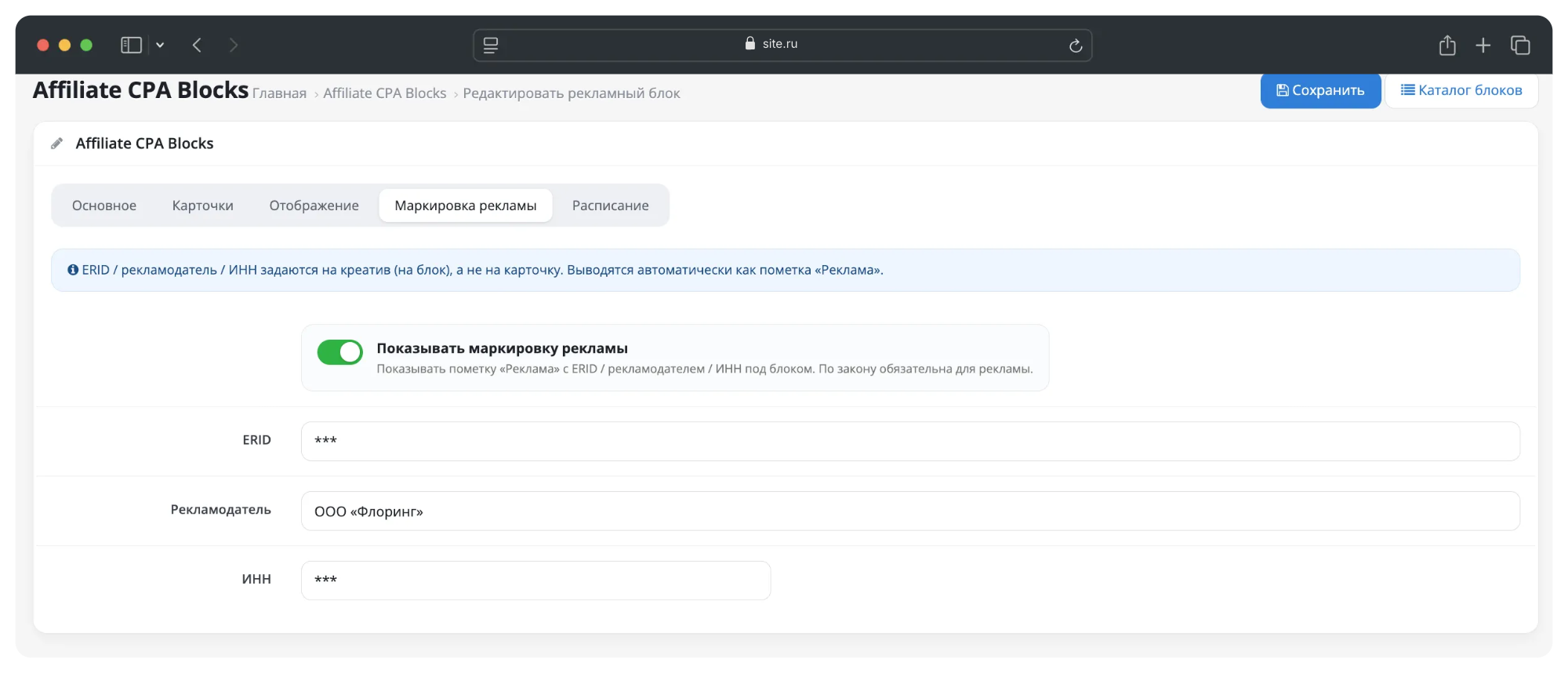
ERID, advertiser name and TIN are assigned to the block, that is, to the creative, and are displayed under the cards with the mark “Advertising”. The output is turned off by a switch.
All external links are formed with attributesrel="nofollow sponsored noopener noreferrer" and open in a new tab: link juice is not transferred, clicking on an affiliate link does not affect the promotion of the store.
SCHEDULE AND ROTATION
- Display period: start and end dates. Outside the period, the block is not output. - Rotation: display all cards or random N cards each time you load. - Status switch for the block and for each card separately.
STATISTICS
For each block, records of impressions and clicks are kept:
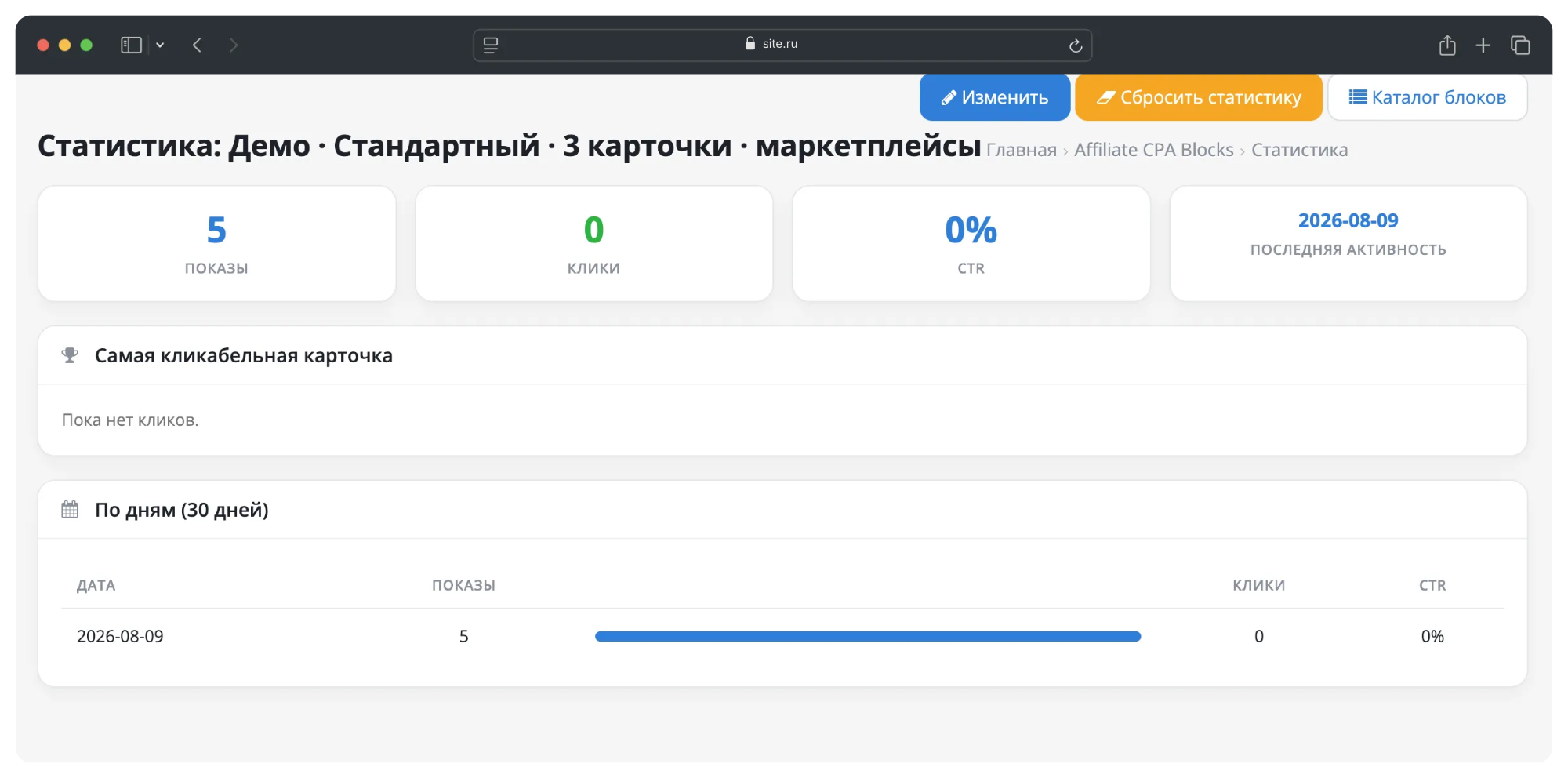
- impressions, clicks, CTR and date of last activity; - the most clickable card; - breakdown by day for the last 30 days; - reset statistics for the block.
Impressions and clicks are recorded on the browser side, so accounting continues to work on sites withfull-page caching.
COMPATIBILITY
- OpenCart 3.0.x, ocStore 3.0.x - PHP 7.0 – 8.1 (7.4 recommended) - PHP extensions: GD, mbstring, json (included in the standard hosting set) - MySQL 5.6+ / MariaDB - Installation using standard tools through the “Installing extensions” section (ocmod file), no code editing required.
The module works on any storefront template, including purchased ones. The output file is located in the default theme and is picked up by the standard OpenCart theme inheritance mechanism. Styles and scripts are built into the block itself and are included once per page - there are no external files, conflicts with template style collectors are excluded. All classes have their own prefix; theme design and block design do not affect each other.
Native engine files are not replaced. Threespot edits are made by the OCMOD mechanism and are marked as optional: during a non-standard assembly, the installation is not interrupted, and an unapplied edit does not disrupt the operation of the module.
PERFORMANCE
- A block placed on a page several times is read from the database once. - Styles and scripts are displayed once, and not with each block. - The shortcode handler exits immediately if there is no shortcode substring on the page. - Images are processed by the standard resize mechanism: the file is created once and then transferred from disk. - Statistics are stored as a daily rollup, not an event log.
LICENSING
The license is tied to the domain name. After installation, the module panel displays the store domain for which you are requesting andthe key is activated. The main domain key is also valid on technical subdomains (test, dev, staging and the like), which allows you to use one license on the production site and its test copy.
KEY ADVANTAGES
- Monetization of traffic with affiliate links without manual layout of blocks. - Complies with out-of-the-box advertising labeling requirements. - The link weight of the store is not transferred to partners. - Three withdrawal methods, including working on third-party blogs. - Correct display on any template and on mobile devices. - Own block control panel and performance statistics.
Details about installation, requirements and answers to frequently asked questions are provided in the INSTALLATION.txt and README_RU.md files. Terms of use are in the LICENSE_RU.txt file.
The module can be evaluated live without installing anything:
Demo: all templates on one page
The demo page contains 15 ready-made blocks - five display templates, light, dark and off backgrounds, automatic branded colors of buttons for marketplaces, units of measurement for prices and the “Advertising” marking. The page is responsive: open it on your phone to see how the blocks rearrange on a narrow screen.
PURPOSE
The store has traffic, but it is not profitable to carry the entire assortment yourself. It’s easier to give some positions to partners and earn money on transitions. The same with review articles, collections and brand pages: advertising is appropriate there, but compiling it manually in HTML takes a long time, and the resulttravels around on mobile phones and gets lost when the template changes.
A separate problem is labeling. Advertising on the site requires the “Advertising” tag with the ERID, advertiser data and TIN. Setting this manually for each block is inconvenient and easy to forget.
Affiliate CPA Blocks solves both problems. Advertising units are created in their own panel: card = link, image, title, price, button. The finished block is inserted anywhere on the site using a shortcode, through layouts or from a theme template. The marking is specified once per block and is displayed automatically.
SUITABLE FOR
- For stores working with affiliate programs of marketplaces and CPA networks: earnings from clicks on items that are not in stock. - Content projects at the store - reviews, selections,blog articles that require accurate monetized delivery of goods. - For those who sell advertising space to third-party advertisers: ERID / advertiser / TIN marking is provided at the creative level. - Stores with services and positions that are calculated in square meters, linear meters, cubes, sets: the unit of measurement is set on the card.
AD BLOCKS
A block is a set of cards with general display settings. Block management is placed in a separate section of the admin panel; a separate settings page for each layout position is not required.
Card fields: link, image, title, price, old price, unit of measurement, button text, button color, color sticker, rating, number of reviews, display switch.
- Auto-detection of a site using a link.For well-known platforms (Ozon, Wildberries, Yandex Market, DNS, Citylink, VseInstrumenty, Lemana PRO, AliExpress, Amazon, eBay), the button color is set to the brand color. For CPA offers and own links, the color is set manually. - The order of cards can be changed by dragging and dropping. - Images are selected by the standard OpenCart file manager, WebP format is supported. - The unit of measurement is displayed next to the price: “1,990 ₽ per m²”, “per lin. m", "for a service" and others.
DISPLAY TEMPLATES
Five ready-made templates, each adapted for mobile devices:
- Standard - a grid of cards, the number of columns is customizable. - Compact - dense list for bottlenecks and sidebars. - Horizontal - large accent cards; on mobile it is rebuilt into tiles according totwo in a row. - Vertical - one narrow column for the sidebar. - Carousel - horizontal scrolling with a large number of positions.
The photo format is selected at the block level: square 1:1 or vertical 3:4, as on marketplaces. The selected proportion is respected in all templates and at all resolutions, images are not distorted.
The background of the block can be configured separately: it can be turned on and off with a switch, the color can be selected arbitrarily. When the background is dark, the cards automatically switch to a dark design - the contrast is maintained without manual adjustment. With the background turned off, the block blends into the page.
OUTPUT METHODS
1. Shortcode - [promo id="1"] in the description of a product, category, information page or article. Works also in blogs of third-party modules and inblogs built into the template, since the finished HTML of the page is processed, and not a specific field in the database. 2. Design → Layouts - the block is available as a module and can be placed in any position of the layout. The instance is created automatically when the block is saved. 3. Twig - call {{ promo(1) }} directly in the theme template file for precise insertion into the layout.
The shortcode accepts optional parameters: template (display template) and limit (number of cards). One block can be placed in any number of places, edits are applied everywhere at the same time.
ADVERTISING MARKING
ERID, advertiser name and TIN are assigned to the block, that is, to the creative, and are displayed under the cards with the mark “Advertising”. The output is turned off by a switch.
All external links are formed with attributesrel="nofollow sponsored noopener noreferrer" and open in a new tab: link juice is not transferred, clicking on an affiliate link does not affect the promotion of the store.
SCHEDULE AND ROTATION
- Display period: start and end dates. Outside the period, the block is not output. - Rotation: display all cards or random N cards each time you load. - Status switch for the block and for each card separately.
STATISTICS
For each block, records of impressions and clicks are kept:
- impressions, clicks, CTR and date of last activity; - the most clickable card; - breakdown by day for the last 30 days; - reset statistics for the block.
Impressions and clicks are recorded on the browser side, so accounting continues to work on sites withfull-page caching.
COMPATIBILITY
- OpenCart 3.0.x, ocStore 3.0.x - PHP 7.0 – 8.1 (7.4 recommended) - PHP extensions: GD, mbstring, json (included in the standard hosting set) - MySQL 5.6+ / MariaDB - Installation using standard tools through the “Installing extensions” section (ocmod file), no code editing required.
The module works on any storefront template, including purchased ones. The output file is located in the default theme and is picked up by the standard OpenCart theme inheritance mechanism. Styles and scripts are built into the block itself and are included once per page - there are no external files, conflicts with template style collectors are excluded. All classes have their own prefix; theme design and block design do not affect each other.
Native engine files are not replaced. Threespot edits are made by the OCMOD mechanism and are marked as optional: during a non-standard assembly, the installation is not interrupted, and an unapplied edit does not disrupt the operation of the module.
PERFORMANCE
- A block placed on a page several times is read from the database once. - Styles and scripts are displayed once, and not with each block. - The shortcode handler exits immediately if there is no shortcode substring on the page. - Images are processed by the standard resize mechanism: the file is created once and then transferred from disk. - Statistics are stored as a daily rollup, not an event log.
LICENSING
The license is tied to the domain name. After installation, the module panel displays the store domain for which you are requesting andthe key is activated. The main domain key is also valid on technical subdomains (test, dev, staging and the like), which allows you to use one license on the production site and its test copy.
KEY ADVANTAGES
- Monetization of traffic with affiliate links without manual layout of blocks. - Complies with out-of-the-box advertising labeling requirements. - The link weight of the store is not transferred to partners. - Three withdrawal methods, including working on third-party blogs. - Correct display on any template and on mobile devices. - Own block control panel and performance statistics.
Details about installation, requirements and answers to frequently asked questions are provided in the INSTALLATION.txt and README_RU.md files. Terms of use are in the LICENSE_RU.txt file.
Distribution method:
Paid
Opencart version:
OCStore 3.*OpenCart 3.*
PHP verision:
PHP 7.0PHP 7.1PHP 7.2PHP 7.3PHP 7.4PHP 8.0PHP 8.1
Activation:
Manually, upon request via private messagesManually, upon request via email
Getting files:
On site, in the personal account
Protection system:
Custom
VQmod:
No
Ocmod:
Yes
Events:
No
Uploaded:
09.08.2026
Updated:
11.08.2026
Viewed:
1186
Sales:
2
Write a review
Your Name:Your Review: Note: HTML is not translated!
Rating: Bad Good
Enter the code in the box below:

Файлы будут доступны после покупки


