Your shopping cart is empty!

Clearing image cache by size for OpenCart 3

Price: 350 ₽

Author: Александр
Write to the author
Sales: 1 (Average rating 0 на основании 0 отзывов)
Need paid help? Contact the site administration
Opencart version:
Sales: 1 (Average rating 0 на основании 0 отзывов)
Need paid help? Contact the site administration
Opencart version:
LiveStore 3.*OCStore 3.*OpenCart 3.*
⭐A Brief Introduction
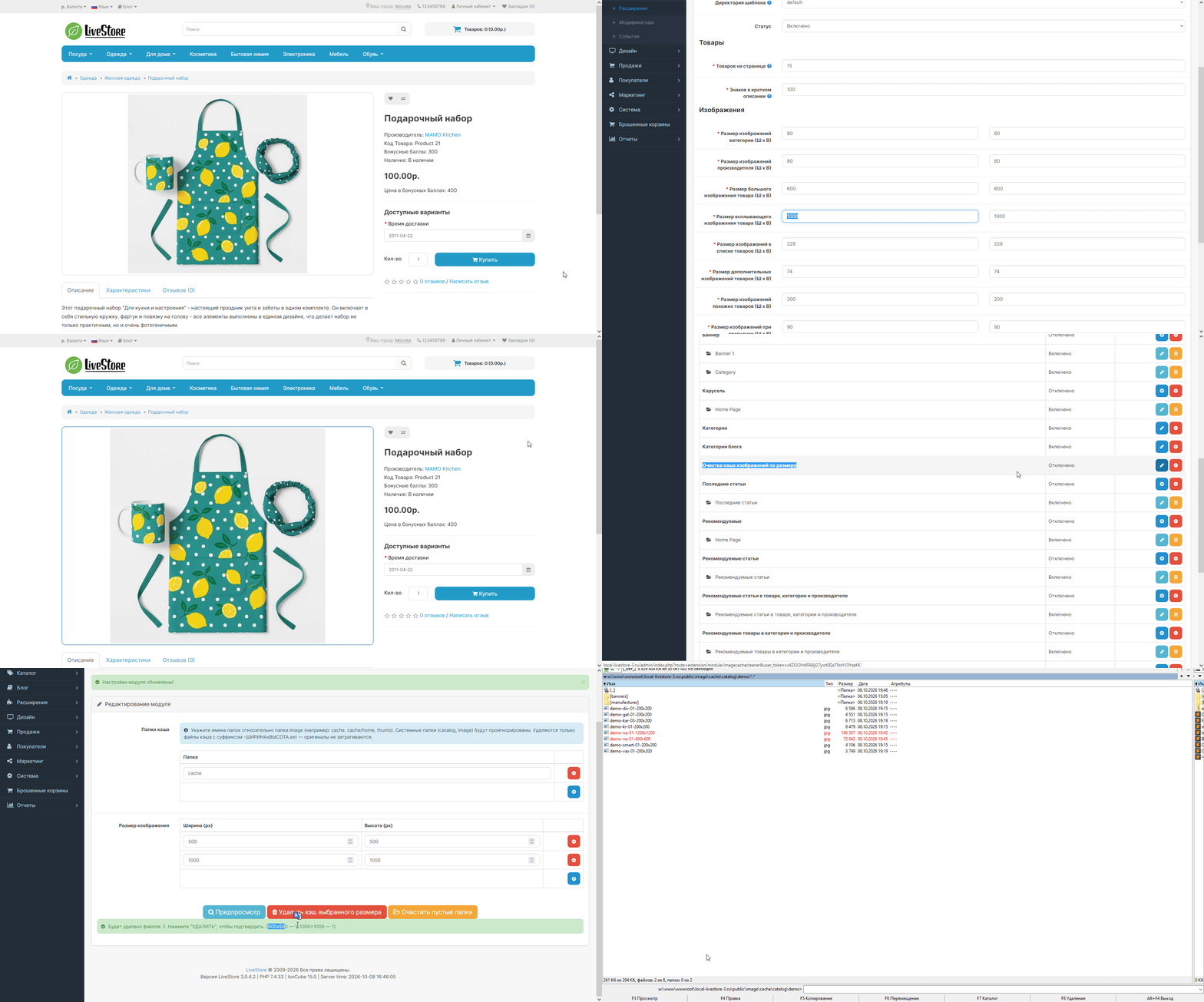
A targeted image cache cleaning module for OpenCart 3.
Allows you to delete only those files from cache folders that were generated for specific dimensions (width × height), without affecting the originals or the rest of the cache.
No more manually navigating through FTP and cleaning out tens of thousands of unnecessary thumbnails, or deleting the entire cache and waiting for the store to regenerate it.
⚙️Why is this necessary
Every time OpenCart displays a product, category, or banner, it creates a cached image of the required size. The files are stored in image/cache/... and have names like product-200x200.jpg, banner-750x300.jpg.
Over time:
- You changed the thumbnail size in the store settings → old caches (e.g., 200x200) are just dead weight.
- You updated the theme — it has different image sizes → all previous caches are not used, but are sitting on disk.
- You changed the category template → old banner sizes are no longer generated, but are taking up space.
- You installed a new module with custom sizes → no one needs the old cache.
Result: the image/cache folder grows to gigabytes, clogging up the disk, slowing down backups, and increasing sync times.
Previously, the only solution was:
- Delete the entire cache folder — but then the store slows down for a week until everything is regenerated. - Use FTP and manually clean out folders.
Now, log into the admin panel, specify the size (or multiple sizes) and folders, and in a second, everything unnecessary is deleted. The remaining cache remains intact, and the store continues to operate quickly.
✔️What the module can do
Flexible cache folder configuration for cleaning
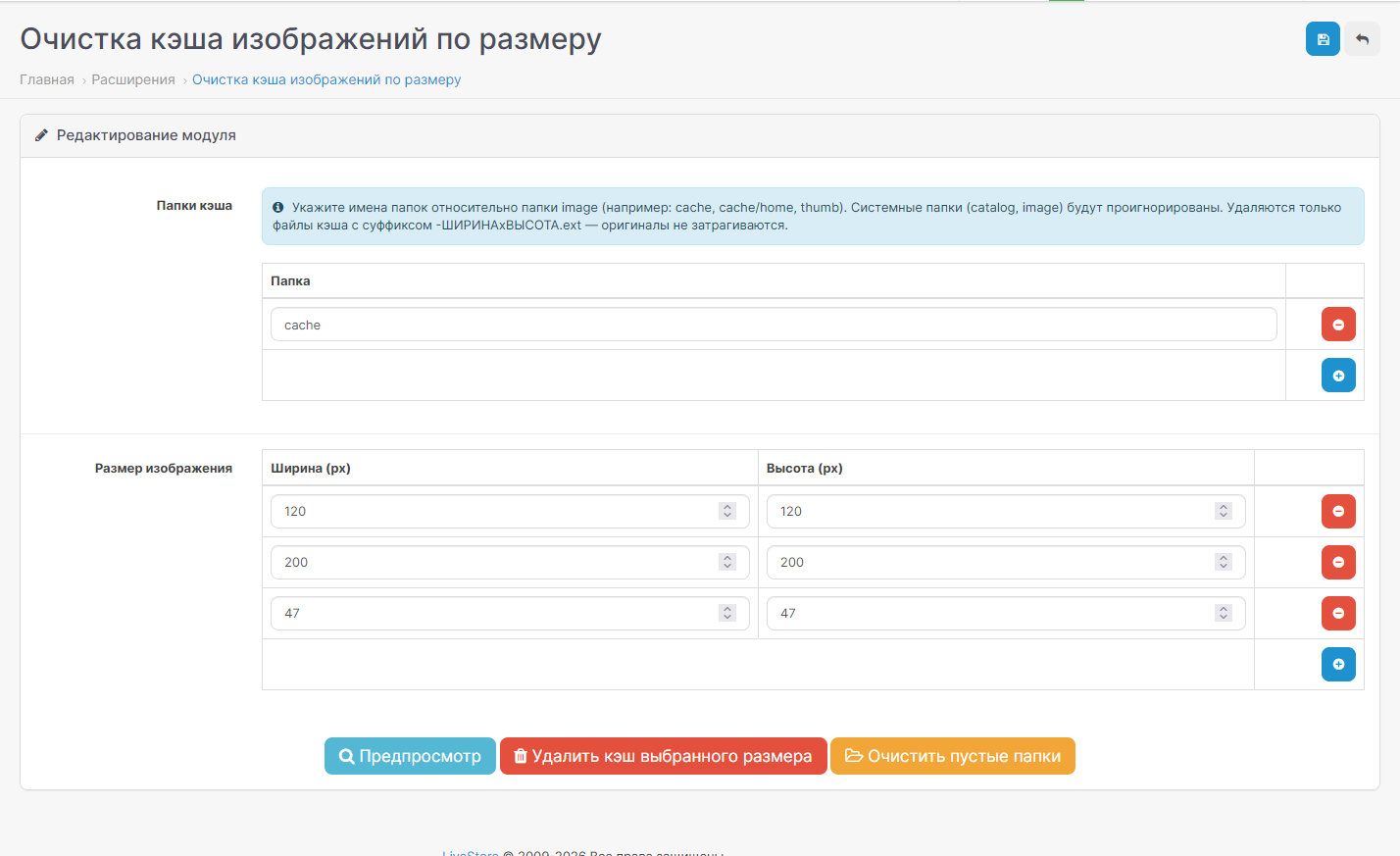
Using the convenient interface with the (+) button, add any number of folders relative to image/:
cache
cache/catalog
cache/catalog/demo
cache/home
cachewebp
thumb
and any others—as many as needed.
The deletion is performed recursively through all nested subfolders.
Multiple sizes at once:
Also with (+) — add as many "width x height" pairs as you like:
200 x 200
500 x 500
750 x 300
1000 x 1000
One click — and all files matching these dimensions are deleted from the selected folders.
Preview before deletion
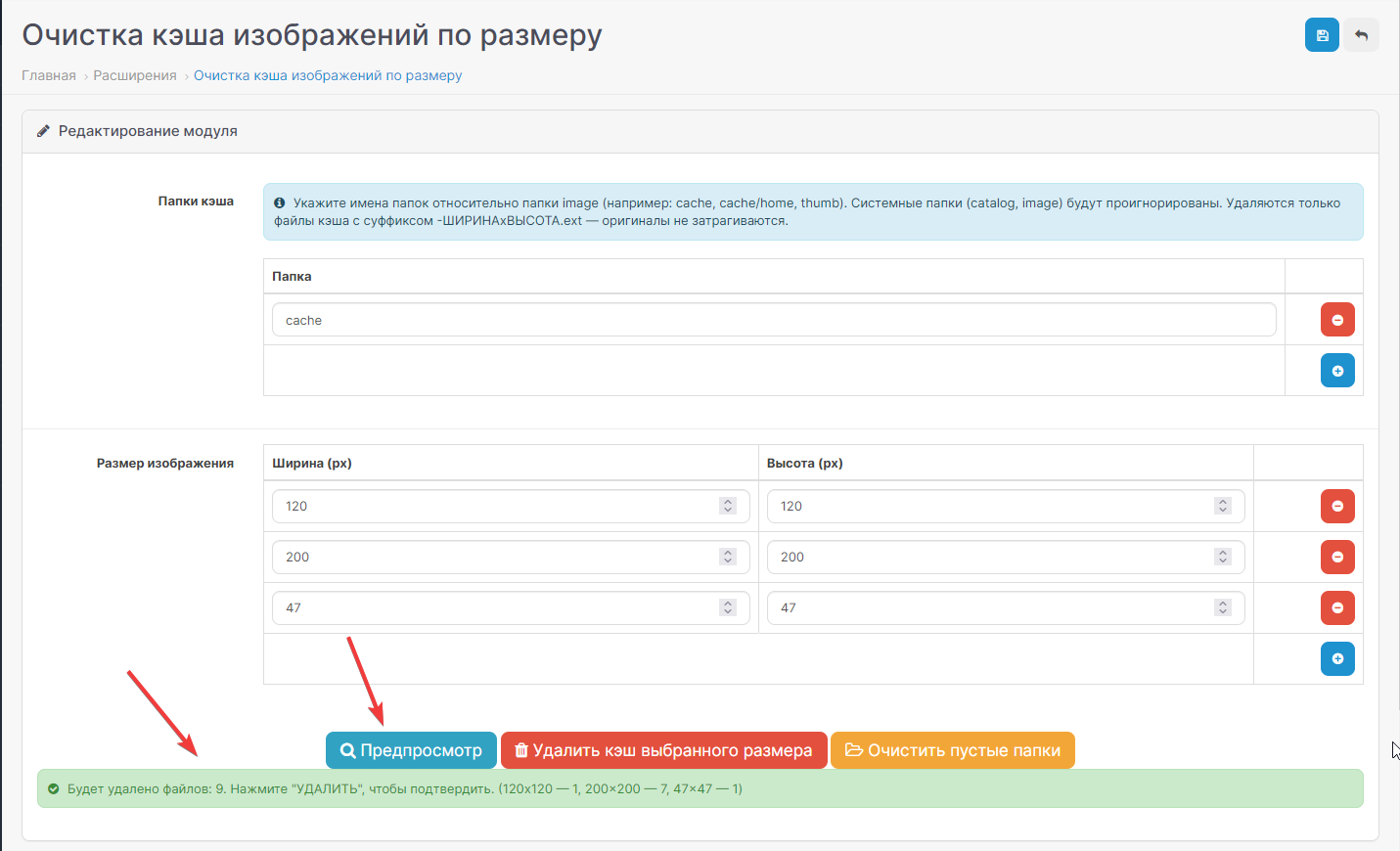
The "Preview" button shows how many files will be deleted without actually deleting them. Excellent protection against accidental clicks — first preview, then delete.
✖️"DELETE CACHE OF THE SELECTED SIZE" button
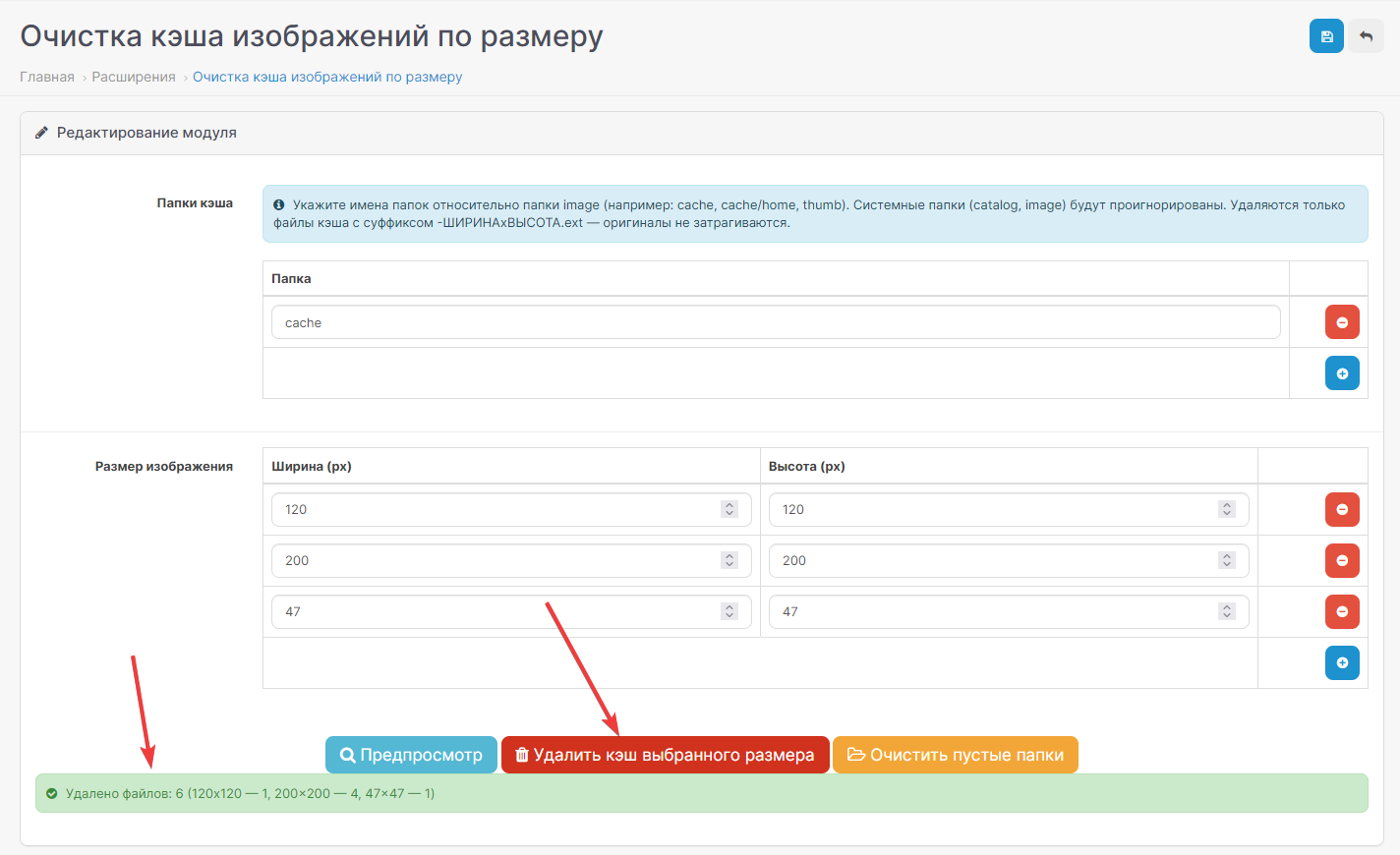
Bulk delete with one click. A detailed report is displayed after the operation:
Files deleted: 247 (200x200 — 189, 500x500 — 58)
♻️Clean empty folders
After a mass deletion, empty directories remain in the cache. A separate "Clean empty folders" button removes them recursively, leaving the cache folder looking clean again.
Logging
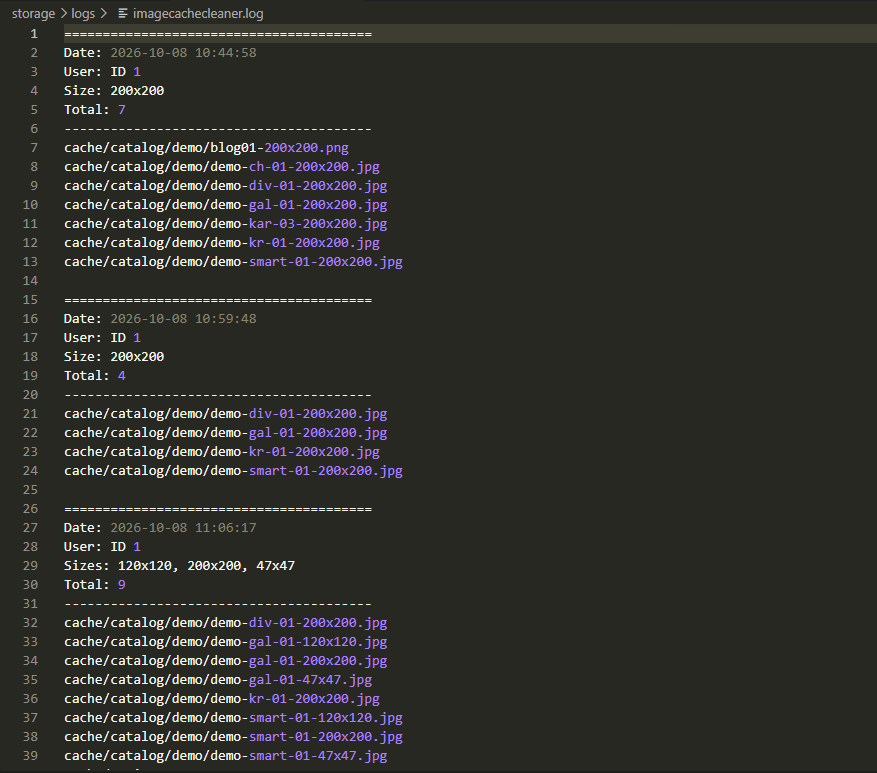
Each deletion is recorded in the system/storage/logs/imagecachecleaner.log log:
date and time,
user ID,
sizes cleaned,
number of deleted files,
full list of paths of deleted files.
You can always see what was deleted and when, and reconstruct the events.
⚠️Security is a priority
Tamper protection
The module will not allow deleting the contents of critical folders:
catalog (and any subfolders) — ignored
image (root) — ignored
empty value — ignored
Attempting to specify such a folder displays a warning — the module will simply skip it and report the cause and reason.
Original files are not touched
Only cache files are deleted — those whose names end with -WIDTHxHIGHT.extension (as generated by OpenCart itself). Original images of products, categories, and banners remain in place, even if they are located in the same folders.
Path traversal protection
Requests with .. or null bytes inPaths are discarded—you can't go beyond the image folder.
Access Permissions
The module only works for users with modify permissions.
✏️Interface
All actions are performed in one click, from the standard OpenCart 3 admin panel.
Settings are saved in the standard oc_setting table—nothing extra in the database.
The appearance is completely consistent with the style of the OpenCart admin panel.
Works on all builds: OpenCart 3.x, ocStore 3.x, and custom builds based on OC3.
☝️Who will benefit
For store owners with large catalogs—saving disk space.
Developers and studios: when changing themes, templates, and image sizes.
Administrators: during regular store maintenance.
For anyone tired of the growing image/cache folder and don't want to delete it entirely.
▶️Installation
Upload the module files to the server (or install .ocmod.zip via the Extension Installer).
Extensions → Modules → find "Clear image cache by size" → click the green (+).
Edit → add folders and sizes → save.
Done. Use the Preview, DELETE, and Clear empty folders buttons.
★Technical Specifications
Compatibility: OpenCart 3.0.x, ocStore 3.0.x
Languages: Russian, English
Base: Uses only oc_setting
Dependencies: None
Security: Path traversal protection, image extension whitelist, permissions check
Logging: system/storage/logs/imagecachecleaner.log
A targeted image cache cleaning module for OpenCart 3.
Allows you to delete only those files from cache folders that were generated for specific dimensions (width × height), without affecting the originals or the rest of the cache.
No more manually navigating through FTP and cleaning out tens of thousands of unnecessary thumbnails, or deleting the entire cache and waiting for the store to regenerate it.
⚙️Why is this necessary
Every time OpenCart displays a product, category, or banner, it creates a cached image of the required size. The files are stored in image/cache/... and have names like product-200x200.jpg, banner-750x300.jpg.
Over time:
- You changed the thumbnail size in the store settings → old caches (e.g., 200x200) are just dead weight.
- You updated the theme — it has different image sizes → all previous caches are not used, but are sitting on disk.
- You changed the category template → old banner sizes are no longer generated, but are taking up space.
- You installed a new module with custom sizes → no one needs the old cache.
Result: the image/cache folder grows to gigabytes, clogging up the disk, slowing down backups, and increasing sync times.
Previously, the only solution was:
- Delete the entire cache folder — but then the store slows down for a week until everything is regenerated. - Use FTP and manually clean out folders.
Now, log into the admin panel, specify the size (or multiple sizes) and folders, and in a second, everything unnecessary is deleted. The remaining cache remains intact, and the store continues to operate quickly.
✔️What the module can do
Flexible cache folder configuration for cleaning
Using the convenient interface with the (+) button, add any number of folders relative to image/:
cache
cache/catalog
cache/catalog/demo
cache/home
cachewebp
thumb
and any others—as many as needed.
The deletion is performed recursively through all nested subfolders.
Multiple sizes at once:
Also with (+) — add as many "width x height" pairs as you like:
200 x 200
500 x 500
750 x 300
1000 x 1000
One click — and all files matching these dimensions are deleted from the selected folders.
Preview before deletion
The "Preview" button shows how many files will be deleted without actually deleting them. Excellent protection against accidental clicks — first preview, then delete.
✖️"DELETE CACHE OF THE SELECTED SIZE" button
Bulk delete with one click. A detailed report is displayed after the operation:
Files deleted: 247 (200x200 — 189, 500x500 — 58)
♻️Clean empty folders
After a mass deletion, empty directories remain in the cache. A separate "Clean empty folders" button removes them recursively, leaving the cache folder looking clean again.
Logging
Each deletion is recorded in the system/storage/logs/imagecachecleaner.log log:
date and time,
user ID,
sizes cleaned,
number of deleted files,
full list of paths of deleted files.
You can always see what was deleted and when, and reconstruct the events.
⚠️Security is a priority
Tamper protection
The module will not allow deleting the contents of critical folders:
catalog (and any subfolders) — ignored
image (root) — ignored
empty value — ignored
Attempting to specify such a folder displays a warning — the module will simply skip it and report the cause and reason.
Original files are not touched
Only cache files are deleted — those whose names end with -WIDTHxHIGHT.extension (as generated by OpenCart itself). Original images of products, categories, and banners remain in place, even if they are located in the same folders.
Path traversal protection
Requests with .. or null bytes inPaths are discarded—you can't go beyond the image folder.
Access Permissions
The module only works for users with modify permissions.
✏️Interface
All actions are performed in one click, from the standard OpenCart 3 admin panel.
Settings are saved in the standard oc_setting table—nothing extra in the database.
The appearance is completely consistent with the style of the OpenCart admin panel.
Works on all builds: OpenCart 3.x, ocStore 3.x, and custom builds based on OC3.
☝️Who will benefit
For store owners with large catalogs—saving disk space.
Developers and studios: when changing themes, templates, and image sizes.
Administrators: during regular store maintenance.
For anyone tired of the growing image/cache folder and don't want to delete it entirely.
▶️Installation
Upload the module files to the server (or install .ocmod.zip via the Extension Installer).
Extensions → Modules → find "Clear image cache by size" → click the green (+).
Edit → add folders and sizes → save.
Done. Use the Preview, DELETE, and Clear empty folders buttons.
★Technical Specifications
Compatibility: OpenCart 3.0.x, ocStore 3.0.x
Languages: Russian, English
Base: Uses only oc_setting
Dependencies: None
Security: Path traversal protection, image extension whitelist, permissions check
Logging: system/storage/logs/imagecachecleaner.log
Distribution method:
Paid
Opencart version:
LiveStore 3.*OCStore 3.*OpenCart 3.*
PHP verision:
PHP 7.0PHP 7.1PHP 7.2PHP 7.3PHP 7.4
Activation:
Not required
Getting files:
On site, in the personal account
Protection system:
No
VQmod:
No
Ocmod:
Yes
Events:
No
Uploaded:
08.10.2026
Updated:
08.10.2026
Viewed:
247
Sales:
1
Write a review
Your Name:Your Review: Note: HTML is not translated!
Rating: Bad Good
Enter the code in the box below:
Файлы будут доступны после покупки


