Your shopping cart is empty!

Custom meta data for any page

Price: free
Author: Tom
Write to the author
Need paid help? Contact the site administration
Opencart version:
Need paid help? Contact the site administration
Opencart version:
LiveStore 3.*OCStore 3.*OpenCart 3.*
I often read requests for help with “errors” coming from Yandex, Google and other search engines that metadata was not found on the pages. Opencart has a lot of features due to which this data on the pages is not really needed. But since there is demand, why not offer a solution. Basically, this extension was created to add meta data to system pages and you should not use it on pages that initially have this data (product, categories, etc.)
Installing the Custom Meta Pages module
1. Log in to the OpenCart admin panel.
2. Go to "Extensions > Install extensions".
3. Click the "Download" button and select the custom_meta.ocmod.zip file.
4. After successful download, go to "Extensions >Modifiers" and click "Update".
5. Then go to "Extensions > Modules", find "Custom Meta Pages" and click "Install".
Using the Custom Meta Pages module
1. Log in to the OpenCart admin panel.
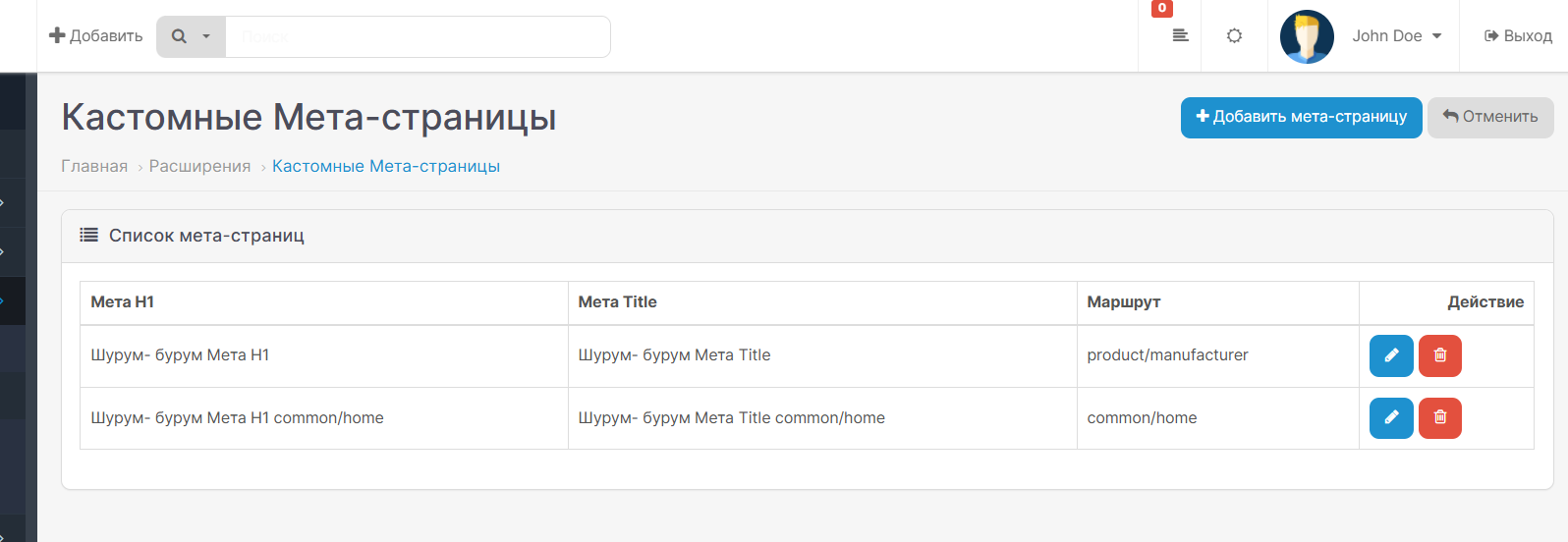
2. Go to "Extensions > Modules > Custom Meta Pages".
3. Click the "Add" button to create a new meta page.
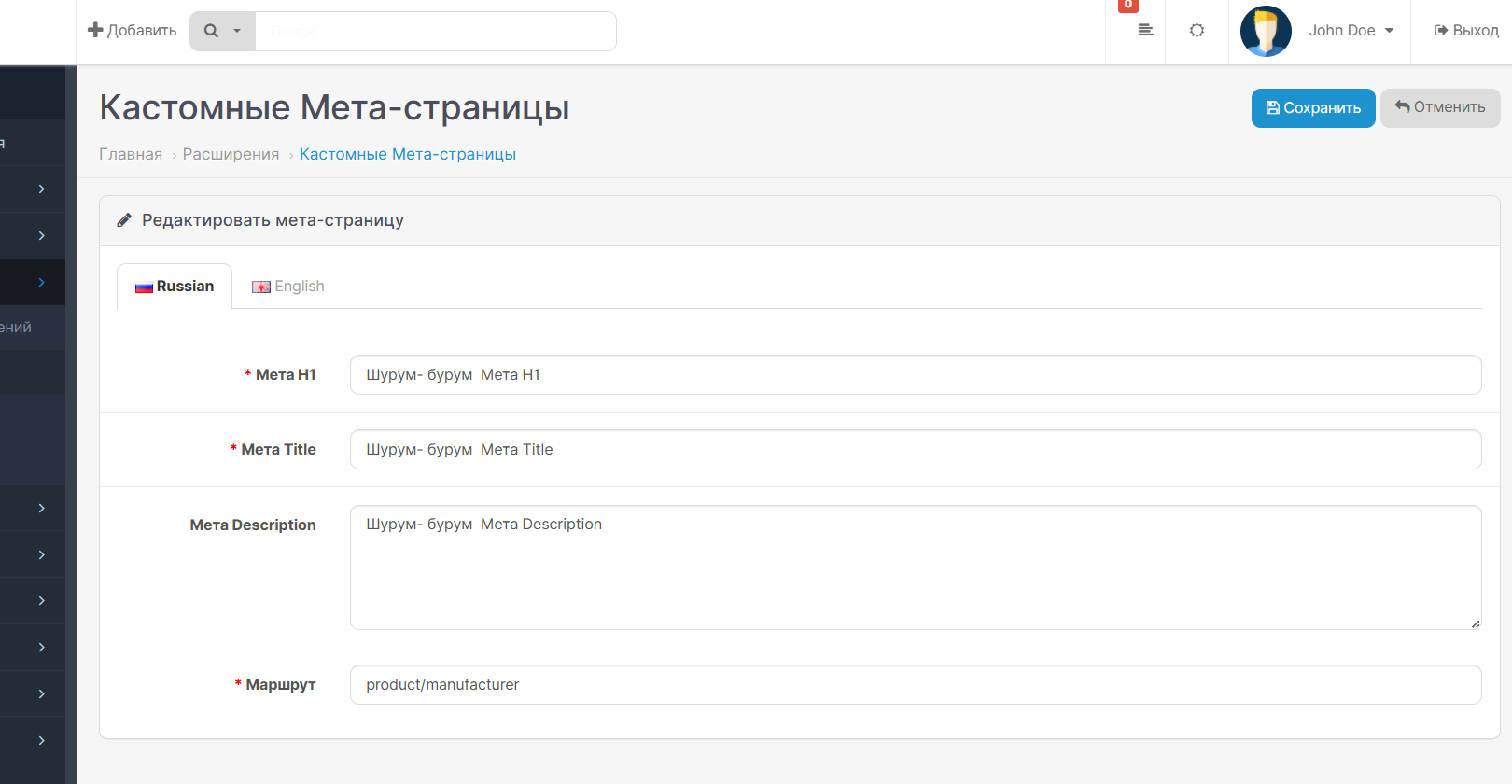
4. Fill out the form:
- Language tabs: For each language configured in your store (System > Localization > Languages), set:
- Meta H1: Specify the H1 heading (for example, “Super Promotions” for Russian, “Super Deals” for English).
- Meta Title: Set an SEO-optimized title (for example, "Promotions andDiscounts in Our Store" for Russian, "Deals and Discounts in Our Store" for English).
- Meta Description: Enter a description (for example, “Discover the best deals and discounts in our online store!” for Russian, “Discover the best deals and discounts in our online store!” for English).
- Route: Specify a route (for example, "product/special" for a promotions page).
5. Click "Save".
6. Examples of use:
- Promotions Page:
- Route: "product/special"
- English: Meta Title "Promotions and Discounts", Meta H1 "Hot Promotions"
- English: Meta Title "Deals and Discounts", Meta H1 "Hot Deals"
- Returns page
- Route:"account/return/add"
- Russian: Meta Title "How to Return a Product", Meta H1 "Return Conditions"
- English: Meta Title "How to Return a Product", Meta H1 "Return Conditions"
- Contact Us Page:
- Route: "information/contact"
- English: Meta Title "Contact Us", Meta H1 "Feedback"
- English: Meta Title "Contact Us", Meta H1 "Get in Touch"
7. After saving, the meta data will be automatically applied on the front end for the corresponding routes and the selected language (Meta Title and Meta Description via a modifier). Meta H1 may require some modification to the theme template.
Multi-language support
Modulesupports multilingualism, allowing you to set unique metadata for each language configured in the store. In the admin panel you will see tabs for each language, where you can specify Meta H1, Meta Title and Meta Description. On the frontend, meta data is automatically adjusted depending on the user’s current language.
Overriding existing meta data
The module redefines the standard meta data of OpenCart pages (for example, for the routes "common/home", "product/product") based on the routes specified in the admin panel. Meta Title and Meta Description are applied automatically via OCMOD modification in catalog/controller/common/header.php. Using Meta H1 as a page title may require additionalmodification of templates or controllers (for example, catalog/controller/common/home.php or product/product.php).
For coffee!
Installing the Custom Meta Pages module
1. Log in to the OpenCart admin panel.
2. Go to "Extensions > Install extensions".
3. Click the "Download" button and select the custom_meta.ocmod.zip file.
4. After successful download, go to "Extensions >Modifiers" and click "Update".
5. Then go to "Extensions > Modules", find "Custom Meta Pages" and click "Install".
Using the Custom Meta Pages module
1. Log in to the OpenCart admin panel.
2. Go to "Extensions > Modules > Custom Meta Pages".
3. Click the "Add" button to create a new meta page.
4. Fill out the form:
- Language tabs: For each language configured in your store (System > Localization > Languages), set:
- Meta H1: Specify the H1 heading (for example, “Super Promotions” for Russian, “Super Deals” for English).
- Meta Title: Set an SEO-optimized title (for example, "Promotions andDiscounts in Our Store" for Russian, "Deals and Discounts in Our Store" for English).
- Meta Description: Enter a description (for example, “Discover the best deals and discounts in our online store!” for Russian, “Discover the best deals and discounts in our online store!” for English).
- Route: Specify a route (for example, "product/special" for a promotions page).
5. Click "Save".
6. Examples of use:
- Promotions Page:
- Route: "product/special"
- English: Meta Title "Promotions and Discounts", Meta H1 "Hot Promotions"
- English: Meta Title "Deals and Discounts", Meta H1 "Hot Deals"
- Returns page
- Route:"account/return/add"
- Russian: Meta Title "How to Return a Product", Meta H1 "Return Conditions"
- English: Meta Title "How to Return a Product", Meta H1 "Return Conditions"
- Contact Us Page:
- Route: "information/contact"
- English: Meta Title "Contact Us", Meta H1 "Feedback"
- English: Meta Title "Contact Us", Meta H1 "Get in Touch"
7. After saving, the meta data will be automatically applied on the front end for the corresponding routes and the selected language (Meta Title and Meta Description via a modifier). Meta H1 may require some modification to the theme template.
Multi-language support
Modulesupports multilingualism, allowing you to set unique metadata for each language configured in the store. In the admin panel you will see tabs for each language, where you can specify Meta H1, Meta Title and Meta Description. On the frontend, meta data is automatically adjusted depending on the user’s current language.
Overriding existing meta data
The module redefines the standard meta data of OpenCart pages (for example, for the routes "common/home", "product/product") based on the routes specified in the admin panel. Meta Title and Meta Description are applied automatically via OCMOD modification in catalog/controller/common/header.php. Using Meta H1 as a page title may require additionalmodification of templates or controllers (for example, catalog/controller/common/home.php or product/product.php).
For coffee!
Distribution method:
Free
Opencart version:
LiveStore 3.*OCStore 3.*OpenCart 3.*
PHP verision:
PHP 7.3PHP 7.4
Activation:
Not required
Getting files:
On author's site, after purchase
Protection system:
No
VQmod:
No
Ocmod:
Yes
Events:
No
Uploaded:
30.08.2025
Updated:
06.07.2026
Viewed:
3310
Write a review
Your Name:Your Review: Note: HTML is not translated!
Rating: Bad Good
Enter the code in the box below:
To download this free product, you do not need to order it, just log in.


