Your shopping cart is empty!

Autocategory module free version

Price: free
Author: nikifalex
Write to the author
Need paid help? Contact the site administration
Opencart version:
Need paid help? Contact the site administration
Opencart version:
LiveStore 3.*OCStore 3.*OpenCart 3.*
Categories that fill themselves. You set selection rules - the module arranges products into categories and updates the composition using the button.
Why is it needed
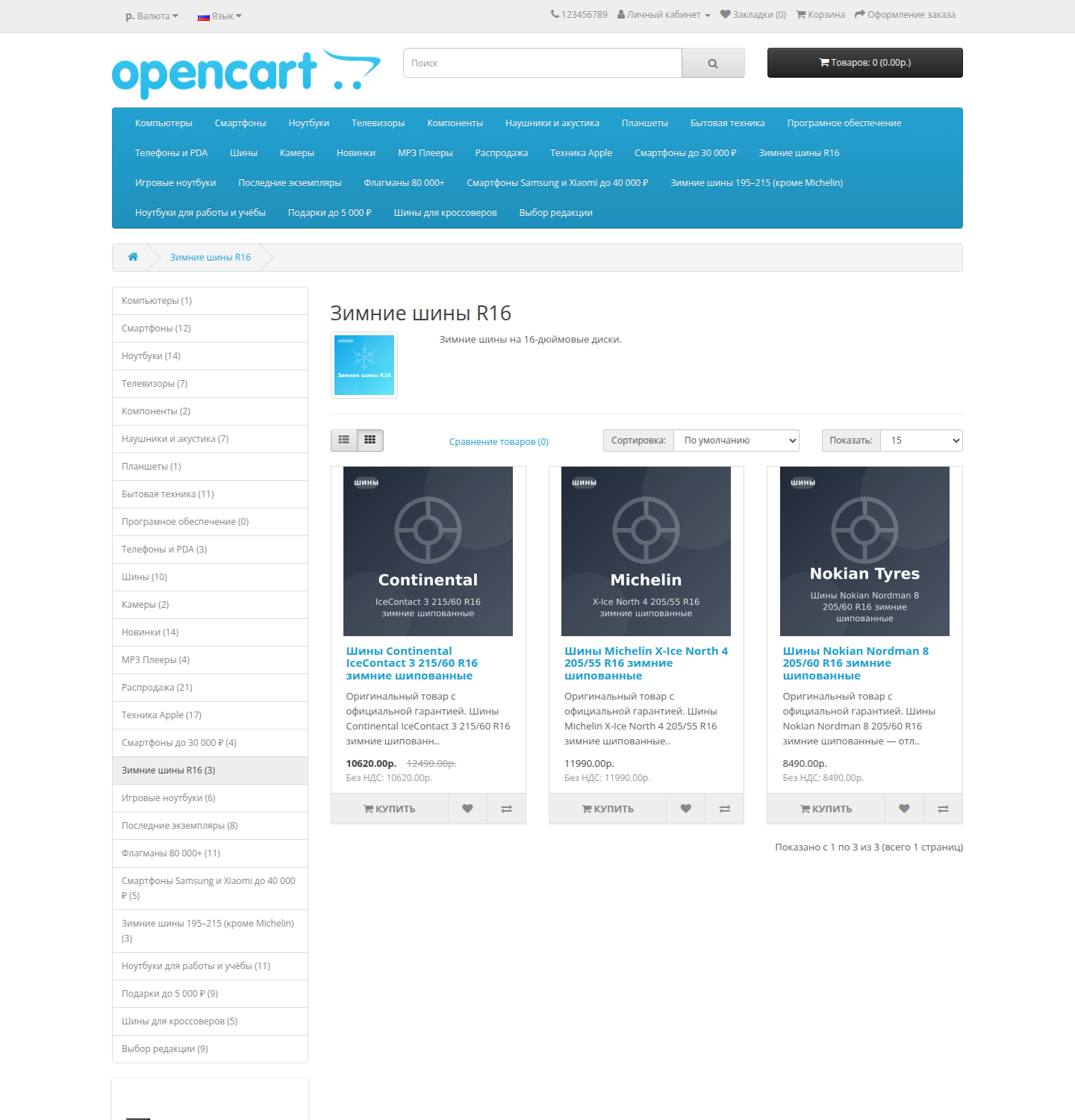
Landing pages for demand - the cheapest SEO traffic for a store: “Smartphones up to 30,000”, “Winter tires R16”, “Gifts up to 5,000”. But such selections don’t live by hand: goods run out, become cheaper, more expensive, new ones come in - but the category remains the same as it was filled six months ago.
The module turns a regular OpenCart category into a live selection. The selection rules are set once on the tab in the category form, then the composition is reassembled by launching from the admin panel. Since this is a regular category, it has everything for promotion: SEO-URL, meta tags, description, place in the menu, working filters andany modules on the page.
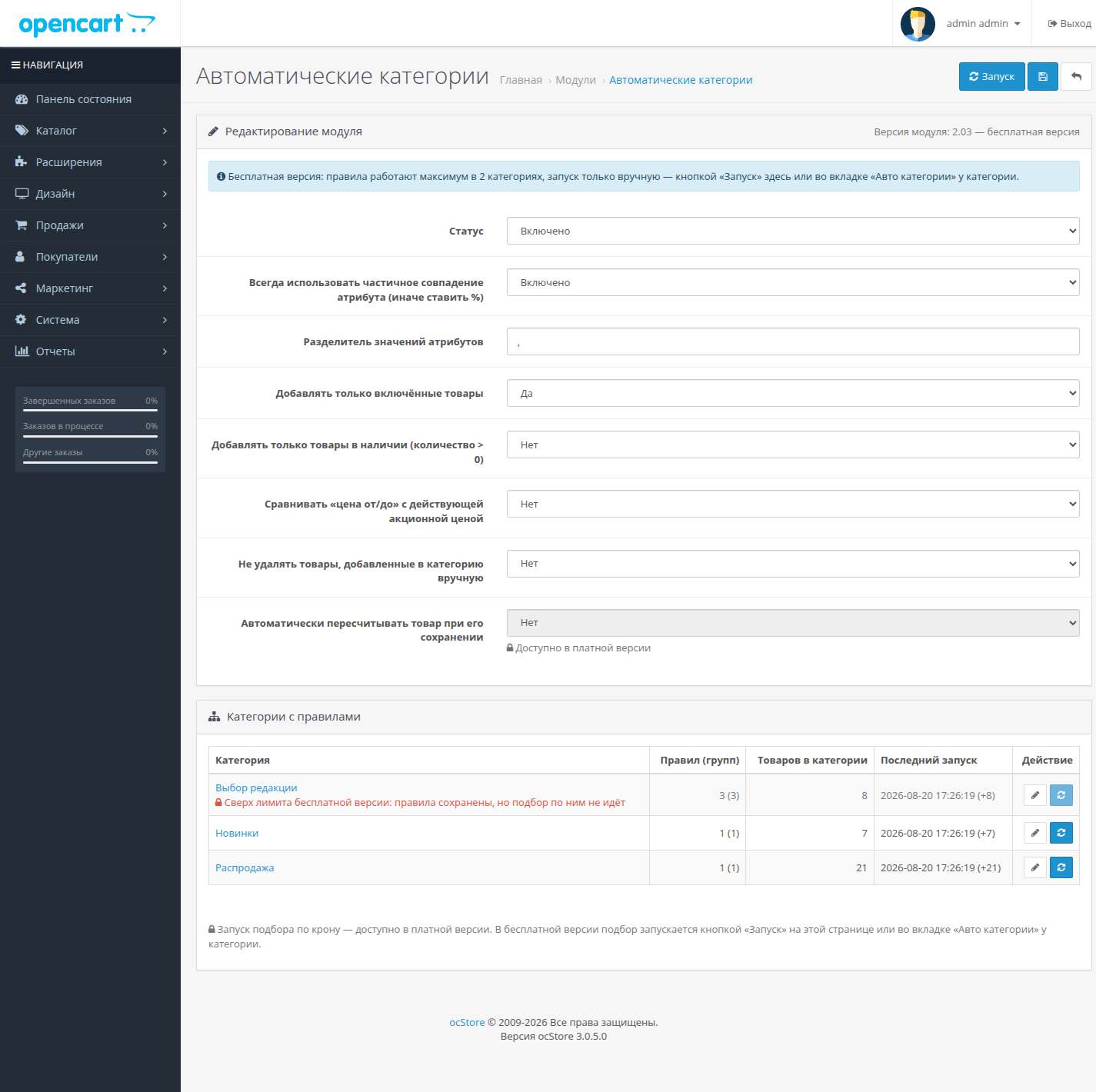
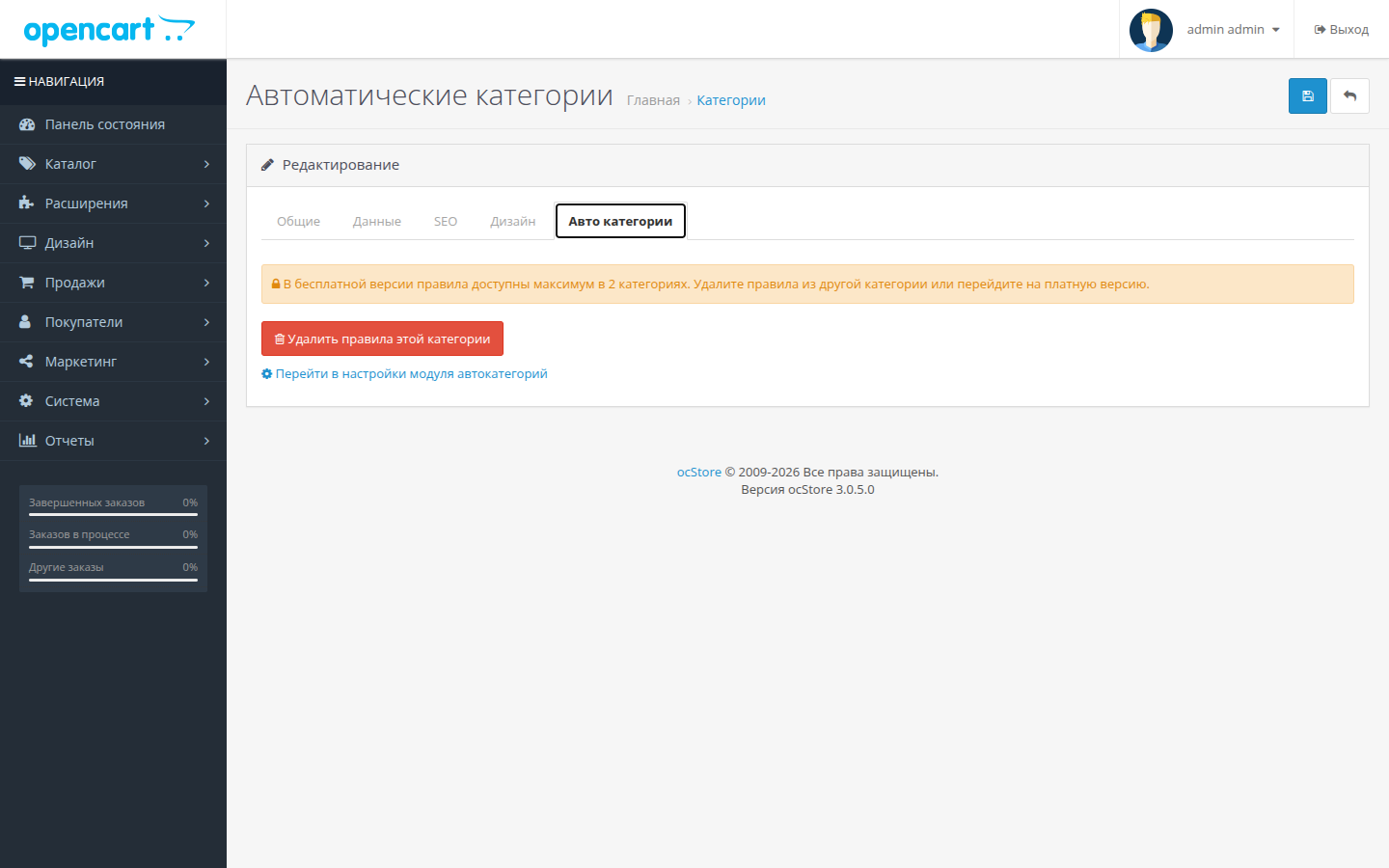
In the free version, the rules work in two categories, and the selection is started manually. A set of conditions, groups, preview and protection of manual assignments - without restrictions.
What the rules are made of
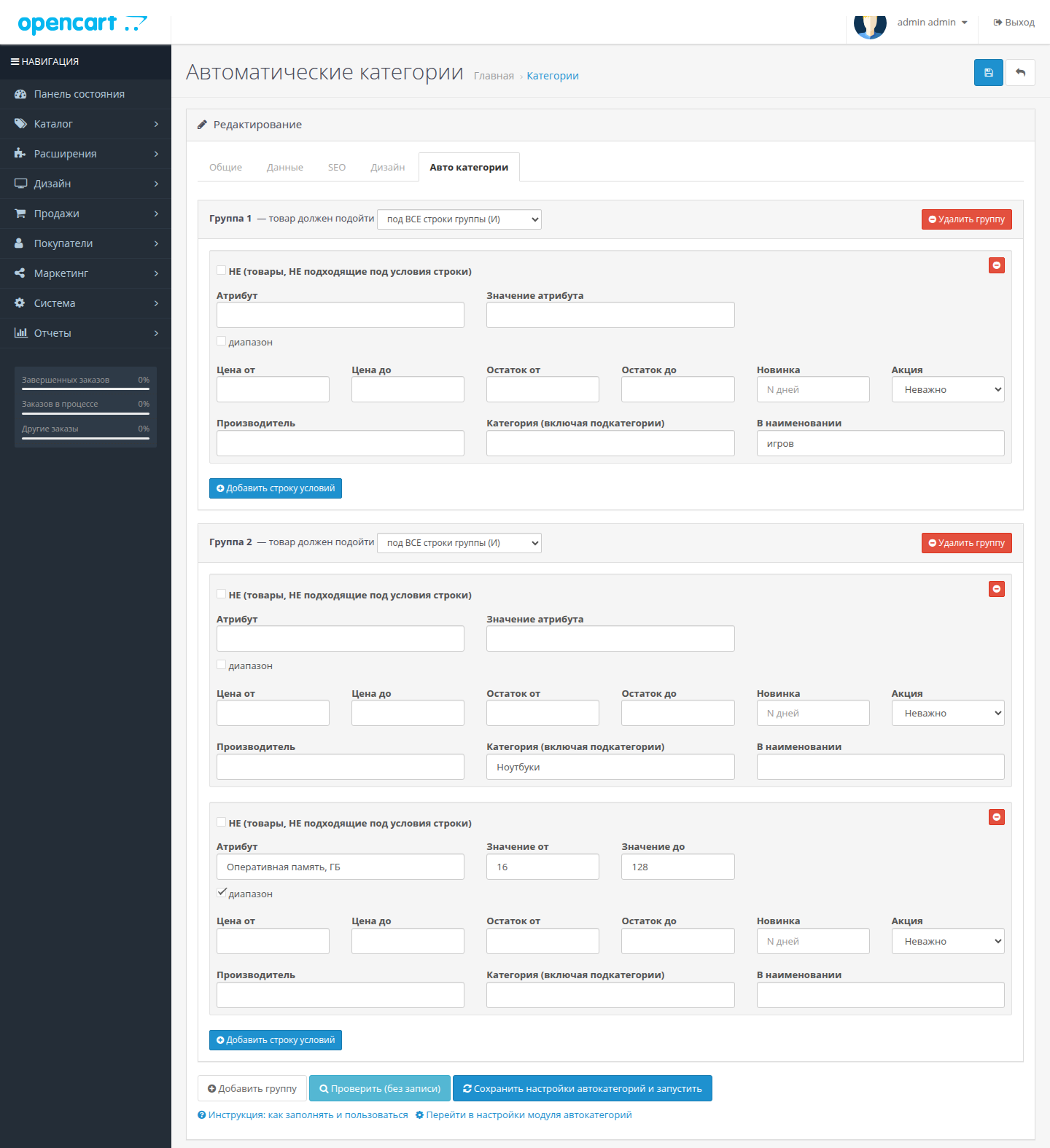
Rules are made up of groups, and groups are made up of condition lines. A product falls into a category if it fits at least one group; Within a group, rows are combined by AND or OR - your choice. You can combine any conditions in one line:
Check button - before changing store
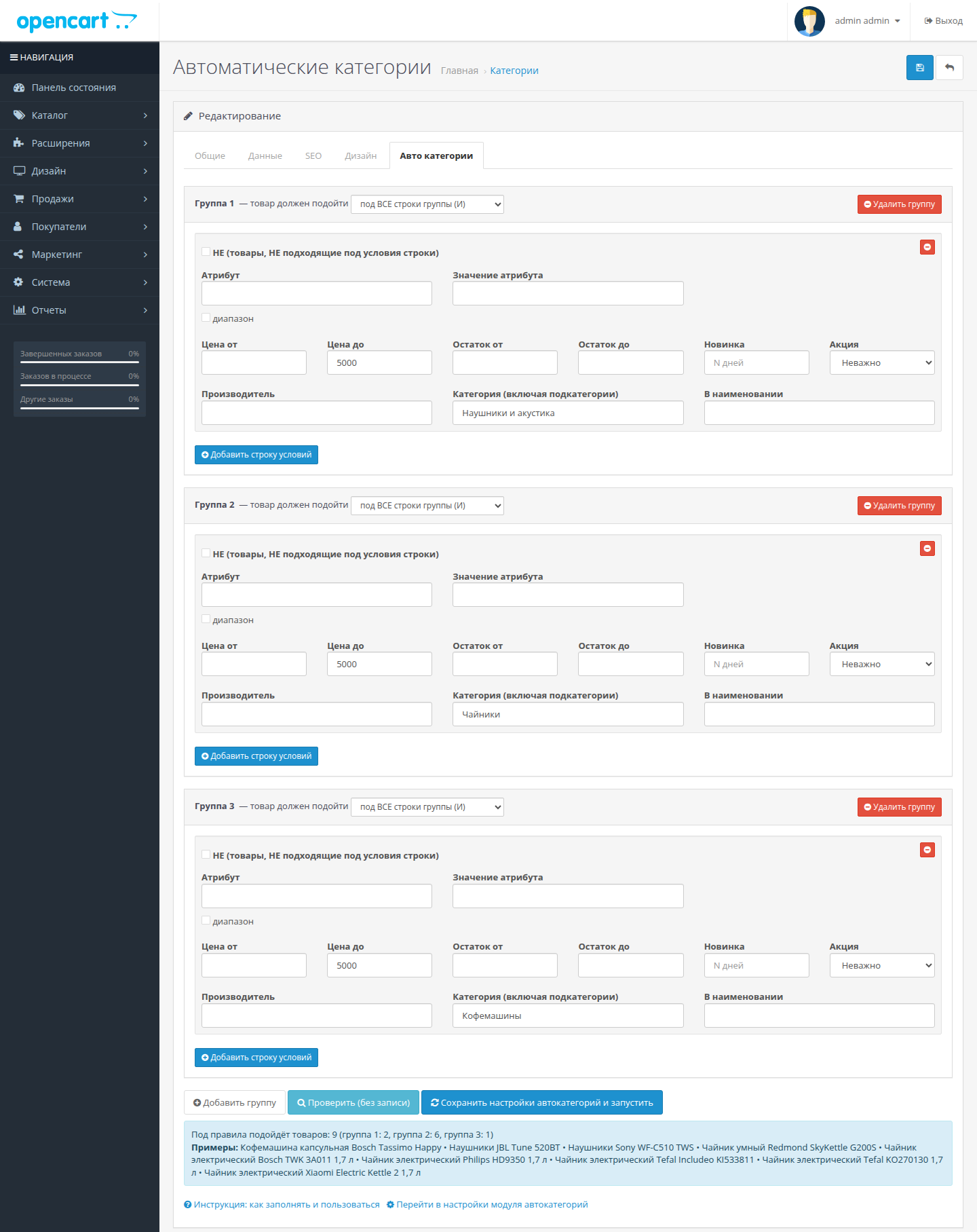
A common pain point for automation modules: you write a rule, run it, and figure out why the category is either empty or the entire catalog. There is a preview here: the “Check (without recording)” button shows how many products fit the current rules - for each group separately - and the first twenty names. Nothing changes in the store.
How selection is started
By button: on the category tab - “Save auto-category settings and run”, on the module settings page - “Run” for all categories at once or one from the pivot table.
Automatic recalculation -in the paid version: launch by crown through the nkf_oc_cli module and recalculation of the product immediately when saving it in the admin panel.
The module behaves neatly
Everything before your eyes
On the settings page there is a summary table of categories with rules: how many rules and groups, how many products are currently in the category, when was the last launch and how many it picked up. From there, the category is launched in one click and opens for editing. Detailed instructions with examples are built right into the rules tab.
Examples of categories that can be assembled in a couple of minutes
How it differs from the paid version
The module code, settings and tables are the same for editions, sothe paid version is placed on top of the free regular archive download: the rules and statistics remain in place, the restrictions are removed.
Technical details
What's new in version 2.03
The free and full versions have the same numbering - these are the same files, assembled differently.
Why is it needed
Landing pages for demand - the cheapest SEO traffic for a store: “Smartphones up to 30,000”, “Winter tires R16”, “Gifts up to 5,000”. But such selections don’t live by hand: goods run out, become cheaper, more expensive, new ones come in - but the category remains the same as it was filled six months ago.
The module turns a regular OpenCart category into a live selection. The selection rules are set once on the tab in the category form, then the composition is reassembled by launching from the admin panel. Since this is a regular category, it has everything for promotion: SEO-URL, meta tags, description, place in the menu, working filters andany modules on the page.
In the free version, the rules work in two categories, and the selection is started manually. A set of conditions, groups, preview and protection of manual assignments - without restrictions.
What the rules are made of
Rules are made up of groups, and groups are made up of condition lines. A product falls into a category if it fits at least one group; Within a group, rows are combined by AND or OR - your choice. You can combine any conditions in one line:
- Attribute. Exact value, listing of valid values through a separator (“215,225”), partial match (“zim%”) or numeric range from/to - for sizes, diagonals, volumes.
- Price from/to. Based on baseprice or - by setting - at the current promotional price.
- Stock balance from/to. Categories of the form “Last copies: no more than three left.”
- New. Product added in the last N days.
- Promotion. Only products with a current promotion - or, conversely, only without it.
- Manufacturer.
- Category, including subcategories. Select “from laptops”, “from all household appliances”.
- Substring in the name.
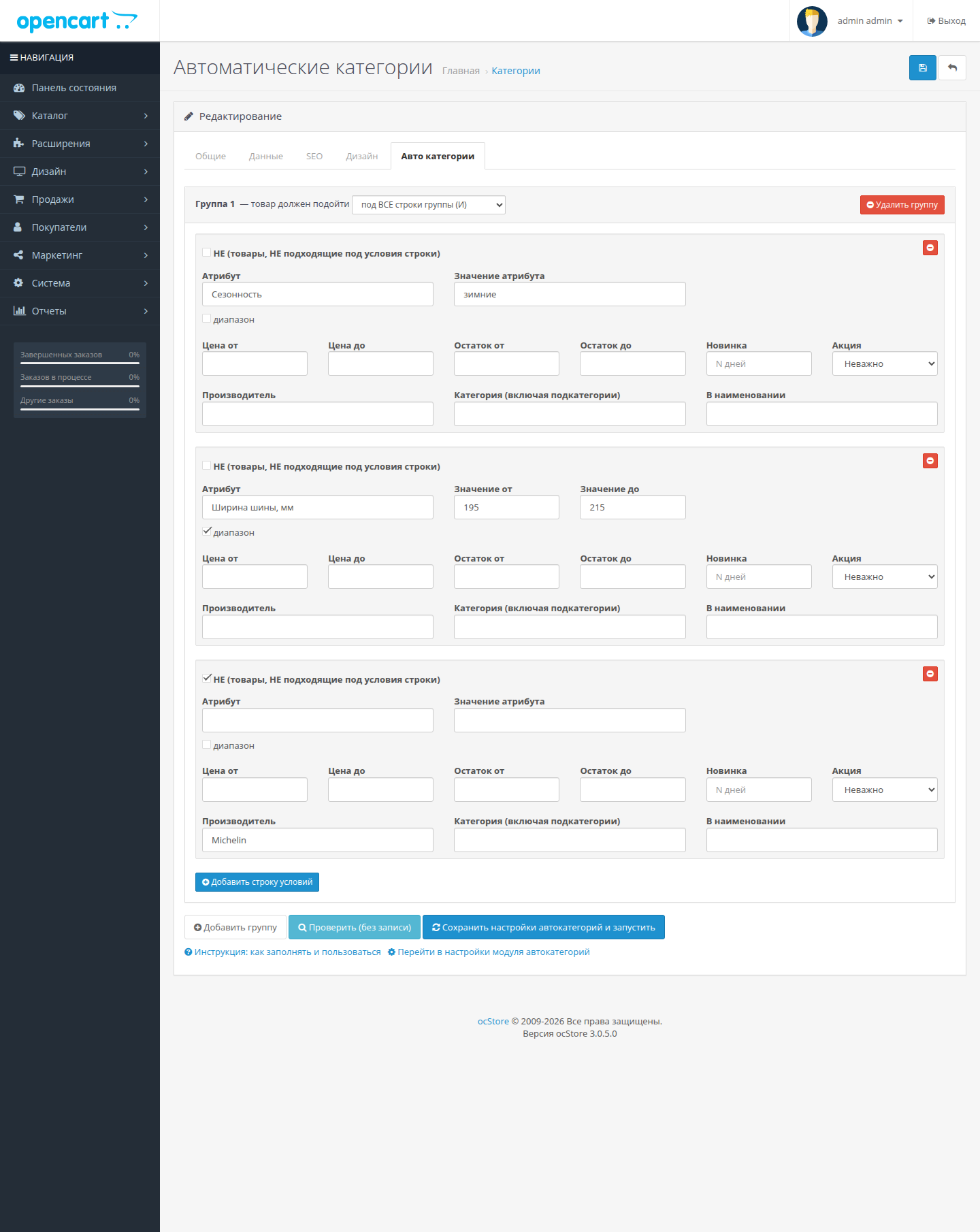
- Inversion of “NOT”. Any string can beturn over: “all winter tires 195–215, except Michelin”, “all laptops, except gaming”.
Check button - before changing store
A common pain point for automation modules: you write a rule, run it, and figure out why the category is either empty or the entire catalog. There is a preview here: the “Check (without recording)” button shows how many products fit the current rules - for each group separately - and the first twenty names. Nothing changes in the store.
How selection is started
By button: on the category tab - “Save auto-category settings and run”, on the module settings page - “Run” for all categories at once or one from the pivot table.
Automatic recalculation -in the paid version: launch by crown through the nkf_oc_cli module and recalculation of the product immediately when saving it in the admin panel.
The module behaves neatly
- The main product category is never erased - SEO addresses are not broken.
- Option “do not touch those added manually”: the module remembers which products it added to the category and deletes only them. Manual assignments survive any run.
- Global filters “only included products” and “only in stock” - so that landing pages do not show things that cannot be purchased.
- An empty condition line is not saved - you cannot accidentally drag the entire catalog into a category.
- Items are added in batchesrequests - filling is fast even in large catalogs.
Everything before your eyes
On the settings page there is a summary table of categories with rules: how many rules and groups, how many products are currently in the category, when was the last launch and how many it picked up. From there, the category is launched in one click and opens for editing. Detailed instructions with examples are built right into the rules tab.
Examples of categories that can be assembled in a couple of minutes
- “New items” - added in the last 30 days;
- “Sale” - all products with a current promotion;
- "Samsung and Xiaomi smartphones up to 40,000" - two groups: category + manufacturer +price ceiling;
- "Winter tires 195–215, except Michelin" - attribute value + width range + NOT-string by manufacturer;
- “Gifts up to 5,000” - three groups in different categories with a common price ceiling;
- “Last copies” - remainder from 1 to 3.
How it differs from the paid version
- Free: rules in two categories, launch only manually from the admin panel.
- Paid: rules in any number of categories, launch by crown and automatic recalculation of goods when saved in the admin panel.
The module code, settings and tables are the same for editions, sothe paid version is placed on top of the free regular archive download: the rules and statistics remain in place, the restrictions are removed.
Technical details
- Module version: 2.03
- Categories with rules: two
- Compatibility: OpenCart 3.0.x, ocStore 3.0.x (including 3.0.3.7+).
- Standard installation: loading the ocmod archive, updating modifications, activating the module. System files are not overwritten.
- Module data lives in its own tables; When a category is deleted, its rules are cleared automatically.
- Language - Russian. Works with any theme: no showcase modulechanges, he manages the composition of staff categories.
- The source code is open, without encryption and domain binding.
What's new in version 2.03
The free and full versions have the same numbering - these are the same files, assembled differently.
- Division into free and paid editions.
- New rules interface: visual condition cards instead of a compressed table, groups under each other.
- Preview of “Check (without recording)” with breakdown by groups and examples of products.
- New conditions: balance in stock, “new in N days”.
- Protection of products added to the categorymanually.
- Settings “only included”, “only in stock”, “compare with promotional price”.
- Summary table of all rules with launch statistics.
Distribution method:
Paid
Opencart version:
LiveStore 3.*OCStore 3.*OpenCart 3.*
PHP verision:
PHP 7.0PHP 7.1PHP 7.2PHP 7.3PHP 8.0PHP 8.1PHP 8.2PHP 8.3
Activation:
Automatic
Getting files:
On site, in the personal account
Protection system:
Custom
VQmod:
No
Ocmod:
Yes
Events:
Yes
Uploaded:
20.08.2026
Updated:
05.10.2026
Viewed:
727
Write a review
Your Name:Your Review: Note: HTML is not translated!
Rating: Bad Good
Enter the code in the box below:
To download this free product, you do not need to order it, just log in.


