Your shopping cart is empty!

End-to-end analytics: DRR, ROI, and advertising payback

Price: 1 400 ₽ 1 800 ₽

Author: nikifalex
Write to the author
Sales: 1 (Average rating 0 на основании 0 отзывов)
Need paid help? Contact the site administration
Opencart version:
Sales: 1 (Average rating 0 на основании 0 отзывов)
Need paid help? Contact the site administration
Opencart version:
LiveStore 3.*OCStore 3.*OpenCart 3.*
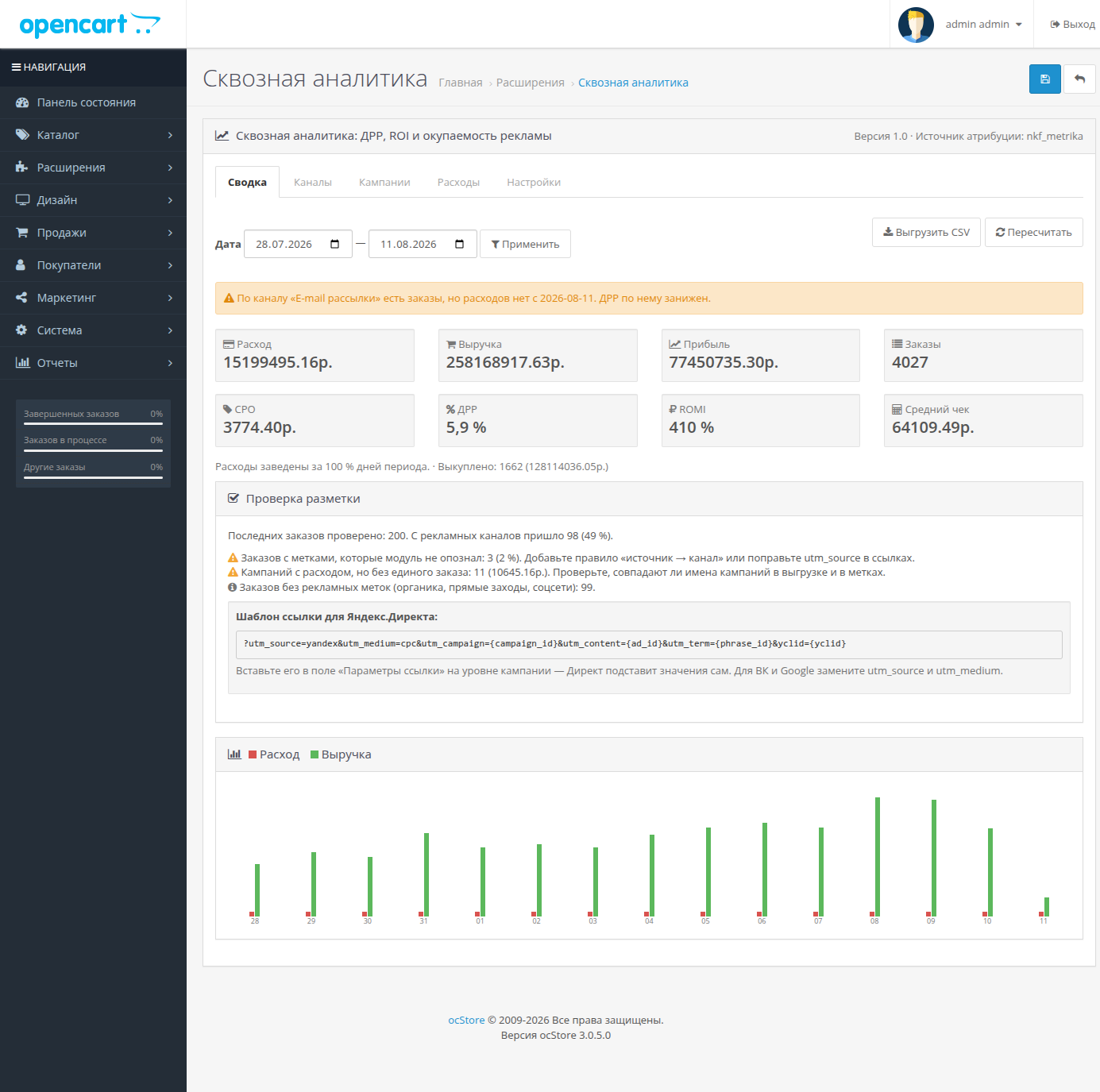
The UTM tracker shows where the order came from. This module shows how much an order cost: it combines advertising costs with sales and calculates the CRR, ROI, and order value for each channel and each campaign.
Demo Store
Showcase —opencart3.nikifalex.ru
Admin —opencart3.nikifalex.ru/admin/, login and password: demo / demo (login fields are already filled in).
The module is installed and configured, the store is filled with products, customers, and orders.
Why is it needed
The store owner pays for Yandex.Direct, Avito, blogger seeding, and SEO, but calculates which of these items actually pays off, at best, quarterly in Excel. End-to-end analytics services charge from 5,000 rubles per month and require webhooks and integrations.
The module answers three questions on a single screen:
What it calculates
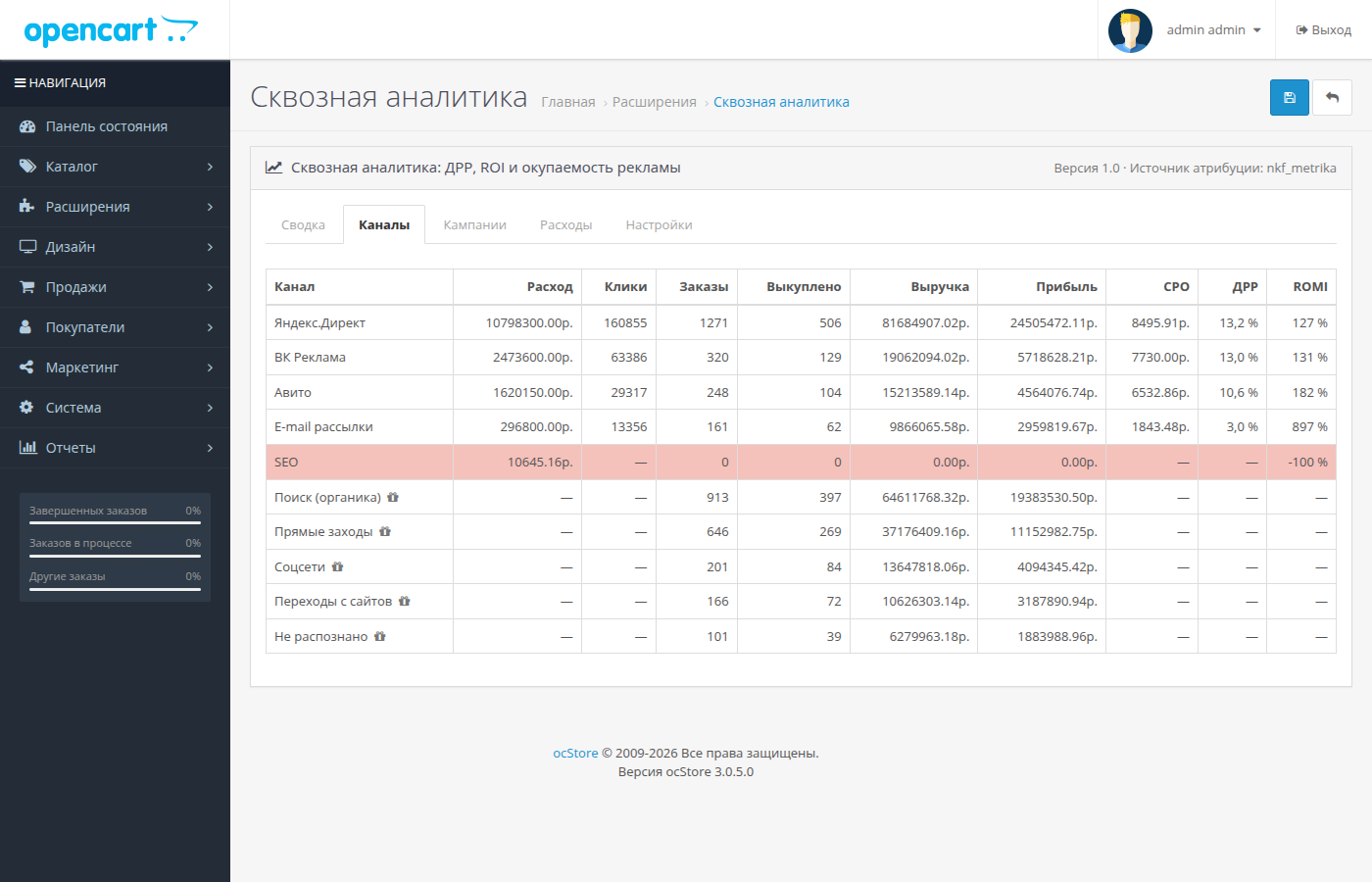
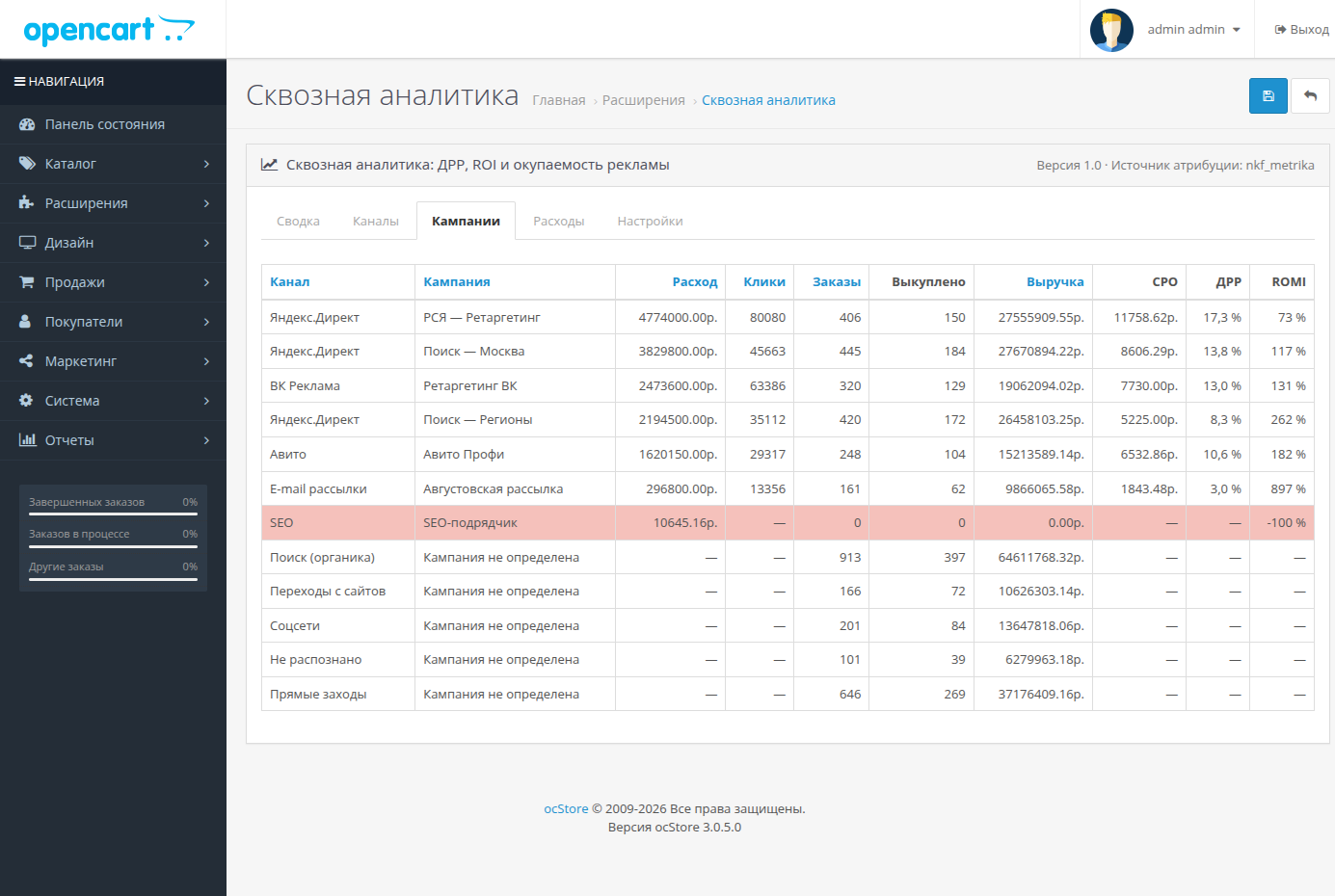
CPC, CPO, CR, CRR, ROAS, ROMI, and average order value—for the period, by channel, and by campaign, sortable by any column and exported to CSV. Orders and purchases are calculated separately and shown side by side: the difference between "ordered" and "collected" is the shortfall, which quietly eats into your advertising budget.
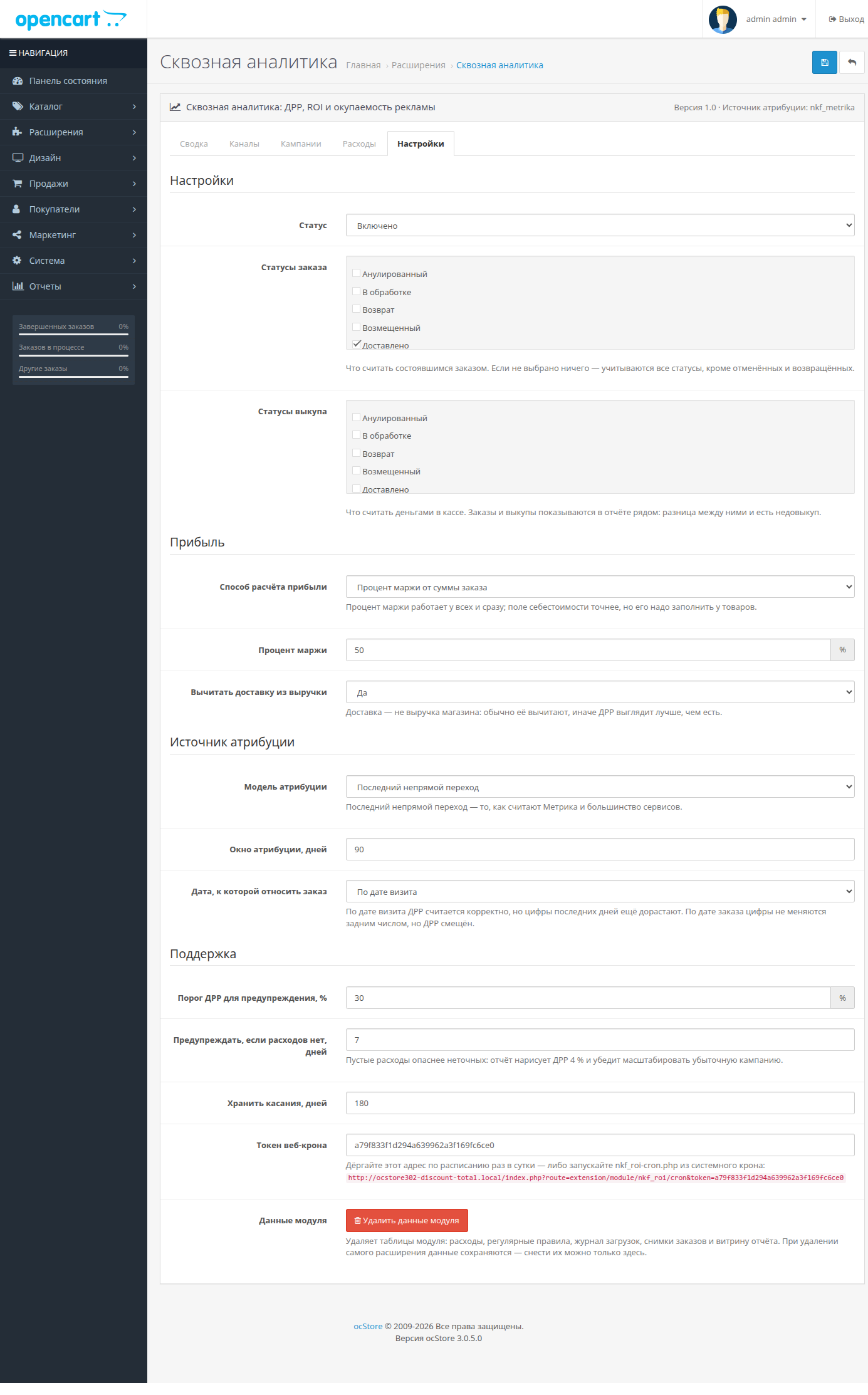
Profit can be calculated in three ways: margin percentage (applies immediately), cost price from the product page (more precisely), or a fixed amount per order. Shipping is deducted from revenue, making the CRR look better than it actually is.
Expenses without API and tokens
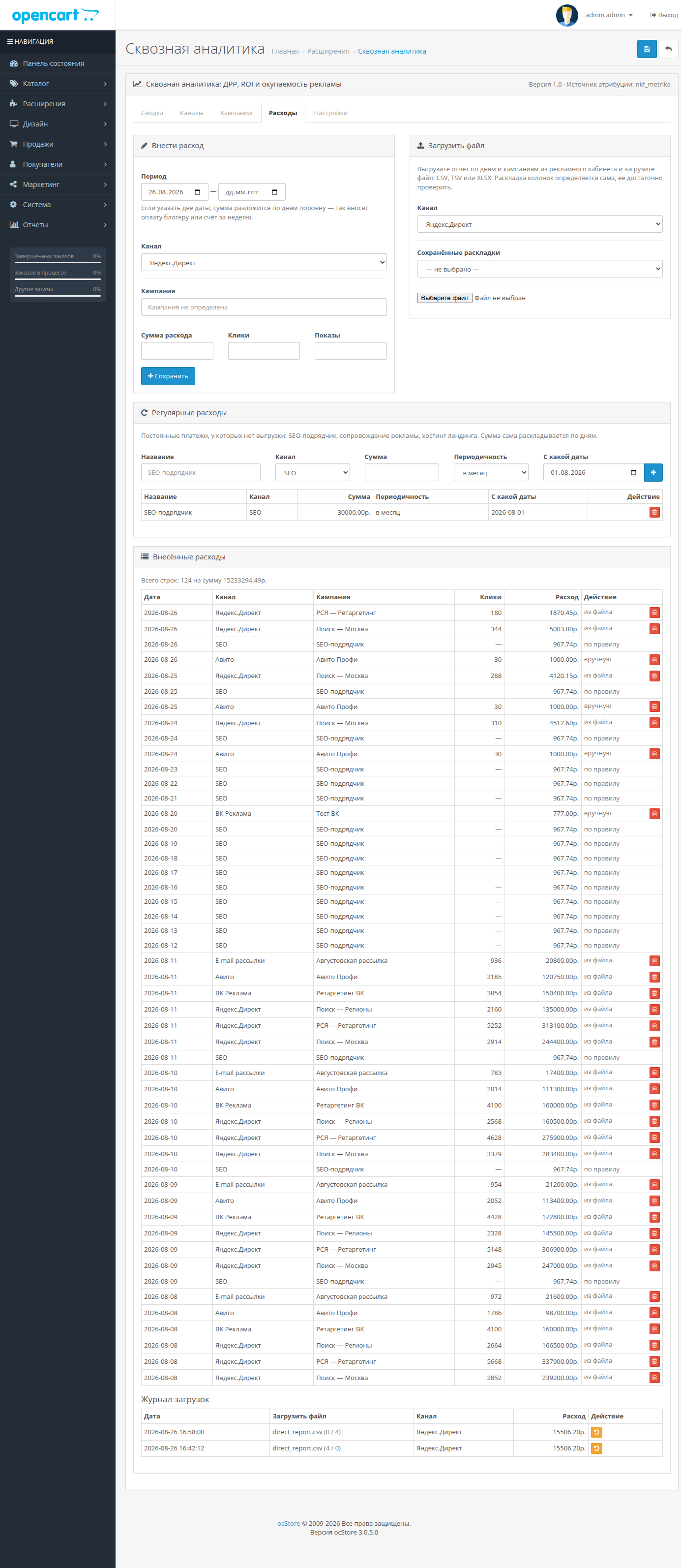
The module does not connect to advertising accounts: no OAuth is required, no API access requests are required, and the store does not store a token that could be used to manage other people's money. Expense data is entered into the module in three ways:
How does the module know the order source
Tags are collected on the website itself: UTM tags, click IDs (yclid, gclid), and referral source. The order is linked to the campaign by the campaign number or name from the tag. The attribution model is last indirect click (as in Metrica), first click, or last click; The attribution window is configurable; the default is 90 days.
Unlabeled clicks are not discarded: search, social media, direct visits, and clicks from websites are considered separate channels and are reported alongside ads, showing the overall share of sales coming from paid traffic.
If the Yandex Metrica Offline Conversions module (nkf_metrika) is installed on the store, attribution is taken from it—the two modules don't compete for the same visitor.
The report doesn't lie
More in the module
Restrictions
A free version is available
You can test the module with your own data for free: the free version collects all order sources and displays a summary and breakdown by channel, with expenses entered manually and using regular rules. The paid version adds a breakdown by campaign, the ability to upload expenses as a file from your advertising account, and export to CSV and multi-store.
Free version of the module
The paid version is installed over the free version by downloading the archive: the settings and accumulated data remain.
Technical details
What's new in version 1.0
Demo Store
Showcase —opencart3.nikifalex.ru
Admin —opencart3.nikifalex.ru/admin/, login and password: demo / demo (login fields are already filled in).
The module is installed and configured, the store is filled with products, customers, and orders.
Why is it needed
The store owner pays for Yandex.Direct, Avito, blogger seeding, and SEO, but calculates which of these items actually pays off, at best, quarterly in Excel. End-to-end analytics services charge from 5,000 rubles per month and require webhooks and integrations.
The module answers three questions on a single screen:
- How much money was spent on advertising and how much was returned in revenue and profit—overall and for each campaign.
- Which campaigns are running in the red: the CRR is above the threshold—the line is highlighted and visible immediately.
- How much is the cost per order from each channel (CPO) and which channel makes sense to scale.
What it calculates
CPC, CPO, CR, CRR, ROAS, ROMI, and average order value—for the period, by channel, and by campaign, sortable by any column and exported to CSV. Orders and purchases are calculated separately and shown side by side: the difference between "ordered" and "collected" is the shortfall, which quietly eats into your advertising budget.
Profit can be calculated in three ways: margin percentage (applies immediately), cost price from the product page (more precisely), or a fixed amount per order. Shipping is deducted from revenue, making the CRR look better than it actually is.
Expenses without API and tokens
The module does not connect to advertising accounts: no OAuth is required, no API access requests are required, and the store does not store a token that could be used to manage other people's money. Expense data is entered into the module in three ways:
- File— CSV, TSV, or XLSX from any dashboard: Yandex.Direct Report Wizard, VK Advertising, Google Ads, Avito. The encoding, separator, and column layout are determined automatically, and the layout is saved—a second upload of the same data takes two clicks. Re-uploading a period does not duplicate rows, but updates them. Any upload can be rolled back with a single click.
- Manual— day, channel, amount. If you specify a period, the amount will be broken down by days: this is how the blogger is paid for integration.
- Rule— "SEO contractor 30,000 ₽/month" is created once and then broken down by days automatically. Without such rules, the report shows advertising ROI, but not marketing ROI.
How does the module know the order source
Tags are collected on the website itself: UTM tags, click IDs (yclid, gclid), and referral source. The order is linked to the campaign by the campaign number or name from the tag. The attribution model is last indirect click (as in Metrica), first click, or last click; The attribution window is configurable; the default is 90 days.
Unlabeled clicks are not discarded: search, social media, direct visits, and clicks from websites are considered separate channels and are reported alongside ads, showing the overall share of sales coming from paid traffic.
If the Yandex Metrica Offline Conversions module (nkf_metrika) is installed on the store, attribution is taken from it—the two modules don't compete for the same visitor.
The report doesn't lie
- The "Not recognized" line is always shown. These are orders whose labels the module couldn't parse—a measure of the quality of the tagging, not junk. Hiding it means drawing a beautiful DRR on half the data.
- A campaign with expenses and without a single order remains inreport. This line is the reason the report is opened.
- If expenses haven't been entered into a channel with orders for a long time, the report warns: the DRR for it is understated. Next to the totals, the percentage of days in the period covered by expenses is indicated.
- Tag verification: the module analyzes the last 200 orders and tells you how many arrived with working tags and what exactly needs to be corrected in the links — with a ready-made parameter template for Yandex.Direct.
More in the module
- Expense vs. revenue chart by day.
- Filters: period, channel, store (multi-channel supported).
- Editable "Source → Channel" rules: any new traffic source is distributed among its channels without updating. Module.
- Changing calculation settings recalculates the history fairly—in batches, by Cron, or by clicking a button, with a warning in the report until the recalculation is complete.
- Export the current selection to CSV—opens in Excel with a double-click.
Restrictions
- The module doesn't pull expenses from accounts automatically—you need to upload a file or create expenses using rules. This is a conscious trade-off: no tokens, API moderation, or integration fixes are required after each dashboard update.
- Attribution begins from the moment of installation: orders placed before this are marked as "Not Recognized"—there's no way to retroactively recover the source.
A free version is available
You can test the module with your own data for free: the free version collects all order sources and displays a summary and breakdown by channel, with expenses entered manually and using regular rules. The paid version adds a breakdown by campaign, the ability to upload expenses as a file from your advertising account, and export to CSV and multi-store.
Free version of the module
The paid version is installed over the free version by downloading the archive: the settings and accumulated data remain.
Technical details
- Module version:1.0
- Compatibility: OpenCart 3.0.x, ocStore 3.0.x. PHP 7.0+, tested with PHP 8.3.
- Standard installation: downloading the ocmod archive, updating modifiers, activating the module.
- Powered by OpenCart events; the core is not patched. The modifier only adds a menu item in "Reports."
- Own tables in the database; does not affect other trackers and counters. Accumulated data is preserved when the module is uninstalled.
- Cron is not required: the storefront is recalculated with a button. For automation, use an HTTP address with a secret or launch from the command line.
What's new in version 1.0
- First release: "Summary," "Channels," and "Campaigns" reports; file, manual, and rule-based costs; tag and click-through attribution; markup validation; CSV export; Cron.
Distribution method:
Paid
Opencart version:
LiveStore 3.*OCStore 3.*OpenCart 3.*
PHP verision:
PHP 7.0PHP 7.1PHP 7.2PHP 7.3PHP 7.4PHP 8.0PHP 8.1PHP 8.2PHP 8.3
Activation:
Automatic
Getting files:
On site, in the personal account
Protection system:
Custom
VQmod:
No
Ocmod:
Yes
Events:
Yes
Uploaded:
27.08.2026
Updated:
16.09.2026
Viewed:
576
Sales:
1
Write a review
Your Name:Your Review: Note: HTML is not translated!
Rating: Bad Good
Enter the code in the box below:
Файлы будут доступны после покупки


