Your shopping cart is empty!

Cheaper together. Automatically.

Price: 600 ₽ 900 ₽
Additional from the author:
Author: nikifalex
Write to the author
Sales: 2 (Average rating 0 на основании 0 отзывов)
Need paid help? Contact the site administration
Opencart version:
Sales: 2 (Average rating 0 на основании 0 отзывов)
Need paid help? Contact the site administration
Opencart version:
LiveStore 3.*OCStore 3.*OpenCart 3.*
Module "Cheaper together"
A module for OpenCart 3.x that automatically determines relationships between products based on order history and provides a discount when purchasing a set.
Features
Automatically determine product relationships based on past orders
Customizable discount percentage when purchasing a set
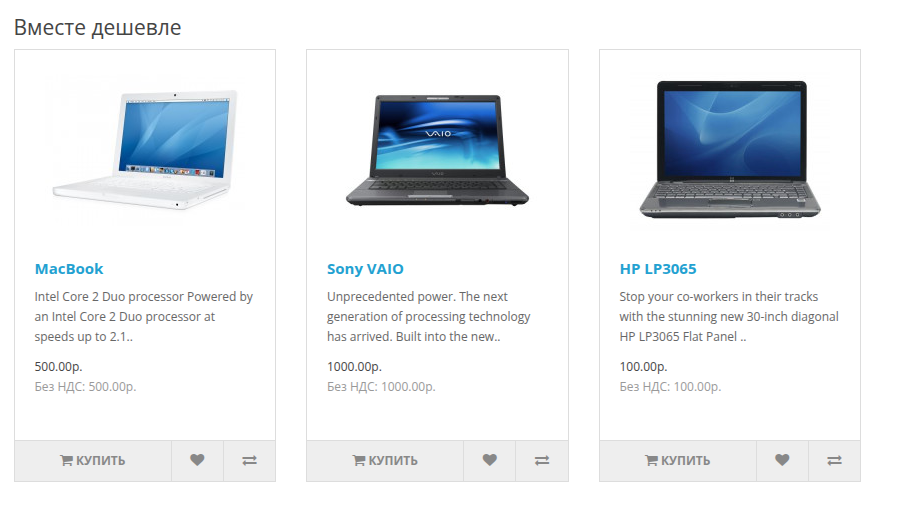
Display related products on the product page indicating the discount
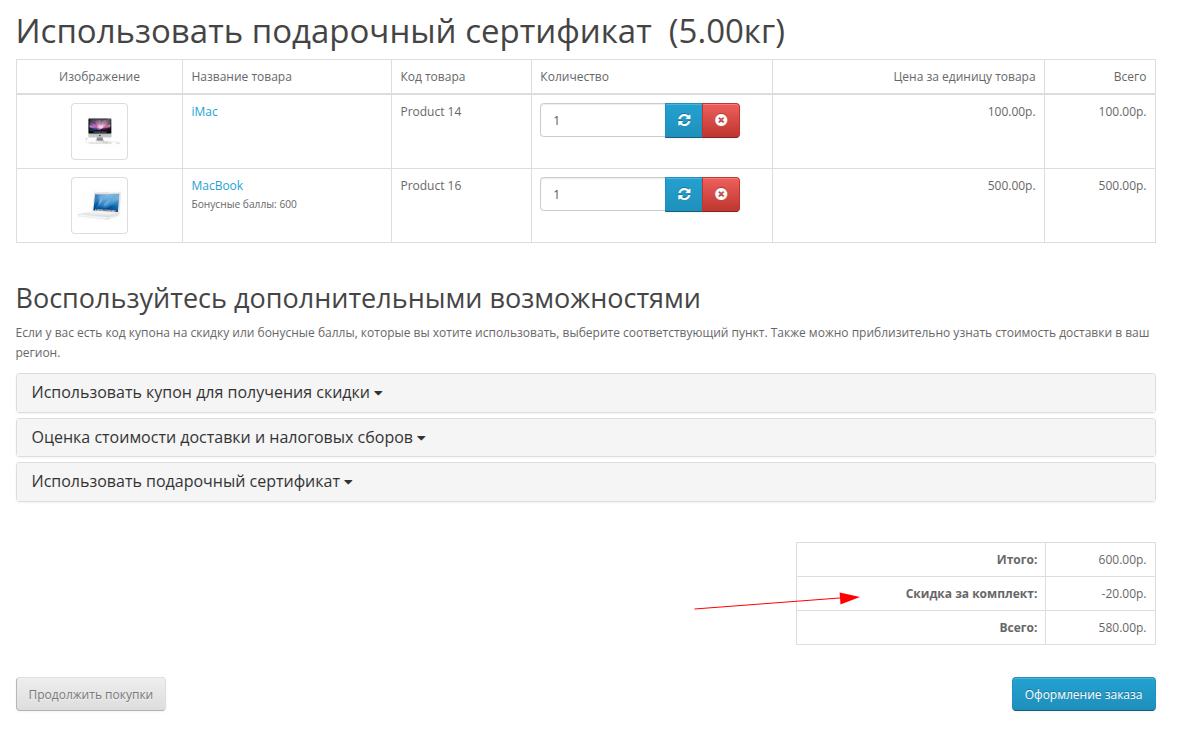
Automatic calculation and display of discounts in the cart as “Discount for set”
"Buy together" button to quickly add both products to your cart
Installation
Method 1: Manual installation
Copy the contents of the upload folder to the root of your OpenCart store
Go to the admin panel: Extensions → Modifiers → Update
Go to Extensions → Extensions → Take into account in order
Find "Cheaper together (bundle discount)" and click "Install"
Set up the module (discount percentage, minimum number of orders)
Go to Extensions → Extensions → Modules
Find "Cheaper Together" and click "Install"
Set up a module and add it to your product page layout
Method 2: Through the extension installer
Download via Extensions → Extension Installer
Settings
Total settings (Take into account when ordering)
Status - enable/disable discount calculation
Discount (%) - discount percentage when purchasing a set
Min. number of orders - the minimum number of orders in which goods were purchased together to create a connection
Sort order - display order in order totals
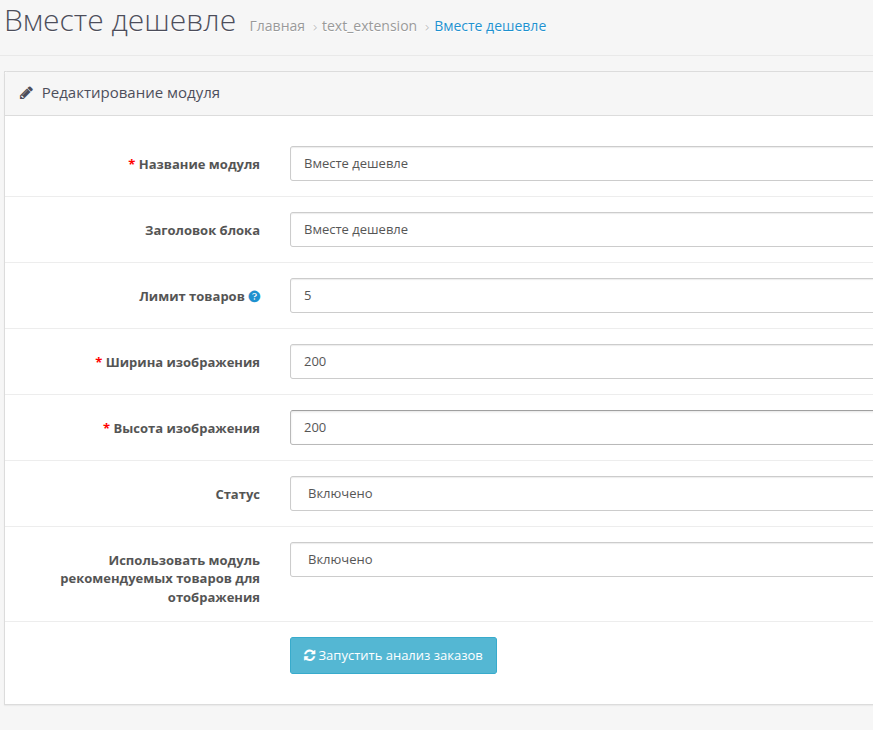
Module Settings
Module name - name for identification in the admin panel
Block title - the title displayed on the product page
Product limit - the maximum number of related products to display
Image width/height - dimensions of product thumbnails
Status - turn on/off block display
Starting order analysis
In the module settings there is a button “Start order analysis”. Click it to analyze order history and create connections between products.
How it works
The module analyzes order history and finds products that are often purchased together
Links are created between products indicating the number of joint purchases
The product page displays related products with an indication of the discount when purchasing a set
When you add both items to your cart, the discount is automatically applied
The discount is displayed in the order results as "Discount for set"
Requirements
OpenCart 3.x
PHP 7.0+
A module for OpenCart 3.x that automatically determines relationships between products based on order history and provides a discount when purchasing a set.
Features
Automatically determine product relationships based on past orders
Customizable discount percentage when purchasing a set
Display related products on the product page indicating the discount
Automatic calculation and display of discounts in the cart as “Discount for set”
"Buy together" button to quickly add both products to your cart
Installation
Method 1: Manual installation
Copy the contents of the upload folder to the root of your OpenCart store
Go to the admin panel: Extensions → Modifiers → Update
Go to Extensions → Extensions → Take into account in order
Find "Cheaper together (bundle discount)" and click "Install"
Set up the module (discount percentage, minimum number of orders)
Go to Extensions → Extensions → Modules
Find "Cheaper Together" and click "Install"
Set up a module and add it to your product page layout
Method 2: Through the extension installer
Download via Extensions → Extension Installer
Settings
Total settings (Take into account when ordering)
Status - enable/disable discount calculation
Discount (%) - discount percentage when purchasing a set
Min. number of orders - the minimum number of orders in which goods were purchased together to create a connection
Sort order - display order in order totals
Module Settings
Module name - name for identification in the admin panel
Block title - the title displayed on the product page
Product limit - the maximum number of related products to display
Image width/height - dimensions of product thumbnails
Status - turn on/off block display
Starting order analysis
In the module settings there is a button “Start order analysis”. Click it to analyze order history and create connections between products.
How it works
The module analyzes order history and finds products that are often purchased together
Links are created between products indicating the number of joint purchases
The product page displays related products with an indication of the discount when purchasing a set
When you add both items to your cart, the discount is automatically applied
The discount is displayed in the order results as "Discount for set"
Requirements
OpenCart 3.x
PHP 7.0+
Distribution method:
Paid
Opencart version:
LiveStore 3.*OCStore 3.*OpenCart 3.*
PHP verision:
PHP 7.0PHP 7.1PHP 7.2PHP 7.3
Activation:
Automatic
Getting files:
On site, in the personal account
Protection system:
Custom
VQmod:
No
Ocmod:
Yes
Events:
No
Uploaded:
17.01.2026
Updated:
16.09.2026
Viewed:
1968
Sales:
2
Write a review
Your Name:Your Review: Note: HTML is not translated!
Rating: Bad Good
Enter the code in the box below:
Файлы будут доступны после покупки


