Your shopping cart is empty!

Checkout Schedule
Price: 990 ₽
From 3 purchase of this product, the price is: 750 ₽

Additional from the author:
Author: Serbulenko
Write to the author
Sales: 1 (Average rating 0 на основании 0 отзывов)
Need paid help? Contact the site administration
Opencart version:
Sales: 1 (Average rating 0 на основании 0 отзывов)
Need paid help? Contact the site administration
Opencart version:
LiveStore 3.*OCStore 3.*OpenCart 3.*OCStore 2.3OpenCart 2.3OpenCart 2.2OCStore 2.1OpenCart 2.1OpenCart 2.0
Is your store open as scheduled?
Then placing orders should work the same way.
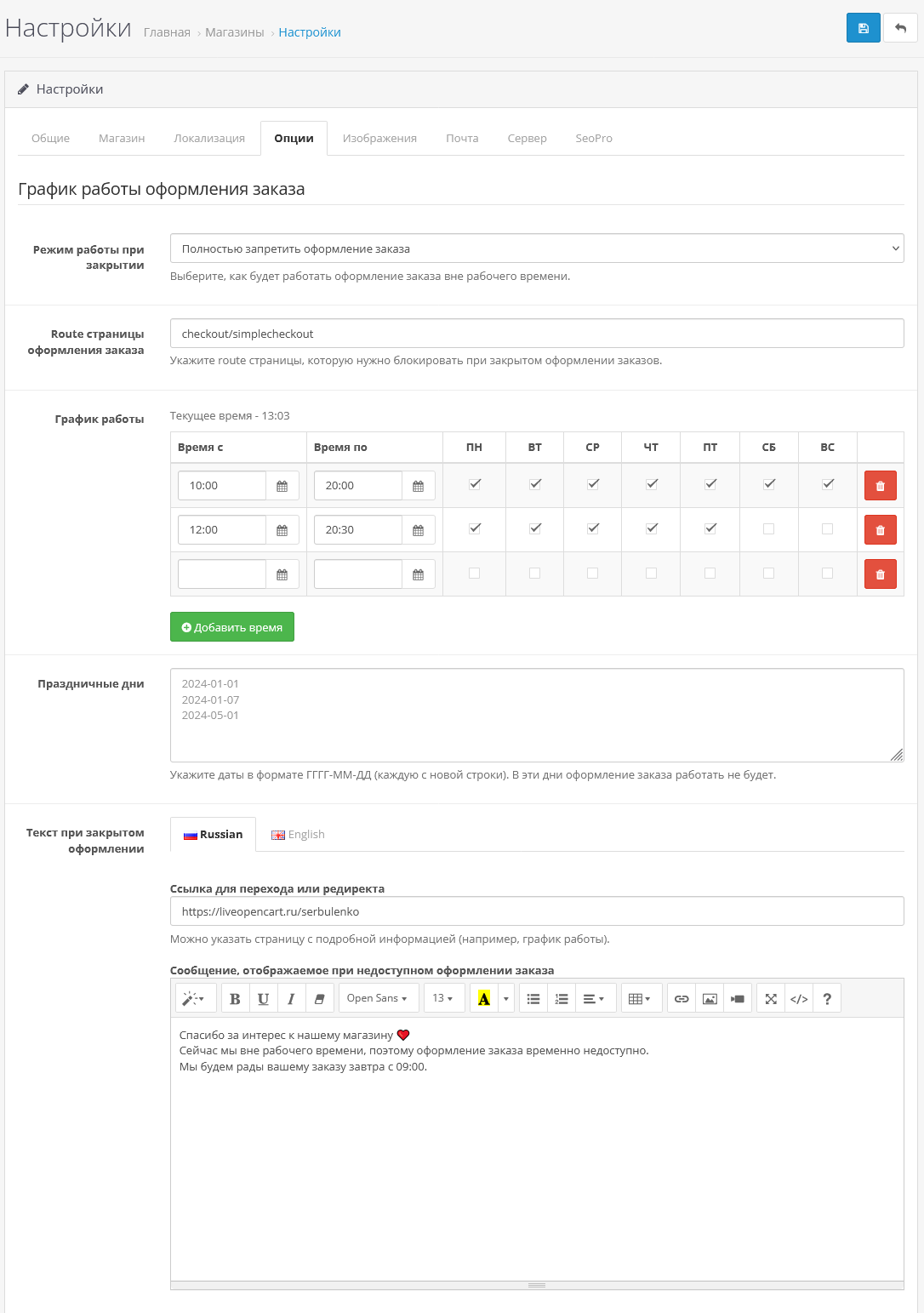
The module “Order processing schedule” allows you to flexibly manage the time of receiving orders - by day of the week and by hour. No more late night orders, early morning surprises, or dissatisfied customers waiting for immediate processing outside of business hours.
You decide how the store will behave when it is “closed”.
DEMO - with order blocking
DEMO - with notification, without order blocking
What the module can do
How it works
When the store is closed, you can choose a scenario:
To whom it is especially useful
Why is this important
The buyer must understand when his order will be processed.
And you are not obliged to accept orders at 02:47 am.
With this module, the store starts working according to your rules, and not vice versa.
Installation instructions:
Technical support:
Technical support is provided to all users who legally purchased the module on official websites or from the author himself.
License:
Each copy of the module affects 1 domain and its subdomain.
Therefore, if you want to install the module on another domain, you must purchase another copy of the module.
For all questions and suggestions write serfbots@gmail.com
My Telegram channel with news and updates on modules @minilarek
Then placing orders should work the same way.
The module “Order processing schedule” allows you to flexibly manage the time of receiving orders - by day of the week and by hour. No more late night orders, early morning surprises, or dissatisfied customers waiting for immediate processing outside of business hours.
You decide how the store will behave when it is “closed”.
DEMO - with order blocking
DEMO - with notification, without order blocking
What the module can do
- Setting working hours by dayweeks
- Set specific days when the module will work
- Time limit for placing an order
- Permission of registration with warning
- Automatic redirect to the selected page
- Displaying a message in a beautiful modal window
- Multiple language support
How it works
When the store is closed, you can choose a scenario:
- Completely prohibit ordering
- Allow the order, but warn the customer
- Redirect the buyer to the page with the work schedule
To whom it is especially useful
- Food delivery
- Flower shops
- Local offline businesses
- Pickup
- Stores with limited staff
Why is this important
The buyer must understand when his order will be processed.
And you are not obliged to accept orders at 02:47 am.
With this module, the store starts working according to your rules, and not vice versa.
Installation instructions:
- Install the art_checkout_schedule.ocmod archive through the standard add-on manager;
- Update OCMOD cache;
- Go to the "System->Settings" section;
- Go to the settings of the main store and click on the "Options" tab;
- And customize your work schedule for yourself;
- Save settings;
Technical support:
Technical support is provided to all users who legally purchased the module on official websites or from the author himself.
License:
Each copy of the module affects 1 domain and its subdomain.
Therefore, if you want to install the module on another domain, you must purchase another copy of the module.
For all questions and suggestions write serfbots@gmail.com
My Telegram channel with news and updates on modules @minilarek
Distribution method:
Paid
Opencart version:
LiveStore 3.*OCStore 3.*OpenCart 3.*OCStore 2.3OpenCart 2.3OpenCart 2.2OCStore 2.1OpenCart 2.1OpenCart 2.0
PHP verision:
PHP 5.4PHP 5.5PHP 5.6PHP 7.0PHP 7.1PHP 7.2PHP 7.3PHP 7.4PHP 8.0PHP 8.1PHP 8.2
Activation:
Automatic
Getting files:
By email, after a request to the author
VQmod:
No
Ocmod:
Yes
Events:
No
Uploaded:
28.02.2026
Updated:
28.02.2026
Viewed:
2340
Sales:
1
Write a review
Your Name:Your Review: Note: HTML is not translated!
Rating: Bad Good
Enter the code in the box below:
Файлы будут доступны после покупки


