Buyers increasingly begin choosing a product not by going to a specific online store, but by asking a question to a search engine or AI assistant. The user can ask Alice AI to select a product with the desired characteristics, compare several options and immediately proceed to purchase. For the store, this means the emergence of a new sales channel, in which the path from inquiry to order placement becomes noticeably shorter.
Yandex Commerce Protocol, or YCP, allows you to connect your OpenCart store to such scenarios. The protocol connects the catalog and the store’s order processing system with Yandex services, and an order placed through a universal checkout is automatically transferred to OpenCart.
What is Yandex Commerce Protocol
The buyer does not need to switch between pages several times, register on a new website and manually fill out all the data. Contact and payment information can be entered from Yandex ID, and you can pay for the order through Yandex Pay, including in parts using Split. In this case, the online store itself remains the seller: it receives information about the buyer and the order, independently assembles the goods, organizes delivery and serves the client.
YCP does not replace OpenCart and does not transfer store management to a separate system. The protocol creates an additional entry point for buyers, and all confirmed orders continue to be processed in the familiar OpenCart panel.
YCP is sometimes referred to as “no-click selling” or “no-click purchasing” technology. This is a simplified definition: the buyer still selects the offer, clicks the buy button and checks out the order. The main difference from the usual scenario is something else - to register, he does not need to go to the online store, register there and re-enter contact and payment information.
However, YCP is not a marketplace. The seller remains the online store: he receives information about the order and the buyer,processes the purchase in its own system, manages balances, delivery and further communication with the client.
What does a purchase look like to a customer
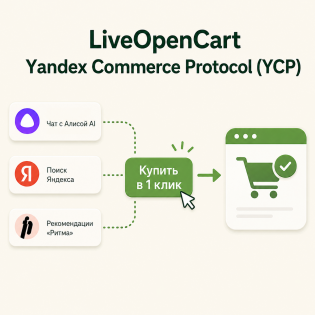
The buyer formulates a request in Search, Alice AI or selects a product in Yandex Rhythm. Yandex can show suitable offers from stores that transfer their assortment to Yandex Products.
The further scenario looks like this:
-
The buyer selects a suitable product in Alice AI, Search or Yandex Rhythm.
-
Clicks the “Buy in 1 click” button.
-
Checks the product, quantity and available options.
-
Selects the collection method and the appropriate delivery date.
-
ChecksAutomatically filled in contact information.
-
Pays for the purchase in an accessible way.
After confirmation, the order is transferred to the online store. For the manager, it becomes a regular OpenCart order, which can be processed according to the process accepted in the store.
The transition to the seller's website is saved. YCP adds an accelerated checkout option, but does not deprive the buyer of the opportunity to open a product card and place an order directly in the store.
How YCP works from OpenCart
's side
For full integration, two related but different parts are needed.
1. Transfer of the catalog through the product feed
Yandex must advanceget information about products: names, links, images, prices, availability, characteristics and other data. To do this, the store uploads the feed to Yandex Products. The quick purchase button can only be shown for offers submitted in the feed.
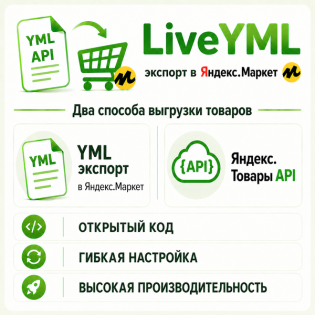
To allow checkout via YCP, the is_checkout_enabled parameter with the value true is passed in product offers. You can prepare such a feed using the module LiveYML - export to Yandex.Market and Yandex Products for OpenCart 3 and 2.
2. Exchange of cart and order data via API
Onethe feed is not enough. During checkout, Yandex needs to receive current prices and balances, find out available warehouses and delivery methods, temporarily reserve goods, confirm the order and subsequently exchange its status.
This part is performed by the YCP module for OpenCart. It accepts secure Yandex requests, accesses store data and creates a confirmed order in OpenCart.
Thus, the product feed answers the question “what does the store sell”, and API integration answers the question “is it possible to buy the selected product now and how to place an order.”
Features of the YCP module for OpenCart
Separate versions of the module for OpenCart, ocStore and LiveStore 3 and for OpenCart and ocStore 2.3.
The module provides:
-
secure connection of OpenCart to the YCP API;
-
transfer of a list of warehouses and own pick-up points;
-
checking the contents of the basket, prices and actual balances;
-
reservation of goods at the time of registration;
-
creating an order in OpenCart only afterconfirmation of purchase
-
protection against re-booking and duplicate orders;
-
receiving available courier delivery options;
-
processing cancellations and delivery notifications;
-
comparison of YCP states with OpenCart states;
-
transmission of order status change history;
-
logging requests and errors in the admin panel.
The module works with both standard and Simple ordering. If the store uses non-standard delivery, order fulfillment, or order processing logic, additional adaptation may be required.
Warehouses, remains andpickup
YCP must understand where the product can be shipped from and whether pickup is available. In the module settings, you can create several warehouses, specifying the address, phone number, description, schedule, time zone and pickup option for each.
The total balance of OpenCart goods can be manually distributed between these warehouses. If the store already uses a compatible “Multiwarehouse + Pickup” module, YCP can receive real warehouses and balances from it.
Own pick-up points are transferred as warehouses. However, retrieving external delivery points for carriers is not implemented in the current version of the integration: the corresponding method returns an empty list.
What happens to the order
DuringThe checkout module first checks the cart and reserves available products. The OpenCart order itself is created only after Yandex confirms the registration. This order reduces the risk of unpaid or incomplete orders appearing in the panel.
For a new, canceled and delivered order, the administrator selects the corresponding OpenCart statuses. Repeated requests are processed idempotently: the module should not re-reserve an item, create a second order, or duplicate the same entry in the status history.
What you need to connect
Before installing the module, you must make sure that the store complies with Yandex's terms and conditions. According to current requirements, YCP is available to online stores that sell physicalgoods. Sales of digital goods, services, wholesale and B2B sales are not yet supported.
To connect you will need:
-
Add a store to Yandex Products and transfer the product feed.
-
Pass the
is_checkout_enabled=true parameter in the product feed.
-
Submit an application to connect YCP and register the store with Yandex.
-
Install the appropriate version of the YCP module in OpenCart.
-
Set up API tokens and transfer the store API address to Yandex.
-
Add warehouses, pickup, cost and terms of courier delivery.
-
Match YCP statuses with order statusesOpenCart
-
Check the connection and perform a test setup.
The store API must be accessible to Yandex via HTTPS. OpenCart 3 requires PHP 7.0 or higher, OpenCart 2.3 requires PHP 5.6 or higher.
The offer ID in the product feed must match the product_id of the OpenCart product. If the weight or dimensions of a product are not filled in, you can set default values in the module settings. The YCP module does not support dividing one product into separate offers based on combinations of options, so the structure of identifiers in the feed should be checked before connecting.
What to prepare inside the store
Technical connection - only onepart of the launch. Before starting work, it is worth checking how ready the store itself is to accept orders from the new channel.
Prices and stock must be updated regularly. If the buyer chooses an item that is no longer in stock, or sees a different price at checkout, the order may be canceled before confirmation. No less important are full specifications, clear names and high-quality images: it is this data that helps Yandex match products with user requests.
Managers need to understand where YCP orders appear and how they should be processed. Such orders arrive in OpenCart and can be included in the general queue for confirmation, assembly and delivery. It is advisable to identify responsible employees in advance and check that those selectedorder statuses are correctly synchronized with YCP.
Who is YCP
suitable for?
Integration is especially interesting for retail stores with an up-to-date catalogue, clear inventory and streamlined delivery. The more accurately prices, availability, images and characteristics are conveyed, the easier it is for Yandex to match the offer with the user’s request, and for the buyer to make a decision.
YCP should be considered not as a replacement for a website, contextual advertising or placement on marketplaces, but as another sales channel. The store maintains a direct relationship with the buyer, receives the order in its own CMS and continues to manage the assortment and order processing in OpenCart.


 09.10.2026