Your shopping cart is empty!

Category Blocks Builder - category block designer with 280+ options
Price: 690 ₽

Author: timofeev.code
Write to the author
Sales: 1 (Average rating 0 на основании 0 отзывов)
Need paid help? Contact the site administration
Opencart version:
Sales: 1 (Average rating 0 на основании 0 отзывов)
Need paid help? Contact the site administration
Opencart version:
OpenCart 3.*OCStore 2.3
WATCH DEMO
The module can be evaluated live without installing anything:
Demo: all block options on one page
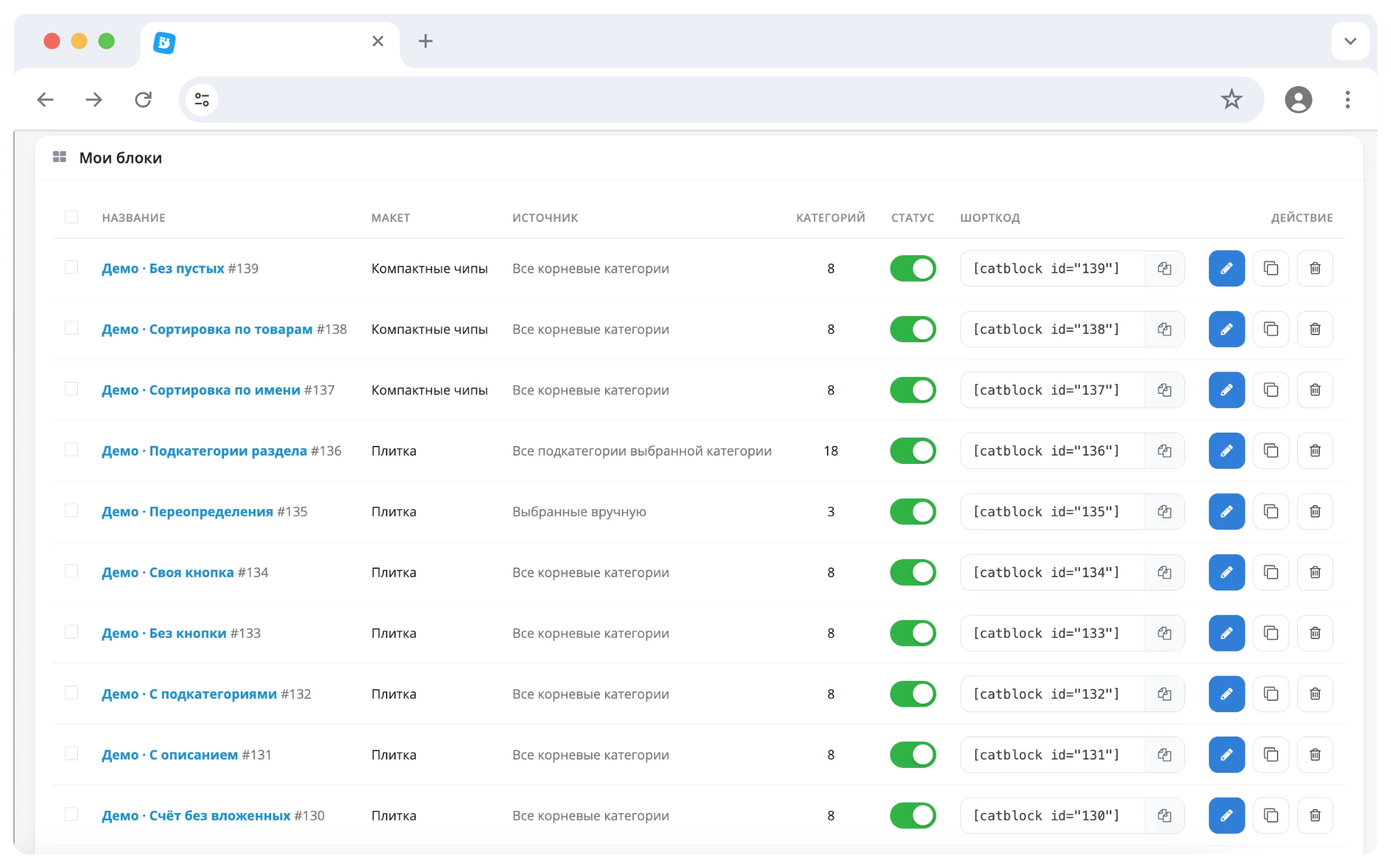
The demo page contains 29 ready-made blocks: six layouts, four image formats, different numbers of columns, light and dark backgrounds, custom stickers and overrides. Under each block it is indicated what settings it is assembled with. The page is adaptive: open it from your phone and the blocks will be rearranged into two columns.
PURPOSE
Standard OpenCart shows categories only on its pages. As soon as you need to insert a selection of sections into a review article, on a landing page or in a product description, manual layout begins. The HTML has to be redone every time the name in the directory changes,a section was added or the picture was changed. On mobile phones, such layout falls apart, and when the template is changed, it breaks completely.
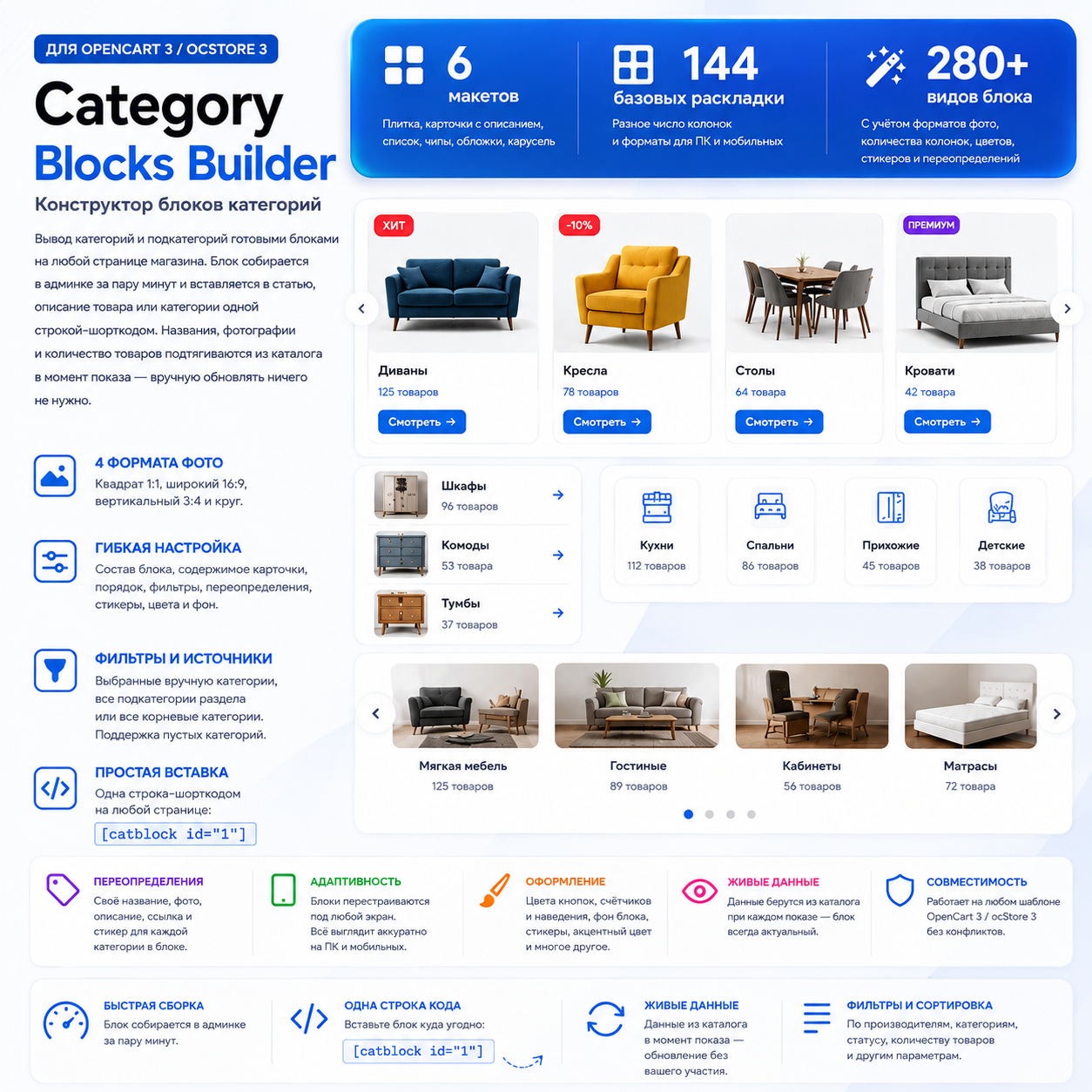
Category Blocks Builder takes away that work. The block is configured once, and the line [catblock id="1"] is placed on the page. Then the block lives on its own: data is taken from the catalog every time it is displayed, the design looks the same on any template and on any screen.
SUITABLE FOR?
- Stores with content: reviews, selections, guides, blog articles - wherever after the text a block “where to buy it” is appropriate. - Projects with landing pages for requests: the required selection of sections is collected on the page instead of a manual list of links. - For stores with a large catalog: the “all subcategories of the section” block updates itself when the catalog is replenished. - To those whogoes through the design: six layouts and four photo formats can be switched in a couple of clicks, without editing the layout.
HOW IS THE BLOCK ASSEMBLED?
A block is a set of categories with general display settings. Management is placed in a separate section of the admin panel; a separate settings page for each layout position is not required.
Three category sources:
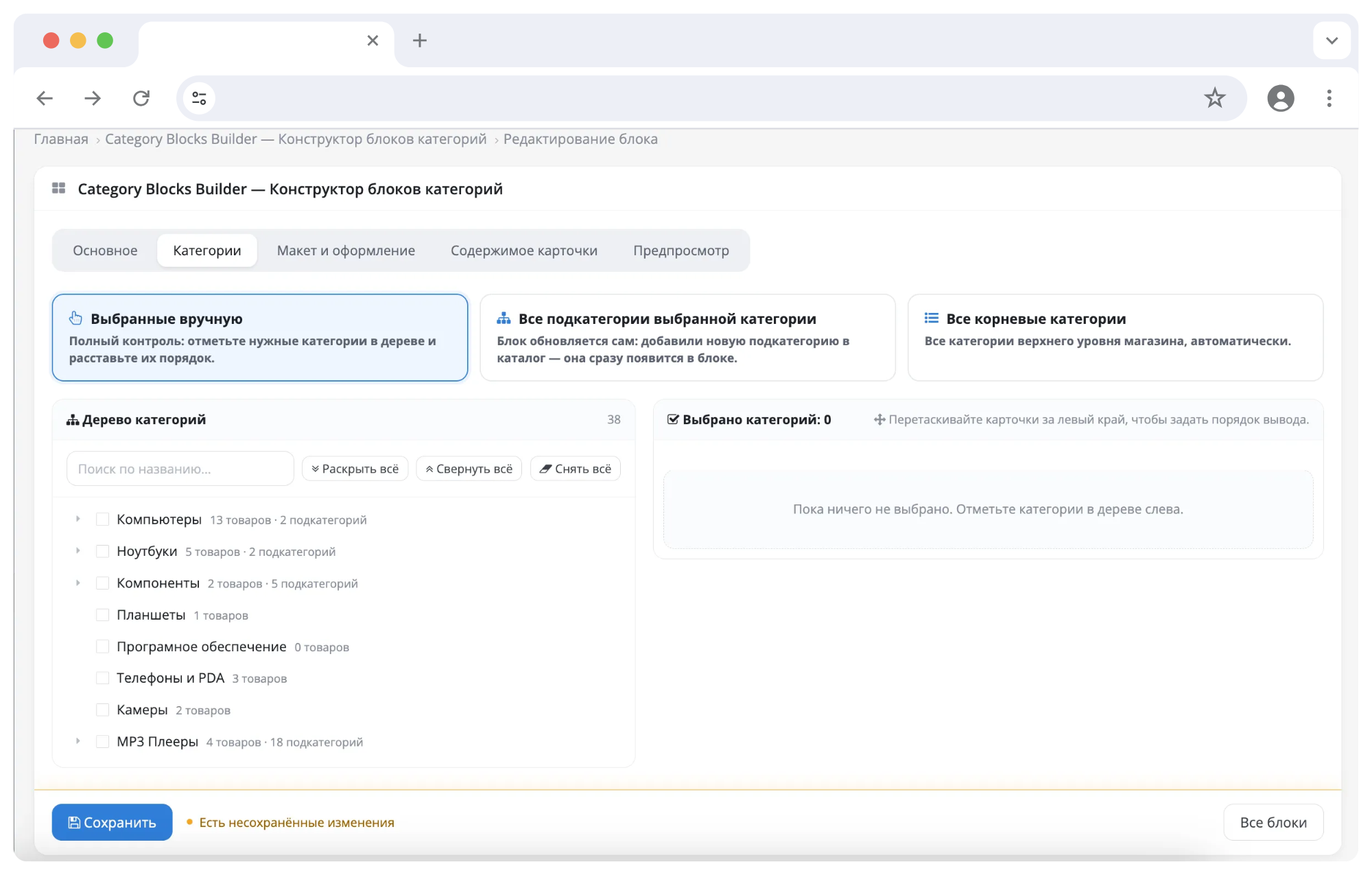
- Selected manually. Category tree with checkboxes, search by name and product counter for each branch. The order is set by dragging. - All subcategories of the selected section. The block updates itself: a new subcategory has appeared in the catalog - it is immediately in the block. - All root categories of the store, automatically.
SIX LAYOUTS
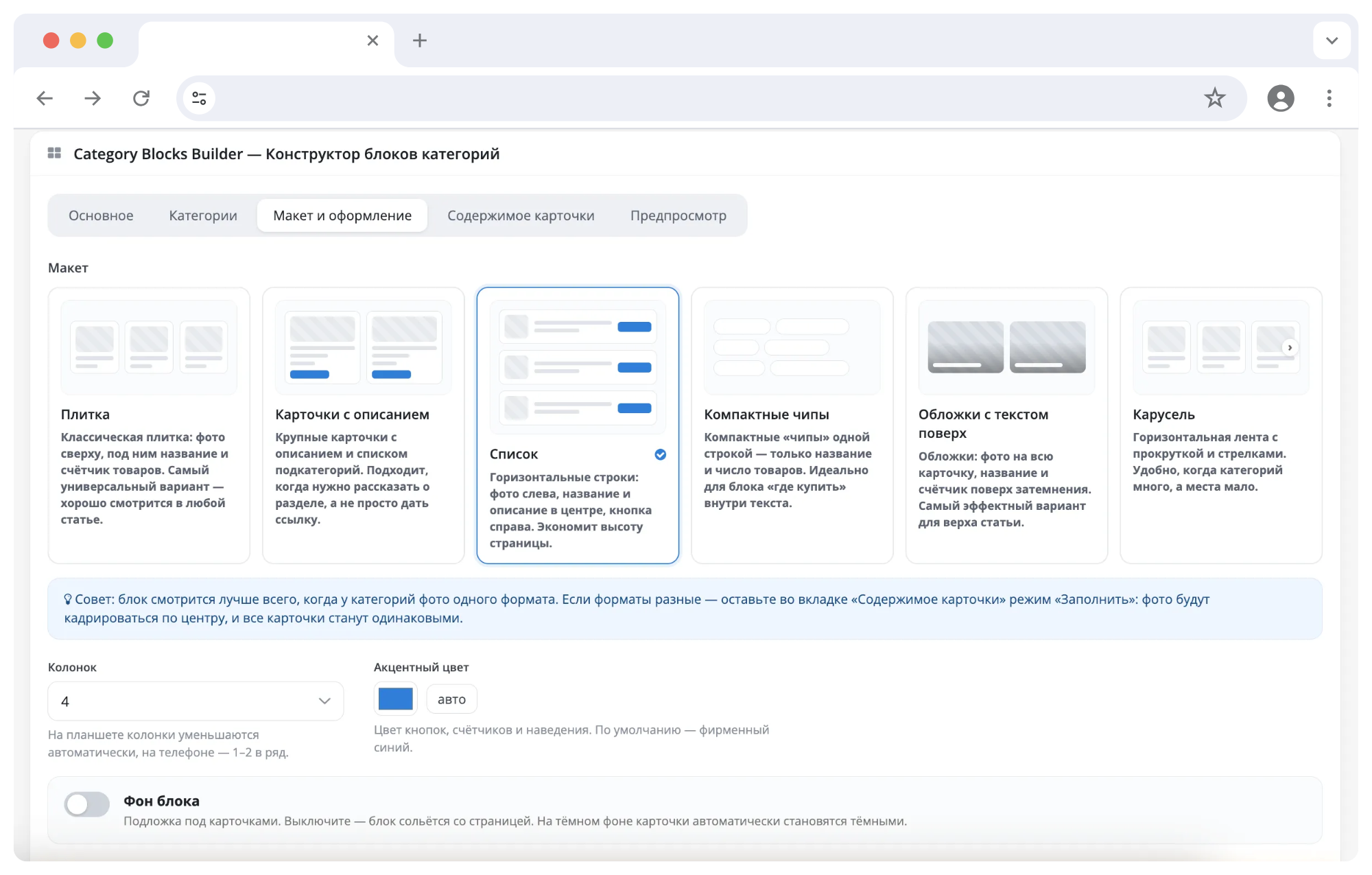
The layout is selected visually - using tiles with a thumbnail of the layout, rather thanline in the drop-down list. Each one is adapted for mobile devices:
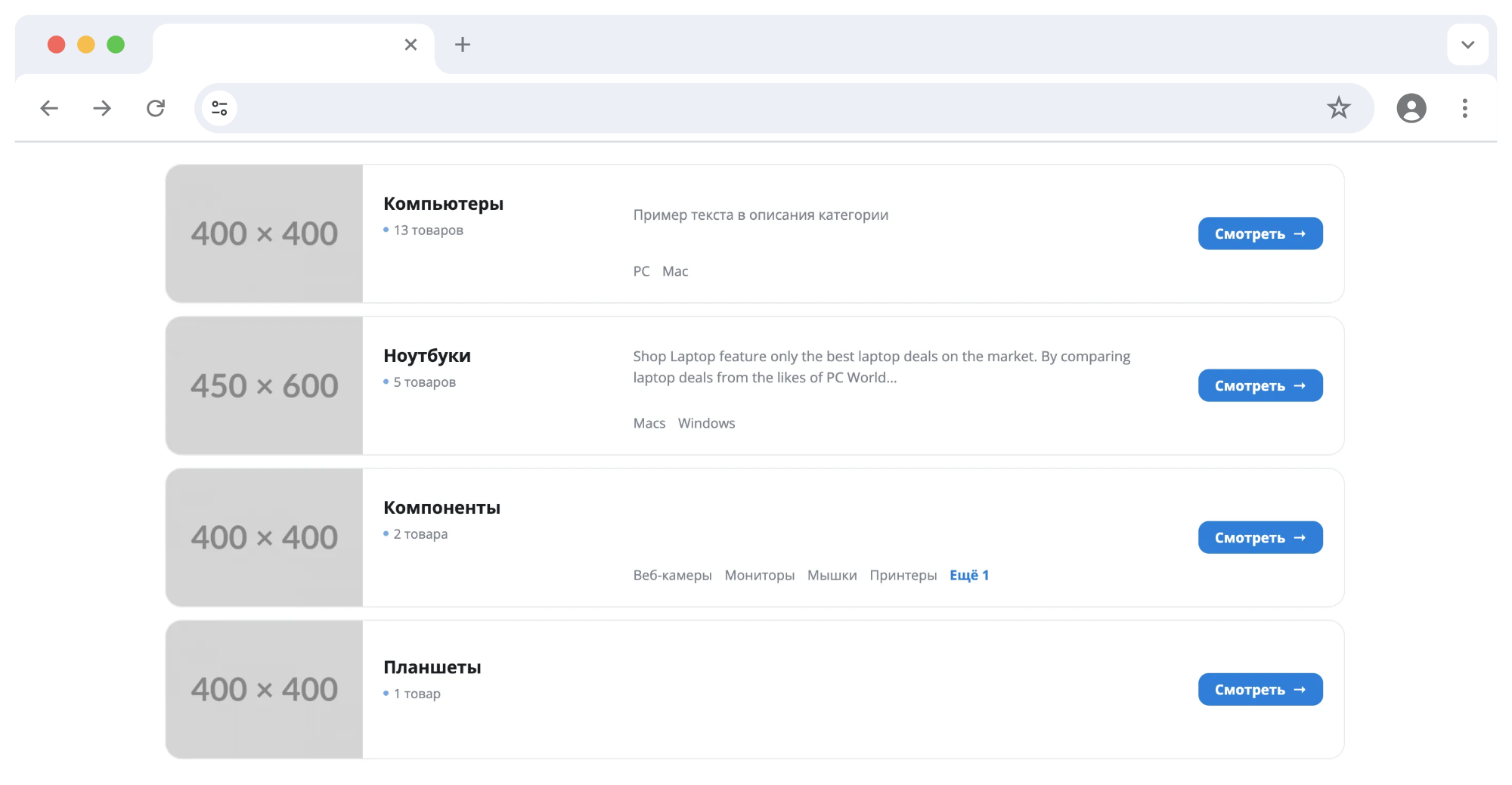
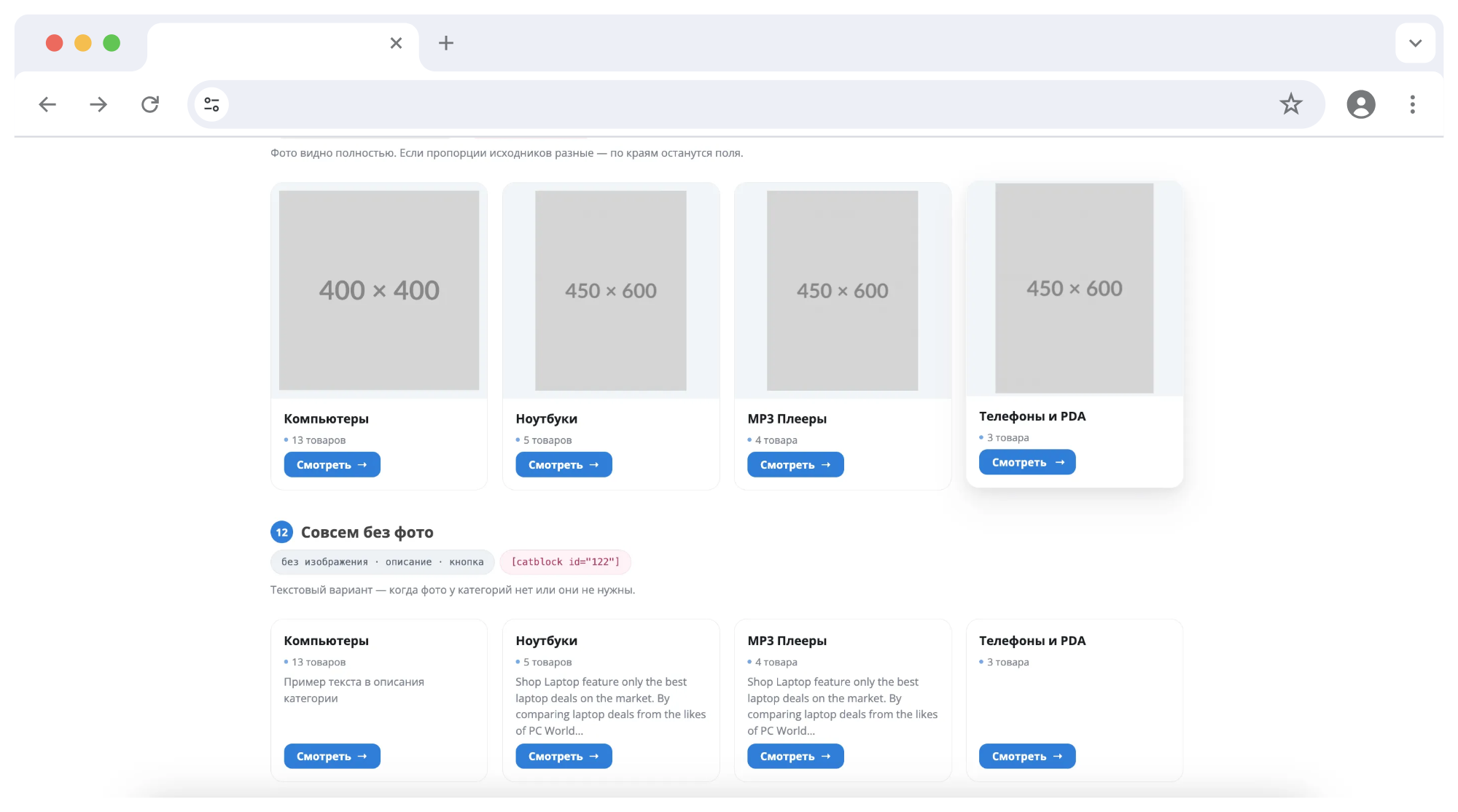
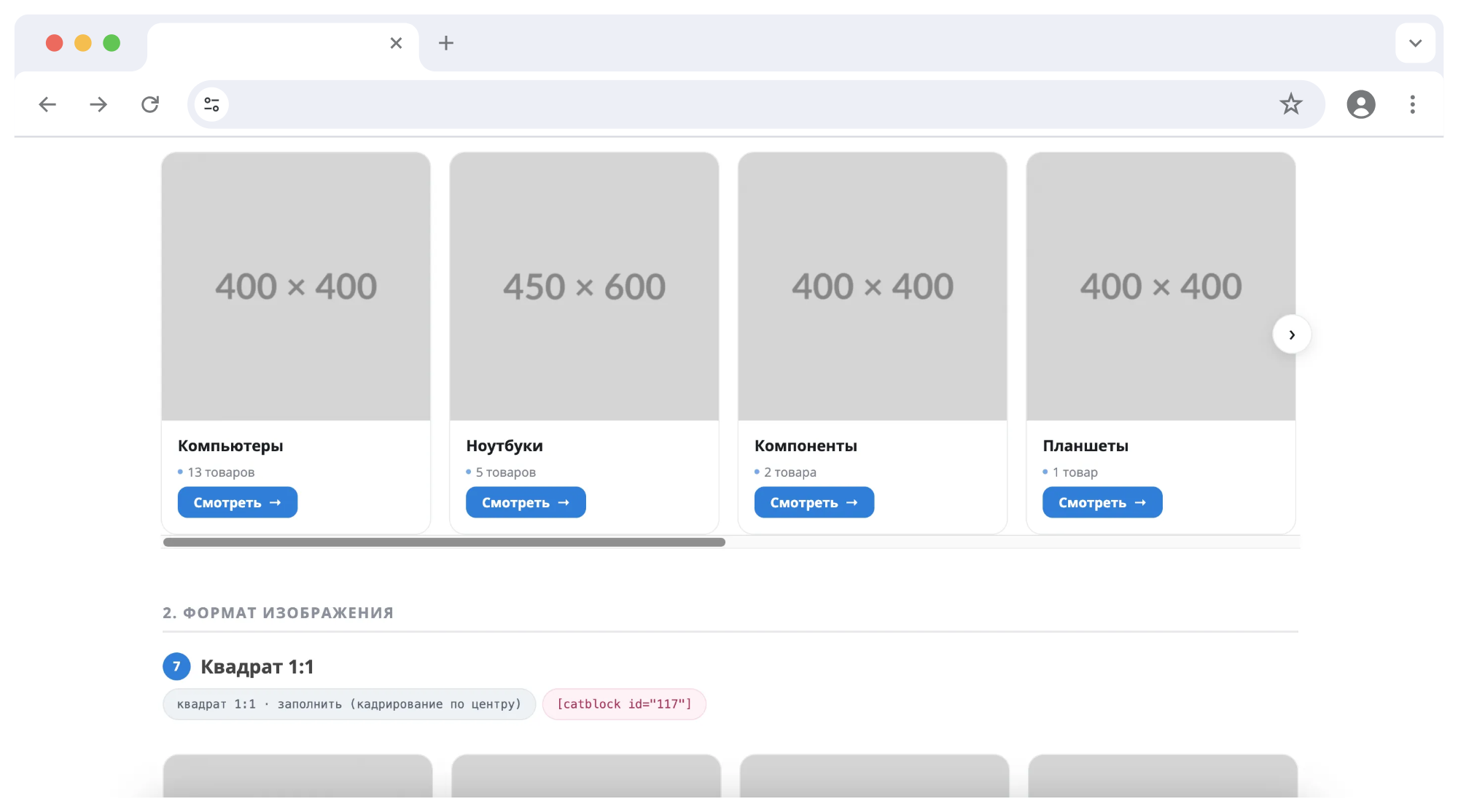
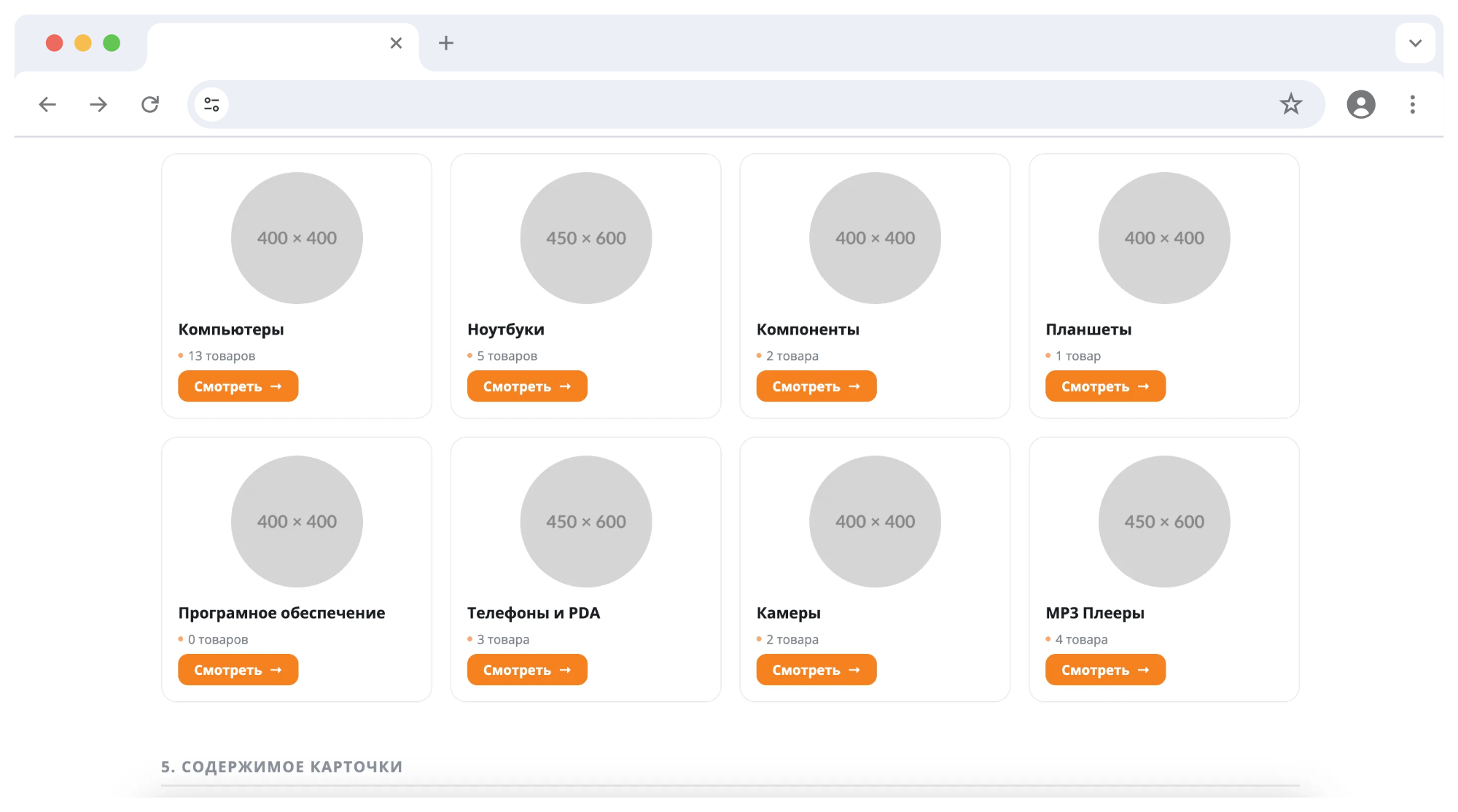
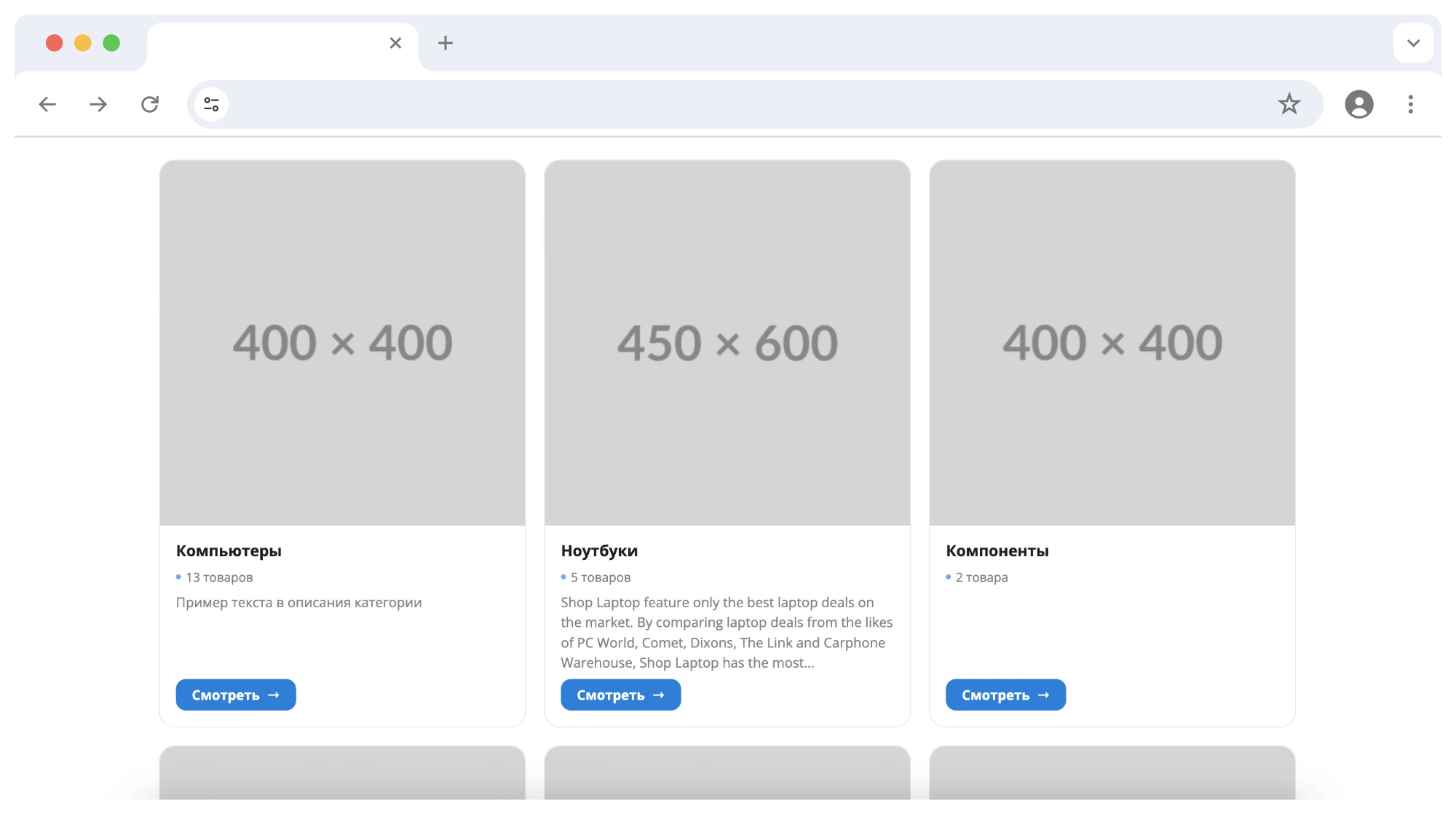
- Tile - classic grid, the number of columns is customizable. A universal option for an article. - Cards with descriptions - large cards with text and a list of subcategories when you need to talk about a section. - List - horizontal lines: photo on the left, description in the center, button on the right. Saves page height. - Compact chips - only the name and number of products. For the “where to buy” block right inside the paragraph. - Covers - photo on the entire card, title and counter on top of the blackout. The most noticeable option to start an article. - Carousel - a horizontal ribbon with arrows and swipe scrolling.
Considering the photo format and the number of columns, we get about 280 visually different types of block - and this does not take into account colors and stickers.IMAGES
The format is set at the block level: square 1:1, wide 16:9, vertical 3:4 or circle. The selected proportion is respected in all layouts and at all resolutions, images are not distorted.
- Cropping in the center. If categories have photos of different proportions loaded, the module brings them to the same format - the row does not move apart. This is not possible with regular OpenCart tools: the core can only enter an image and fill in the fields with a background. - Photo from the product. The category does not have a picture specified - a photo of the first product from it is substituted. The block does not appear empty. - “Fit in whole” mode – when it is important to show the photo in its entirety.
CARD CONTENT
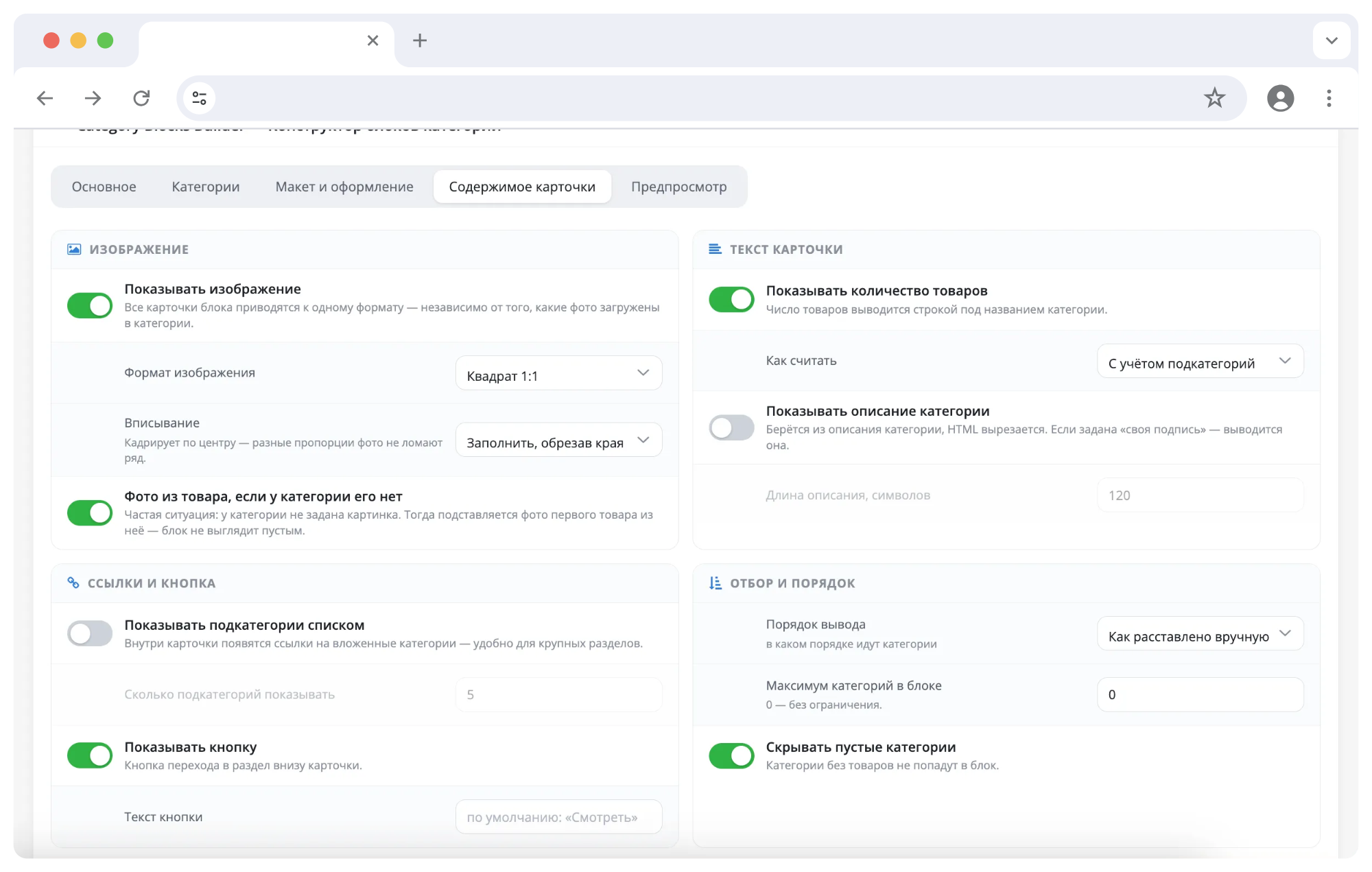
Switches configure what to show: image, quantityproducts, category description, list of subcategories, transition button.
- The product counter is calculated taking into account nested categories or only by the category itself - your choice. The number is declined correctly: 1 product, 2 products, 13 products. - The description is taken from the category, the HTML is cut, the text is trimmed along the word boundary to the specified length. - Subcategories are displayed as links inside the card, marked “More N”. - Empty categories can be hidden, the display order can be done manually, by name, by number of products, or as in the catalog.
OVERDEFINES
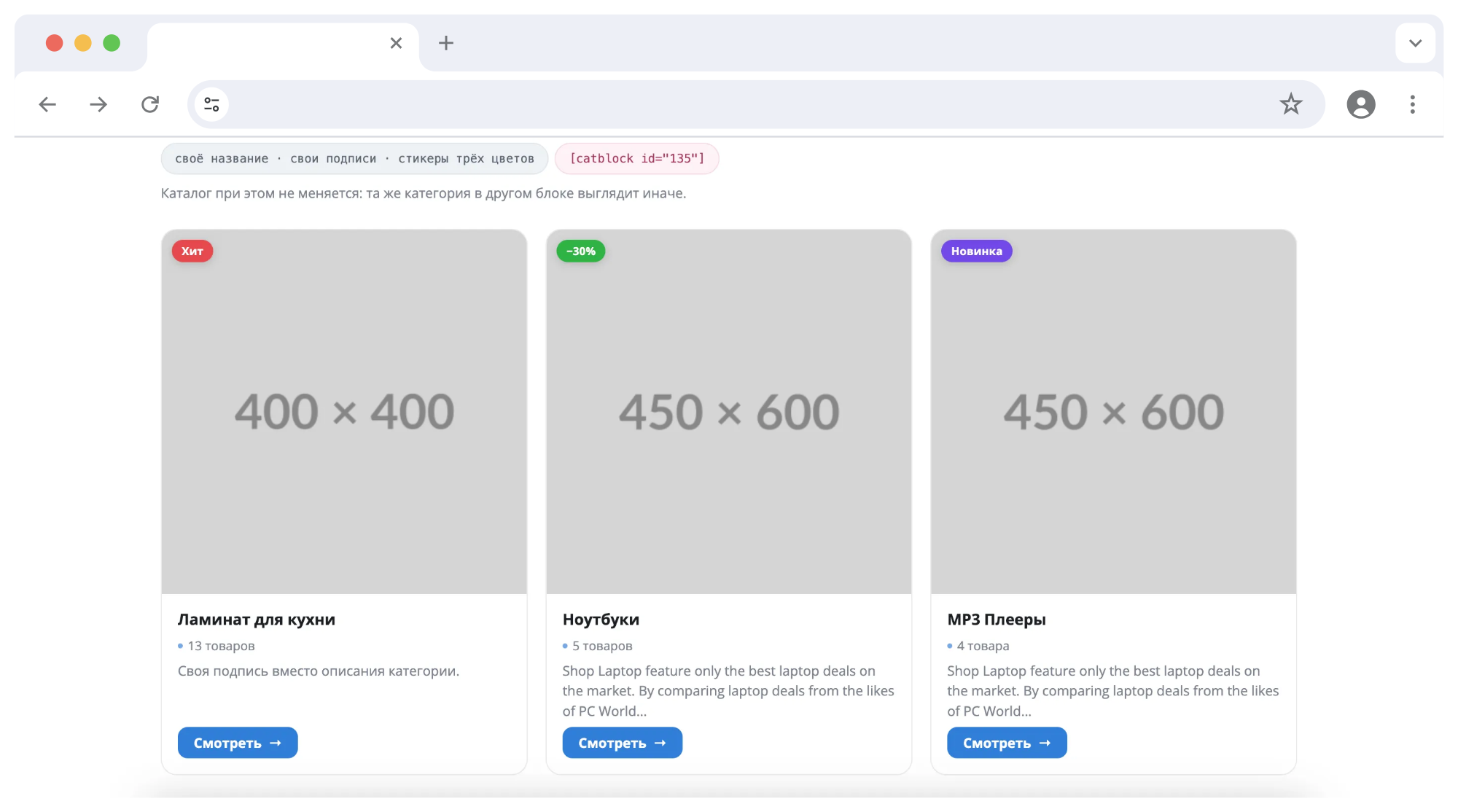
For each category inside the block, you can set your own name, your own photo, your own signature, a sticker with a color, and even your own link - for example, to a review instead of a category page. The catalog itself does not change: the same category inmay look different in different blocks.
LIVE PREVIEW
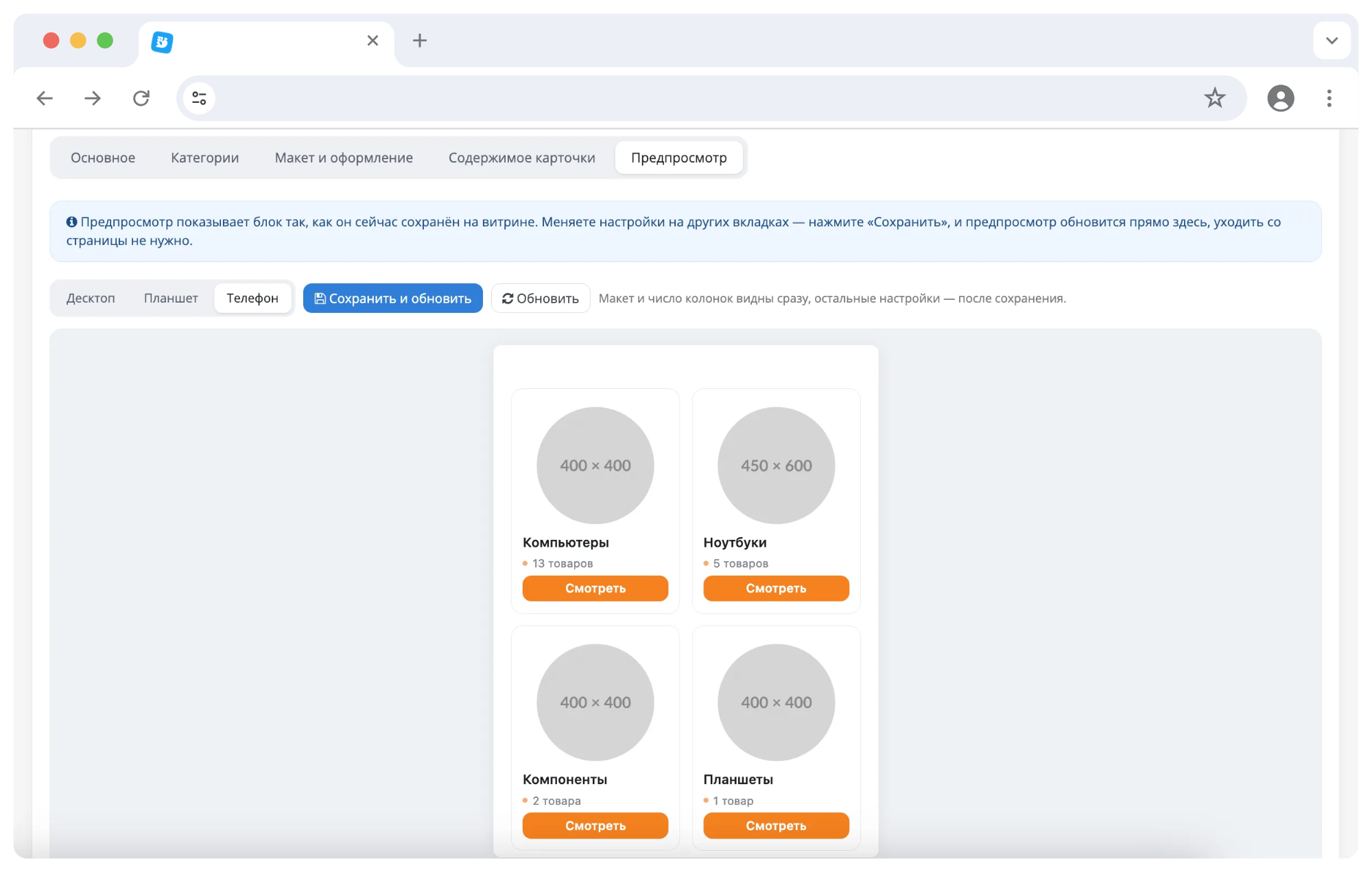
The “Preview” tab shows the block exactly as the buyer will see it: this is a real storefront page, and not an imitation in the admin panel. Desktop/Tablet/Phone switches test responsiveness without leaving Settings. The layout and number of columns are applied immediately, other settings are applied after saving.
The address of the preview page is signed with a key: it gives 404 to strangers and cannot get into the search results.
OUTPUT METHODS
1. Shortcode - [catblock id="1"] in the description of a product, category, information page or article. It also works in blogs of third-party modules and in blogs built into the template, since the finished HTML page is processed, and notspecific field in the database. 2. Design → Layouts - the block is available as a module and can be placed in any position of the layout. The instance is created automatically when the block is saved. 3. Twig - call {{ catblock(1) }} directly in the theme template file for precise insertion into the layout.
The shortcode accepts optional parameters columns (number of columns) and limit (how many categories to show). One block can be placed in any number of places, edits are applied everywhere at the same time. To show the shortcode in the text as an example, rather than displaying a block, the parentheses are doubled: [[catblock id="1"]].
DESIGN
- Accent color - buttons, counters and hover are recolored to match the store. - Block backing: switched on, color is arbitrary. When the background is dark, the cards automatically switch todark design - contrast is maintained without manual adjustment. - The title and subtitle above the block are set in the settings; separate text in the article is not needed.
COMPATIBILITY
- OpenCart 3.0.x, ocStore 3.0.x
- PHP 7.1 – 8.3 - PHP extensions: GD, mbstring, json (included in the standard hosting set)
- MySQL 5.6+ / MariaDB - Installation using standard tools through the “Installing extensions” section (ocmod file), no code editing required.
The module works on any storefront template, including purchased ones. The output file is located in the default theme and is picked up by the standard OpenCart theme inheritance mechanism. If the theme wants its own design, just put the style file of the same name into it - the module will pick it up itself. All classes have their own prefix, theme design andblock design do not affect each other.
Native engine files are not replaced. Two point edits are made by the OCMOD mechanism and are marked as optional: during a non-standard assembly, the installation is not interrupted, and an unapplied edit does not disrupt the operation of the module.
PERFORMANCE
- All selections are batch: categories, counters, subcategories and spare pictures are read by a fixed number of queries, regardless of how many categories are in the block. - A block placed on a page several times is read from the database once. - Styles are displayed once, and not with each block; There are no external libraries. - The shortcode handler exits immediately if there is no shortcode substring on the page. - Cropped images are created once and then transferred from disk. - Measurement ontest store: a page with 29 blocks is rendered in 0.43 s versus 0.30 s for the same page without blocks.
LICENSING
The license is tied to the domain name. After installation, the “License” section at the bottom of the module page displays the store domain for which a key is requested and activated. The main domain key is also valid on technical subdomains (test, dev, staging and the like), which allows you to use one license on the production site and its test copy.
Until the key is entered, the module is locked: blocks are not created or edited.
KEY ADVANTAGES
- Categories in articles and landing pages without manual layout. - The data is always up to date: names, photos and counters are taken from the catalogue. - Sixlayouts and four photo formats - about 280 types of blocks. - Center cropping: different photo proportions do not break the row. - Overrides for each category without changing the directory. - Live preview with verification on your phone and tablet. - Correct display on any template and on mobile devices.
Details about installation, requirements and answers to frequently asked questions are provided in the INSTALLATION.txt and README_RU.md files. Terms of use are in the LICENSE_RU.txt file.
The module can be evaluated live without installing anything:
Demo: all block options on one page
The demo page contains 29 ready-made blocks: six layouts, four image formats, different numbers of columns, light and dark backgrounds, custom stickers and overrides. Under each block it is indicated what settings it is assembled with. The page is adaptive: open it from your phone and the blocks will be rearranged into two columns.
PURPOSE
Standard OpenCart shows categories only on its pages. As soon as you need to insert a selection of sections into a review article, on a landing page or in a product description, manual layout begins. The HTML has to be redone every time the name in the directory changes,a section was added or the picture was changed. On mobile phones, such layout falls apart, and when the template is changed, it breaks completely.
Category Blocks Builder takes away that work. The block is configured once, and the line [catblock id="1"] is placed on the page. Then the block lives on its own: data is taken from the catalog every time it is displayed, the design looks the same on any template and on any screen.
SUITABLE FOR?
- Stores with content: reviews, selections, guides, blog articles - wherever after the text a block “where to buy it” is appropriate. - Projects with landing pages for requests: the required selection of sections is collected on the page instead of a manual list of links. - For stores with a large catalog: the “all subcategories of the section” block updates itself when the catalog is replenished. - To those whogoes through the design: six layouts and four photo formats can be switched in a couple of clicks, without editing the layout.
HOW IS THE BLOCK ASSEMBLED?
A block is a set of categories with general display settings. Management is placed in a separate section of the admin panel; a separate settings page for each layout position is not required.
Three category sources:
- Selected manually. Category tree with checkboxes, search by name and product counter for each branch. The order is set by dragging. - All subcategories of the selected section. The block updates itself: a new subcategory has appeared in the catalog - it is immediately in the block. - All root categories of the store, automatically.
SIX LAYOUTS
The layout is selected visually - using tiles with a thumbnail of the layout, rather thanline in the drop-down list. Each one is adapted for mobile devices:
- Tile - classic grid, the number of columns is customizable. A universal option for an article. - Cards with descriptions - large cards with text and a list of subcategories when you need to talk about a section. - List - horizontal lines: photo on the left, description in the center, button on the right. Saves page height. - Compact chips - only the name and number of products. For the “where to buy” block right inside the paragraph. - Covers - photo on the entire card, title and counter on top of the blackout. The most noticeable option to start an article. - Carousel - a horizontal ribbon with arrows and swipe scrolling.
Considering the photo format and the number of columns, we get about 280 visually different types of block - and this does not take into account colors and stickers.IMAGES
The format is set at the block level: square 1:1, wide 16:9, vertical 3:4 or circle. The selected proportion is respected in all layouts and at all resolutions, images are not distorted.
- Cropping in the center. If categories have photos of different proportions loaded, the module brings them to the same format - the row does not move apart. This is not possible with regular OpenCart tools: the core can only enter an image and fill in the fields with a background. - Photo from the product. The category does not have a picture specified - a photo of the first product from it is substituted. The block does not appear empty. - “Fit in whole” mode – when it is important to show the photo in its entirety.
CARD CONTENT
Switches configure what to show: image, quantityproducts, category description, list of subcategories, transition button.
- The product counter is calculated taking into account nested categories or only by the category itself - your choice. The number is declined correctly: 1 product, 2 products, 13 products. - The description is taken from the category, the HTML is cut, the text is trimmed along the word boundary to the specified length. - Subcategories are displayed as links inside the card, marked “More N”. - Empty categories can be hidden, the display order can be done manually, by name, by number of products, or as in the catalog.
OVERDEFINES
For each category inside the block, you can set your own name, your own photo, your own signature, a sticker with a color, and even your own link - for example, to a review instead of a category page. The catalog itself does not change: the same category inmay look different in different blocks.
LIVE PREVIEW
The “Preview” tab shows the block exactly as the buyer will see it: this is a real storefront page, and not an imitation in the admin panel. Desktop/Tablet/Phone switches test responsiveness without leaving Settings. The layout and number of columns are applied immediately, other settings are applied after saving.
The address of the preview page is signed with a key: it gives 404 to strangers and cannot get into the search results.
OUTPUT METHODS
1. Shortcode - [catblock id="1"] in the description of a product, category, information page or article. It also works in blogs of third-party modules and in blogs built into the template, since the finished HTML page is processed, and notspecific field in the database. 2. Design → Layouts - the block is available as a module and can be placed in any position of the layout. The instance is created automatically when the block is saved. 3. Twig - call {{ catblock(1) }} directly in the theme template file for precise insertion into the layout.
The shortcode accepts optional parameters columns (number of columns) and limit (how many categories to show). One block can be placed in any number of places, edits are applied everywhere at the same time. To show the shortcode in the text as an example, rather than displaying a block, the parentheses are doubled: [[catblock id="1"]].
DESIGN
- Accent color - buttons, counters and hover are recolored to match the store. - Block backing: switched on, color is arbitrary. When the background is dark, the cards automatically switch todark design - contrast is maintained without manual adjustment. - The title and subtitle above the block are set in the settings; separate text in the article is not needed.
COMPATIBILITY
- OpenCart 3.0.x, ocStore 3.0.x
- PHP 7.1 – 8.3 - PHP extensions: GD, mbstring, json (included in the standard hosting set)
- MySQL 5.6+ / MariaDB - Installation using standard tools through the “Installing extensions” section (ocmod file), no code editing required.
The module works on any storefront template, including purchased ones. The output file is located in the default theme and is picked up by the standard OpenCart theme inheritance mechanism. If the theme wants its own design, just put the style file of the same name into it - the module will pick it up itself. All classes have their own prefix, theme design andblock design do not affect each other.
Native engine files are not replaced. Two point edits are made by the OCMOD mechanism and are marked as optional: during a non-standard assembly, the installation is not interrupted, and an unapplied edit does not disrupt the operation of the module.
PERFORMANCE
- All selections are batch: categories, counters, subcategories and spare pictures are read by a fixed number of queries, regardless of how many categories are in the block. - A block placed on a page several times is read from the database once. - Styles are displayed once, and not with each block; There are no external libraries. - The shortcode handler exits immediately if there is no shortcode substring on the page. - Cropped images are created once and then transferred from disk. - Measurement ontest store: a page with 29 blocks is rendered in 0.43 s versus 0.30 s for the same page without blocks.
LICENSING
The license is tied to the domain name. After installation, the “License” section at the bottom of the module page displays the store domain for which a key is requested and activated. The main domain key is also valid on technical subdomains (test, dev, staging and the like), which allows you to use one license on the production site and its test copy.
Until the key is entered, the module is locked: blocks are not created or edited.
KEY ADVANTAGES
- Categories in articles and landing pages without manual layout. - The data is always up to date: names, photos and counters are taken from the catalogue. - Sixlayouts and four photo formats - about 280 types of blocks. - Center cropping: different photo proportions do not break the row. - Overrides for each category without changing the directory. - Live preview with verification on your phone and tablet. - Correct display on any template and on mobile devices.
Details about installation, requirements and answers to frequently asked questions are provided in the INSTALLATION.txt and README_RU.md files. Terms of use are in the LICENSE_RU.txt file.
Distribution method:
Paid
Opencart version:
OpenCart 3.*OCStore 2.3
PHP verision:
PHP 7.1PHP 7.2PHP 7.3PHP 7.4PHP 8.0PHP 8.1PHP 8.2PHP 8.3
Activation:
Manually, upon request via private messagesManually, upon request via email
Getting files:
On site, in the personal account
Protection system:
Custom
VQmod:
No
Ocmod:
Yes
Events:
No
Uploaded:
10.08.2026
Updated:
10.08.2026
Viewed:
414
Sales:
1
Write a review
Your Name:Your Review: Note: HTML is not translated!
Rating: Bad Good
Enter the code in the box below:


Файлы будут доступны после покупки


