Your shopping cart is empty!

Extra Email

Price: free
Author: Tom
Write to the author
Need paid help? Contact the site administration
Opencart version:
Need paid help? Contact the site administration
Opencart version:
LiveStore 3.*OCStore 3.*OpenCart 3.*
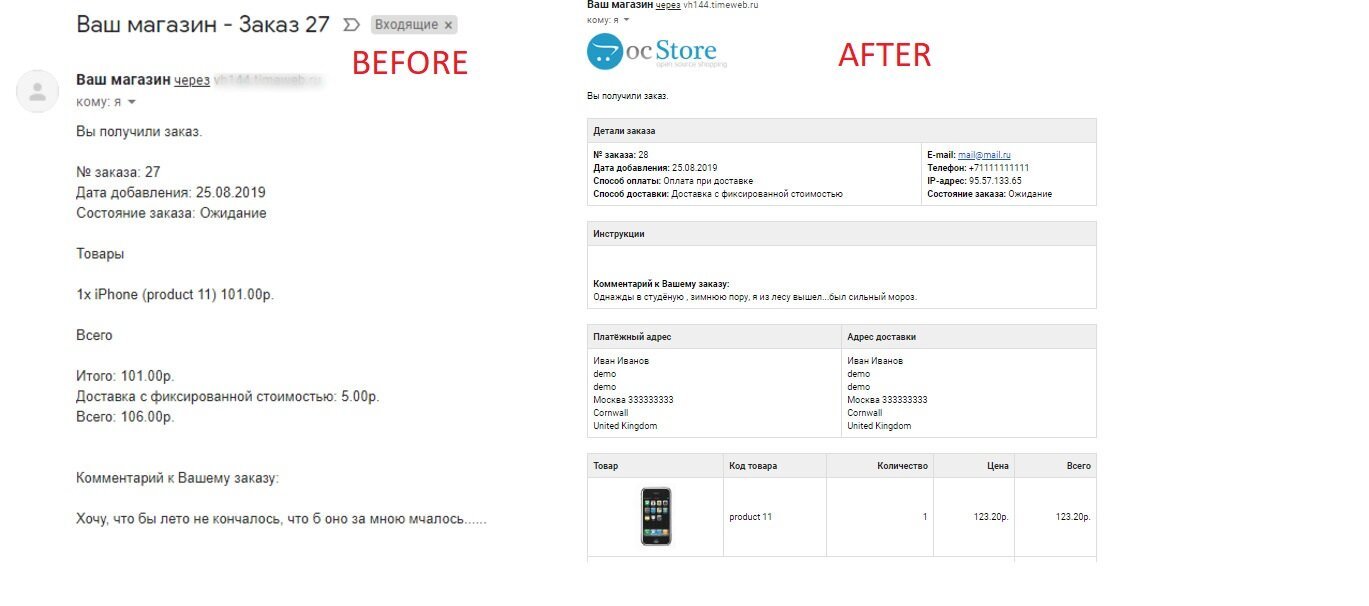
At one time, in opencart versions 1.4 and earlier versions 1.5, a letter to the administrator about a new order came in a greatly simplified form.
Later in versions 2 and higher, it was made similar to a letter to the buyer (HTML).
In new versions of opencart 3, a simplified view has been returned. This modifier makes the letter complete (analogous to a letter to the buyer).
Adds product images and buyer comments to the email.
Installation via the admin panel (Extensions - Installing extensions). Don't forget to clear caches.
Distributed "as is". Tested only on Ocstore 3.0.2
You can delete a modifier in the admin panel in the Modifiers section.
Happy sales everyone!
PS: People often ask why changes are not visible and the letter arrives in the same form.
The most common reason isletter template from the template used.
Make sure you don't have this file catalog\view\theme\your_template\template\mail\order_add.twig
If you still have it, save it, then delete and update the modifier cache.
In this case, my modifier changes will be applied.
For coffee!
Later in versions 2 and higher, it was made similar to a letter to the buyer (HTML).
In new versions of opencart 3, a simplified view has been returned. This modifier makes the letter complete (analogous to a letter to the buyer).
Adds product images and buyer comments to the email.
Installation via the admin panel (Extensions - Installing extensions). Don't forget to clear caches.
Distributed "as is". Tested only on Ocstore 3.0.2
You can delete a modifier in the admin panel in the Modifiers section.
Happy sales everyone!
PS: People often ask why changes are not visible and the letter arrives in the same form.
The most common reason isletter template from the template used.
Make sure you don't have this file catalog\view\theme\your_template\template\mail\order_add.twig
If you still have it, save it, then delete and update the modifier cache.
In this case, my modifier changes will be applied.
For coffee!
Distribution method:
Free
Opencart version:
LiveStore 3.*OCStore 3.*OpenCart 3.*
PHP verision:
PHP 7.3PHP 7.4
Activation:
Not required
Getting files:
On site, in the personal account
Protection system:
No
VQmod:
No
Ocmod:
Yes
Events:
No
Uploaded:
01.12.2023
Updated:
06.07.2026
Viewed:
6201
Write a review
Your Name:Your Review: Note: HTML is not translated!
Rating: Bad Good
Enter the code in the box below:
To download this free product, you do not need to order it, just log in.


после установки модификатора письмо админу приходит в том же виде, что и покупателю, но изображение товара не появляется. где может быть проблема?
смотрю кеш модификаторов - там только модифицировнный order.php
order_add.twig присутствует только в default теме, в Journal его нет
У меня в планах нет желания связываться с этим французским творением.
И ничего не изменяет в его вёрстке.
Потому и изменить ничего в данном решении не возможно для изменения отображения в любой версии, в том числе и мобильной.
Для этого вам нужно изменять имеющийся файл order_add.twig самого opencart
catalog/view/theme/unishop2/template/mail/order_add.twig