Your shopping cart is empty!

Links to certificates and declarations in the product card under Federal Law 546
Price: 790 ₽ 1 500 ₽

Author: pikitos
Write to the author
Sales: 2 (Average rating 0 на основании 0 отзывов)
Need paid help? Contact the site administration
Opencart version:
Sales: 2 (Average rating 0 на основании 0 отзывов)
Need paid help? Contact the site administration
Opencart version:
LiveStore 3.*OCStore 3.*OpenCart 3.*
Starting September 1, 2026, online sellers are required to include a link to the entry for this document in the Rosaccreditation registry or the Unified Register of the Eurasian Economic Union (Clause 2, Article 26.1 of the Law on Consumer Protection as amended by Federal Law No. 546-FZ) in the description of products requiring a certificate or declaration of conformity(Clause 2, Article 26.1 of the Law on Consumer Rights Protection as amended by Federal Law No. 546-FZ).
Starting October 1, 2026, such products cannot be offered on the website without a valid document(Clause 6, Article 11.1 of Federal Law No. 381-FZ on Trade).
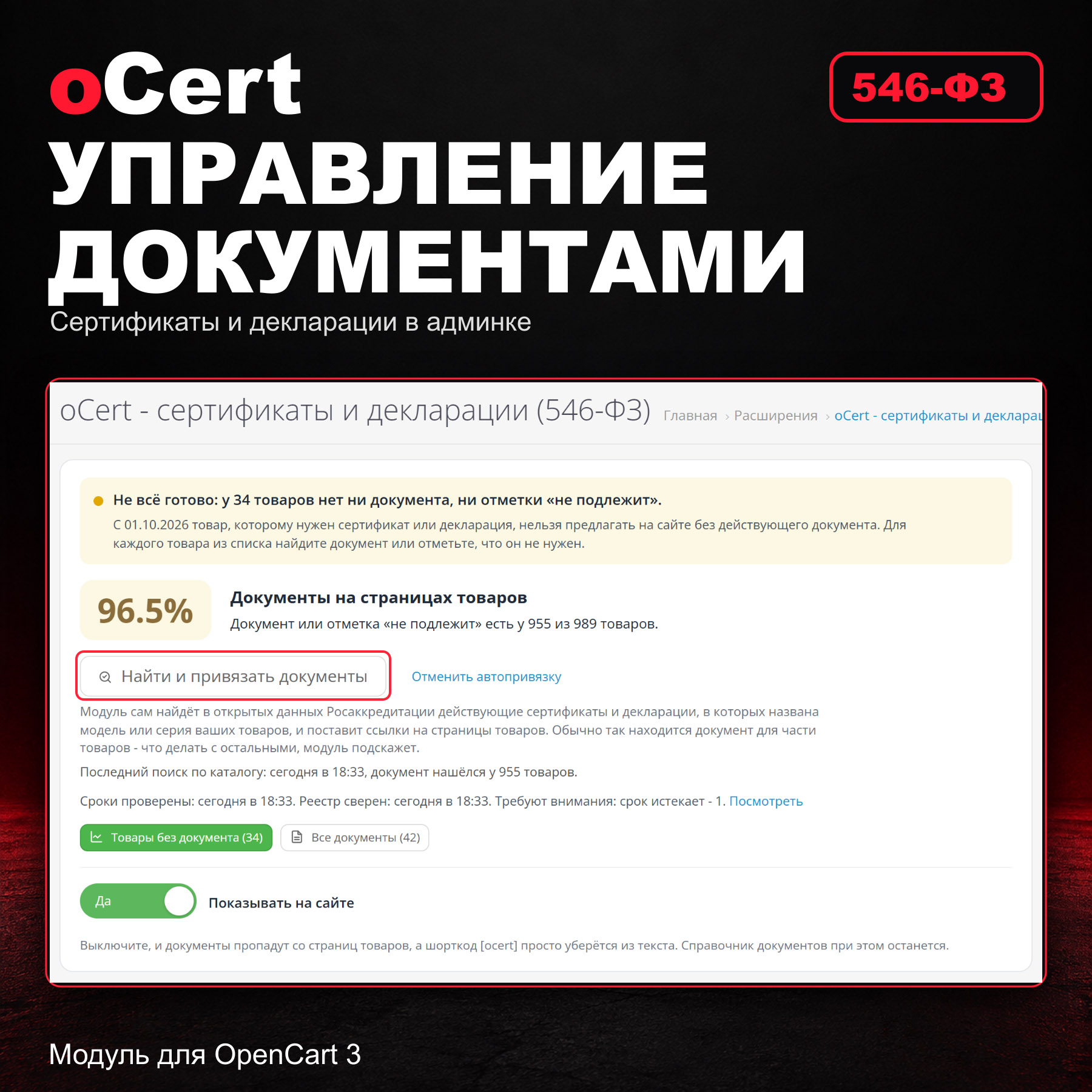
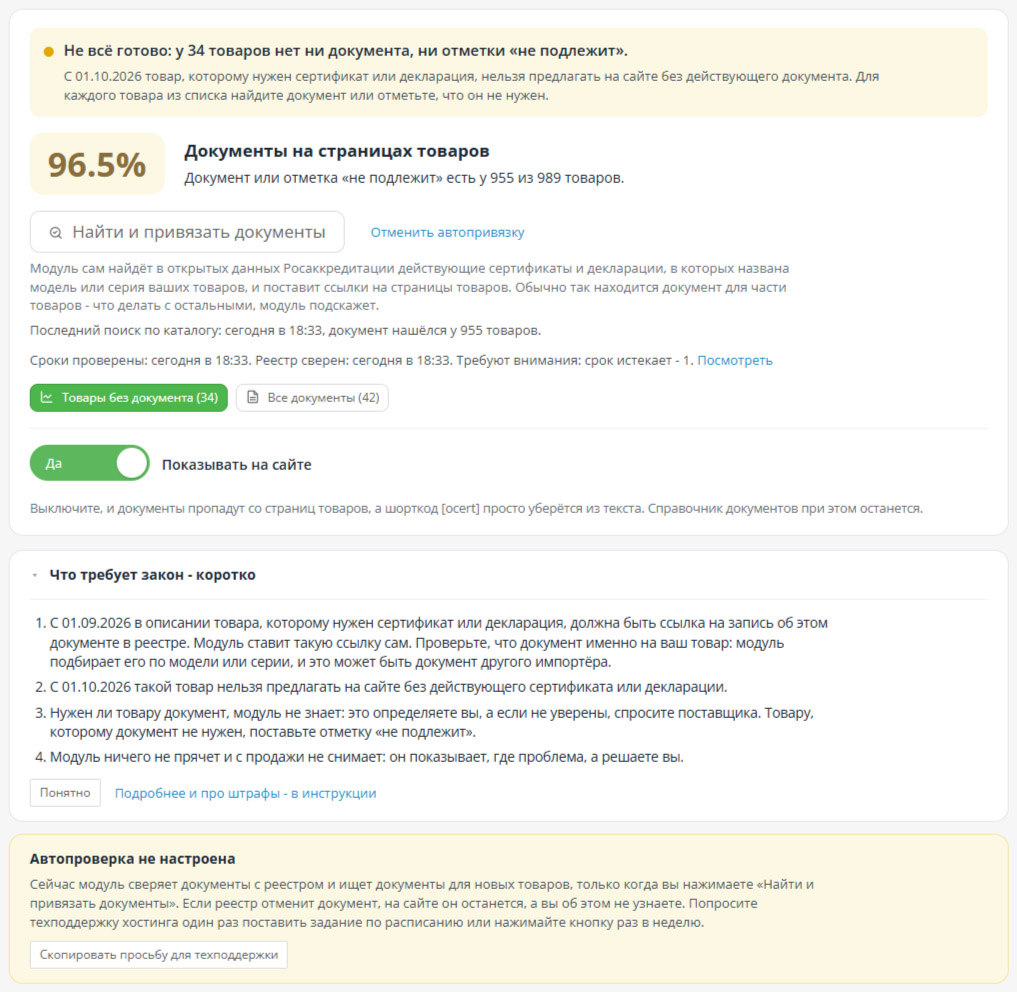
oCert automatically displays these links on product pages, finds documents by product number and model, tracks expirations and statuses, and displays which products do not yet have the document. This isn't a directory where you manually enter every link: the module handles most of the work itself, and what it can't, it honestly displays in a list.
Why does it take so long to do it manually
In the Rosaccreditation registry, the record address is based on the internal registry number, not the document number. To get a link, you need to find the document in the FGIS search, open the record, and copy the address from the browser—and do this for each document. Then documents expire, are suspended, and are terminated, but the old links remain on the website. Anything manually entered in the description is overwritten by the first price list import.
Document number—and the link is ready
Insert the certificate or declaration number in the document card and click "Find." The module will populate the document type, record link, registry, dates, and status. The number is known to the supplier and is printed on the document itself.
One button for the entire Catalog
"Find and Link Documents" scans all products without documentation. The module sends the manufacturer, model, and product name to our server, and the server searches for them in the text of current certificates and declarations from Rosaccreditation's open data. If the document specifies the product model, the mask it fits under, or the series, the document is added to the directory, and a link is sent to the product page.
How many are there?
The number of documents in the open data refers to the model or series of your products. This depends on the niche and how the manufacturer is recorded in the documents.
For other products, the document is assigned using the supplier number. A single model may require documents from different importers, so it's worth checking what the module finds against your supplier's documents.
Expirations and statuses under control
Report "Products without Documents"
One declaration per series
Where will the buyer see the document
Even a beginner can figure it out
Installation
You don't need to update the modifications. To run a daily check, provide the scheduler address from the "Additional" section to the hosting service: the module will provide a ready-made request text.
Questions and Answers
What is the penalty for not providing a link?
Starting October 1, 2026, such products cannot be offered on the website without a valid document(Clause 6, Article 11.1 of Federal Law No. 381-FZ on Trade).
oCert automatically displays these links on product pages, finds documents by product number and model, tracks expirations and statuses, and displays which products do not yet have the document. This isn't a directory where you manually enter every link: the module handles most of the work itself, and what it can't, it honestly displays in a list.
- Document number - and the link to the record is ready. The module will automatically populate the view, dates, and status.
- "Find and Link Documents" - one button scans the entire catalog and links documents that identify the product model or series
- Timeframes and statuses are monitored: verification against the EAEU registry, notifications by email, Telegram, or Max
- "Products without Documents" report with the reason for each product and a prepared letter to the supplier
- The block at the end of the product description is compiled on the server and is visible without JavaScript
- One-time payment, no subscription. If the license expires, the links on the website will remain
Why does it take so long to do it manually
In the Rosaccreditation registry, the record address is based on the internal registry number, not the document number. To get a link, you need to find the document in the FGIS search, open the record, and copy the address from the browser—and do this for each document. Then documents expire, are suspended, and are terminated, but the old links remain on the website. Anything manually entered in the description is overwritten by the first price list import.
Document number—and the link is ready
Insert the certificate or declaration number in the document card and click "Find." The module will populate the document type, record link, registry, dates, and status. The number is known to the supplier and is printed on the document itself.
- Russian documents are searched in our Rosaccreditation open data index – over 6 million records of certificates and declarations. The FSIS itself has neither a record address by number nor an open API.
- EAEU documents are searched directly in the open data of the unified EAEU registry.
- You can also paste the record address from the browser: the module will determine the registry, document type, and record and warn you if it is a link to a search rather than a record.
- The number is standardized: the number sign, extra spaces, mixed Latin and Cyrillic characters.
- If the number is not in the open data, the module will provide step-by-step instructions on how to find the record in the registry manually.
One button for the entire Catalog
"Find and Link Documents" scans all products without documentation. The module sends the manufacturer, model, and product name to our server, and the server searches for them in the text of current certificates and declarations from Rosaccreditation's open data. If the document specifies the product model, the mask it fits under, or the series, the document is added to the directory, and a link is sent to the product page.
- Before linking, the module checks the document against the EAEU registry: suspended, terminated, or invalid documents are not included; the next suitable one is used.
- The module does not include a brand document that does not include the product model. Such finds are visible on the "Document Selection" page: open a record and link it if it contains a product.
- The module does not affect products that already have a document.The document you removed from the product is no longer assigned to that product.
- "Cancel automatic linking" removes everything the module automatically linked. Your links remain.
- Closed the page prematurely - click the button again, the module will resume from the same place.
- With the scheduler (cron), the module automatically selects documents for new products, and where none were found, it repeats the search once a month.
How many are there?
The number of documents in the open data refers to the model or series of your products. This depends on the niche and how the manufacturer is recorded in the documents.
For other products, the document is assigned using the supplier number. A single model may require documents from different importers, so it's worth checking what the module finds against your supplier's documents.
Expirations and statuses under control
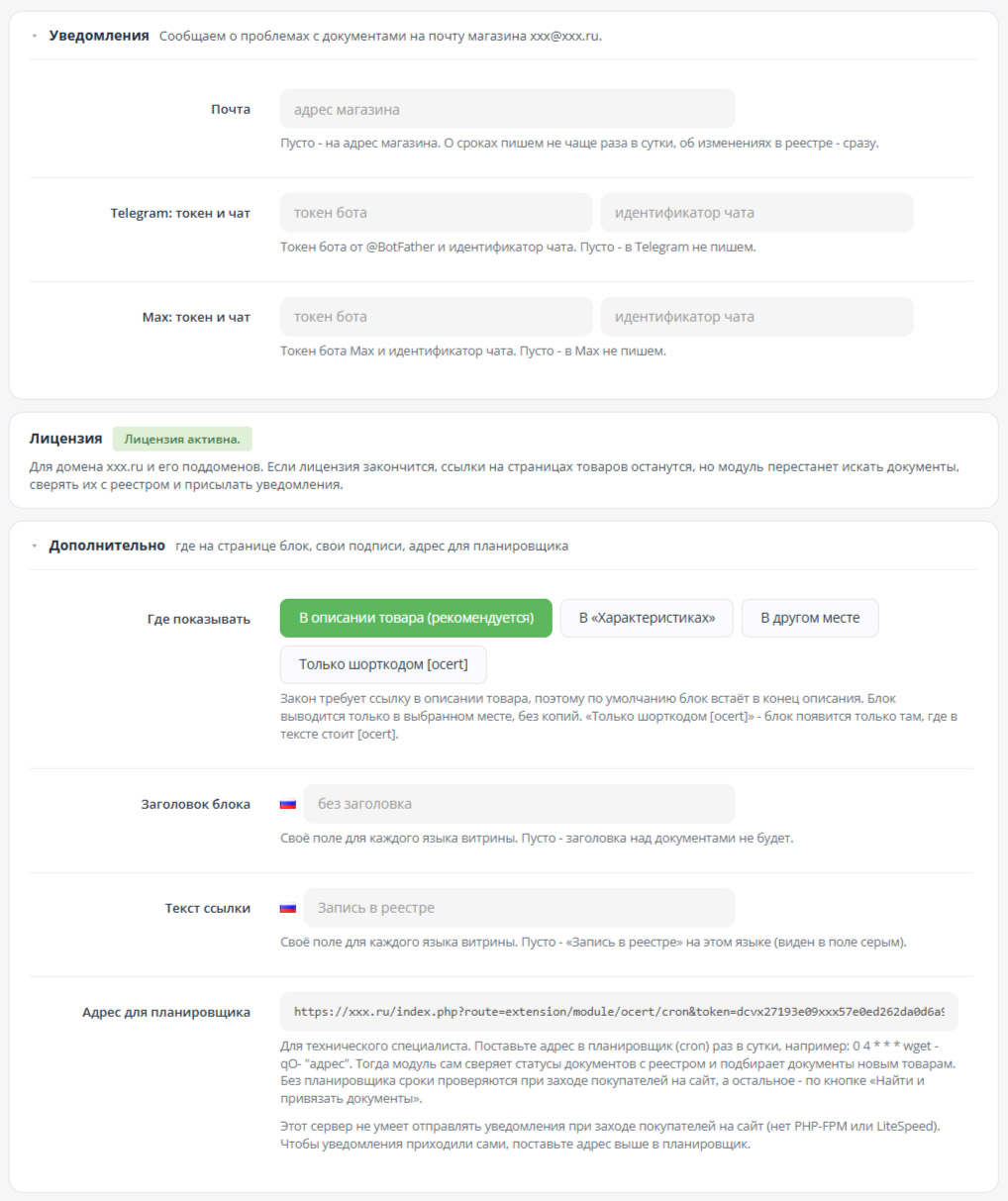
- Once a day, the module checks expirations: which documents have expired and which expire within the next 30 days. No configuration is required for this
- Statuses are checked against the unified register of the EAEU, each document once a week - according to the scheduler or by clicking a button. The module will note if a document is suspended, terminated, or invalid
- Open data may be out of date. At a real store, a check against the EAEU found a certificate that was listed as valid in the public data but was invalidated in the registry.
- If the document for a product is no longer valid, the module searches for a valid replacement. It removes its previous document, but keeps the one you linked and notifies you of it in a notification.
- Notifications - via store email, Telegram, or Max. About deadlines - no more than once a day, about changes in the registry - immediately
- The module doesn't hide anything and doesn't remove anything from sale: it shows where the problem is, and you solve it
Report "Products without Documents"
- How many products are already closed by a document or marked "not subject to cancellation," broken down by manufacturer and category
- For each product, the reason and what to do: the module didn't find the document, the manufacturer is not specified, the document exists but is not valid, the document was removed by exclusion
- "Supplier Table" - CSV with a list of products and a ready-made email text: supplier Enters document numbers
- Documents that require attention: expired, expires in the next month, document is not valid in the registry, no link to the record, link leads to a search, not to the record
- "Document not needed?" - a hint for products that often don't require a document: fasteners, mounting tapes, and the like. This is just a hint: you check the list and mark the desired products as "not subject" immediately
One declaration per series
- The document is linked to a product, article mask, manufacturer, category with subcategories, or the entire catalog, with exceptions
- Article mask: ABC-* will cover ABC-100 and ABC-200
- The list of models from the declaration appendix is inserted in a column: the module will find products by model and article number and display rows for which the product is not in the catalog
- Before linking to The module specifies how many products will receive the document for a manufacturer, category, or the entire catalog.
- "Not subject" mark: instead of a link, the buyer sees "Product is not subject to mandatory conformity assessment."
- "Conformity" tab on the product card: which document the buyer will see and whether it is specific to the product or shared
- Import and export a catalog to CSV. Before loading, the module will show thatWhat will be added and what will change without writing anything down
Where will the buyer see the document
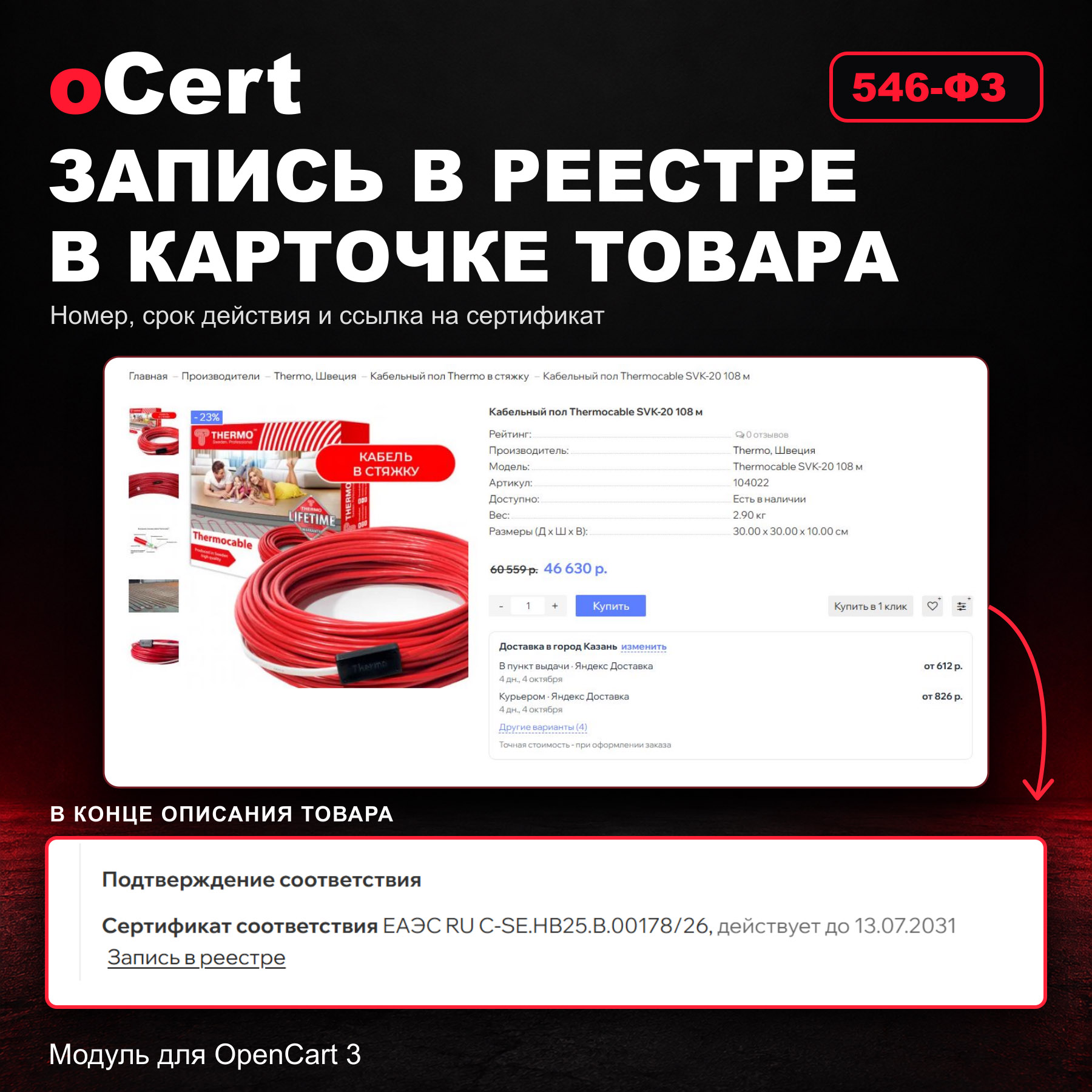
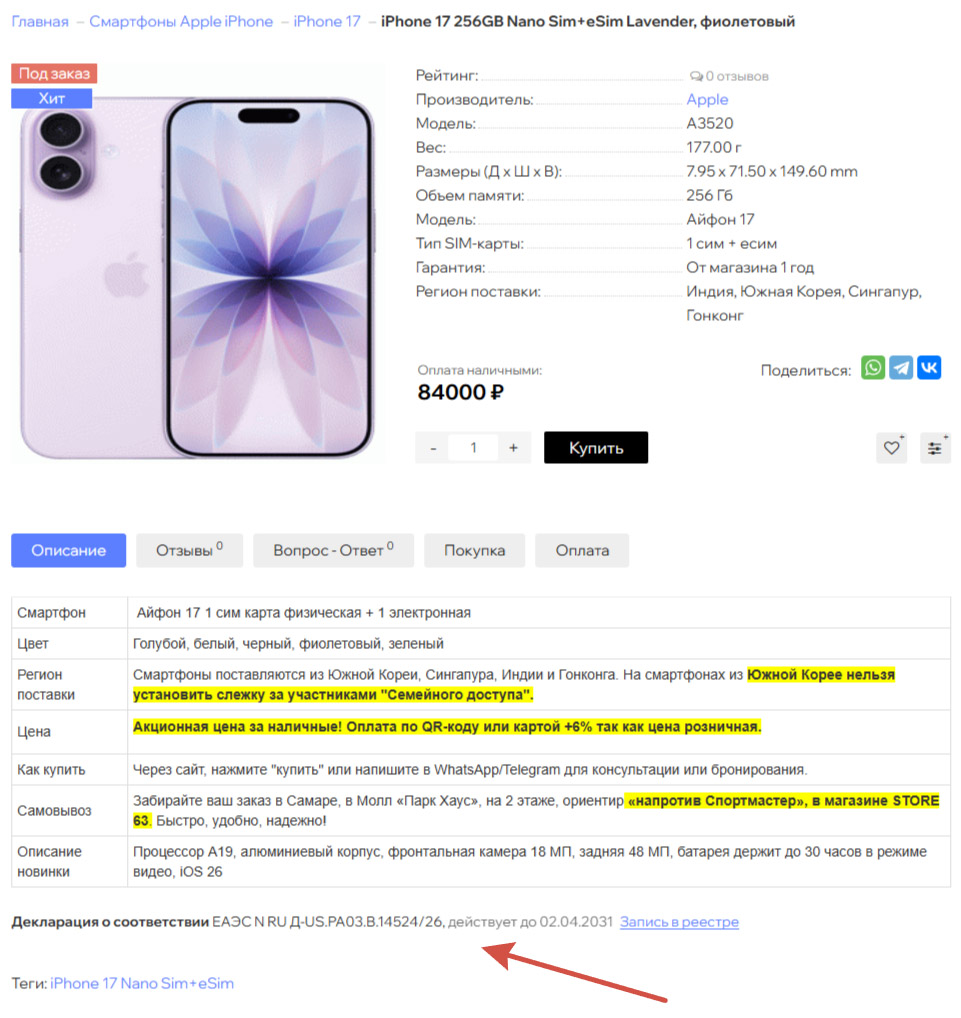
- At the end of the product description - this is closest to the wording of the law. The block is built on the server and is visible without JavaScript
- Copy in "Specifications" and in product comparison
- In the block: document type, number, expiration date, and "Registry entry" link; for the certificate - the certification authority, if completed
- Optional - next to any page element using a CSS selector or shortcode[ocert]: in the description, on the information page, in the tab, and in the Revolution blog
- The order remembers which documents the buyer has seen: in the admin panel, they are visible in the order card
- Links do not fit into the description text, so an import that overwrites Descriptions, they won't be erased
- The block title and link text can be set for each storefront language
Even a beginner can figure it out
- The line above the number on the module's main page tells you what to do next: activate the license, click the button, and sort products without documentation
- The "What the law requires - in brief" card and detailed instructions directly in the admin panel
- If you don't have your own technical specialist, the module will provide a ready-made request to hosting technical support so they can assign a task to Schedule
Installation
- "Extensions - Extension Installer": Download ocert.ocmod.zip. Or FTP the contents of the upload folder from the archive to the website root
- "Extensions - Extensions", type "Modules": For oCert, click "Install", then "Edit"
- Click "Find and Link Documents". Display on the website will automatically turn on after the first link
You don't need to update the modifications. To run a daily check, provide the scheduler address from the "Additional" section to the hosting service: the module will provide a ready-made request text.
Questions and Answers
What is the penalty for not providing a link?
- The law does not impose a separate fine specifically for not providing a link. Rospotrebnadzor may consider this a failure to provide product information (Part 1, Article 14.8 of the Code of Administrative Offenses), but this has not yet been implemented. And from October 1, 2026, offering a product that requires a document without a valid certificate or declaration is a separate violation, punishable by a fine under Article 14.70 of the Code of Administrative Offenses.
- Ask the supplier for the number—there's a "Supplier Table" with a pre-written letter for this. Enter the number in the module, and it will find the record. If the number isn't in the public data, the module will tell you how to manually find the record in the registry and enter its address.
Distribution method:
Paid
Opencart version:
LiveStore 3.*OCStore 3.*OpenCart 3.*
PHP verision:
PHP 7.0PHP 7.1PHP 7.2PHP 7.3PHP 7.4PHP 8.0PHP 8.1PHP 8.2PHP 8.3
Activation:
Automatic
Getting files:
On author's site, after purchase
Protection system:
Custom
VQmod:
No
Ocmod:
Yes
Events:
Yes
Uploaded:
30.09.2026
Updated:
30.09.2026
Viewed:
102
Sales:
2
Write a review
Your Name:Your Review: Note: HTML is not translated!
Rating: Bad Good
Enter the code in the box below:


Файлы будут доступны после покупки


