Your shopping cart is empty!

Module "NWA - Report availability", "Pre-order" (for Opencart 3.x.x) v1.0.6
15 sales
Price: 780 ₽ 1 450 ₽

Author: AmidDG
Write to the author
Sales: 17 (Average rating 3.7 на основании 3 отзывов)
Need paid help? Contact the site administration
Opencart version:
Sales: 17 (Average rating 3.7 на основании 3 отзывов)
Need paid help? Contact the site administration
Opencart version:
OpenCart 3.*LiveStore 3.*OCStore 3.*
The "Report Availability" module changes the "Add to Cart" button to "Report Availability" for items that are temporarily out of stock. Thanks to this, site users can conveniently subscribe to email notifications to find out when the product will be back on sale.
In addition, the advanced functionality of the module allows you to configure it both for placing pre-orders and for processing other types of requests.
Demo:
Login: demo
Password: demo
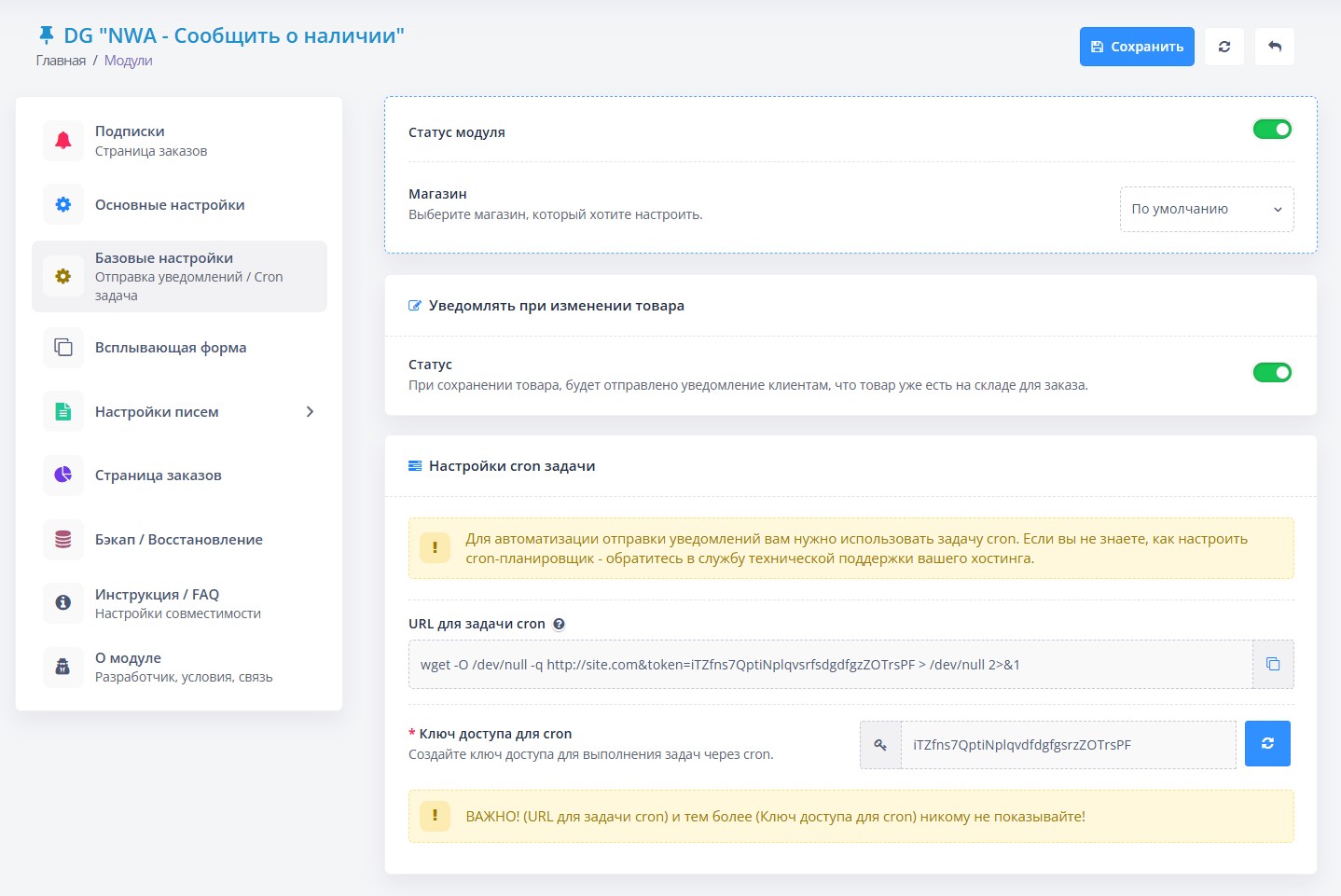
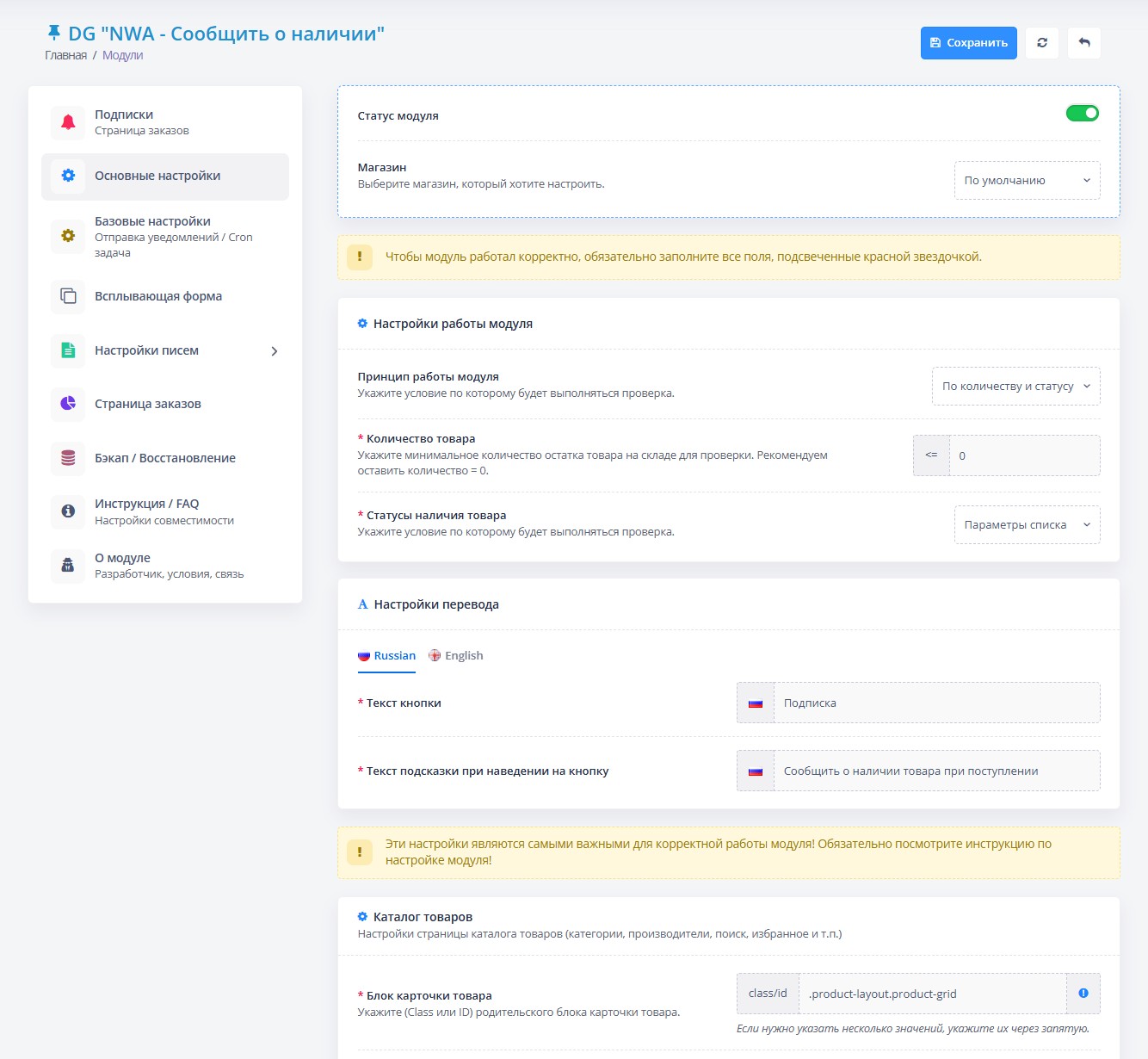
Administrator:Module setup page
Site:Product page
UPDATE: 05/24/2025.The module’s performance when sending notifications by email has been improved.
1) Letters now arrive with the correct encoding - no more “krakozyabrs”.
2) The price of the product is displayed correctly.
3) Fixed a problem due to which pictures of products with Cyrillic names were not shown.
4) The module began to work more stable when launched according to a schedule (cron).
UPDATE: 03/16/2025. Fixed a critical error when installing the module.
UPDATE TO NEW VERSION!!! v1.0.6
UPDATE: 03/15/2025.
1) Removing items from cart: If the option is enabled, those items that are out of stock will be removed from the user's cart, even ifsaved.
2) Delete applications after successful sending: After successfully sending a notification to the client, the application will be deleted. If you need to collect a customer base, disable this option.
3) Delete orders if product does not exist: Deletes all orders subscribed to a product that no longer exists.
4) Added the ability to change the icon on the button or not display it at all. You can also add button text and tooltip text.
5) MODULE can be multi-application. The module can now be used for other purposes; you can turn it into a “QUICK ORDER of goods”, “PRE-ORDER of goods”, or even Accept applications for other services.
6)Advanced customization of the product ID search on the page: not all templates are standard, and the template author can indicate the product ID in the card differently, so for versatility, a new field has been added to indicate all ID search options.
7) Support for PHP >=5.3 versions.
UPDATE: 01/01/2024.
1) Added the ability to display the (Report) button next to the (Buy) button.
2) Added instructions for setting up the module.
3) Added compatibility with third-party modules. Setup instructions have been writtencompatibility.
4) Added support for languages: Russian, Ukrainian, English.
# Key features of the "NWA - Notify availability" module:
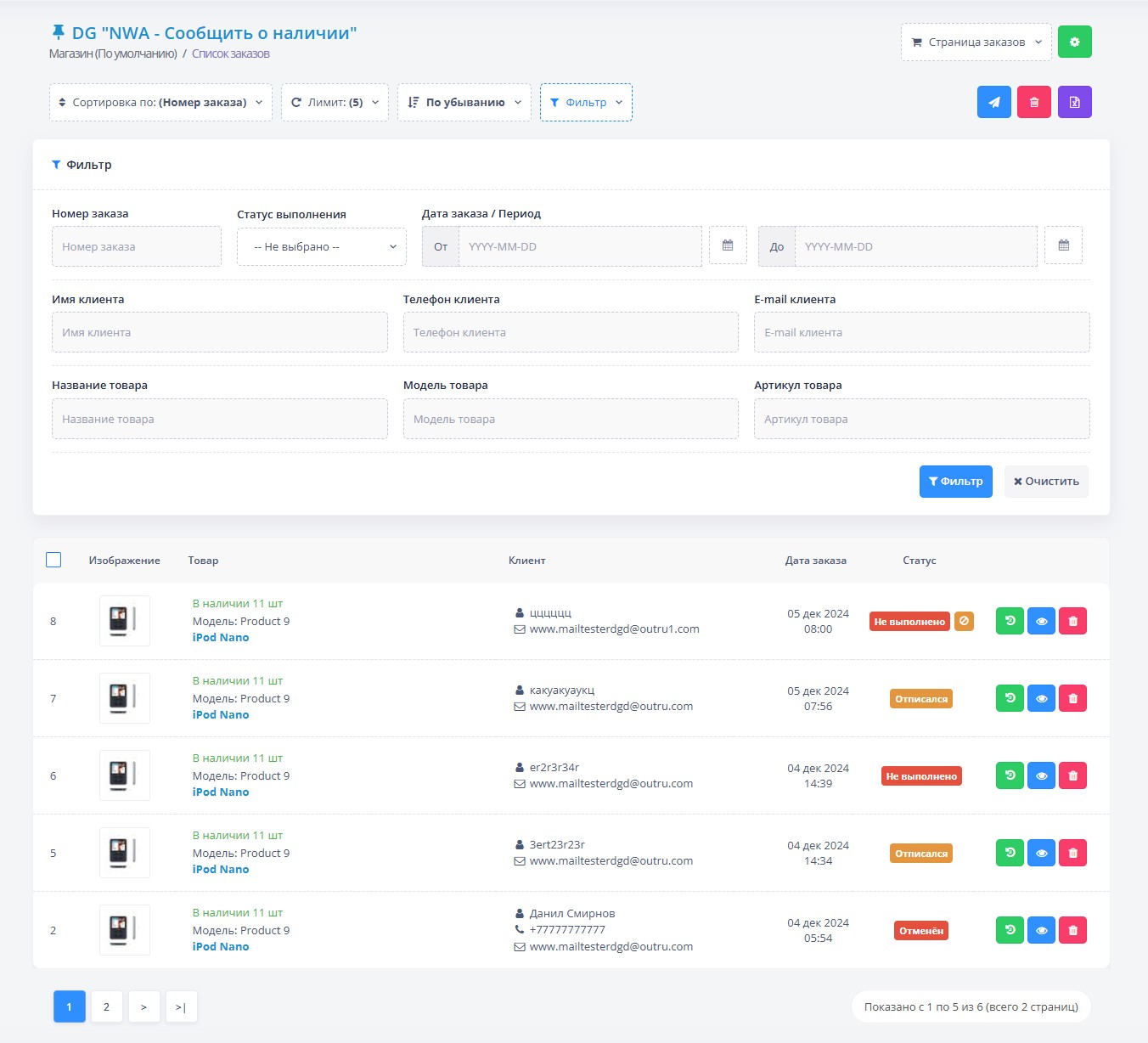
1. Application history: Complete history of all requests for notifications, which allows you to track customer interest in specific products.
2. Filtering applications: Possibility of filtering applications by status, product or client.
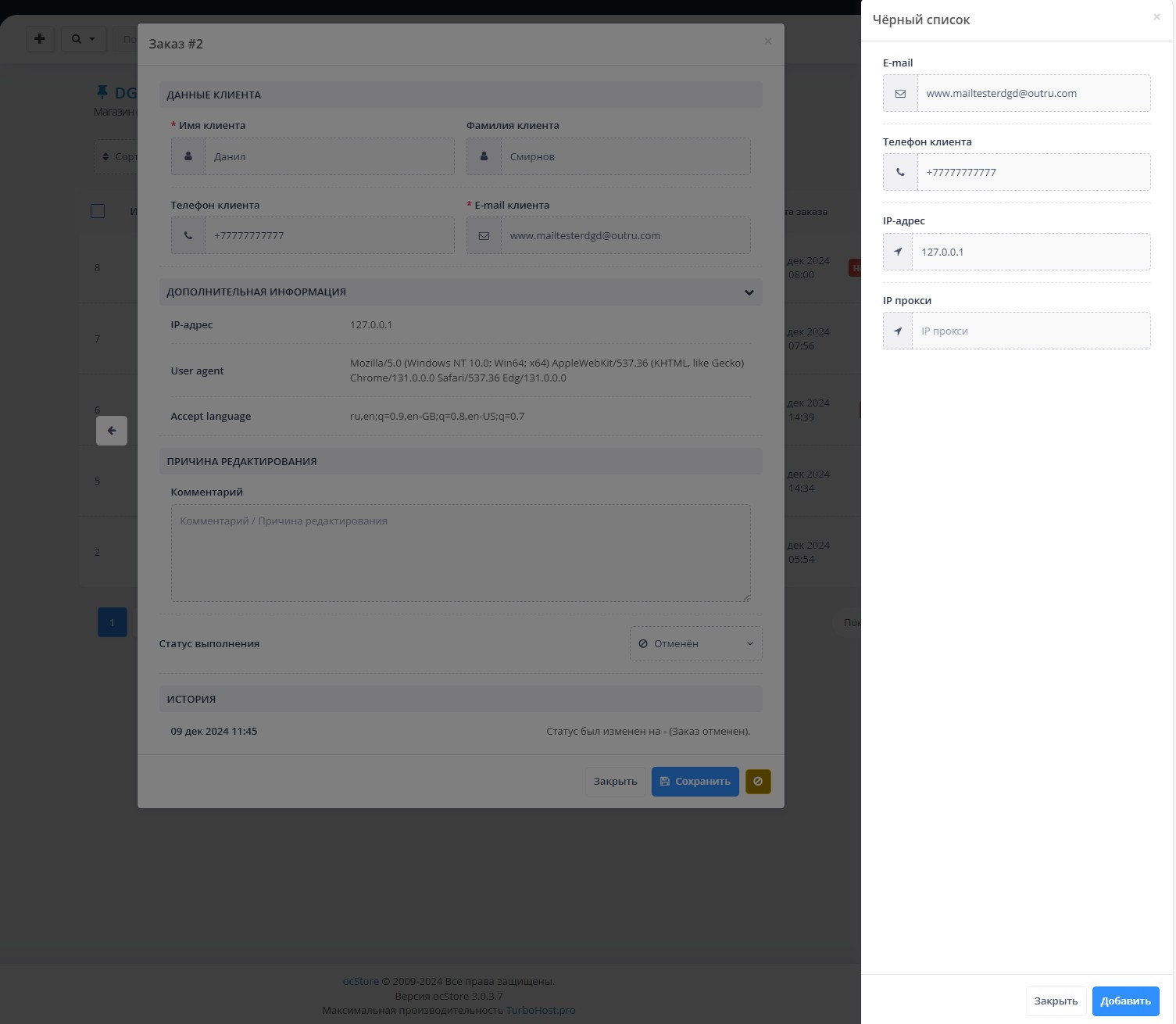
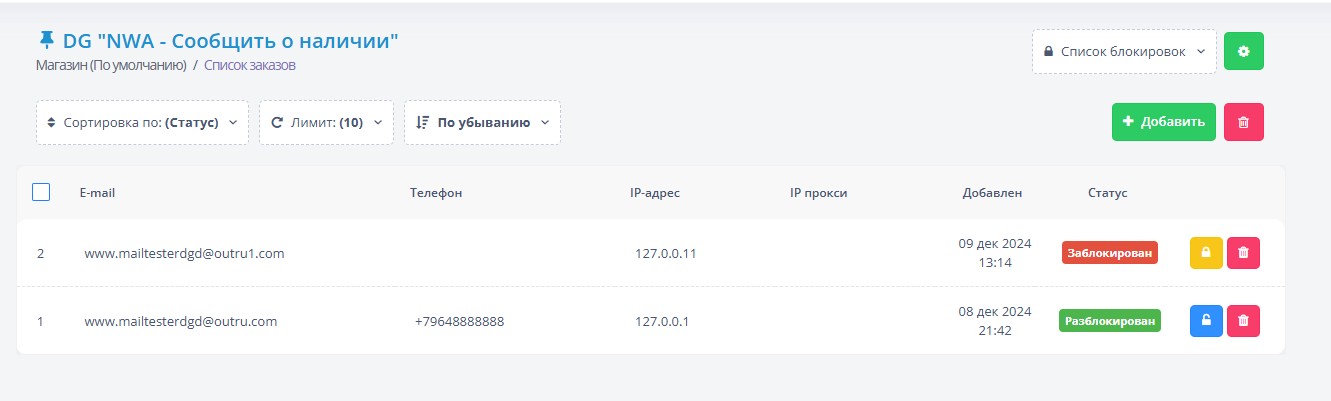
3. Blacklist: The function of adding clients to the blacklist, which prohibits them from sending requests in the future.
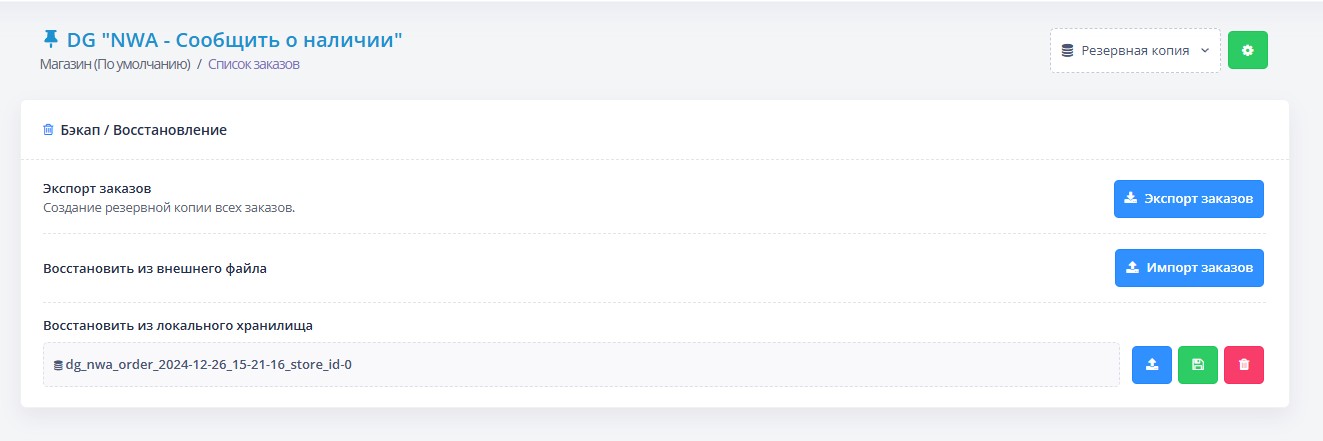
4. Backup: Possibility of creating a backup copy of the module settings, as well as all requests. 5. Uploading applications to CSV: Convenient function for exporting applications in CSV format.
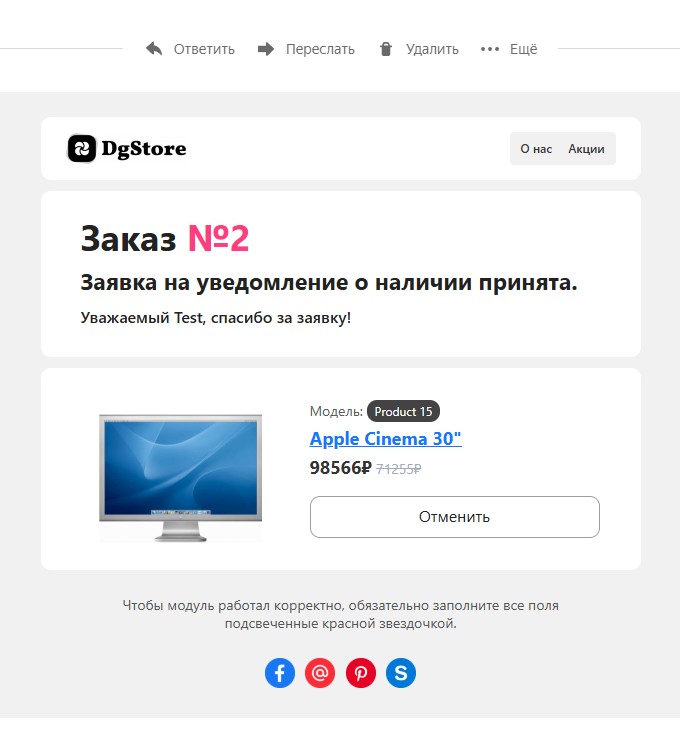
6. Setting up letters: Easy customization of the content of notifications that will be sent to clients. Possibility of adding a company logo, links in the header of the letter template and informational or advertising banners. You can also display information at the bottom of the letter and links to social networks for quick communication.
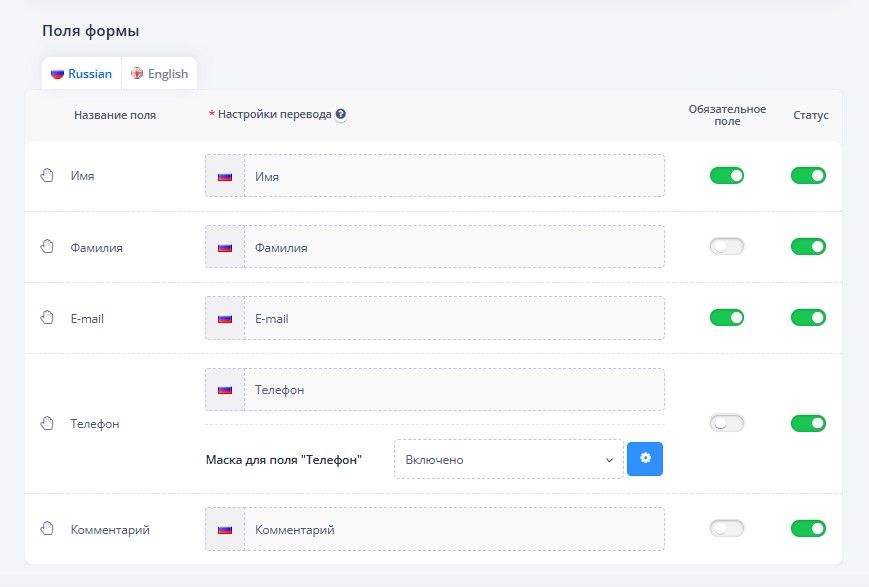
7. Pop-up form on the website: Ability to customize the headers and text of the form at your discretion. Enabling and disabling form fields, setting up a phone mask with the ability to select a country, as well as automatic client detection by IP.
8. Notification when product changes: Automaticsending notifications to customers when storing goods, which allows them to be informed about the availability of goods in stock. Possibility to turn this function on and off.
9. Customization of form and button: Possibility of customizing button or form styles in a special block for writing code.
10. Manual status update: The ability to manually update the status of a request without the need to send notifications, providing flexibility in managing requests.
11. Bulk notification sending: An effective feature that allows you to send notifications to all clients with one click of a button.
12. Targeted sending of notifications: Notifications are sent only for those applications for which the productaccessible, which minimizes the likelihood of customer dissatisfaction.
13. Application status management: The ability to manually transfer applications from closed to open state, which simplifies the request processing process.
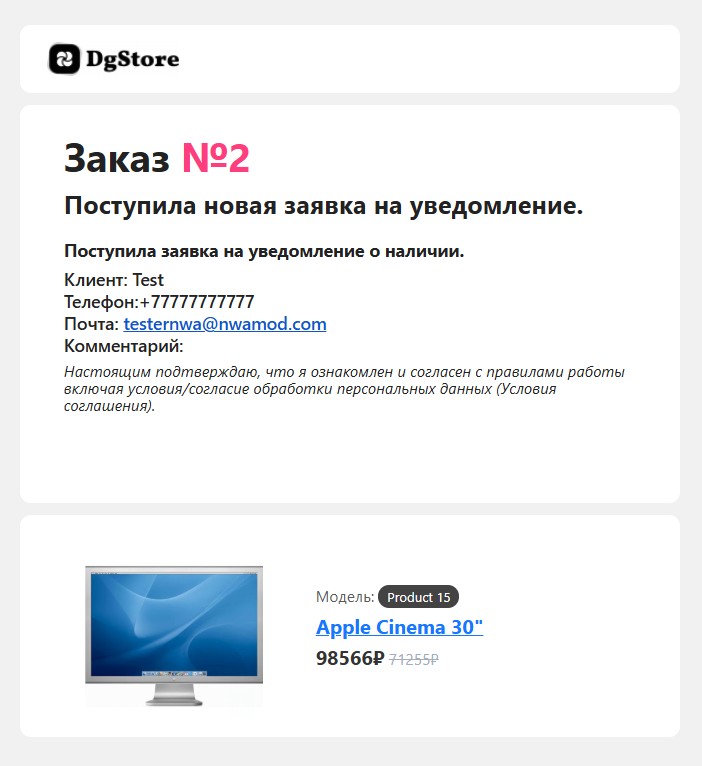
14. Administrator notification: Automatic notifications for administrators about new applications, which allows you to quickly respond to customer interest.
15. Anti-spam protection: Setting up captcha to prevent abuse and spam in requests.
16. Automation using cron: Setting up automatic sending of notifications using cron, which ensures uninterrupted operation of the module.
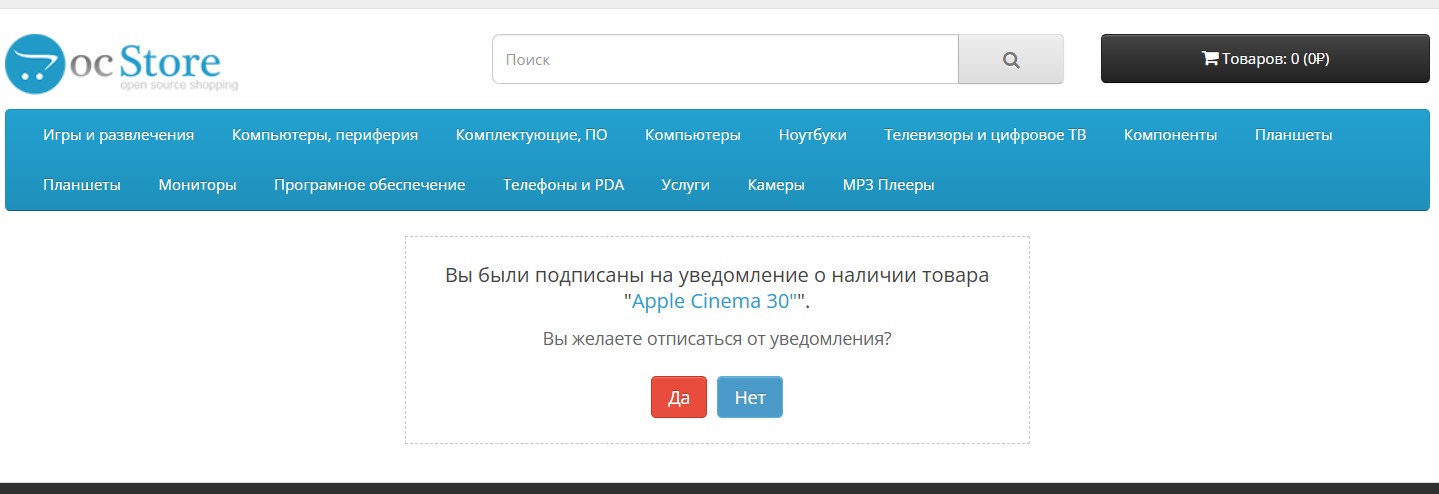
17. Unsubscribe from notifications: The client canOpt out of receiving notifications by clicking on the link in the email.
# The license for the module is provided under the following conditions:
1. One license = one purchase = one domain name.
This means that when you purchase a module, you receive an activation key that allows you to use the module only on one domain name and in one online store.
Please note that to use the module on other domain names or in other stores, you must purchase a separate license.
# System requirements:
1. Download the archive with the module.
2. Install the module:
After installing Localcopy, try installing the module again.
# Please note!
If you have not received the key within an hour, please write to me in private messages on the site. I recommend it right awayinstall the module and go to
to the module page, where you will find my contact details and contact me.
# When requesting a key, please provide the following information:
In addition, the advanced functionality of the module allows you to configure it both for placing pre-orders and for processing other types of requests.
Demo:
Login: demo
Password: demo
Administrator:Module setup page
Site:Product page
UPDATE: 05/24/2025.The module’s performance when sending notifications by email has been improved.
1) Letters now arrive with the correct encoding - no more “krakozyabrs”.
2) The price of the product is displayed correctly.
3) Fixed a problem due to which pictures of products with Cyrillic names were not shown.
4) The module began to work more stable when launched according to a schedule (cron).
UPDATE: 03/16/2025. Fixed a critical error when installing the module.
UPDATE TO NEW VERSION!!! v1.0.6
UPDATE: 03/15/2025.
1) Removing items from cart: If the option is enabled, those items that are out of stock will be removed from the user's cart, even ifsaved.
2) Delete applications after successful sending: After successfully sending a notification to the client, the application will be deleted. If you need to collect a customer base, disable this option.
3) Delete orders if product does not exist: Deletes all orders subscribed to a product that no longer exists.
4) Added the ability to change the icon on the button or not display it at all. You can also add button text and tooltip text.
5) MODULE can be multi-application. The module can now be used for other purposes; you can turn it into a “QUICK ORDER of goods”, “PRE-ORDER of goods”, or even Accept applications for other services.
6)Advanced customization of the product ID search on the page: not all templates are standard, and the template author can indicate the product ID in the card differently, so for versatility, a new field has been added to indicate all ID search options.
7) Support for PHP >=5.3 versions.
UPDATE: 01/01/2024.
1) Added the ability to display the (Report) button next to the (Buy) button.
2) Added instructions for setting up the module.
3) Added compatibility with third-party modules. Setup instructions have been writtencompatibility.
4) Added support for languages: Russian, Ukrainian, English.
# Key features of the "NWA - Notify availability" module:
1. Application history: Complete history of all requests for notifications, which allows you to track customer interest in specific products.
2. Filtering applications: Possibility of filtering applications by status, product or client.
3. Blacklist: The function of adding clients to the blacklist, which prohibits them from sending requests in the future.
4. Backup: Possibility of creating a backup copy of the module settings, as well as all requests. 5. Uploading applications to CSV: Convenient function for exporting applications in CSV format.
6. Setting up letters: Easy customization of the content of notifications that will be sent to clients. Possibility of adding a company logo, links in the header of the letter template and informational or advertising banners. You can also display information at the bottom of the letter and links to social networks for quick communication.
7. Pop-up form on the website: Ability to customize the headers and text of the form at your discretion. Enabling and disabling form fields, setting up a phone mask with the ability to select a country, as well as automatic client detection by IP.
8. Notification when product changes: Automaticsending notifications to customers when storing goods, which allows them to be informed about the availability of goods in stock. Possibility to turn this function on and off.
9. Customization of form and button: Possibility of customizing button or form styles in a special block for writing code.
10. Manual status update: The ability to manually update the status of a request without the need to send notifications, providing flexibility in managing requests.
11. Bulk notification sending: An effective feature that allows you to send notifications to all clients with one click of a button.
12. Targeted sending of notifications: Notifications are sent only for those applications for which the productaccessible, which minimizes the likelihood of customer dissatisfaction.
13. Application status management: The ability to manually transfer applications from closed to open state, which simplifies the request processing process.
14. Administrator notification: Automatic notifications for administrators about new applications, which allows you to quickly respond to customer interest.
15. Anti-spam protection: Setting up captcha to prevent abuse and spam in requests.
16. Automation using cron: Setting up automatic sending of notifications using cron, which ensures uninterrupted operation of the module.
17. Unsubscribe from notifications: The client canOpt out of receiving notifications by clicking on the link in the email.
# The license for the module is provided under the following conditions:
1. One license = one purchase = one domain name.
This means that when you purchase a module, you receive an activation key that allows you to use the module only on one domain name and in one online store.
Please note that to use the module on other domain names or in other stores, you must purchase a separate license.
# System requirements:
- CMS:The module is compatible with CMS versions OpenCart and ocStore3.x.x.
- PHP:The PHP 7.x version is required for the module to work correctly.
- Ioncube Loader:Must be installed on the hosting Ioncube Loader, which is necessary for decoding module files.
1. Download the archive with the module.
2. Install the module:
- Go to the site's administrative panel.
- Open the "Add-ons" section and select "Install add-ons".
- Download and install the downloaded archive frommodule.
- Go to the "Add-ons" section and select "Modifiers".
- Update the cache for the changes to take effect.
- Go to edit the module and enter the activation key.
- Go to the module settings and activate it by moving the option "Status" to the position "Enabled".
- Now the module is ready to use!
After installing Localcopy, try installing the module again.
# Please note!
If you have not received the key within an hour, please write to me in private messages on the site. I recommend it right awayinstall the module and go to
to the module page, where you will find my contact details and contact me.
# When requesting a key, please provide the following information:
- Site where you purchased the module.
- Your email that you used when purchasing.
- Domain of your website.
Distribution method:
AllPaid
Opencart version:
OpenCart 3.*LiveStore 3.*OCStore 3.*
PHP verision:
PHP 5.4PHP 5.5PHP 5.6PHP 7.0PHP 7.1PHP 7.2PHP 7.3PHP 7.4
Activation:
Manually, upon request via emailManually, upon request via private messages
Getting files:
On site, in the personal account
Protection system:
IonCube
Ocmod:
Yes
Events:
Yes
Uploaded:
26.12.2024
Updated:
24.05.2025
Viewed:
4266
Sales:
17
Write a review
Your Name:Your Review: Note: HTML is not translated!
Rating: Bad Good
Enter the code in the box below:
Файлы будут доступны после покупки


Спасибо за модуль и за помощь!