Your shopping cart is empty!

Generating a video for a product
Price: 990 ₽ 2 000 ₽

Additional from the author:
Author: Serbulenko
Write to the author
Sales: 2 (Average rating 5 на основании 1 отзывов)
Need paid help? Contact the site administration
Opencart version:
Sales: 2 (Average rating 5 на основании 1 отзывов)
Need paid help? Contact the site administration
Opencart version:
LiveStore 3.*OCStore 3.*OpenCart 3.*
Generating video for a product - automatic video for your catalog
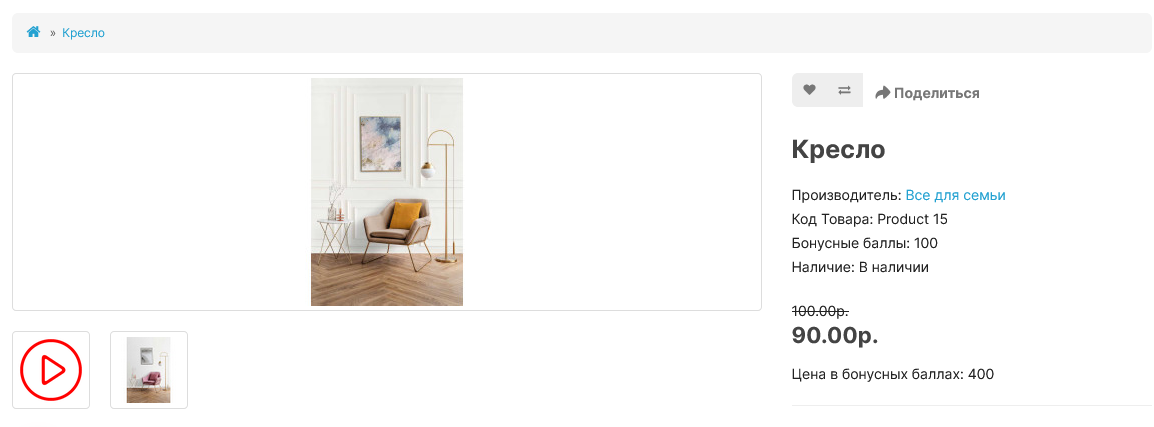
Product video generation is a module that turns your catalog images into professional videos in one click. Save thousands on video production and get more business with video product presentations.
You invest in high-quality product photos, but this is no longer enough. Static images do not hold attention, do not show the product in dynamics and are inferior to competitors who have video. Manually creating videos for hundreds of products is time-consuming, expensive, and practically impossible for a constantly updated catalog.
Our module automatically generates MP4 videos from all product images directly in the OpenCart admin panel. No third-party services, no manual installation and noadditional content preparation.
DEMO
As a result you get:
? Increase in conversion on the product page
Video allows you to examine the product from all sides, better understand its features and reduces buyer doubts, directly influencing the growth of orders.
? Improving SEO and search rankings
Pages with videos are viewed longer and show better behavioral factors - this is an important signal for Google and Yandex, which improves the quality of ranking.
⏳ Saving time and budget
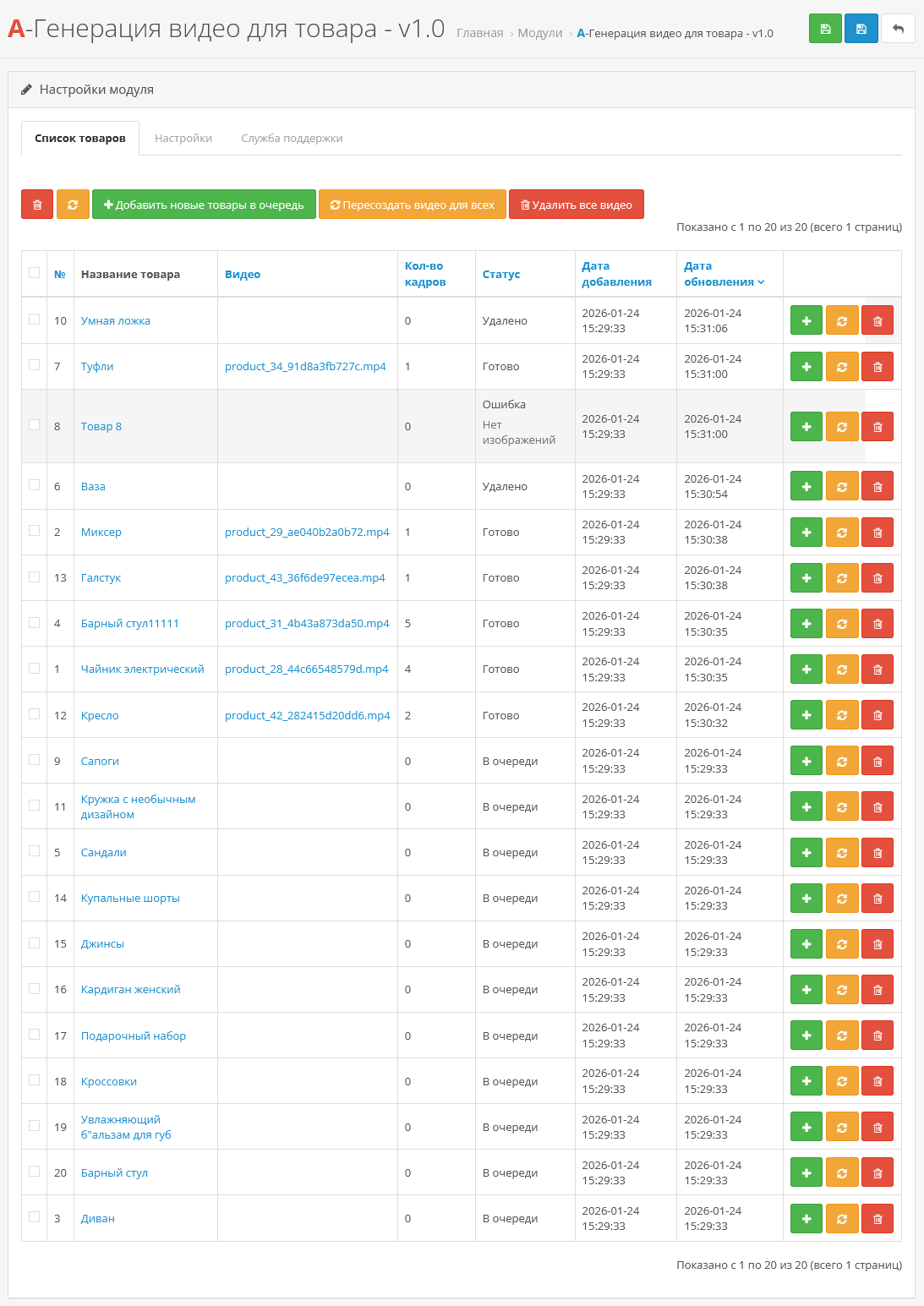
Forget about hiring videographers and editors. Automatic generation of videos for the entire catalog, new products or selected items - manually or on a schedule (Cron).
?Reducing the number of returns
The buyer better understands what exactly he is buying by receiving a complete visual representation of the product even before placing an order.
? Professional image of the store
A modern catalog with video presentations makes your store stand out from competitors and increases brand trust.
If you are using a non-default theme, you may need to adapt the video output in the product card to your theme (adaptation is paid for from 1000 rubles);
For the module to work, the FFmpeg library is required on the server (used to generate videos).
If you are not sure whether FFmpeg is installed on your hosting, write to usin private messages or by email. We will send you a file for checking for free or tell you exactly what to check with hosting technical support.
The module has flexible settings for creating the perfect video:
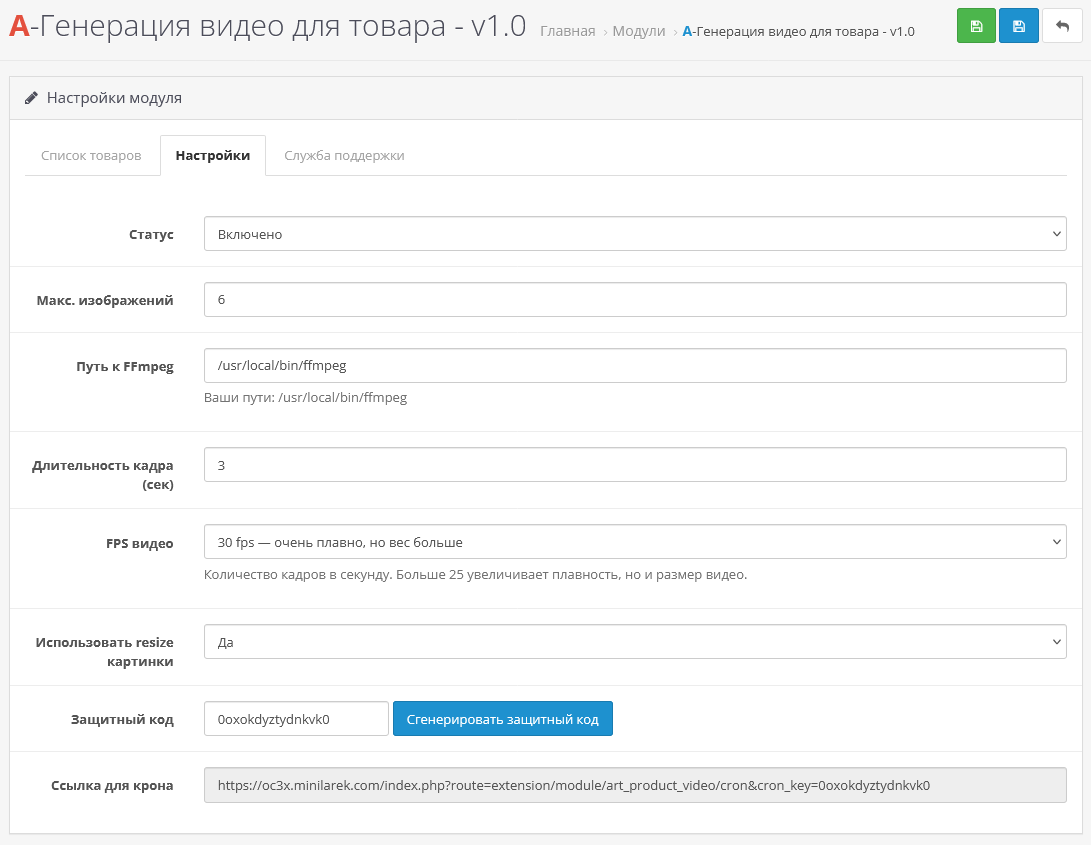
Length and Smoothness Control: You can set number of pictures for videos and adjust FPS (frames per second) for optimal smoothness.
Selection of original images: There is an option to use original photos or automatically prepared copies.
Important: If you want to use originals, please make sure that all product images are the same size andformat (for example, all JPEG 1000x1000px). Otherwise, generation errors are possible.
Recommendation: For reliable operation, it is better to select the option “Use resize pictures”. In this case, the module will use small copies of images (popup versions from the product card). This ensures that all frames are of the same size and proportions, which is critical for stable performance and beautiful, distortion-free results. This also reduces the load on the server and speeds up generation.
Setting the path to FFmpeg: You can specify the path to the installed FFmpeg library on the server. The module supports manual path configuration, which is convenient for VPS and non-standard hosting configurations. The module will also suggest possibleoptions for your paths, it will be enough to copy them and specify them in the settings.
Before setting up automatic generation (Cron), it is recommended to first create several videos manually. This will allow:
Installation instructions:
Technical support:
Technical support is provided to all users who legally purchased the module on official websites or from the author himself.License:
Each copy of the module affects 1 domain and its subdomain.
Therefore, if you want to install the module on another domain, you must purchase another copy of the module.
For all questions and suggestions write to serfbots@gmail.com
Product video generation is a module that turns your catalog images into professional videos in one click. Save thousands on video production and get more business with video product presentations.
You invest in high-quality product photos, but this is no longer enough. Static images do not hold attention, do not show the product in dynamics and are inferior to competitors who have video. Manually creating videos for hundreds of products is time-consuming, expensive, and practically impossible for a constantly updated catalog.
Our module automatically generates MP4 videos from all product images directly in the OpenCart admin panel. No third-party services, no manual installation and noadditional content preparation.
DEMO
As a result you get:
? Increase in conversion on the product page
Video allows you to examine the product from all sides, better understand its features and reduces buyer doubts, directly influencing the growth of orders.
? Improving SEO and search rankings
Pages with videos are viewed longer and show better behavioral factors - this is an important signal for Google and Yandex, which improves the quality of ranking.
⏳ Saving time and budget
Forget about hiring videographers and editors. Automatic generation of videos for the entire catalog, new products or selected items - manually or on a schedule (Cron).
?Reducing the number of returns
The buyer better understands what exactly he is buying by receiving a complete visual representation of the product even before placing an order.
? Professional image of the store
A modern catalog with video presentations makes your store stand out from competitors and increases brand trust.
If you are using a non-default theme, you may need to adapt the video output in the product card to your theme (adaptation is paid for from 1000 rubles);
For the module to work, the FFmpeg library is required on the server (used to generate videos).
If you are not sure whether FFmpeg is installed on your hosting, write to usin private messages or by email. We will send you a file for checking for free or tell you exactly what to check with hosting technical support.
The module has flexible settings for creating the perfect video:
Length and Smoothness Control: You can set number of pictures for videos and adjust FPS (frames per second) for optimal smoothness.
Selection of original images: There is an option to use original photos or automatically prepared copies.
Important: If you want to use originals, please make sure that all product images are the same size andformat (for example, all JPEG 1000x1000px). Otherwise, generation errors are possible.
Recommendation: For reliable operation, it is better to select the option “Use resize pictures”. In this case, the module will use small copies of images (popup versions from the product card). This ensures that all frames are of the same size and proportions, which is critical for stable performance and beautiful, distortion-free results. This also reduces the load on the server and speeds up generation.
Setting the path to FFmpeg: You can specify the path to the installed FFmpeg library on the server. The module supports manual path configuration, which is convenient for VPS and non-standard hosting configurations. The module will also suggest possibleoptions for your paths, it will be enough to copy them and specify them in the settings.
Before setting up automatic generation (Cron), it is recommended to first create several videos manually. This will allow:
- Make sure that the final video meets your expectations (quality, duration, smoothness).
- Check that the module settings and source images are correct.
- Avoid mass generation of inappropriate videos for the entire catalog.
Installation instructions:
- Install archive art_art_product_video_3.x.ocmod via the standard add-on manager;
- Update modifiers;
- Afterwards, go to extensions->modules and find “A-Video generation for a product”, activate it;
- Go to the module settings and customize it for yourself;
- Add products for video generation and set up a cron task on the hosting;
- Cron processes one product when launched, this is done so as not to load the server on which the site is hosted;
Technical support:
Technical support is provided to all users who legally purchased the module on official websites or from the author himself.License:
Each copy of the module affects 1 domain and its subdomain.
Therefore, if you want to install the module on another domain, you must purchase another copy of the module.
For all questions and suggestions write to serfbots@gmail.com
Distribution method:
Paid
Opencart version:
LiveStore 3.*OCStore 3.*OpenCart 3.*
PHP verision:
PHP 5.4PHP 5.5PHP 5.6PHP 7.0PHP 7.1PHP 7.2PHP 7.3PHP 7.4PHP 8.0PHP 8.1PHP 8.2
Activation:
Automatic
Getting files:
By email, after a request to the author
VQmod:
No
Ocmod:
Yes
Events:
No
Uploaded:
24.01.2026
Updated:
17.02.2026
Viewed:
2176
Sales:
2
Write a review
Your Name:Your Review: Note: HTML is not translated!
Rating: Bad Good
Enter the code in the box below:
Файлы будут доступны после покупки
Jor0354 / купил товар / 19 April 2026 16:56:54 #
Отличный модуль для улучшения SEO у товаров. Рекомендую!
Войдите, чтобы ответить
Showing 1 to 1 of 1 (1 Pages)


