Your shopping cart is empty!

Regional store 1.2 (subdomains/subfolders)
100 sales

Price: 6 999 ₽ 10 000 ₽

Additional from the author:
Author: Vegas
Write to the author
Sales: 165 (Average rating 5 на основании 29 отзывов)
Need paid help? Contact the site administration
Opencart version:
Sales: 165 (Average rating 5 на основании 29 отзывов)
Need paid help? Contact the site administration
Opencart version:
LiveStore 3.*OCStore 3.*OpenCart 3.*OCStore 2.3OpenCart 2.3
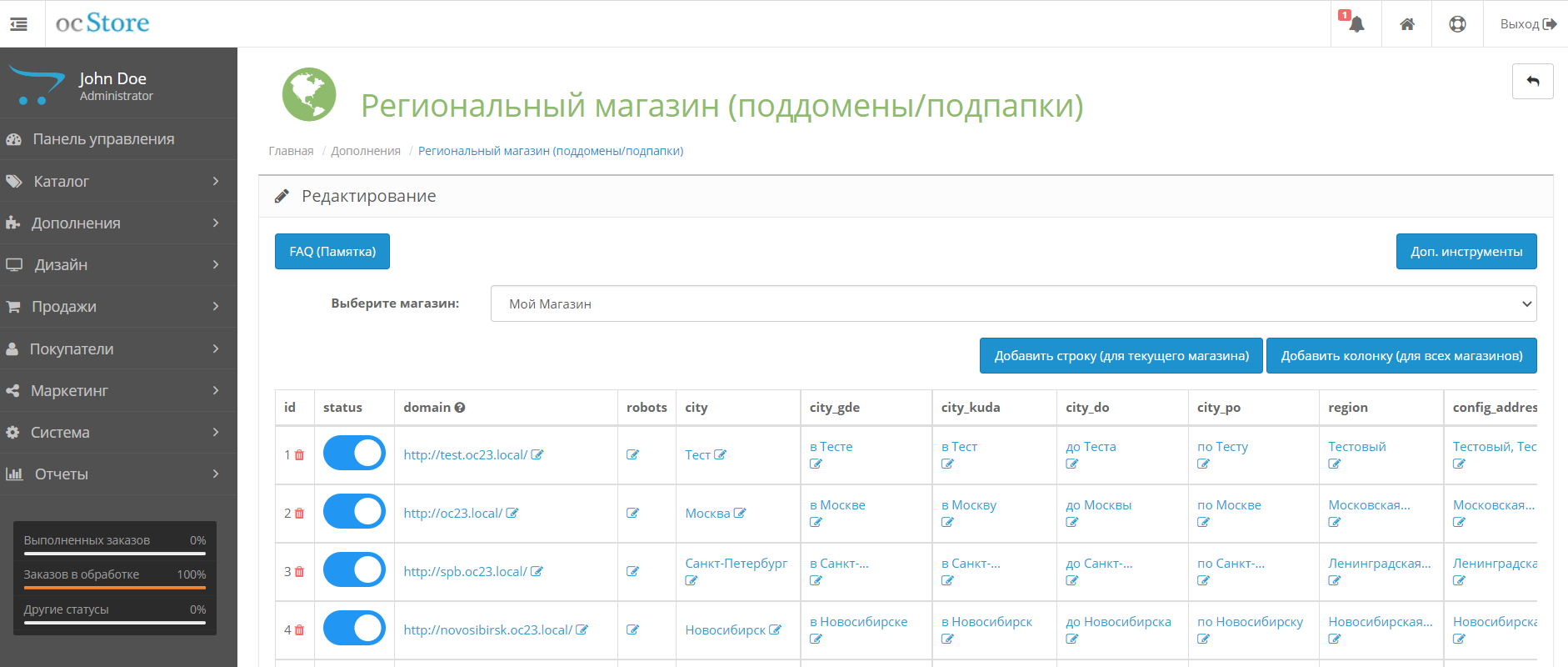
Regional subdomains and subfolders without using a multi-store!
Features:
Concepts:
Using shortcodes:
Nuances:
1. Go to the modifiers page
2. Remove the "Regional Store" modifier
3. Update the modifier cache.
4. Install a new modifier through the modifier installer.
5. Refresh your cache
Features:
- built-in 170 cities with a population of > 100,000 thousand people (with Russian postal addresses)
- Without multi-store
- The ability to use a multi-store in parallel to create a new website with its own set of subdomains and subfolders.
- Usage toponyms (in Moscow, Samara) and address substitution
- Your own shortcodes
- Separate robots.txt for each city (with the ability to mass edit)
- Using subdomains and subfolders together on one website (for example samara.site.ru and site.ru/perm/)
- All shortcodes starting with config_... replace the standard store settings, for example config_address or config_telephone. This means that if you add a shortcode with that name, it will automatically be replaced wherever it is used by the system.
Concepts:
- Shortcode - the name of the column that you create in the module. All columns are shortcodes that will be replaced with the value in the line of the desired city.
Using shortcodes:
- Anywhere on the site in the format %rs_[название колонки]%. For example, a column with the toponym "in Moscow" is called city_gde - which means you can use the shortcode %rs_city_gde%
- All shortcodes in an array: $this->config->get('regional_domain')
- For example, getting cities: $this->config->get('regional_domain')['city']
- For subdomains to work, before installing the module, make sure that the server (hosting) is configured so that any subdomain is accessible and links to the folder with the main site. For example, if everything is configured correctly, the subdomain sfafssasf.site.ru should open your website. For example, in ISP Manager this is very easy to set up: in the alias (alias) of the main domain, just add the entry *.site.ru
Nuances:
- There may be problems with caching modules or templates that cache things like menus. You need to disable caching of links (menus and other things)!
- Working with the Mega Filter Plus module is not guaranteed!
1. Go to the modifiers page
2. Remove the "Regional Store" modifier
3. Update the modifier cache.
4. Install a new modifier through the modifier installer.
5. Refresh your cache
What's new in version 1.2
- Important correction of the robots.txt column
- Adaptation for opencart 3
- Fixing bugs of the previous version
- Optimization code
Opencart version:
LiveStore 3.*OCStore 3.*OpenCart 3.*OCStore 2.3OpenCart 2.3
VQmod:
No
Uploaded:
08.08.2021
Updated:
18.03.2026
Viewed:
32117
Sales:
165
Write a review
Your Name:Your Review: Note: HTML is not translated!
Rating: Bad Good
Enter the code in the box below:


Файлы будут доступны после покупки
Articles about the product

Why Your Online Store on OpenCart is Better Than a Marketplace.


Надеюсь будет результат через месяц, занимаемся оптимизацией.
Модуль уникальный в своем роде, надеюсь на развитие данного решение.
На запросы реагирует быстро, ещё быстрее решает возникающие вопросы.
Никогда не отказывает в просьбах проработать дополнительный функционал или исправить возникшие ошибки, даже если они возникают не на стороне модуля.
Что касается модуля, отличная работа, прост в настройках, лёгок в управлении.
Рекомендую, не пожалеете.
Андрей, спасибо за адаптацию и консультацию!