Your shopping cart is empty!

Static Sitemap


Price: 750 ₽

Author: oc-vier
Write to the author
Need paid help? Contact the site administration
Opencart version:
Need paid help? Contact the site administration
Opencart version:
LiveStore 3.*OCStore 3.*OpenCart 3.*OCStore 2.3OpenCart 2.3OpenCart 2.2OCStore 2.1OpenCart 2.1OpenCart 2.0
In OpenCart, the sitemap is generated dynamically. And this always happens when a Search Robot visits a site and reads this map. And there are more than one such robots.
But a dynamic sitemap does not always allow you to provide promptly required information. This is due to many factors. It also adds additional load to the site.
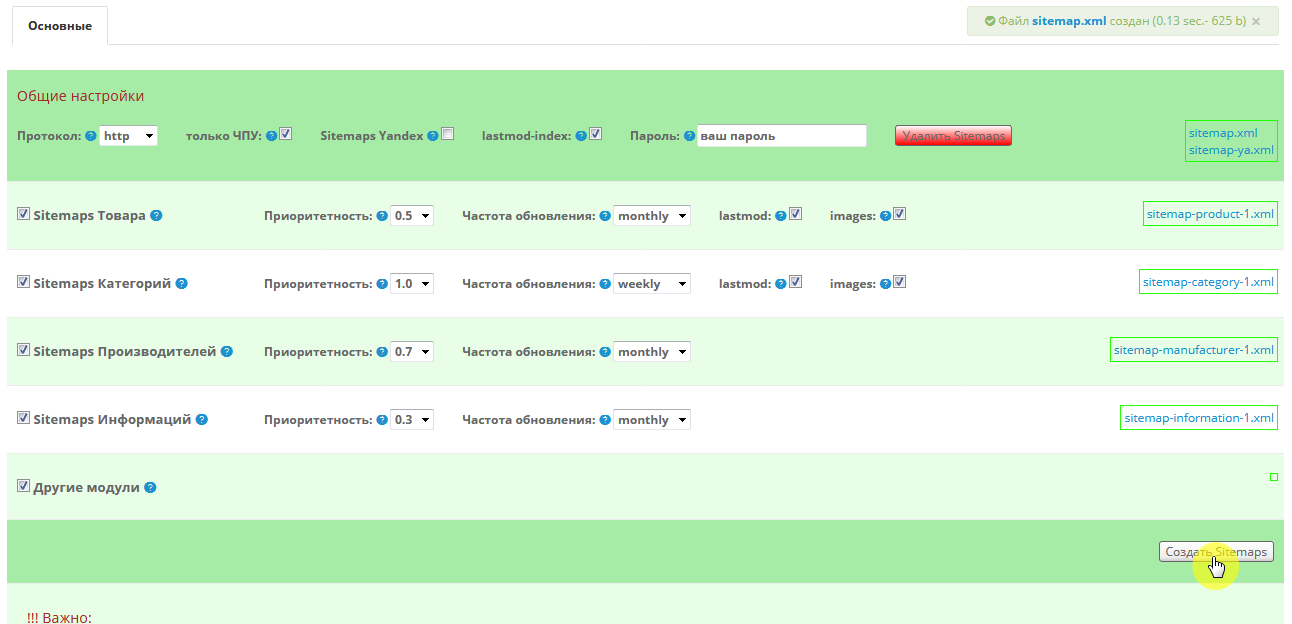
This module Static Sitemap for Opencart 2.x.x allows you to create static maps. In this case, you can assign your own parameters for each group that participates in the formation of the sitemap: Products, Categories, Manufacturers, etc.: Update frequency, Priority, etc.
The module also additionally provides for the generation of a sitemap for Yandex. - file name – sitemap-ya.xml – alsolocated at the root of the site. If you use it, you will need to upload it separately to Yandex Webmaster.
If you don’t use images in the map, then you don’t have to create a map for Yandex, but use the standard one for everyone - sitemap.xml
Don’t forget to include your map in robots.txt for each search engine. For example, descriptions for Yandex are here
Login to the admin panel: demo/demo
Administrator
!!! Important:
in .htaccess, which is located at the root of your site, find the line starting with:
The module uses hints throughout, but I will describe some of the features:
CNC only: – only those Products, Categories, etc., whose links have the form of CNC, will be generated.
lastmod-index: – you can specify the current date of the generated main maps – sitemapindex
Password: – card generation is password protected (from pests).
You can also connect other modules to the module to participate in map generation using a separate modifier. Why separately, because not everyone uses the same modules, and so as not to overload the code. The connection description is written in the module admin tooltip itself.
The module uses its own optimized code, which allowsquickly create the necessary content.
All information after processing is displayed in the module.
Installation – 2 standard steps (does not overwrite files, modifier is not used).
1) Unpack the module archive for the required version of Opencart
-> enter the folder of the required version of php
-> enter into the upload folder
and copy the contents of from the upload folder to the root of your site
(*root is where the site folders are: admin, catalog, image).
2) in the Admin Panel in Modules, install the module Static Sitemap.
System requirements: Ioncube Loader;
PHP Version: 5.6 - 7.4
(for OpenCart 3 module only for onelanguage and under 7.1-7.4)
Technical support for the module is provided only to those persons who purchased the module officially.
It is prohibited to transfer the module to third parties without the consent of the author.
But a dynamic sitemap does not always allow you to provide promptly required information. This is due to many factors. It also adds additional load to the site.
This module Static Sitemap for Opencart 2.x.x allows you to create static maps. In this case, you can assign your own parameters for each group that participates in the formation of the sitemap: Products, Categories, Manufacturers, etc.: Update frequency, Priority, etc.
The module also additionally provides for the generation of a sitemap for Yandex. - file name – sitemap-ya.xml – alsolocated at the root of the site. If you use it, you will need to upload it separately to Yandex Webmaster.
If you don’t use images in the map, then you don’t have to create a map for Yandex, but use the standard one for everyone - sitemap.xml
Don’t forget to include your map in robots.txt for each search engine. For example, descriptions for Yandex are here
Login to the admin panel: demo/demo
Administrator
!!! Important:
in .htaccess, which is located at the root of your site, find the line starting with:
RewriteRule ^sitemap.xml$ index.php?route=and comment it out like this:
#RewriteRule ^sitemap.xml$ index.php?route=otherwise, you will not have a static mapyou will see, although it will be formed.
The module uses hints throughout, but I will describe some of the features:
CNC only: – only those Products, Categories, etc., whose links have the form of CNC, will be generated.
lastmod-index: – you can specify the current date of the generated main maps – sitemapindex
Password: – card generation is password protected (from pests).
You can also connect other modules to the module to participate in map generation using a separate modifier. Why separately, because not everyone uses the same modules, and so as not to overload the code. The connection description is written in the module admin tooltip itself.
The module uses its own optimized code, which allowsquickly create the necessary content.
All information after processing is displayed in the module.
Installation – 2 standard steps (does not overwrite files, modifier is not used).
1) Unpack the module archive for the required version of Opencart
-> enter the folder of the required version of php
-> enter into the upload folder
and copy the contents of from the upload folder to the root of your site
(*root is where the site folders are: admin, catalog, image).
2) in the Admin Panel in Modules, install the module Static Sitemap.
System requirements: Ioncube Loader;
PHP Version: 5.6 - 7.4
(for OpenCart 3 module only for onelanguage and under 7.1-7.4)
Technical support for the module is provided only to those persons who purchased the module officially.
It is prohibited to transfer the module to third parties without the consent of the author.
#1
2018-05-18
- corrected the code.
2018-05-18
- corrected the code.
Distribution method:
Paid
Opencart version:
LiveStore 3.*OCStore 3.*OpenCart 3.*OCStore 2.3OpenCart 2.3OpenCart 2.2OCStore 2.1OpenCart 2.1OpenCart 2.0
PHP verision:
PHP 7.1PHP 7.2PHP 7.3PHP 7.4PHP 8.1PHP 8.2PHP 8.3
Activation:
Automatic
Getting files:
On site, in the personal account
Protection system:
IonCube
VQmod:
No
Ocmod:
No
Events:
No
Uploaded:
18.05.2018
Updated:
09.08.2026
Viewed:
13720
Sales:
106
Write a review
Your Name:Your Review: Note: HTML is not translated!
Rating: Bad Good
Enter the code in the box below:
Файлы будут доступны после покупки
Articles about the product


это статическая карта, и
это не для модуля, а для Поисковика - sitemaps.org
Вам надо просто нажать кнопку Создать карту.
Кнопку (создать карту) нажму и всё, в корне сайса ничего не нужно делать?
А как часто эту кнопку нажимать? после редактирования товаров или нет?
да. - модуль сам все остальное сделает.
когда посчитаете нужным. до этого вся информация в Карте будет на момент её формирования.
на этот момент не видел смысла "дурить" поисковиков.
думаю, что для желающих, в новой версии это предусмотрю )
Решает ли проблему записей дублей страниц в sitemap?
У нас шаблон с кучей дополнений, как убедиться в том, что в случае установки вашего модуля, все будет работать прекрасно?
Какие конечные url будут для сформированного sitemap для google и яндекс?
Спасибо!
такие, какие формирует ваш модуль по урлам - SEO_URL или SEO_PRO
А как быть с этими вопросами?
Решает ли проблему записей дублей страниц в sitemap?
У нас шаблон с кучей дополнений, как убедиться в том, что в случае установки вашего модуля, все будет работать прекрасно?
модуль всего лишь берет данные из Базы, обрабатывает урл посредством модуля SEO_PRO (в вашем случаи).
а как мне известно SEO_PRO не допускает дублей.
да и так при модуле SEO_URL не может быть дублей в sitemap, так как данные из базы то одни, и модуль по sitemap их просто технически не сможет обработать два раза.
Дубли - это когда можно попасть по разным ссылкам на одну и туже страницу,
например, по такой ссылке - http://demo-fv-seo-2.oc-vier.ru/computers/pc/
и по такой - http://demo-fv-seo-2.oc-vier.ru/pc/
Моя карта сформирует только одну ссылку, согласно настроек модуля SEO_PRO -
http://demo-fv-seo-2.oc-vier.ru/computers/pc/
Теперь я готов прибрести ваш модуль, только хотелось бы получить помощь в его установке, чтобы быть уверенным, что все будет работать корректно. Готовы доплатить за помощь!
главное, чтоб Вы понимали для чего нужны эти настройки, ведь модуль не учит азам СЕО - он их только учитывает в настройках.
но если хочется, чтоб я установил, то пишите в личку - будем что-то решать.
1) 2 посадочные страницы созданы
2) галочка Сайтмэп в фильтре поставлена
3) галочка "другие модули" в модуле карты поставлена.
генерятся все карты кроме "Другие модули".
Давайте пожалуйста решим этот вопрос
если карту позже устанавливали модуля-фильтра, значит надо обновить модификаторы, чтоб код же подтянулся из фильтра в Карту.
спасибо.
а то модуль появляется без обновления модификаторов, я и забыл обновить
Специально приобрел Ваш модуль карты сайта, чтобы он работал с Вашим фильтром https://liveopencart.ru/opencart-moduli-shablony/moduli/filtryi/filtervier_seo_v-2-3-x.
Прошу предоставить подробные инструкции, как сделать так, чтобы посадочные страницы отображались в карте сайта.
Подсказку в админке не очень понимаю, нужно подробнее.
Спасибо
Модуль-фильтр работает не только с моей картой, но и с другими стандартными картами Опенкарта.
Для этого надо, чтоб были созданы Посадочные в фильтре.
Потом во вкладке Sitemap сделать подходящие для Вас настройки -
А в самом модуле Static Sitemap установить галку на Другие модули и нажать кнопку Создать карты -