Your shopping cart is empty!

Reviews about the store

Price: free
Author: Tom
Write to the author
Need paid help? Contact the site administration
Opencart version:
Need paid help? Contact the site administration
Opencart version:
LiveStore 3.*OCStore 3.*OpenCart 3.*OCStore 2.3
Now your customers will be able to leave their opinion about your store. You, as the store owner, will be able to comment (reply) to this review.
And also display these reviews in any layout and part of your store!
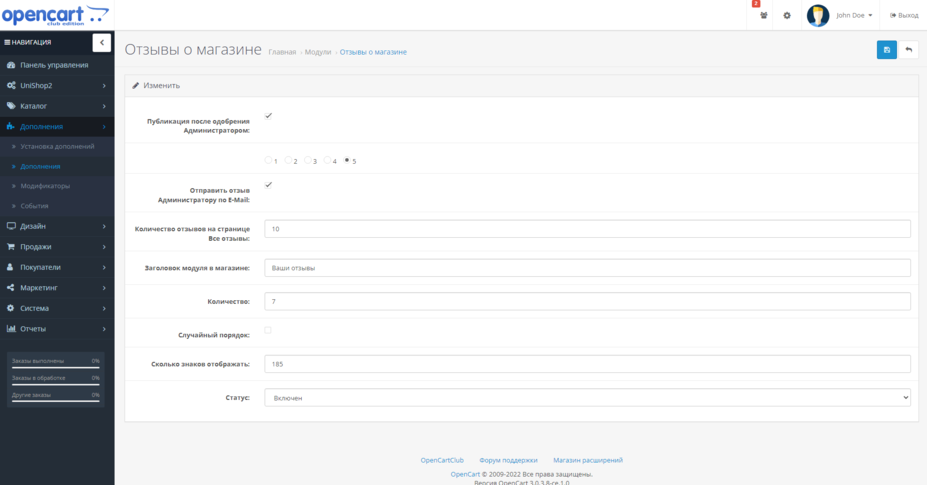
In the settings you can set :
Installation:
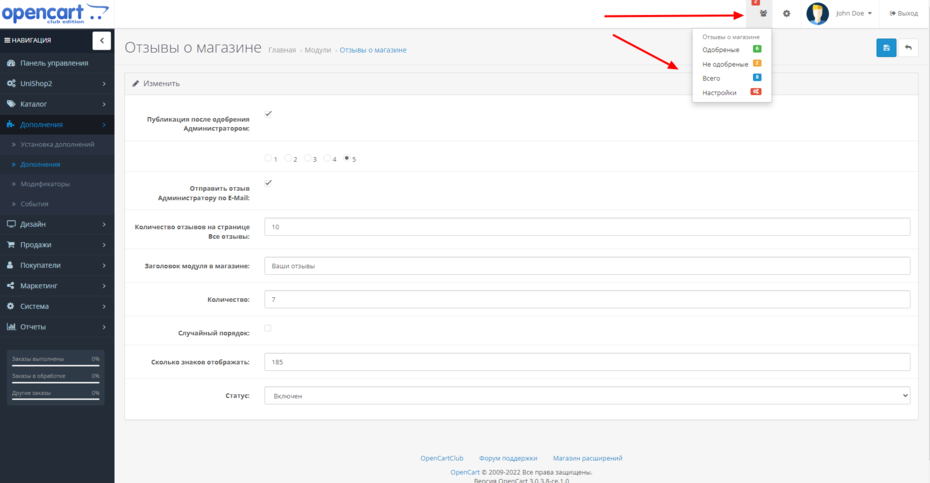
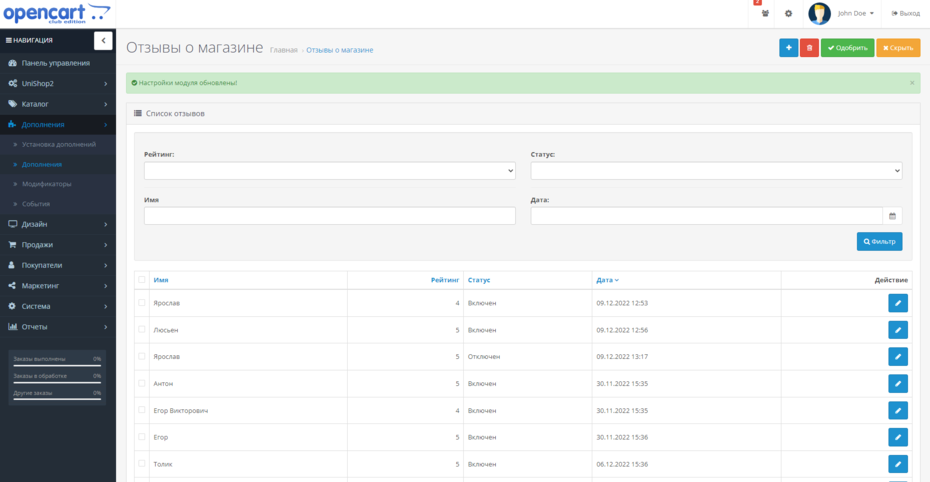
After setting up and enabling the module, I recommend adding 4-5 reviews yourself, since the module without any of them will not be displayed in the store. In order to do this, at the top of the store in the admin panel, click on the module icon and follow the “Total” link (All reviews). You will be redirected to the list page, where further in the store all reviews received from customers through this module will be stored. Click on the Plus icon at the top. Fill in and outforget to set the status to "Enabled". Save.
Creating Layout/Schemes for module pages.
A list of all reviews in your store will be displayed on the page your_site/index.php?route=extension/module/testimonial_list
To be able to add other modules to this page, open Design - Layouts (Schemes) in the admin panel, click on the Plus icon at the top to add.
The layout name is arbitrary, for example “Store reviews”
Route (Path) extension/module/testimonial_list
Save. Now you can display on this page, for example, the Categories module in the left column, Best Sellers in the footer, etc.
If necessary, you can similarly create a diagram for a separate page for writing a review. It contains the path extension/module/posttestimonial.
Short links (NC).If you need to assign short links to the page of all reviews, open Design - CNC (SEOURL) in the admin panel, click Add
In the very top line, enter: extension/module/testimonial_list
Below is the desired short link, for example "otzyvy_o_magazine".
Save. Now your page should open via the link your_site/otzyvy_o_magazine
If etc. does not open, check the settings of the CNC itself in the store. The module does not participate in these settings, it only uses them.
Attention!
I recommend that you enable captcha in the settings, which will avoid problems with spam, not only in this module, but in the store in general!
The module is distributed "as is". Technical support is not provided!
A separate version has been added for users of the Unishop2 template, withadaptation to the appearance of the template.
Testimonial_Unishop2.ocmod.zip
For everyone else
testimonial_V3.ocmod.zip
For coffee!
And also display these reviews in any layout and part of your store!
In the settings you can set :
- Default rating for new reviews.
- The need (on/off) to notify the store administration by email about a new review.
- The ability to enable publication immediately after writing a review or only after moderation (in case of spam or inappropriate messages).
- Specify the limit (number of reviews) that are displayed on a separate module page.
- Set your own header to display reviews as a module in anyscheme.
- Apply “random order” for reviews (by default, new ones first).
- In the admin panel there is an informer to notify about new reviews, which allows you, without going to the reviews page in the admin panel, to know the number of all reviews or those that, for example, are still under moderation (not approved).
- You, as a store administrator, have the ability to filter reviews by rating, customer name, status, etc.
- You can also completely edit the review itself or even create your own.
- The store administrator also has the opportunity to respond to the review. Moreover, the answer can contain not only text, but also images, videos, etc., since a full-fledged text is usededitor.
Installation:
- Installation via the admin panel, section Add-ons - Installing add-ons or via FTP.
- Install the module in the list of all store modules.
- Users - User group, grant permissions: extension/module/testimonial and extension/testimonial_list.
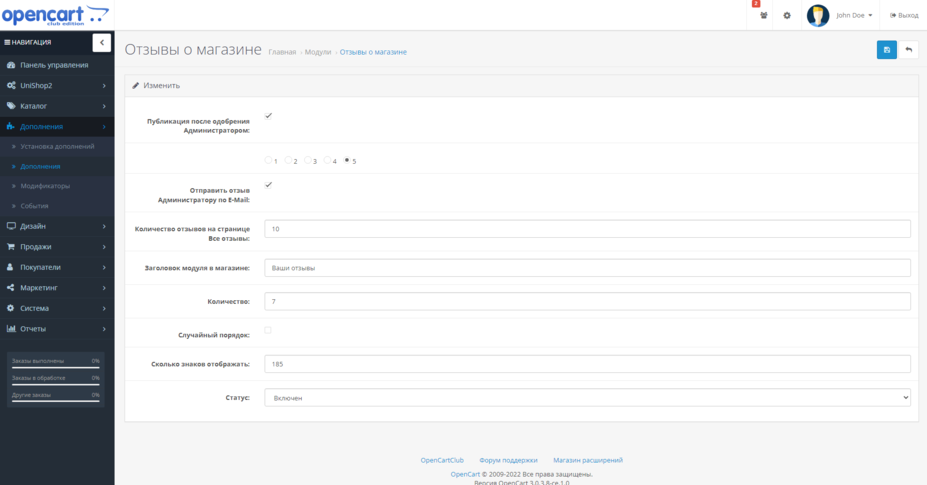
- Open the module settings "Reviews of store":
- Publishing after approval by the Administrator: - allows you to limit the publication of reviews without moderating them. The review will be hidden until approved by the admin. If you do not need moderation, do not check this settings item.
- Default rating: - Here you can specifydefault rating of new reviews. If, for example, you don’t want to have them below a certain value.
- Send feedback to the Administrator by E-Mail: - the add-on enables or disables sending a notification letter to you about a new review.
- Number of reviews on the page All reviews: - an add-on for setting a limit on the number of reviews displayed on one page. Recommended value 10.
- Module title in the store: - here you can set the desired name of the module to be displayed in the store.
- Quantity: - Add-on for specifying the number of reviews in the module itself (not on the page of all reviews).
- Random order: - Add-on which allows the module to display reviews randomlyok (but new ones first). Not suitable for those cases when you want reviews to appear as they are added.
- How many characters to display: - Add-on for limiting the length of review text in the module.
- Status: - Enables / Disables the module.
After setting up and enabling the module, I recommend adding 4-5 reviews yourself, since the module without any of them will not be displayed in the store. In order to do this, at the top of the store in the admin panel, click on the module icon and follow the “Total” link (All reviews). You will be redirected to the list page, where further in the store all reviews received from customers through this module will be stored. Click on the Plus icon at the top. Fill in and outforget to set the status to "Enabled". Save.
Creating Layout/Schemes for module pages.
A list of all reviews in your store will be displayed on the page your_site/index.php?route=extension/module/testimonial_list
To be able to add other modules to this page, open Design - Layouts (Schemes) in the admin panel, click on the Plus icon at the top to add.
The layout name is arbitrary, for example “Store reviews”
Route (Path) extension/module/testimonial_list
Save. Now you can display on this page, for example, the Categories module in the left column, Best Sellers in the footer, etc.
If necessary, you can similarly create a diagram for a separate page for writing a review. It contains the path extension/module/posttestimonial.
Short links (NC).If you need to assign short links to the page of all reviews, open Design - CNC (SEOURL) in the admin panel, click Add
In the very top line, enter: extension/module/testimonial_list
Below is the desired short link, for example "otzyvy_o_magazine".
Save. Now your page should open via the link your_site/otzyvy_o_magazine
If etc. does not open, check the settings of the CNC itself in the store. The module does not participate in these settings, it only uses them.
Attention!
I recommend that you enable captcha in the settings, which will avoid problems with spam, not only in this module, but in the store in general!
The module is distributed "as is". Technical support is not provided!
A separate version has been added for users of the Unishop2 template, withadaptation to the appearance of the template.
Testimonial_Unishop2.ocmod.zip
For everyone else
testimonial_V3.ocmod.zip
For coffee!
Distribution method:
Free
Opencart version:
LiveStore 3.*OCStore 3.*OpenCart 3.*OCStore 2.3
PHP verision:
PHP 7.1PHP 7.3PHP 7.4
Activation:
Not required
Getting files:
On site, in the personal account
Protection system:
No
VQmod:
No
Ocmod:
Yes
Events:
No
Uploaded:
01.12.2023
Updated:
06.07.2026
Viewed:
5944
Write a review
Your Name:Your Review: Note: HTML is not translated!
Rating: Bad Good
Enter the code in the box below:
To download this free product, you do not need to order it, just log in.
Sanya222 / 12 June 2026 01:08:35 #
Крутой и бесплатный модуль! Жаль только нельзя дату добавления отзыва менять
Войдите, чтобы ответить
collapse the branch
Sanya222 / 12 June 2026 01:31:36 #
Прошу прощения мои слова про изменения даты неверны! Дату можно изменить в админке
Войдите, чтобы ответить
Andrey50 / 25 January 2026 01:09:08 #
Ошибка в ссылке на скачивание: Описание "Отзывы о магазине Opencart 2" а скачивается Testimonial_Unishop2.ocmod . Исправьте, чтобы не вводить в заблуждение.
Войдите, чтобы ответить
collapse the branch
Tom / автор / 25 January 2026 02:20:12 #
Для скачивания доступны версии как для opencart 2 , так и opencart 3, по этой причине и названия архивов соответственно их версий опенкарт.
Войдите, чтобы ответить
MAG / 19 March 2025 12:55:45 #
какие языки поддерживает модуль и можно ли его вывести в главное меню?
Войдите, чтобы ответить
collapse the branch
Tom / автор / 19 March 2025 14:24:40 #
Русский язык. В меню вывод вы должны сделать сами.
Войдите, чтобы ответить
MAG / 19 March 2025 12:51:16 #
для опенкарта 3038 подойдет?
Войдите, чтобы ответить
collapse the branch
Tom / автор / 19 March 2025 14:48:45 #
Не тестировал.
Войдите, чтобы ответить
Rahashan / 19 February 2025 23:21:27 #
Установил модуль на ocStore 2.3, дал разрешения. При нажатии на кнопку Установить в Дополнениях пишем "error"... И все - непонятно, куда копать дальше! Тех поддержка не предусмотрена...
Войдите, чтобы ответить
collapse the branch
Tom / автор / 20 February 2025 15:29:44 #
Я указал версии , которые поддерживает модуль. Ну а если их не читать, то ещё более странно ставить минусовой отзыв, если причина не во мне.
Войдите, чтобы ответить
kate-rd / 11 September 2024 19:22:38 #
Установила уже третий модификатор автора и все полезные для любого магазина. Спасибо большое, Tom!
Войдите, чтобы ответить
Showing 1 to 11 of 11 (1 Pages)


