Your shopping cart is empty!

Contact via messenger
15 sales

Price: 550 ₽
From 3 purchase of this product, the price is: 400 ₽

Additional from the author:
Author: Serbulenko
Write to the author
Sales: 15 (Average rating 0 на основании 0 отзывов)
Need paid help? Contact the site administration
Opencart version:
Sales: 15 (Average rating 0 на основании 0 отзывов)
Need paid help? Contact the site administration
Opencart version:
LiveStore 3.*OCStore 3.*OpenCart 3.*OCStore 2.3OpenCart 2.3OpenCart 2.2OCStore 2.1OpenCart 2.1OpenCart 2.0
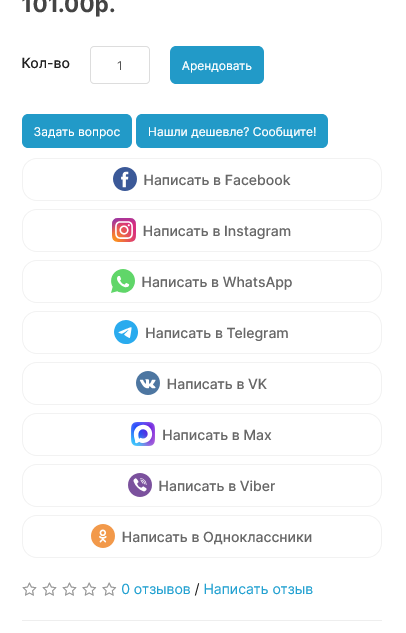
The module "Contact in messenger" adds communication buttons through popular instant messengers and social networks to the product card: Telegram, Max, WhatsApp, Viber, Instagram, Facebook, VK, Odnoklassniki.
Buyers often need to clarify product characteristics, availability, delivery times, or terms of purchase before placing an order. The module allows you to do this quickly and conveniently - through familiar messengers, without calls and complex feedback forms.
The use of instant messengers reduces the barrier to communication, increases trust in the online store and helps you make a faster purchasing decision. The buttons are neatly integrated into the design of the product card and are displayed correctly on mobile devices and computers.
DEMO
Advantages of the module:
If you are using a non-default theme, you may need adaptation to your theme (adaptation is paid for from 500 rubles);
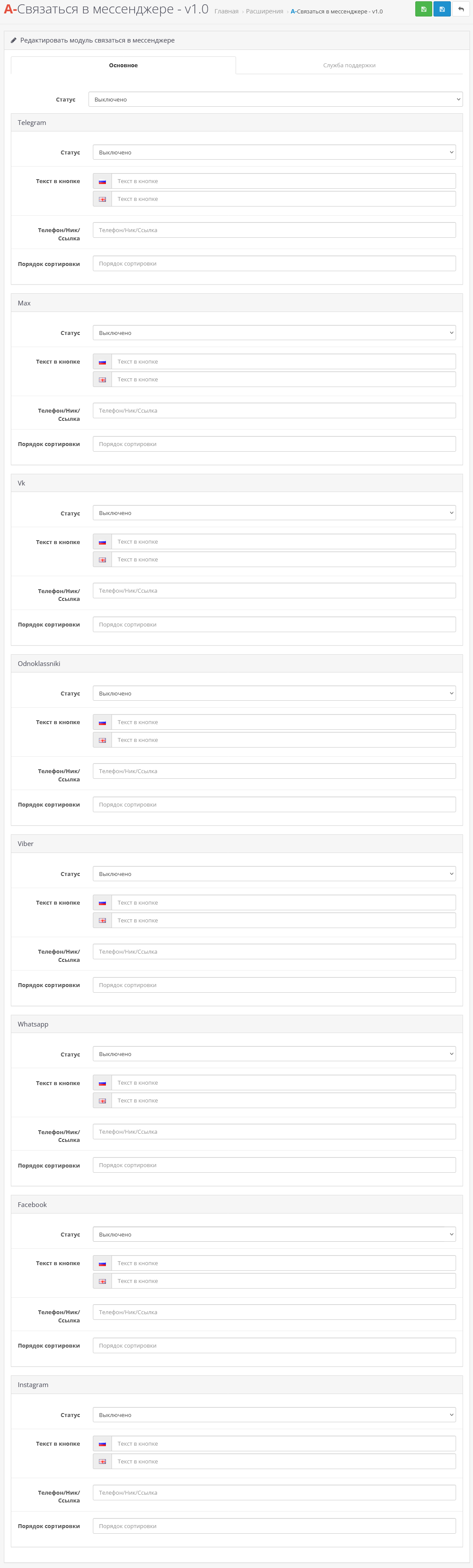
In the module settings you can:
Technical support is provided to all users who legally purchased the module on official websites or from the author himself.
License:
Each copy of the module affects 1 domain and its subdomain.
Therefore, if you want to install the module on another domain, you must purchase another copy of the module.
For all questions and suggestions, write to serfbots@gmail.com
Buyers often need to clarify product characteristics, availability, delivery times, or terms of purchase before placing an order. The module allows you to do this quickly and conveniently - through familiar messengers, without calls and complex feedback forms.
The use of instant messengers reduces the barrier to communication, increases trust in the online store and helps you make a faster purchasing decision. The buttons are neatly integrated into the design of the product card and are displayed correctly on mobile devices and computers.
DEMO
Advantages of the module:
- connection with the store in one click
- support for popular instant messengers and social networks
- convenience for mobile and desktop users
- increasing engagement and conversion
- universal solution for any niche
- easy installation and configuration
If you are using a non-default theme, you may need adaptation to your theme (adaptation is paid for from 500 rubles);
In the module settings you can:
- enabling and disabling the necessary instant messengers and social networks
- you can set your phone number/nickname/link for each social. networks
- setting the display order of buttons (sorting)
- opportunity to set your own text for each button
- Install the art_messenger_contact.ocmod.zip archive through the standard add-on manager;
- Update the modifiers;
- Then go to extensions->modules and find “A-Contact in messenger”, activate it;
- Go to the module settings and configure it for yourself;
Technical support is provided to all users who legally purchased the module on official websites or from the author himself.
License:
Each copy of the module affects 1 domain and its subdomain.
Therefore, if you want to install the module on another domain, you must purchase another copy of the module.
For all questions and suggestions, write to serfbots@gmail.com
Distribution method:
Paid
Opencart version:
LiveStore 3.*OCStore 3.*OpenCart 3.*OCStore 2.3OpenCart 2.3OpenCart 2.2OCStore 2.1OpenCart 2.1OpenCart 2.0
PHP verision:
PHP 5.4PHP 5.5PHP 5.6PHP 7.0PHP 7.1PHP 7.2PHP 7.3PHP 7.4PHP 8.0PHP 8.1PHP 8.2
Activation:
Automatic
Getting files:
By email, after a request to the author
VQmod:
No
Ocmod:
Yes
Events:
No
Uploaded:
12.01.2026
Updated:
12.05.2026
Viewed:
3606
Sales:
15
Write a review
Your Name:Your Review: Note: HTML is not translated!
Rating: Bad Good
Enter the code in the box below:
Файлы будут доступны после покупки
Articles about the product


Modules for the Max messenger allow you to establish quick and convenient contact with customers, automate notifications and simplify authorization, increasing ...


