Your shopping cart is empty!

Product Page Coupons

Price: 990 ₽ 1 500 ₽

Additional from the author:
Author: Serbulenko
Write to the author
Sales: 2 (Average rating 5 на основании 1 отзывов)
Need paid help? Contact the site administration
Opencart version:
Sales: 2 (Average rating 5 на основании 1 отзывов)
Need paid help? Contact the site administration
Opencart version:
LiveStore 3.*OCStore 3.*OpenCart 3.*
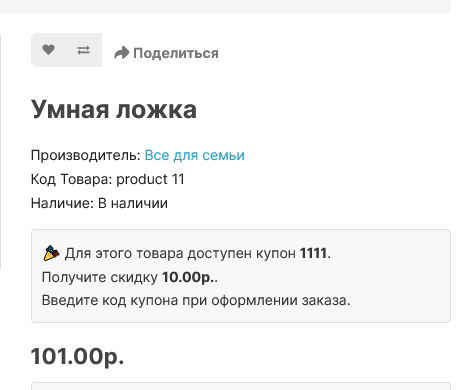
Show customers available coupons directly in the product card and increase conversion and average check.
The module automatically finds the best coupon for the product and displays it on the product page. The buyer immediately sees a possible discount and is more likely to place an order.
This is a great tool for increasing sales and promoting promotions in your OpenCart store.
Module capabilities
• automatic selection of the appropriate coupon for the product
• coupon output directly in the product card
• display the nearest coupon if the minimum amount has not yet been reached
• separate messages for coupons available after user authorization
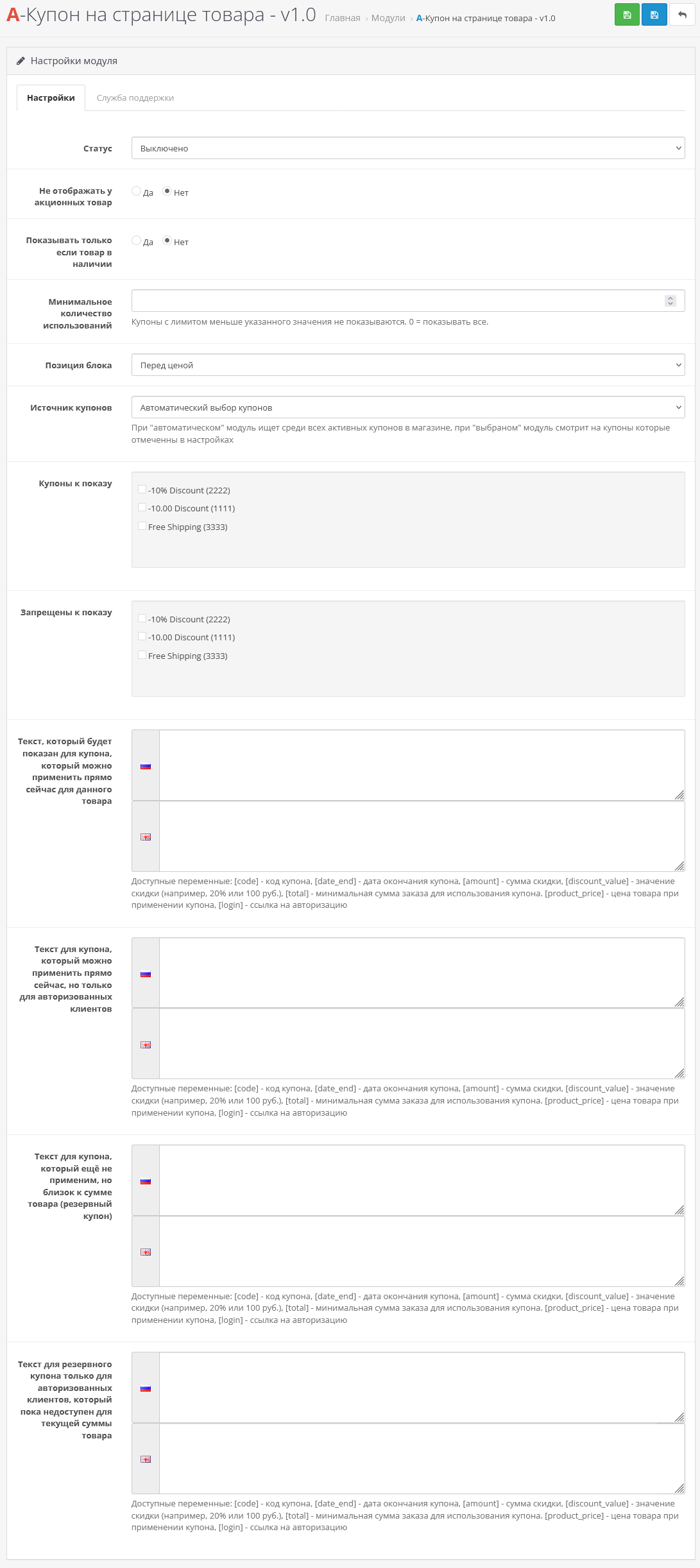
• selection of coupon source (automatically or only selected ones)
• the ability to exclude certain coupons
• accountingspecial price of goods
• ability to hide a block if the product is out of stock
• taking into account the coupon usage limit
• selection of block position (before or after the product price)
• HTML and multilingual support
Supported variables
You can use dynamic variables for your template:
[code] - coupon code
[date_end] — end date
[amount] — discount amount
[discount_value] — discount value (for example 10% or 500 ₽)
[total] — minimum order amount
[product_price] — price of the product when applying the coupon
[login] — authorization link
If you are using a non-default theme, you may need adaptation to your theme (adaptation is paid from 500 rubles);You also use third-party modules for coupons, they most likely also need to be adapted to the module so that it can work with them and does not show coupons that do not work
DEMO
Upon request in PM, I will make versions for opencart 2.x versions
Installation instructions:
Technical support is provided to all users who legally purchased the module on official websites or from the author himself.
License:
Each copy of the module affects 1 domain and its subdomain.
Therefore, if you want to install the module on another domain, you must purchase another copy of the module.
For all questions and suggestions write to serfbots@gmail.com
My Telegram channel with news and updates on modules @minilarek
The module automatically finds the best coupon for the product and displays it on the product page. The buyer immediately sees a possible discount and is more likely to place an order.
This is a great tool for increasing sales and promoting promotions in your OpenCart store.
Module capabilities
• automatic selection of the appropriate coupon for the product
• coupon output directly in the product card
• display the nearest coupon if the minimum amount has not yet been reached
• separate messages for coupons available after user authorization
• selection of coupon source (automatically or only selected ones)
• the ability to exclude certain coupons
• accountingspecial price of goods
• ability to hide a block if the product is out of stock
• taking into account the coupon usage limit
• selection of block position (before or after the product price)
• HTML and multilingual support
Supported variables
You can use dynamic variables for your template:
[code] - coupon code
[date_end] — end date
[amount] — discount amount
[discount_value] — discount value (for example 10% or 500 ₽)
[total] — minimum order amount
[product_price] — price of the product when applying the coupon
[login] — authorization link
If you are using a non-default theme, you may need adaptation to your theme (adaptation is paid from 500 rubles);You also use third-party modules for coupons, they most likely also need to be adapted to the module so that it can work with them and does not show coupons that do not work
DEMO
Upon request in PM, I will make versions for opencart 2.x versions
Installation instructions:
- Install the archive art_product_coupon.ocmod via the standard add-on manager;
- Then go to extensions->modules and find “A-Coupon on the product page” activate it;
- Go to the module settings and customize it for yourself;
Technical support is provided to all users who legally purchased the module on official websites or from the author himself.
License:
Each copy of the module affects 1 domain and its subdomain.
Therefore, if you want to install the module on another domain, you must purchase another copy of the module.
For all questions and suggestions write to serfbots@gmail.com
My Telegram channel with news and updates on modules @minilarek
Distribution method:
Paid
Opencart version:
LiveStore 3.*OCStore 3.*OpenCart 3.*
PHP verision:
PHP 5.4PHP 5.5PHP 5.6PHP 7.0PHP 7.1PHP 7.2PHP 7.3PHP 7.4PHP 8.0PHP 8.1PHP 8.2
Activation:
Automatic
Getting files:
By email, after a request to the author
VQmod:
No
Ocmod:
Yes
Events:
No
Uploaded:
07.03.2026
Updated:
07.03.2026
Viewed:
2440
Sales:
2
Write a review
Your Name:Your Review: Note: HTML is not translated!
Rating: Bad Good
Enter the code in the box below:
Файлы будут доступны после покупки
fedos777 / купил товар / 04 August 2026 10:19:36 #
Модуль классный, настройки интуитивно понятны. Пользуйтесь доп услугой по установке, разработчик быстро отвечает, быстро устанавливает. Очень удобно, рекомендую и модуль и разработчика!
Войдите, чтобы ответить
Showing 1 to 1 of 1 (1 Pages)


