Your shopping cart is empty!

Spring character
5 sales

Price: 300 ₽ 550 ₽

Additional from the author:
Author: Serbulenko
Write to the author
Sales: 5 (Average rating 5 на основании 1 отзывов)
Need paid help? Contact the site administration
Opencart version:
Sales: 5 (Average rating 5 на основании 1 отзывов)
Need paid help? Contact the site administration
Opencart version:
LiveStore 3.*OCStore 3.*OpenCart 3.*
Give your customers a real spring mood! ?
On the eve of 8 March and the spring holidays, each online store tries to create a cozy and festive atmosphere. Small design elements help attract customers' attention, increase engagement and remind them of special offers.
With the module "Spring Character" your site comes to life: a cute character appears on the page who greets visitors and helps tell about your promotions or congratulations.
The module is great for:
The module adds a spring character to the site:
When you click on a character, a pop-up window opens where you canyou can put whatever you want:
Flexible settings
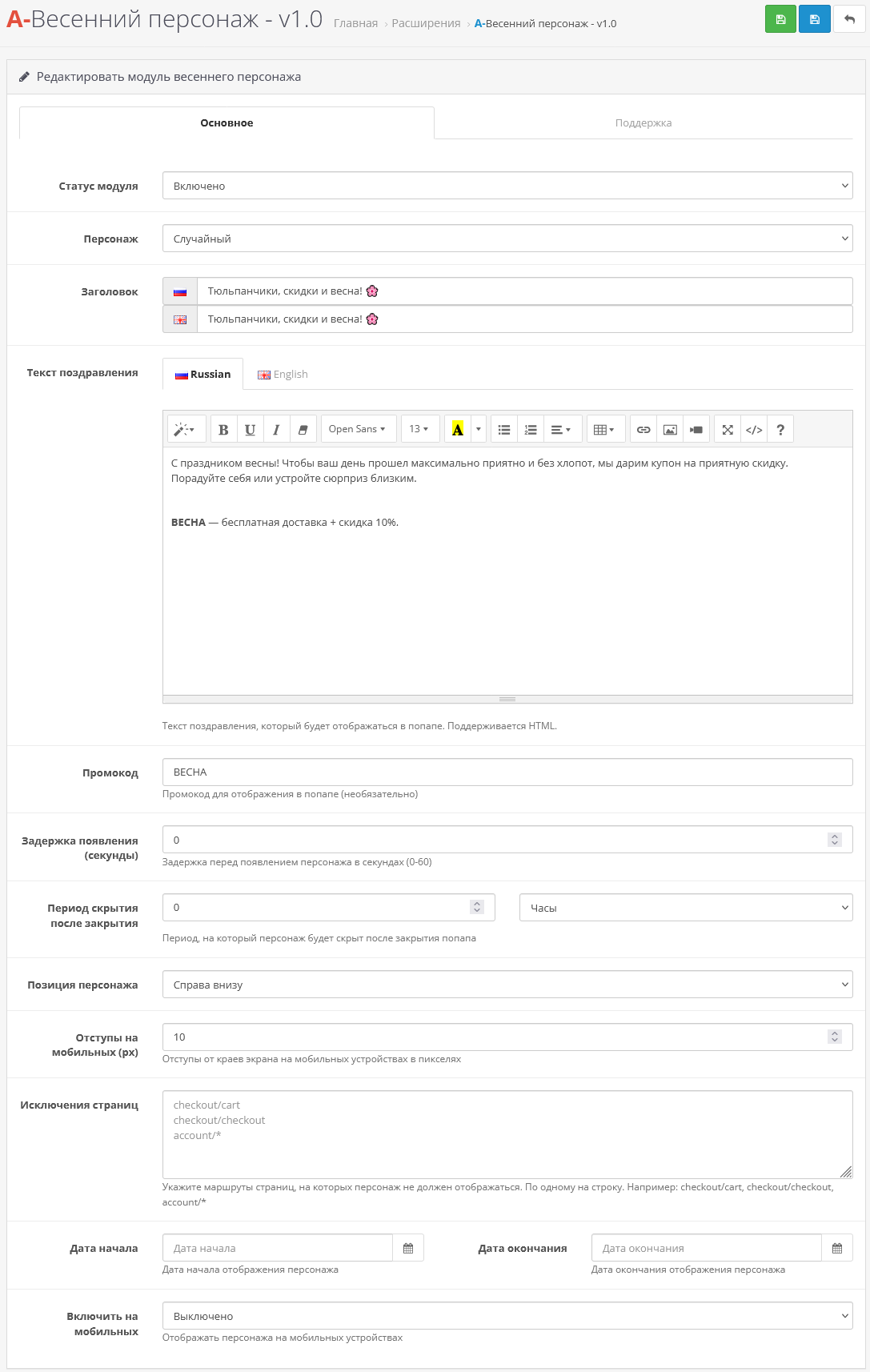
The module allows you to configure:
Upon request in PM, I will make versions for opencart 2.x versions
Installation instructions:
Technical support is provided to all users who legally purchased the module on official websites or from the author himself.License:
Each copy of the module affects 1 domain and its subdomain.
Therefore, if you want to install the module on another domain, you must purchase another copy of the module.
For all questions and suggestions, write to serfbots@gmail.com
My Telegram channel with news and updates on modules @minilarek
On the eve of 8 March and the spring holidays, each online store tries to create a cozy and festive atmosphere. Small design elements help attract customers' attention, increase engagement and remind them of special offers.
With the module "Spring Character" your site comes to life: a cute character appears on the page who greets visitors and helps tell about your promotions or congratulations.
The module is great for:
- congratulations to customers on 8 March
- information about spring discounts and promotions
- displayspromo codes or gifts
- creating a festive website design
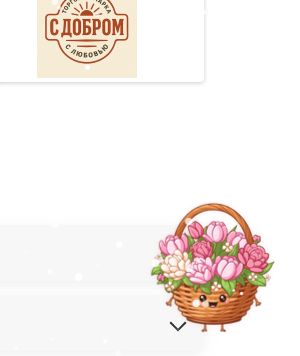
The module adds a spring character to the site:
- ? Character flower is a cute flower with kind eyes.
- ? Tulip is an elegant spring flower, a symbol of celebration and beauty.
- ? Flower basket - an elegant basket with a spring bouquet.
- ? Spring gift is a bright gift box hinting at pleasant surprises.
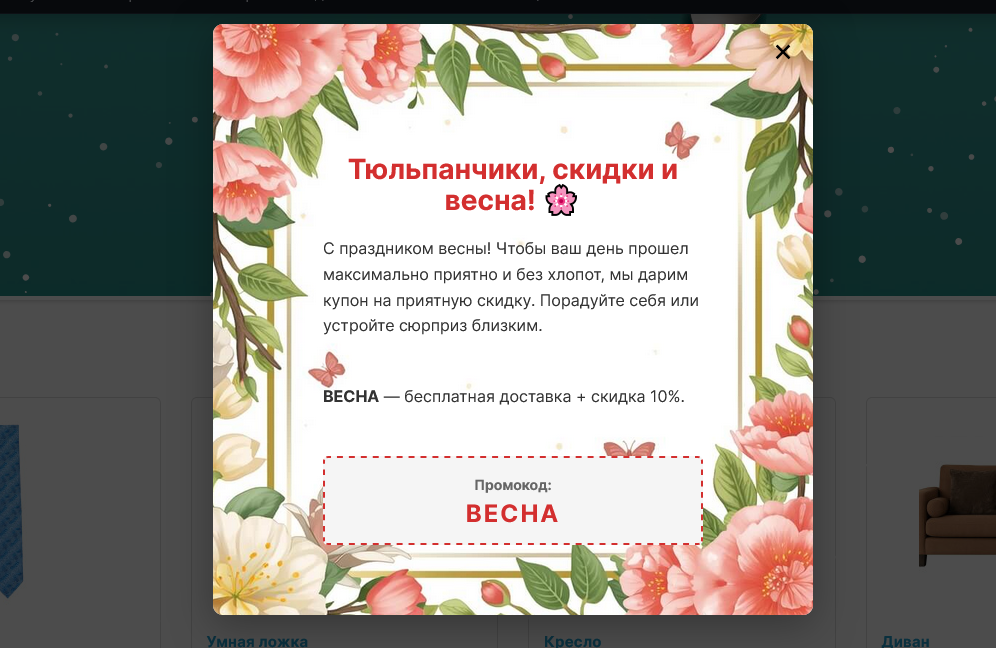
When you click on a character, a pop-up window opens where you canyou can put whatever you want:
- warm congratulations on the upcoming holidays;
- personal promotional code for a discount;
- information about seasonal promotions, gift selections or opening hours during the holidays
Flexible settings
The module allows you to configure:
- character selection
- text of message or congratulations
- display period (for example, only before March 8)
- character appearance delay
- display location on page
- exceptions (for example, do not show in the cart or personal account)
Upon request in PM, I will make versions for opencart 2.x versions
Installation instructions:
- Install the archive art_spring_character.ocmod.zip via the standard add-on manager;
- Afterwards go to extensions->modules and find “A-Spring character” activate it;
- Go to the module settings and customize it for yourself;
Technical support is provided to all users who legally purchased the module on official websites or from the author himself.License:
Each copy of the module affects 1 domain and its subdomain.
Therefore, if you want to install the module on another domain, you must purchase another copy of the module.
For all questions and suggestions, write to serfbots@gmail.com
My Telegram channel with news and updates on modules @minilarek
Distribution method:
Paid
Opencart version:
LiveStore 3.*OCStore 3.*OpenCart 3.*
PHP verision:
PHP 5.4PHP 5.5PHP 5.6PHP 7.0PHP 7.1PHP 7.2PHP 7.3PHP 7.4PHP 8.0PHP 8.1PHP 8.2
Activation:
Automatic
Getting files:
On site, in the personal account
Protection system:
Custom
VQmod:
No
Ocmod:
Yes
Events:
No
Uploaded:
05.03.2026
Updated:
18.05.2026
Viewed:
2142
Sales:
5
Write a review
Your Name:Your Review: Note: HTML is not translated!
Rating: Bad Good
Enter the code in the box below:
Файлы будут доступны после покупки
wel / купил товар / 07 March 2026 16:07:15 #
Отличный модуль для увеличения времени на сайте. Девачки любят цвяточки)
Войдите, чтобы ответить
Showing 1 to 1 of 1 (1 Pages)


