Your shopping cart is empty!

Quantity of purchased item for UniShop2 (OpenCart3)

Price: free
Author: Владимир
Write to the author
Need paid help? Contact the site administration
Opencart version:
Need paid help? Contact the site administration
Opencart version:
LiveStore 3.*OCStore 3.*OpenCart 3.*
Modifier for OpenCart 3. Will not work with other versions!
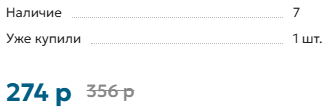
This add-on adds to the product card a display of the total number of copies of this product sold. On the product page, next to the stock balance, a line appears with the text “Already purchased: X items,” where X is the total number of product units purchased in completed orders (with the status “Completed”).
Main features:
DThis modifier is distributed as is, the author of the modifier does not provide support or assistance with installation. You can make all changes YOURSELF!
I made this modifier for myself, maybe it will be useful to someone else.

This add-on adds to the product card a display of the total number of copies of this product sold. On the product page, next to the stock balance, a line appears with the text “Already purchased: X items,” where X is the total number of product units purchased in completed orders (with the status “Completed”).
Main features:
- Shows customers how many times this product has already been purchased.
- Does not affect the standard display of product availability in the warehouse.
- Automatically counts sales only for completed orders (order_status_id = 5).
- Easy integration - does not require manual edits in the template or code.
- For stores on OpenCart with the Unishop2 theme that want to increase trust in products and increase conversion through social proof.
- Install the modifier through the standard OpenCart add-on manager.
- Clear the modification cache and refresh the product page.
- In the product card, after the block with availability, the line “Already purchased: X pieces” appears if this product has already been purchased at least once.
- If there were no sales, the block is not displayed.
DThis modifier is distributed as is, the author of the modifier does not provide support or assistance with installation. You can make all changes YOURSELF!
I made this modifier for myself, maybe it will be useful to someone else.
Distribution method:
Free
Opencart version:
LiveStore 3.*OCStore 3.*OpenCart 3.*
PHP verision:
PHP 7.4
Activation:
Not required
Getting files:
On site, in the personal account
Protection system:
No
VQmod:
No
Ocmod:
Yes
Events:
No
Uploaded:
21.07.2025
Updated:
14.05.2026
Viewed:
2800
Write a review
Your Name:Your Review: Note: HTML is not translated!
Rating: Bad Good
Enter the code in the box below:
To download this free product, you do not need to order it, just log in.


Работает на Unishop2 3.5.5.1 и livestore 3.0.4.2
Остается только один вопросик: можно как-то сам текст выделить, например по жирнее и другим цветом. Это куда надо влезть?
Спасибо большое за ваш отзыв!
Если вы хотите изменить внешний вид выводимой информации, то вам нужно зайти в административной части вашего сайта в раздел "Расширения" - "Модификаторы" и найти там модификатор с названием "Количество купленных товаров UniShop2" и нажать кнопку "Редактировать" (иконка зеленого карандаша).
В самом конце кода модификатора найти вот этот кусок кода:
Чтобы добавить стили внесите изменения в эту строчку:
Можете использовать использовать инлайн-стили, либо вынести в отдельный CSS-класс и вставить ваш код CSS в настройках шаблона UniShop2 в раздел "Свои стили и скрипты".
Если нужен более сложный и гибкий функционал - обращайтесь, могу на платной основе сделать доработку под ваш запрос.