Your shopping cart is empty!

Order payment status for opencart 3.x

Price: free
Additional from the author:
Author: Serbulenko
Write to the author
Sales: 2 (Average rating 0 на основании 0 отзывов)
Need paid help? Contact the site administration
Opencart version:
Sales: 2 (Average rating 0 на основании 0 отзывов)
Need paid help? Contact the site administration
Opencart version:
LiveStore 3.*OCStore 3.*OpenCart 3.*
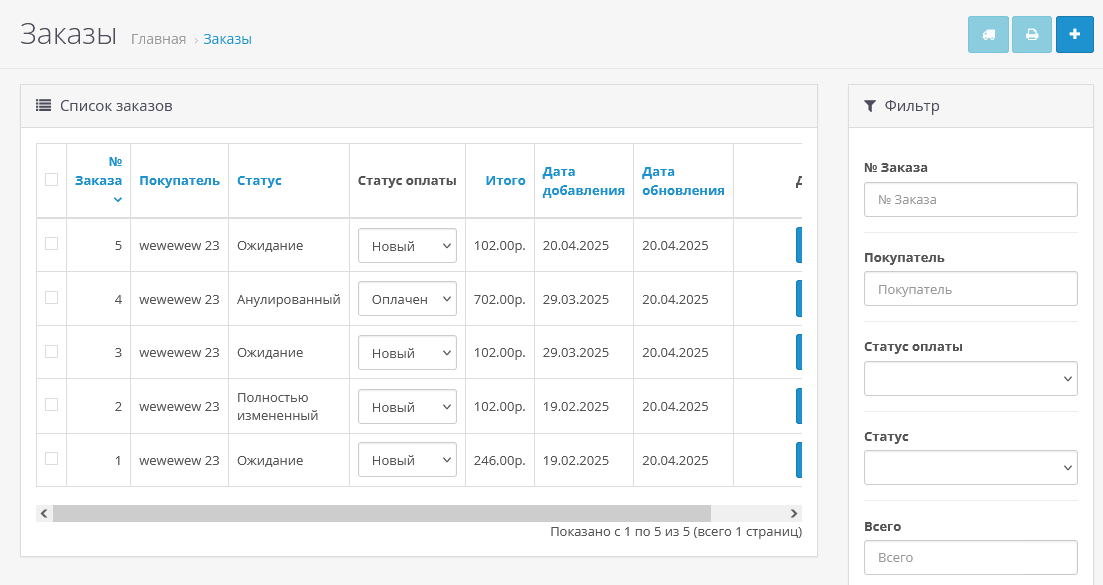
The module adds a separate field to the order for payment status, allowing you to accurately track whether the order has been paid, partially paid, awaits payment, etc. This is especially useful if you work with cash on delivery, prepayment, or manually mark the payment.
Module capabilities:
Technical support is provided to all users who legally purchased the module on official websites or from the author himself.
License:Each copy of the module affects 1 domain and its subdomain.
Therefore, if you want to install the module on another domain, you must purchase another copy of the module.
For all questions and suggestions write to serfbots@gmail.com
Module capabilities:
- Adds a separate field "Payment Status" to the order;
- It is possible to set automatic payment status for all new orders when they are created;
- History of status changespayment is recorded in the general order history - convenient for tracking;
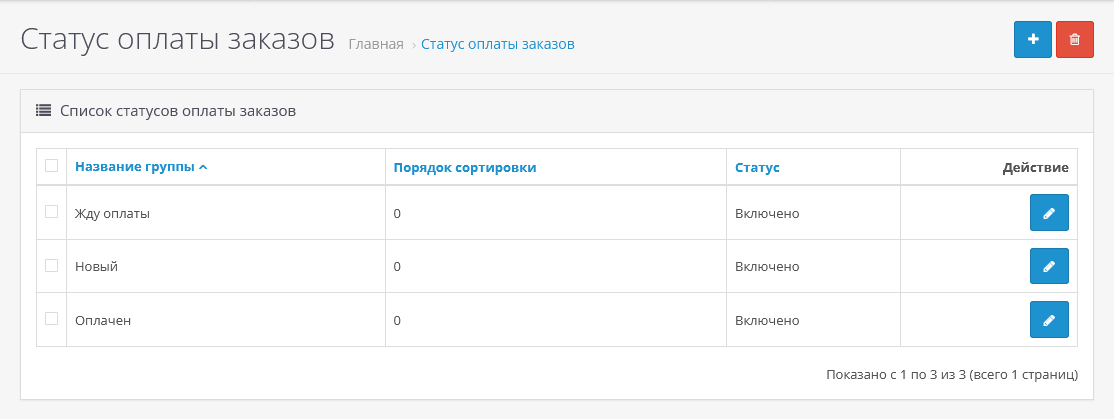
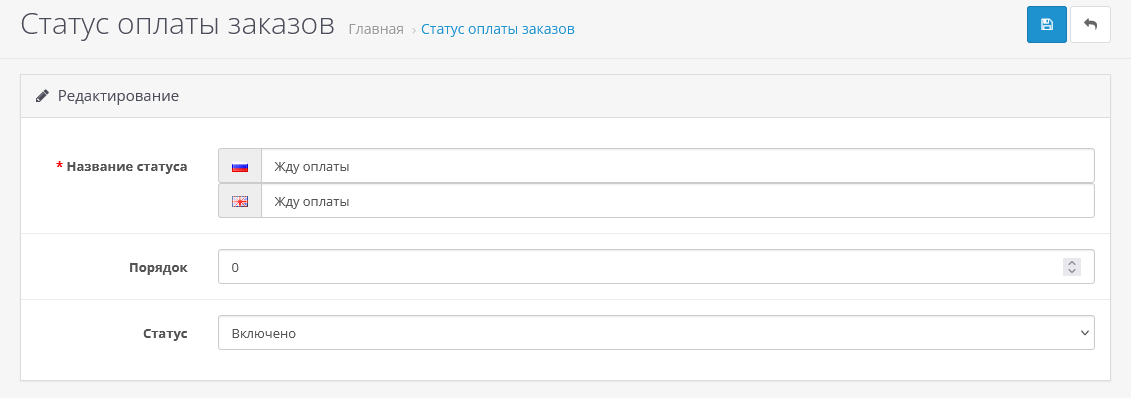
- Creating your own payment statuses;
- On the orders page, a filter by payment status has been added - simplifies the work of managers;
- To separate logistics and payment - the main order status can be used for processing stages, and the payment status can be used to control the receipt of funds;
- Convenient for stores working with prepayment, cash on delivery or multi-stage payment;
- Allowsquickly understand which order has been paid for and which one needs to be contacted by the client;
- Improves analytics and control - now payment data is more structured and accessible.
- Unzip the order_payment_status.zip archive;
- Upload the contents of the upload folder to the root of the site;
- Install the order_payment_status.ocmod.zip archive through a standard manager add-ons;
- Update the OCMOD cache;
- Go to the "System->User Groups" section, select the desired group and check the "Allowed viewing" and "Allowed changes" checkboxes next to localization/order_payment_status and save;
- Go to the section "System->Localization->Payment status of orders";
- Create the statuses you need;
- Go to the section "System->Settings"
- Go to the settings of the main store and click on the "Options" tab;
- Select the status that will be assigned by default to orders in the "Order payment status" field;
- Save settings;
Technical support is provided to all users who legally purchased the module on official websites or from the author himself.
License:Each copy of the module affects 1 domain and its subdomain.
Therefore, if you want to install the module on another domain, you must purchase another copy of the module.
For all questions and suggestions write to serfbots@gmail.com
Distribution method:
Free
Opencart version:
LiveStore 3.*OCStore 3.*OpenCart 3.*
PHP verision:
PHP 5.4PHP 5.5PHP 5.6PHP 7.0PHP 7.1PHP 7.2PHP 7.3PHP 7.4PHP 8.0PHP 8.1PHP 8.2PHP 8.3
Activation:
Automatic
Getting files:
On site, in the personal account
Protection system:
No
VQmod:
No
Ocmod:
Yes
Events:
No
Uploaded:
20.04.2025
Updated:
10.10.2026
Viewed:
4173
Sales:
2
Write a review
Your Name:Your Review: Note: HTML is not translated!
Rating: Bad Good
Enter the code in the box below:









To download this free product, you do not need to order it, just log in.


