Your shopping cart is empty!

Selecting products to purchase in the cart for opencart 3.x
15 sales
Price: 1 200 ₽ 1 500 ₽

Author: Serbulenko
Write to the author
Sales: 19 (Average rating 5 на основании 4 отзывов)
Need paid help? Contact the site administration
Opencart version:
Sales: 19 (Average rating 5 на основании 4 отзывов)
Need paid help? Contact the site administration
Opencart version:
LiveStore 3.*OCStore 3.*OpenCart 3.*
The "Select items to purchase in cart" module provides the buyer with the ability to manage the items in the cart, marking them for checkout or saving them for future use. This improves the shopping cart experience, making the shopping process flexible and intuitive.
Detailed functionality:
1. Selection of goods for registration:
Technical support is provided to all users who legally purchased the module on official websites or from the author himself.
License:
Each copy of the module affects 1 domain and its subdomain.
Therefore, if you want to install the module on another domain, you must purchase another copy of the module.
For all questions andsuggestions write to serfbots@gmail.com
Detailed functionality:
1. Selection of goods for registration:
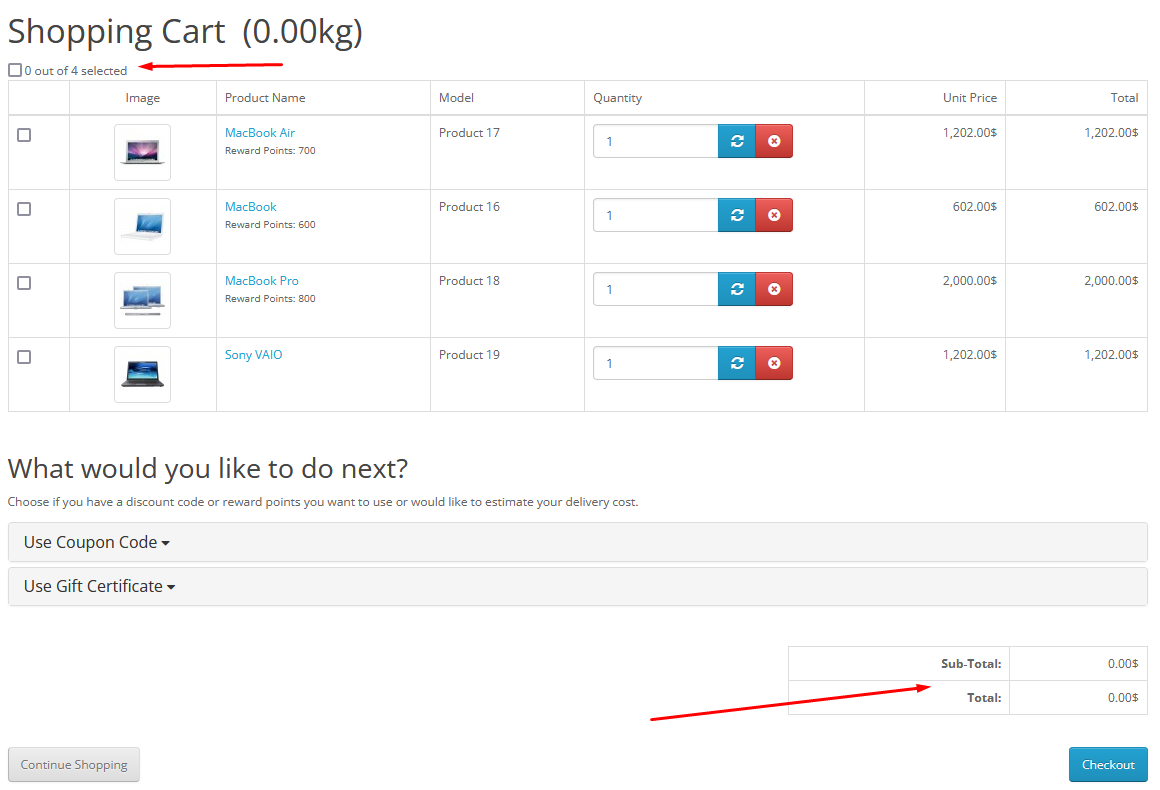
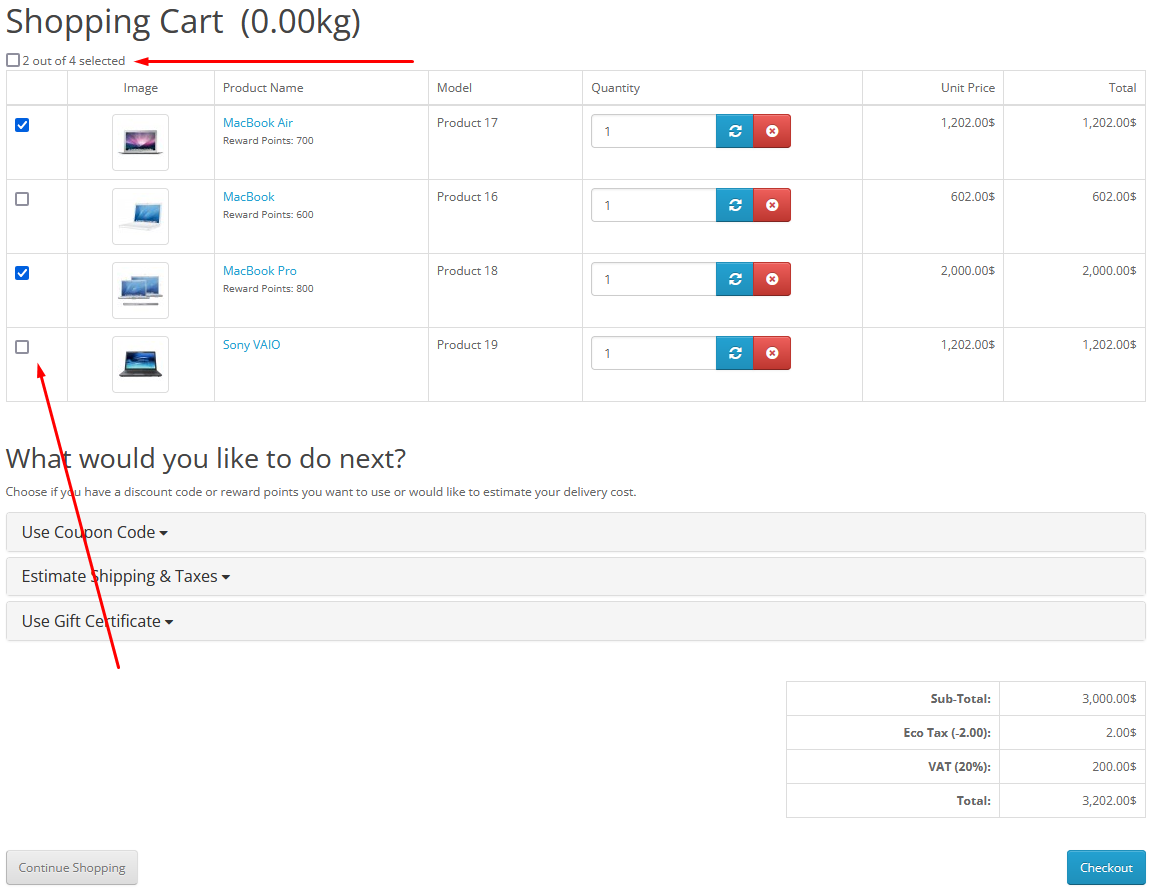
- Each item in the cart is displayed with a checkbox.
- The checkbox allows you to mark specific products for placing an order.
- Supports mass selection or deselection for all products through a single checkbox (for example, “Select all”).
- The number of selected products is displayed dynamically (for example, “2 out of 3 selected”).
- The total amount of only the selected products is calculated and displayed.
- Items not marked for checkout remain in the cart unchanged, available for selection next time.
- Flexibility. The user can select only those products that he wants to buy at the moment.
- Convenience. Clear indication of the number of selected products and theircost.
- Saving time. Quickly select the desired positions without deleting or complex manipulations.
- Improved user experience. The module allows you to avoid confusion with products and simplifies the ordering process.
- The module works only on the default cart page and on the checkout of the Simple module.
- Built-in pop-up cart templates or other checkout modules require paid customization.
- It is advisable to test the module on a test site before installing it on a production site to avoid possible failures or breakdownssite.
- Unzip the archive cart_status_3.x.zip;
- Upload the contents of the archive folder upload to the server;
- Install the archive cart_status_3.x.ocmod.zip through a standard manager addons;
- Update OCMOD cache;
Technical support is provided to all users who legally purchased the module on official websites or from the author himself.
License:
Each copy of the module affects 1 domain and its subdomain.
Therefore, if you want to install the module on another domain, you must purchase another copy of the module.
For all questions andsuggestions write to serfbots@gmail.com
Distribution method:
Paid
Opencart version:
LiveStore 3.*OCStore 3.*OpenCart 3.*
PHP verision:
PHP 5.4PHP 5.5PHP 5.6PHP 7.0PHP 7.1PHP 7.2PHP 7.3PHP 7.4
Activation:
Automatic
Getting files:
On site, in the personal account
VQmod:
No
Ocmod:
Yes
Events:
No
Uploaded:
13.01.2025
Updated:
27.03.2026
Viewed:
5137
Sales:
19
Write a review
Your Name:Your Review: Note: HTML is not translated!
Rating: Bad Good
Enter the code in the box below:
Файлы будут доступны после покупки


Спасибо автору за помощь ))