Your shopping cart is empty!

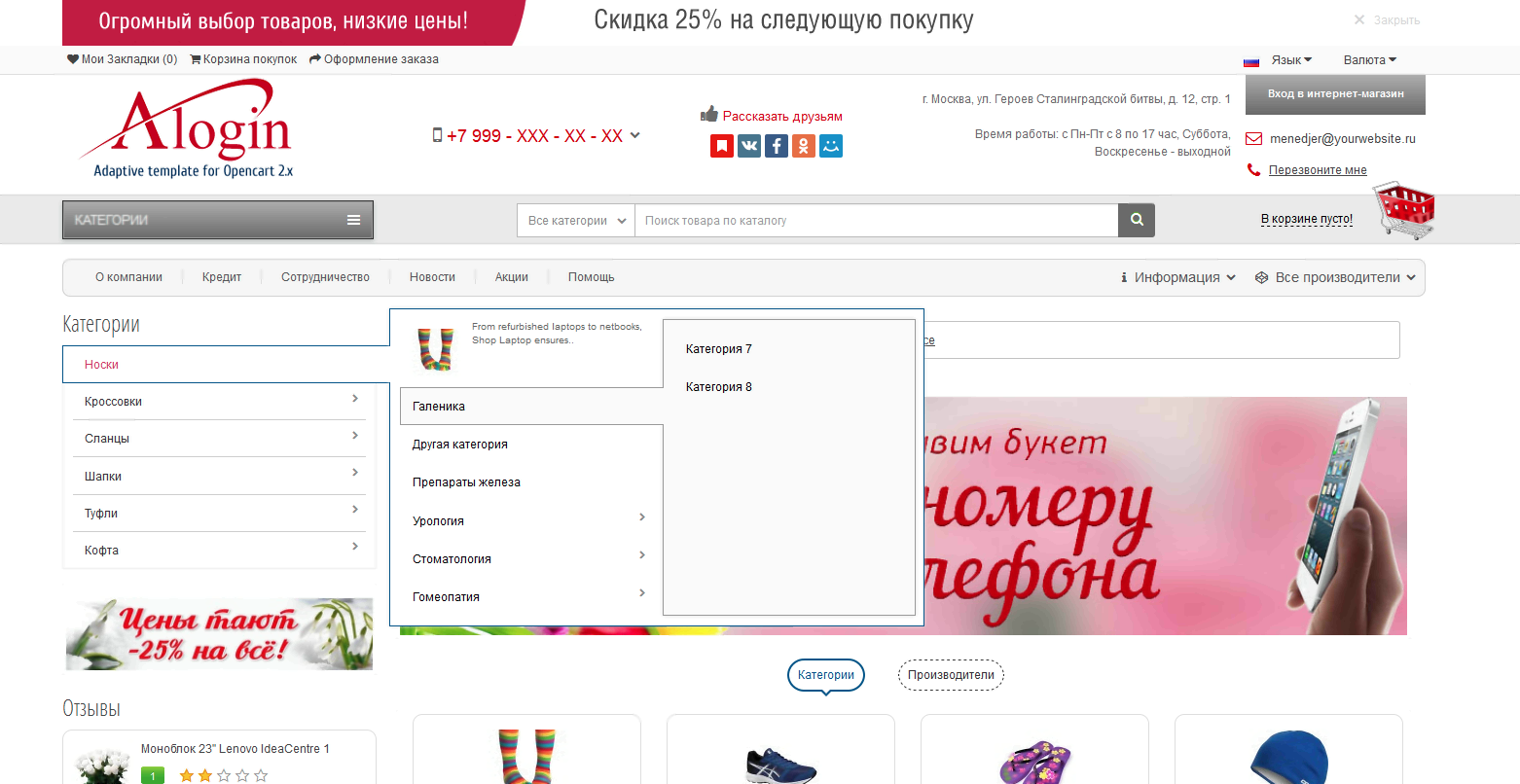
Multi-module adaptive template “Alogin” 3.0
15 sales

Price: 1 470 ₽

Author: Rostov85
Write to the author
Sales: 21 (Average rating 5 на основании 5 отзывов)
Need paid help? Contact the site administration
Opencart version:
Sales: 21 (Average rating 5 на основании 5 отзывов)
Need paid help? Contact the site administration
Opencart version:
OpenCart 3.*OCStore 2.3OCStore 2.1
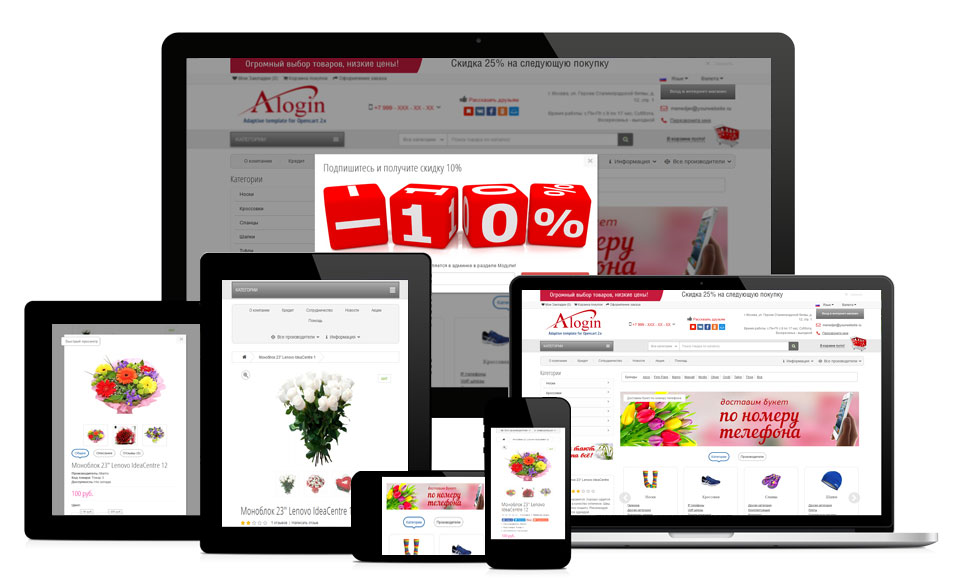
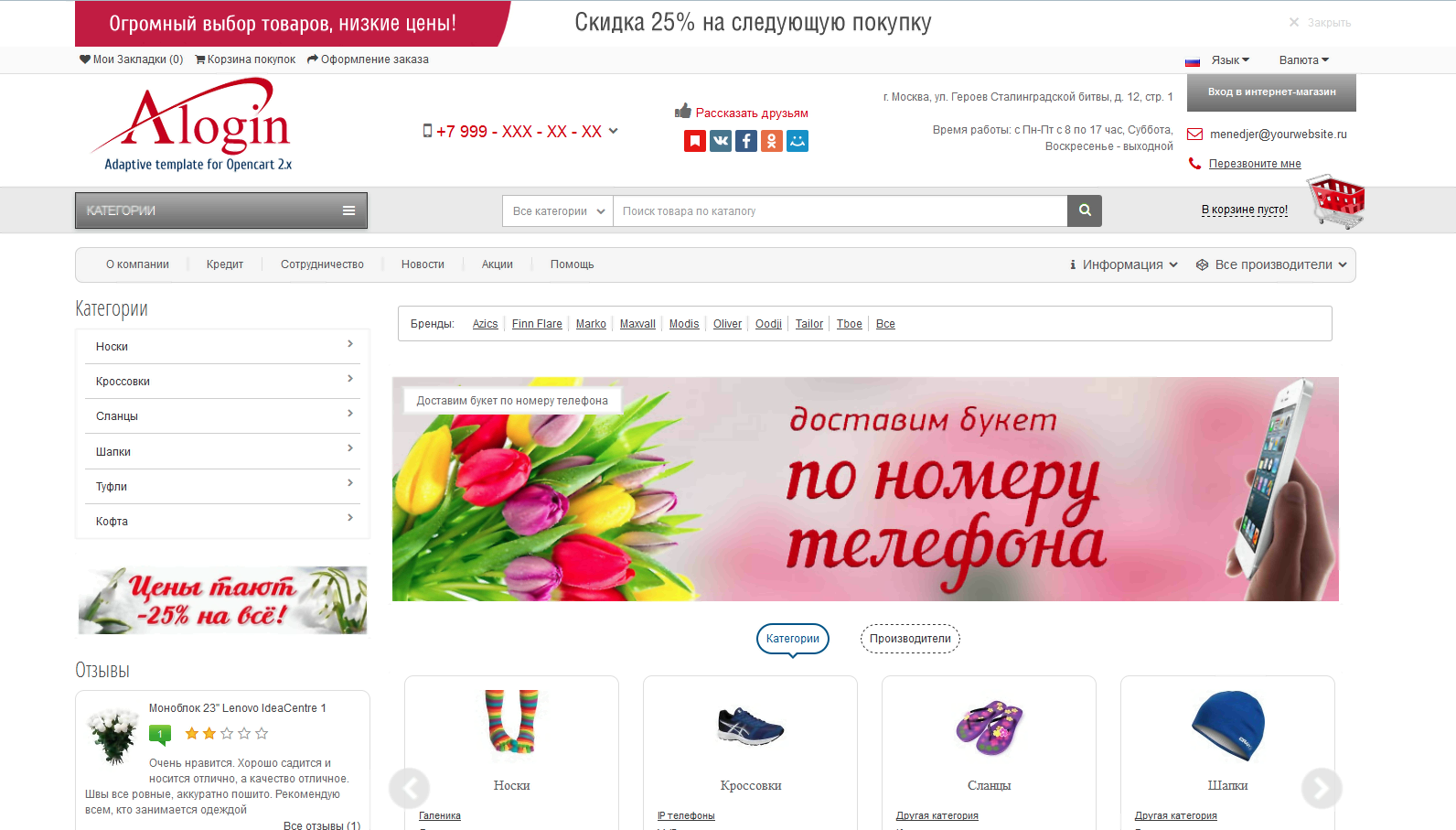
Multi-module, multifunctional, adaptive template with a set of modules, vital for running your business. When purchasing a template, you receive more than 15 necessary modules + 1 extensive module for its management, costing more than 8 thousand rubles. And of course, when you purchase , you receive mandatory technical support regarding the template and compatibility of third-party modules .
Quick order, Call back, Found cheaper, News, Live search, News subscription, Pop-up banners, etc. allow you to organize a full-fledged functional store.
The template is built on pure code, you can verify here
Passed optimization check Google for mobile devices

The following modules are included with the template:
- WIDE template settings module , containing more than 200 settings for managing the template and more.
- QUICK ORDER, ACCOUNTING and processing of quick orders in the admin panel
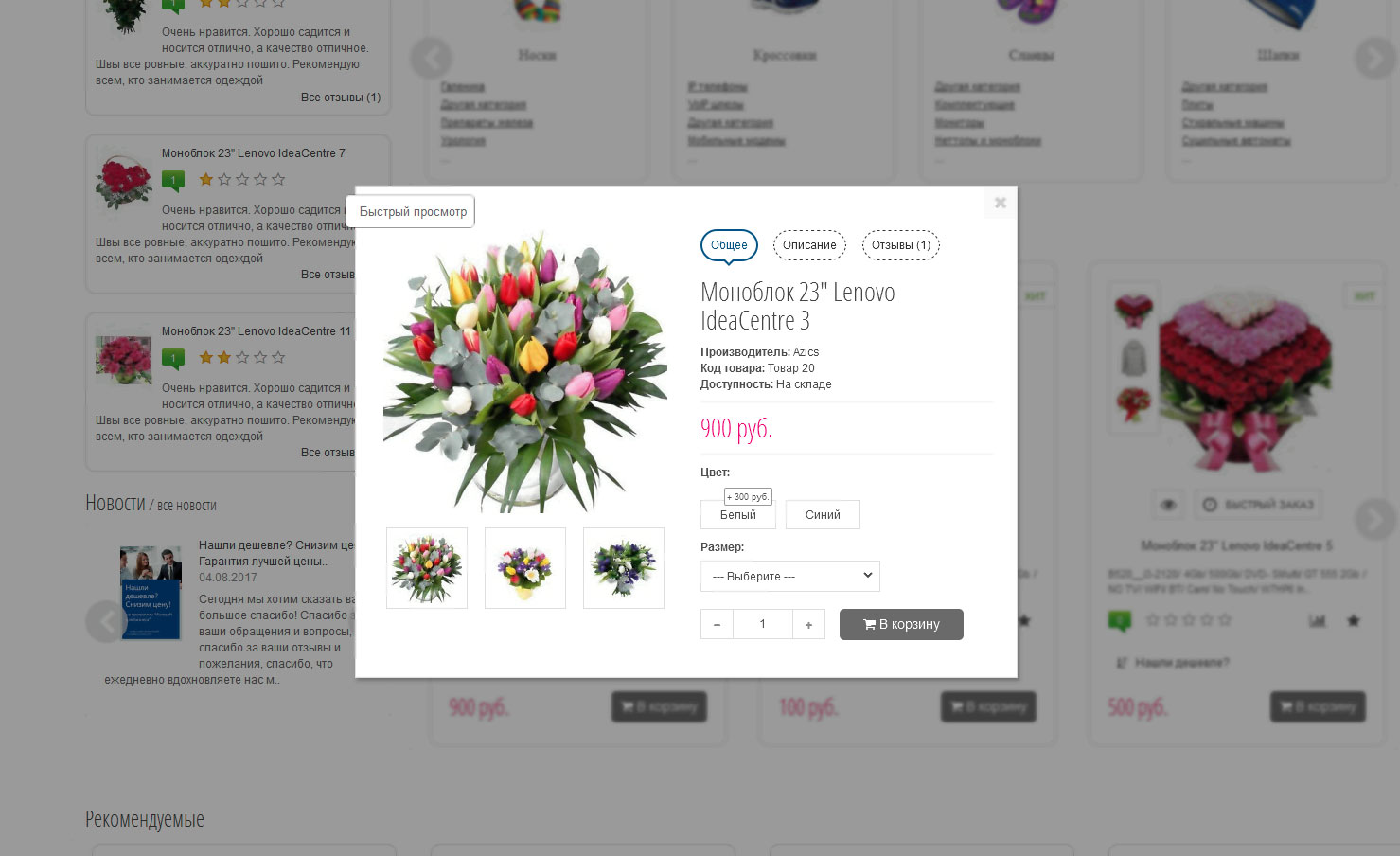
- DYNAMIC PRICE CHANGE WHEN SELECTING OPTIONS (on the product page, inQuick view, Found cheaper, Quick purchase)
- Authorization via SOCIAL NETWORKS
- CALL BACK, ACCOUNTING and call processing in the admin panel
- Module LIVE SEARCH taking into account search by Category
- Module FOUND CHEAPERER? ACCOUNTING and request processing in the admin panel
- Subscribe to the mailing list, ACCOUNTING and processing mailings in the admin panel
- Pop-up banner for subscription, display delay interval settings and turn off.
- Banner module in the template header
- Module NEWS, processing in the admin panel
- Module for automatically displaying reviews after approval
- CAROUSEL OF CATEGORIES and MANUFACTURERS,customizable in the admin panel
- Module Manufacturer List
- Display social networks, payment methods
- Map in the footer of the template with the ability to disable and configure in the admin panel
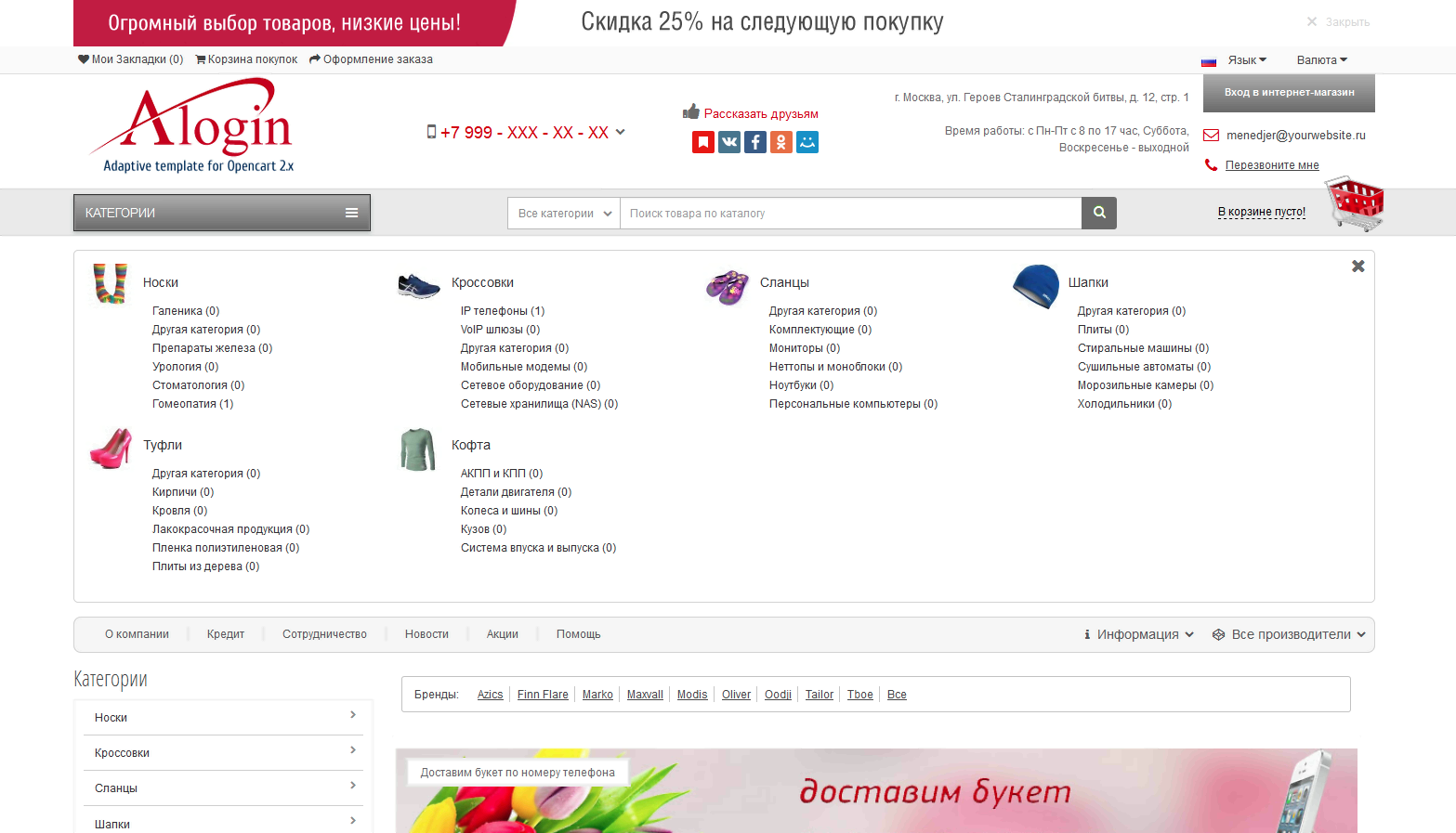
- Modified Categories output module on the left.
- Quick access to vital template modules in the admin panel
- Information display of requests, change of color indication of unprocessed requests


If necessaryfree help in installing and customizing the template!
And of course, you will receive constant operational technical support for the operation of the template, including free adaptation (if necessary) of any modules.
View Modules and Template Management in the Admin Area
You can view the admin panel using these links
For Opencart 3.0.2.0 DEMO
Compatibility
- Ocstore 2.3.0.2.2,
- Ocstore 2.1.0.2.1,
- Future versions of Ocstore, Maxystore
- Maxystore 2.3.0.2
- Simple – simplified registration and ordering
- Filter pro speed
- Other modules that you request (the list will be updated)
License
1 template - 1 domain. It is prohibited to transfer this product to third parties, including their use for informational or other purposes.
When purchasing a template you receive 1 key per domain. For subsequent domains, the key costs 500 rubles/piece. It is possible to change the domain for free if the template is removed from the previous domain.
Technical support
For more prompt technical support, write to aleksandr.rostov@mail.ru, Skype aleks.rostov85, or PM on this website. All messages and questions are processed as quickly as possible.
 Template control module (more than 200 settings):
General style settings:
- Setting the background of the site, setting the location of the image as the background in the admin panel
- Setting header styles, link styles, button styles in the admin panel
Template header settings:
- Style settings for the top menu with links in the admin panel
- Settings for the styles of the login button to the online store in the admin panel
- Phone style settings in the header in the admin panel
- Contacts style settings in the header in the admin panel
- Settings for Addresses and working hours styles in the admin panel
- Style settings Tell friends in the admin panel
- Style settings for Category Block, Searchand baskets in the admin panel
- Settings for Category button styles in the admin panel
- Search Block style settings in the admin panel
- Style settings for categories 1 and 2 levels in the admin panel
- Settings for link styles in the site header in the admin panel
- Text input settings Tell friends in the admin panel
- Entering the script Tell friends in the admin panel
- Entering articles in the admin panel, deleting, editing
- entering text when you click on the phone in the admin panel
Module settings Categories
- Settings for the color and size of the text of the 1st level category in the admin panel
- Settings for color and text size of level 2 category in the admin panel
- Settings for color and text size of level 3 category in the admin panel
Template footer settings
- Subscription block style settingsin the admin panel
- Settings for standard link styles in the footer in the admin panel
- Settings for address block styles and operating hours in the admin panel
- Text settings in the footer in the admin panel
- Map display settings in the admin panel
- Settings for displaying footer link blocks in the admin panel
- Settings for displaying payment methods in the admin panel
- Text settings in the footer in the admin panel
- Social network settings in the admin panel
- Article menu settings in the admin panel
- Installation of counters in the admin panel
Modules display modes (Recommended, Bestsellers, Promotions, Latest products)
- Setting up product price styles
- Customize product title styles
- Setting up product description styles
- Customize the styles of the Buy button
- Selecting the module display mode (Normal mode or Product Carousel)
-Settings for displaying product descriptions in the list
- Settings for displaying additional images
- Quick View display settings
- Settings for displaying the QUICK view button in the product list
- Button display settings Found cheaper?
- Rating display settings (On, Off, On only if there is a review)
Modules display modes (Categories, Manufacturers, Search page and promotional products)
- Setting up product price styles
- Customize product title styles
- Setting up product description styles
- Customize the styles of the Buy button
- Selecting the module display mode (Normal mode or Product Carousel)
- Settings for displaying product descriptions in the list
- Settings for displaying additional images
- SettingsQuick View display
- Settings for displaying the QUICK view button in the product list
- Button display settings Found cheaper?
- Rating display settings (On, Off, On only if there is a review)
Product card display settings
- Zoom product images on hover
- Product price style settings
- Customize tabs on the page
Template sticker display settings
- Sticker color style settings
- Settings on, off, number of days, number of views for displaying stickers
- Separate management of stickers in each module or on product pages
All capabilities of the admin module and modules included are displayed on the screenshots:


Quick order, Call back, Found cheaper, News, Live search, News subscription, Pop-up banners, etc. allow you to organize a full-fledged functional store.
The template is built on pure code, you can verify here
Passed optimization check Google for mobile devices
The following modules are included with the template:
- WIDE template settings module , containing more than 200 settings for managing the template and more.
- QUICK ORDER, ACCOUNTING and processing of quick orders in the admin panel
- DYNAMIC PRICE CHANGE WHEN SELECTING OPTIONS (on the product page, inQuick view, Found cheaper, Quick purchase)
- Authorization via SOCIAL NETWORKS
- CALL BACK, ACCOUNTING and call processing in the admin panel
- Module LIVE SEARCH taking into account search by Category
- Module FOUND CHEAPERER? ACCOUNTING and request processing in the admin panel
- Subscribe to the mailing list, ACCOUNTING and processing mailings in the admin panel
- Pop-up banner for subscription, display delay interval settings and turn off.
- Banner module in the template header
- Module NEWS, processing in the admin panel
- Module for automatically displaying reviews after approval
- CAROUSEL OF CATEGORIES and MANUFACTURERS,customizable in the admin panel
- Module Manufacturer List
- Display social networks, payment methods
- Map in the footer of the template with the ability to disable and configure in the admin panel
- Modified Categories output module on the left.
- Quick access to vital template modules in the admin panel
- Information display of requests, change of color indication of unprocessed requests
If necessaryfree help in installing and customizing the template!
And of course, you will receive constant operational technical support for the operation of the template, including free adaptation (if necessary) of any modules.
View Modules and Template Management in the Admin Area
You can view the admin panel using these links
For Opencart 3.0.2.0 DEMO
Compatibility
- Ocstore 2.3.0.2.2,
- Ocstore 2.1.0.2.1,
- Future versions of Ocstore, Maxystore
- Maxystore 2.3.0.2
- Simple – simplified registration and ordering
- Filter pro speed
- Other modules that you request (the list will be updated)
License
1 template - 1 domain. It is prohibited to transfer this product to third parties, including their use for informational or other purposes.
When purchasing a template you receive 1 key per domain. For subsequent domains, the key costs 500 rubles/piece. It is possible to change the domain for free if the template is removed from the previous domain.
Technical support
For more prompt technical support, write to aleksandr.rostov@mail.ru, Skype aleks.rostov85, or PM on this website. All messages and questions are processed as quickly as possible.
Template control module (more than 200 settings):General style settings:
- Setting the background of the site, setting the location of the image as the background in the admin panel
- Setting header styles, link styles, button styles in the admin panel
Template header settings:
- Style settings for the top menu with links in the admin panel
- Settings for the styles of the login button to the online store in the admin panel
- Phone style settings in the header in the admin panel
- Contacts style settings in the header in the admin panel
- Settings for Addresses and working hours styles in the admin panel
- Style settings Tell friends in the admin panel
- Style settings for Category Block, Searchand baskets in the admin panel
- Settings for Category button styles in the admin panel
- Search Block style settings in the admin panel
- Style settings for categories 1 and 2 levels in the admin panel
- Settings for link styles in the site header in the admin panel
- Text input settings Tell friends in the admin panel
- Entering the script Tell friends in the admin panel
- Entering articles in the admin panel, deleting, editing
- entering text when you click on the phone in the admin panel
Module settings Categories
- Settings for the color and size of the text of the 1st level category in the admin panel
- Settings for color and text size of level 2 category in the admin panel
- Settings for color and text size of level 3 category in the admin panel
Template footer settings
- Subscription block style settingsin the admin panel
- Settings for standard link styles in the footer in the admin panel
- Settings for address block styles and operating hours in the admin panel
- Text settings in the footer in the admin panel
- Map display settings in the admin panel
- Settings for displaying footer link blocks in the admin panel
- Settings for displaying payment methods in the admin panel
- Text settings in the footer in the admin panel
- Social network settings in the admin panel
- Article menu settings in the admin panel
- Installation of counters in the admin panel
Modules display modes (Recommended, Bestsellers, Promotions, Latest products)
- Setting up product price styles
- Customize product title styles
- Setting up product description styles
- Customize the styles of the Buy button
- Selecting the module display mode (Normal mode or Product Carousel)
-Settings for displaying product descriptions in the list
- Settings for displaying additional images
- Quick View display settings
- Settings for displaying the QUICK view button in the product list
- Button display settings Found cheaper?
- Rating display settings (On, Off, On only if there is a review)
Modules display modes (Categories, Manufacturers, Search page and promotional products)
- Setting up product price styles
- Customize product title styles
- Setting up product description styles
- Customize the styles of the Buy button
- Selecting the module display mode (Normal mode or Product Carousel)
- Settings for displaying product descriptions in the list
- Settings for displaying additional images
- SettingsQuick View display
- Settings for displaying the QUICK view button in the product list
- Button display settings Found cheaper?
- Rating display settings (On, Off, On only if there is a review)
Product card display settings
- Zoom product images on hover
- Product price style settings
- Customize tabs on the page
Template sticker display settings
- Sticker color style settings
- Settings on, off, number of days, number of views for displaying stickers
- Separate management of stickers in each module or on product pages
All capabilities of the admin module and modules included are displayed on the screenshots:
05/03/2017 - Added support for Maxystore 2.3.0.2
Distribution method:
Paid
Opencart version:
OpenCart 3.*OCStore 2.3OCStore 2.1
PHP verision:
PHP 5.6PHP 7.0PHP 7.1PHP 7.2PHP 7.3PHP 7.4PHP 8.0PHP 8.1PHP 8.2
Activation:
Manually, upon request via private messagesManually, upon request via email
Getting files:
By email, after a request to the author
Protection system:
IonCube
VQmod:
No
Ocmod:
Yes
Events:
No
Uploaded:
17.04.2017
Updated:
01.06.2026
Viewed:
15713
Sales:
21
Write a review
Your Name:Your Review: Note: HTML is not translated!
Rating: Bad Good
Enter the code in the box below:
Файлы будут доступны после покупки
zcbr / купил товар / 05 December 2017 21:06:36 #
Шаблон очень понравился, все четко и понятно, отличный функционал и огромное количество понятных настроек на любой самый требовательный вкус. Чувствуется что сделано с душой. Разработчику Rostov85 отдельная благодарность за оперативность и помощь.
Войдите, чтобы ответить
Jeki / 16 November 2017 18:46:09 #
Добрый вечер можно демо версию залить на свой магазин ?
Войдите, чтобы ответить
collapse the branch
Rostov85 / автор / 05 December 2017 15:30:03 #
Нет, шаблон вы получаете только после покупки.
Войдите, чтобы ответить
tgzavyalova / 21 October 2017 18:14:05 #
Шаблон шикарный, очень рада, что наткнулась на него , до этого долго искала что-то подходящее. А Разработчик и правда на высоте, всегда поможет, подскажите, исправит. Спасибо большое!
Войдите, чтобы ответить
Krush / купил товар / 01 June 2017 22:35:44 #
Отличный шаблон. Красочный, удобный. Поддержка на высоте. Разработчик всегда на связи, всегда готов помочь. Спасибо за проделанную работу!
Войдите, чтобы ответить
Showing 1 to 5 of 5 (1 Pages)


