Your shopping cart is empty!

Colored order statuses OpenCart 3


Price: 150 ₽ 300 ₽

Author: Владимир
Write to the author
Sales: 1 (Average rating 0 на основании 0 отзывов)
Need paid help? Contact the site administration
Opencart version:
Sales: 1 (Average rating 0 на основании 0 отзывов)
Need paid help? Contact the site administration
Opencart version:
LiveStore 3.*OCStore 3.*OpenCart 3.*
Colored order statuses for OpenCart 3.x.
The module adds to the OpenCart administrative panel the ability to assign a custom color to each order status and use this color to visually highlight orders in the general list.
After installation, an additional color selection field appears in the System → Localization → Order statuses section. For each status, you can set its own color, for example, you can separately highlight new, paid, sent, completed or canceled orders.
This allows you to quickly navigate a large number of orders and visually determine their current status without having to read the status name each time.
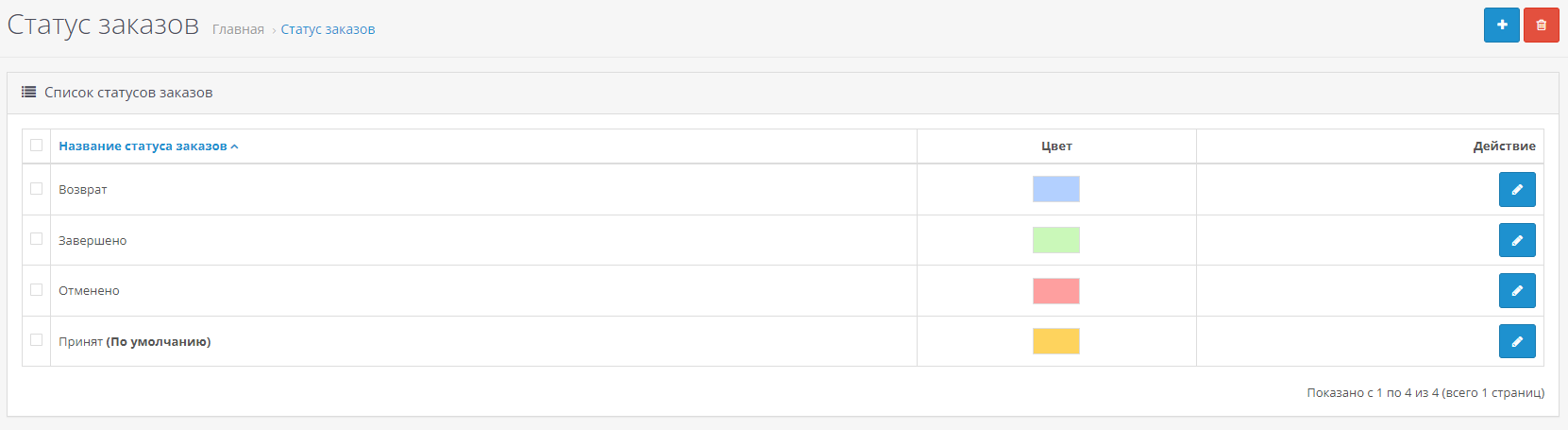
You can choose colors independently for each existing order status.

An example of using order color statuses on a real project.
Installation:
1. Go to the OpenCart administrative panel to the Extensions → Install extension section.
2. Upload the modifier file.
3. Go to Extensions → Modifiers.
4. Click the Update Modifiers button.
5. If necessary, clear the template cache.
6. Go to System → Localization → Order statuses.
7. Open the desired status and select a color for it.
8. Save changes and open the list of orders.If the changes are not displayed, refresh the page using Ctrl + F5, and also clear the cache of OpenCart modifiers and templates.
LICENSE
1 module - 1 domain
Unauthorized use, copying, resale, transfer of the module to third parties, as well as other methods of distribution, including for informational purposes, are prohibited.
Additional improvements or expansion of functionality - PAID.
The module adds to the OpenCart administrative panel the ability to assign a custom color to each order status and use this color to visually highlight orders in the general list.
After installation, an additional color selection field appears in the System → Localization → Order statuses section. For each status, you can set its own color, for example, you can separately highlight new, paid, sent, completed or canceled orders.
This allows you to quickly navigate a large number of orders and visually determine their current status without having to read the status name each time.
You can choose colors independently for each existing order status.
An example of using order color statuses on a real project.
Installation:
1. Go to the OpenCart administrative panel to the Extensions → Install extension section.
2. Upload the modifier file.
3. Go to Extensions → Modifiers.
4. Click the Update Modifiers button.
5. If necessary, clear the template cache.
6. Go to System → Localization → Order statuses.
7. Open the desired status and select a color for it.
8. Save changes and open the list of orders.If the changes are not displayed, refresh the page using Ctrl + F5, and also clear the cache of OpenCart modifiers and templates.
LICENSE
1 module - 1 domain
Unauthorized use, copying, resale, transfer of the module to third parties, as well as other methods of distribution, including for informational purposes, are prohibited.
Additional improvements or expansion of functionality - PAID.
Distribution method:
Paid
Opencart version:
LiveStore 3.*OCStore 3.*OpenCart 3.*
PHP verision:
PHP 7.0PHP 7.1PHP 7.3PHP 7.4
Activation:
Automatic
Getting files:
On site, in the personal account
Protection system:
No
VQmod:
No
Ocmod:
Yes
Events:
No
Uploaded:
09.08.2026
Updated:
09.08.2026
Viewed:
330
Sales:
1
Write a review
Your Name:Your Review: Note: HTML is not translated!
Rating: Bad Good
Enter the code in the box below:





Файлы будут доступны после покупки


