Your shopping cart is empty!

Telegram notifications 3.3
500 sales


Price: 900 ₽
From 3 purchase of this product, the price is: 750 ₽

Author: Serbulenko
Write to the author
Sales: 516 (Average rating 5 на основании 60 отзывов)
Need paid help? Contact the site administration
Opencart version:
Sales: 516 (Average rating 5 на основании 60 отзывов)
Need paid help? Contact the site administration
Opencart version:
Notifications about orders in Telegram for Opencart!
Notifications about new orders and reviews in Telegram!
Receive instant notifications in Telegram about important events in your online store:
Currently for OC 1.5.x the current version is 3.1
for OS 2.x, current version 3.2.1
for OC 3x. current version 3.3
Before asking for technical support, read FAQ, maybe there will be an answer to your question.
Setting instructions:
Step 1:
Technical support is provided to all users who legally purchased the module on official websites or from the author himself.
License:
Each copy of the module affects 1 domain and its subdomain.
Therefore, if you want to install the module on another domain, you must purchase another copy of the module.
For all questions and suggestions write to serfbots@gmail.com
Notifications about new orders and reviews in Telegram!
Receive instant notifications in Telegram about important events in your online store:
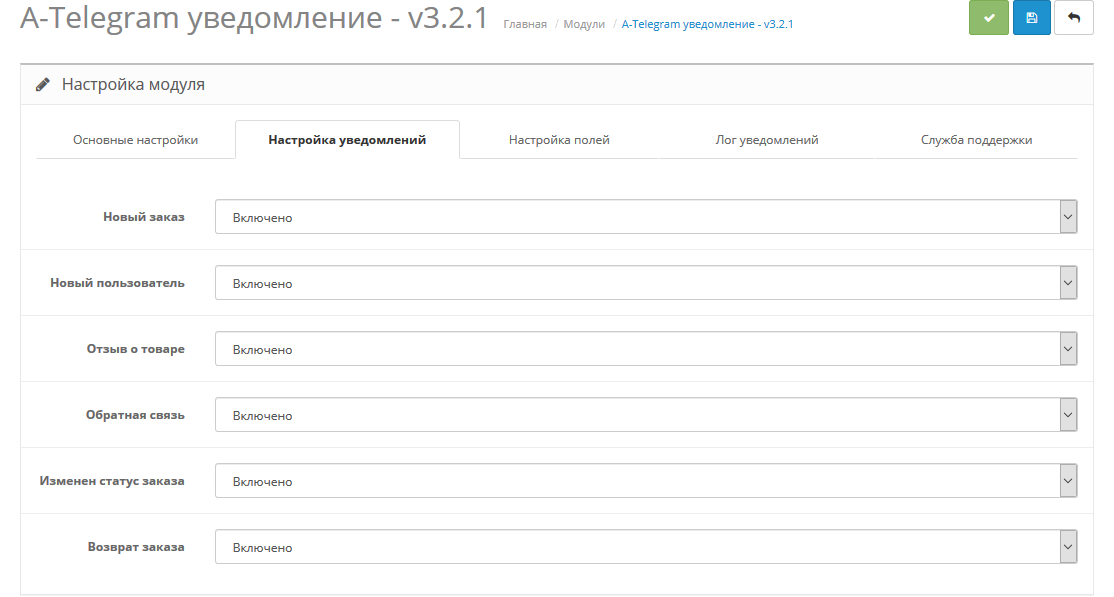
- New orders and reviews
- Registration of new users
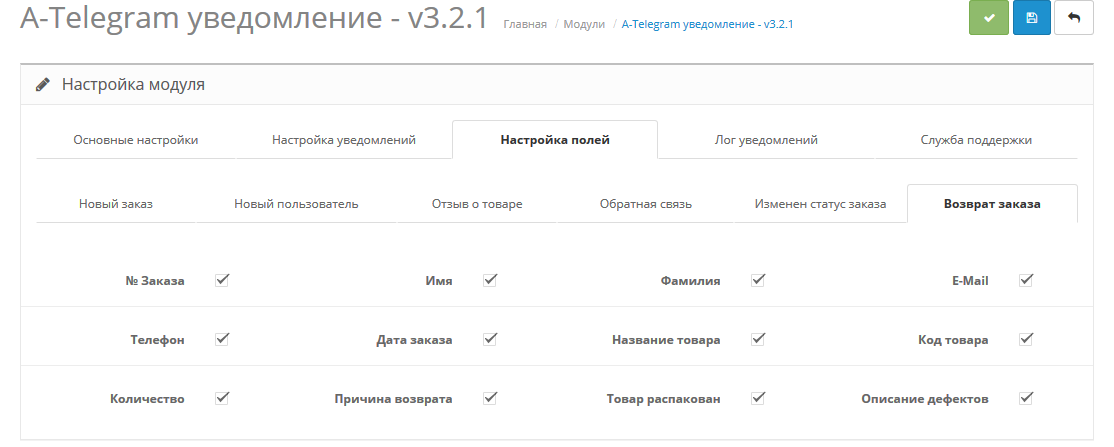
- Requests to return goods
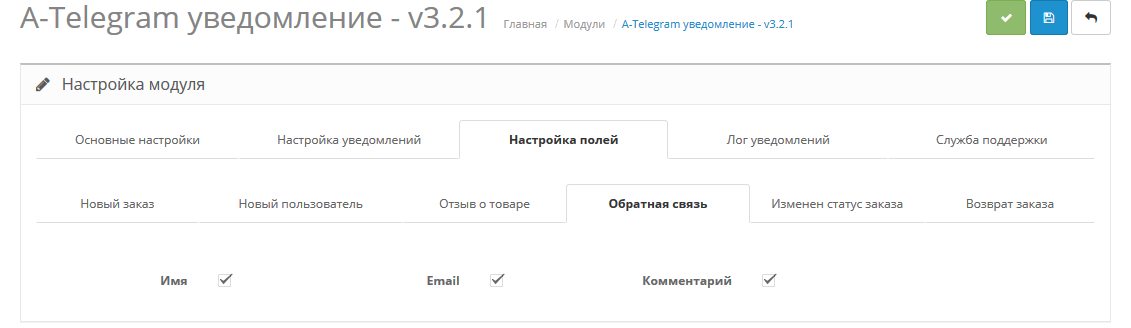
- Messages from the feedback form communications
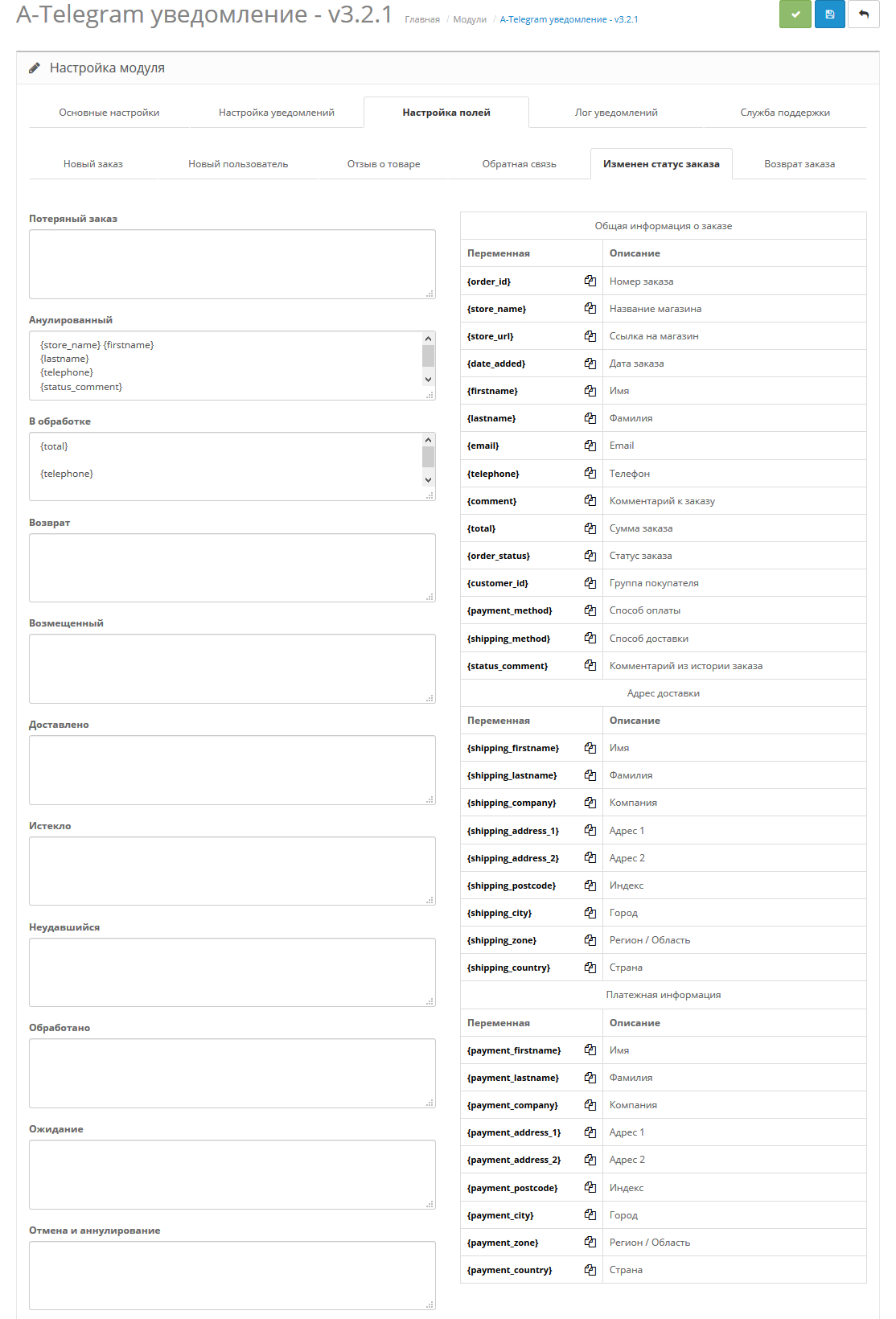
- Changing order status
- And you can also connect any form on the website to a notification in telegram
Currently for OC 1.5.x the current version is 3.1
for OS 2.x, current version 3.2.1
for OC 3x. current version 3.3
Before asking for technical support, read FAQ, maybe there will be an answer to your question.
Setting instructions:
Step 1:
- Go to Telegram, search for the bot BotFather and start communicating with him. This is the official bot from telegram-a
- Write the command /newbot to the bot - this is the command to create a new bot.
- BotFather in response asked you to write the name of the bot. Write back this name (For example: Bot for order notifications) - this name can be changed later.
- After entering the name, BotFather will ask you to enter a username (public name of the bot) it must end in bot (For example: cmsshopbot or cmsshop_bot);
- If such a name is not busy, then in response you will receive a message with the token of your new bot;
- Follow the link to your bot from the message or find it in the search by username (which you specified) and click /start. This is necessary so that the bot can write to you. Without this, you will not be able to receive notifications.
- Unzip the archive;
- Select the desired version of the archive (.ocmod.zip) depending on your version of opencart;
- Install this module archive through the standard add-on manager;
- Update the cache OCMOD;
- Unzip the archive;
- Select the archive version (1.5.x.zip) for your version of opencart;
- Upload the contents of this archive from the upload folder to the server
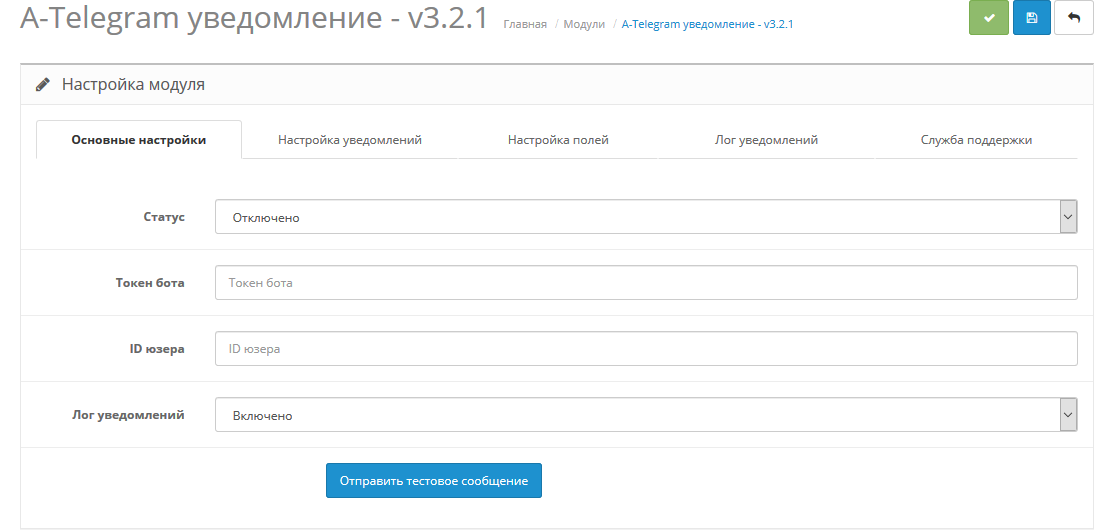
- Then go to extensions->modules and find the "A-Telegram notification" activate it;
- Go to the module settings;
- Indicate the token (in the "Bot Token" field) that the bot gave you BotFather;
- Specify the user ID to whom notifications should be sent. If you need it to be sent to several recipients, specify these IDs separated by commas (For example: 12222222222,22222223333,333333333);
- How to find out the id user
- Next, check the boxes that should be received in the notification and click save.
- That's it, the bot is configured and ready to use.
- PHP 5.3 or higher;
- Сurl;
Technical support is provided to all users who legally purchased the module on official websites or from the author himself.
License:
Each copy of the module affects 1 domain and its subdomain.
Therefore, if you want to install the module on another domain, you must purchase another copy of the module.
For all questions and suggestions write to serfbots@gmail.com
3.3 - 03/29/2025
1) Added support for php 8.x;
2) Added support for sending messages to channel topics (channel ID/topic ID);
3) The logic for counting the number has been changed. symbol in the message (perhaps someone will lose the “Attempt to send a notification containing more than 4090 characters”) and everything will be received correctly, in version 4.0 this will be completely fixed;
4) Added the ability to turn on/off. link preview;
5) Now you can choose to send the product name as a link or just as text (two different fields);
6) Now the “order amount” field sends the total cost of the order. A new field has been added for complete order details.
3.2.1 - 06/18/2019
Minor bugs fixed.
3.2 - 03/20/2019
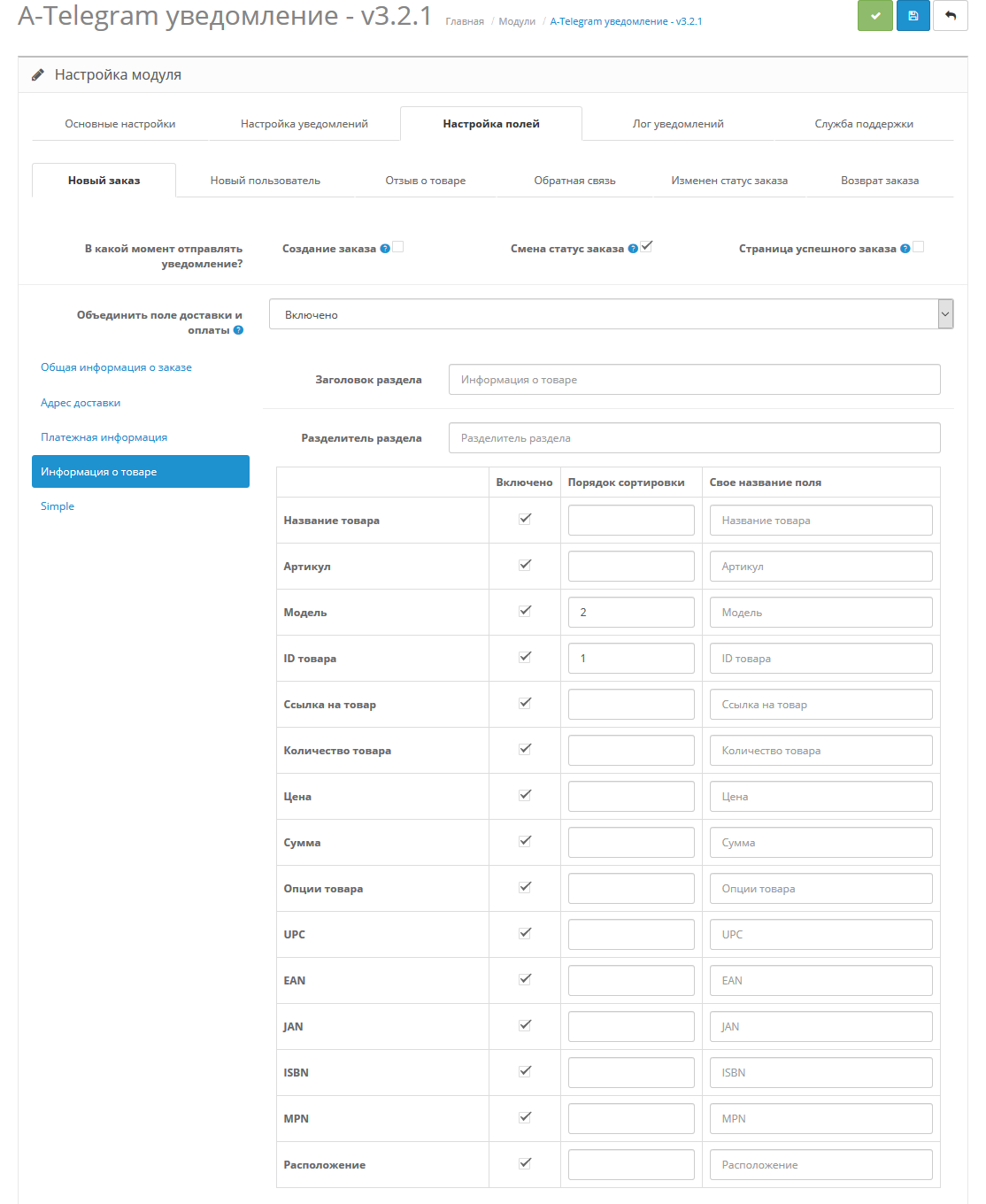
1) Added new fields for products (upc, ean, jan, isbn, mpn, location);
2) Added notification log (by default it is off);
3) The principle of notification of “changes in order status” has been changed. Now you can set your own notification template for each status;
4) Added the ability to set your own separator between the main blocks in the “new order” notification;
5) The choice of when to send notifications about a “new order” has expanded (now 3 statuses);
6) Added Ukrainian localization;
7) The product name is now a link to the product (notifications of a “new order”);
8) When sending a notification containing more than 4090 characters, the message “Attempting to send a notification containing more than 4090 characters” will be received;
3.1 - 01/19/2019
Bug fix
12/19/2018 - added support for OS 1.5.x
3.0 - 12/13/2018
1) Added support for Simple custom fields
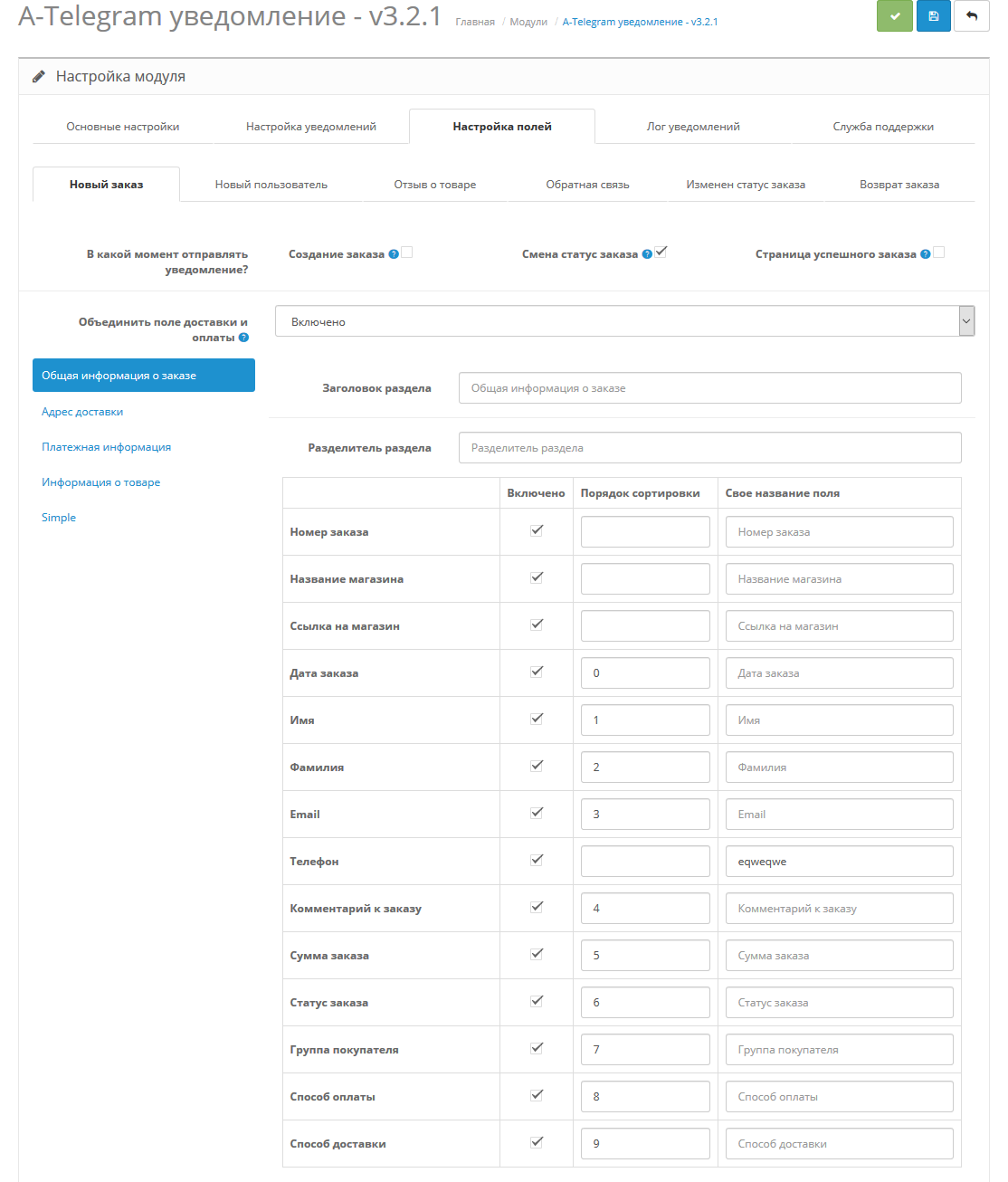
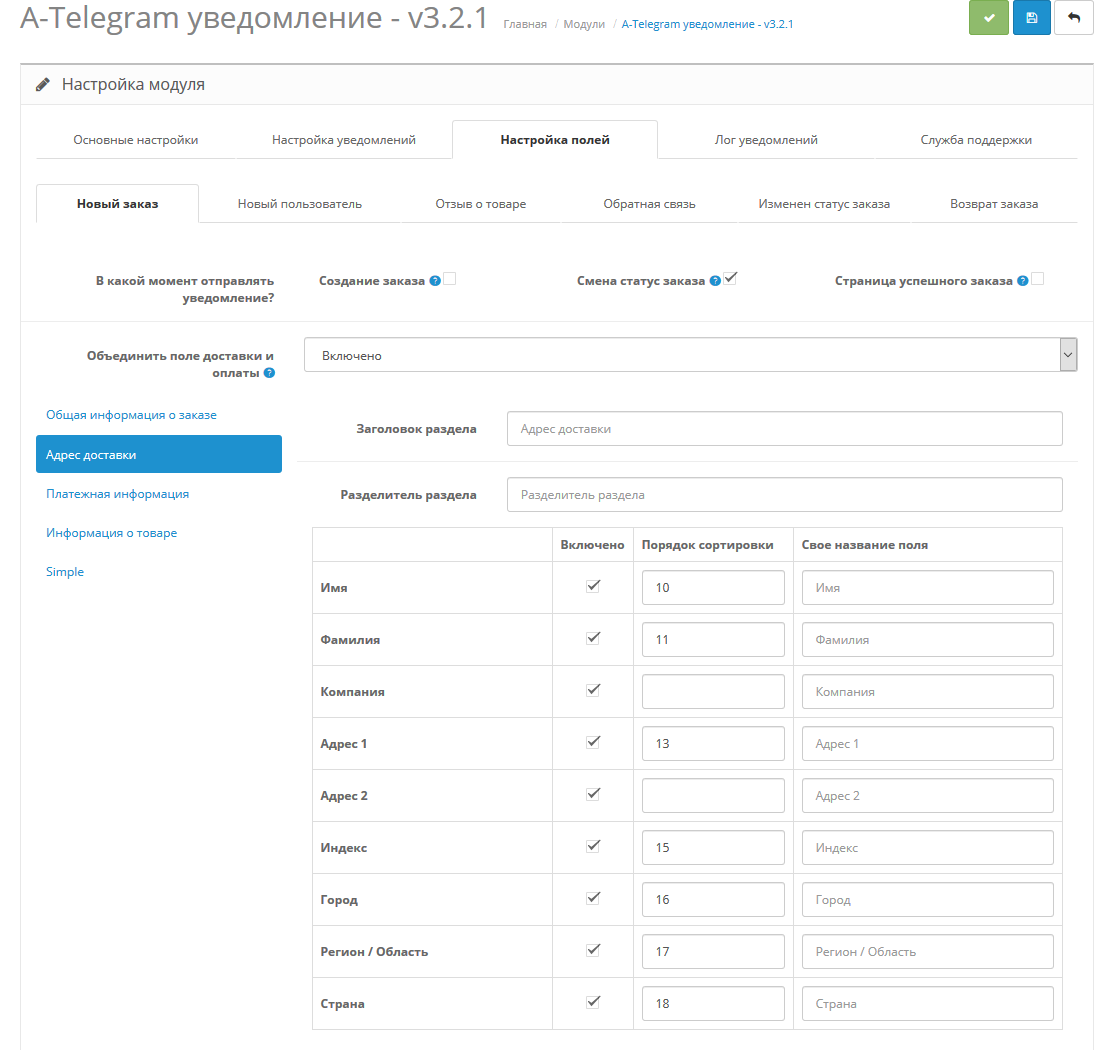
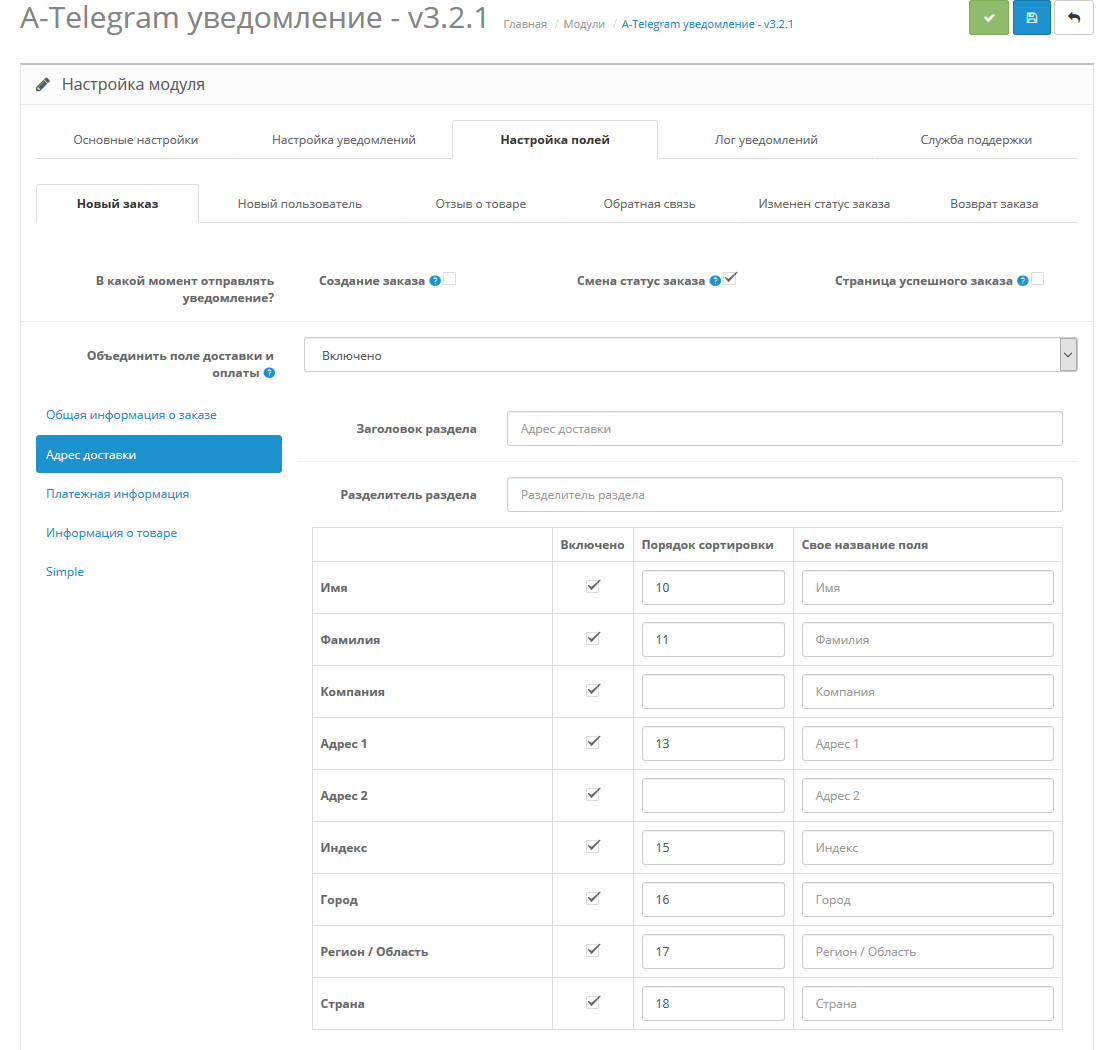
2) Added sorting of fields. Now you can customize the order in which the fields are displayed in notifications (applies to order notifications)
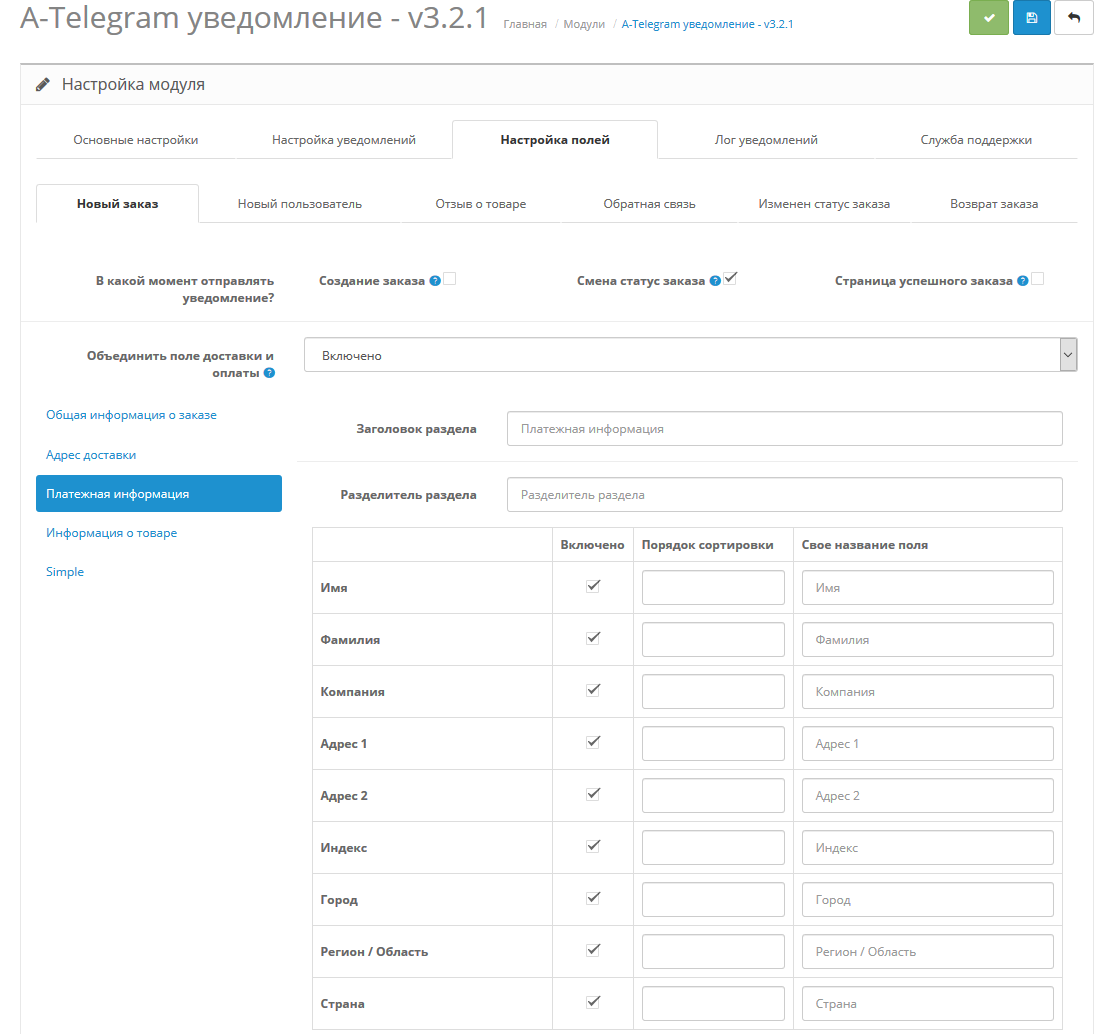
3) Added the ability to combine the “delivery” and “payment” fields
4) The appearance of notifications has been changed (applies to order notifications)
5) The principle of operation of the “notification of a change in order status” has been changed. Now notifications will be sent whenever there is a change in the order status (if third-party modules use built-in OS functions and not their own functions)
2.5.1 - 14.1.2018
Bug fixed.
2.5 - 09.26.2018
1) Fixed display of module status for OC3
2)Added apply button
3) Upgraded modifier
4) Added a notification about “return of goods” - at the moment in the OS it is not at all as the admin informs
2.4 - 07/16/2018
1) Minor bugs fixed
2) A more complete report on the cost of the order has been added to the notification (total order amount, delivery price, coupon, etc.)
2.3
This update applies only to Russian citizens who have stopped receiving notifications.
Added alternative sending messages through a third-party service using the telegram api. To send, check the “country Russia” box in the settings.
2.2
1) A new field has been added to the order information - “order status”
2) Added check for sent data.
3) Fixed a bug with sending product links.
4) Added a new notification about changes in order status in the admin panel.
2.1
Fixed minor bugs
2.0
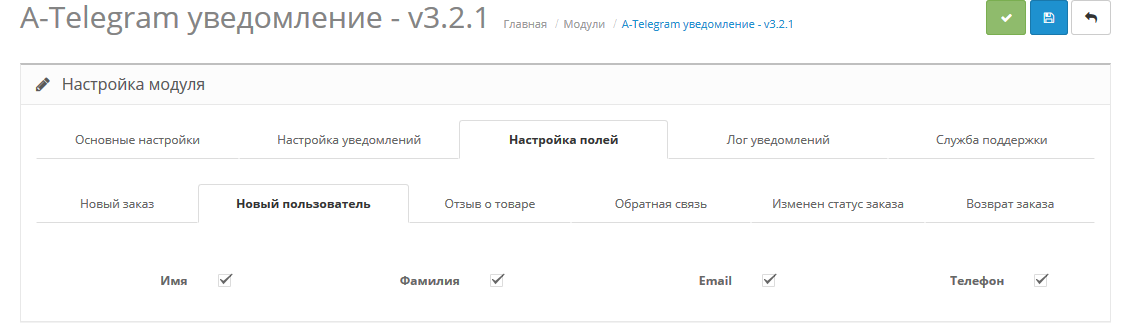
1) Added new notifications: product reviews, new registered user, new question from the contact form
2) Added the ability to specify your own field name for orders.
3) Added choice of when exactly to receive messages about a new order.
1) Added support for php 8.x;
2) Added support for sending messages to channel topics (channel ID/topic ID);
3) The logic for counting the number has been changed. symbol in the message (perhaps someone will lose the “Attempt to send a notification containing more than 4090 characters”) and everything will be received correctly, in version 4.0 this will be completely fixed;
4) Added the ability to turn on/off. link preview;
5) Now you can choose to send the product name as a link or just as text (two different fields);
6) Now the “order amount” field sends the total cost of the order. A new field has been added for complete order details.
3.2.1 - 06/18/2019
Minor bugs fixed.
3.2 - 03/20/2019
1) Added new fields for products (upc, ean, jan, isbn, mpn, location);
2) Added notification log (by default it is off);
3) The principle of notification of “changes in order status” has been changed. Now you can set your own notification template for each status;
4) Added the ability to set your own separator between the main blocks in the “new order” notification;
5) The choice of when to send notifications about a “new order” has expanded (now 3 statuses);
6) Added Ukrainian localization;
7) The product name is now a link to the product (notifications of a “new order”);
8) When sending a notification containing more than 4090 characters, the message “Attempting to send a notification containing more than 4090 characters” will be received;
3.1 - 01/19/2019
Bug fix
12/19/2018 - added support for OS 1.5.x
3.0 - 12/13/2018
1) Added support for Simple custom fields
2) Added sorting of fields. Now you can customize the order in which the fields are displayed in notifications (applies to order notifications)
3) Added the ability to combine the “delivery” and “payment” fields
4) The appearance of notifications has been changed (applies to order notifications)
5) The principle of operation of the “notification of a change in order status” has been changed. Now notifications will be sent whenever there is a change in the order status (if third-party modules use built-in OS functions and not their own functions)
2.5.1 - 14.1.2018
Bug fixed.
2.5 - 09.26.2018
1) Fixed display of module status for OC3
2)Added apply button
3) Upgraded modifier
4) Added a notification about “return of goods” - at the moment in the OS it is not at all as the admin informs
2.4 - 07/16/2018
1) Minor bugs fixed
2) A more complete report on the cost of the order has been added to the notification (total order amount, delivery price, coupon, etc.)
2.3
This update applies only to Russian citizens who have stopped receiving notifications.
Added alternative sending messages through a third-party service using the telegram api. To send, check the “country Russia” box in the settings.
2.2
1) A new field has been added to the order information - “order status”
2) Added check for sent data.
3) Fixed a bug with sending product links.
4) Added a new notification about changes in order status in the admin panel.
2.1
Fixed minor bugs
2.0
1) Added new notifications: product reviews, new registered user, new question from the contact form
2) Added the ability to specify your own field name for orders.
3) Added choice of when exactly to receive messages about a new order.
Paid?:
Opencart version:
PHP verision:
Activation:
Getting files:
Protection:
VQmod:
Ocmod:
Events:
Uploaded:
15.02.2018
Updated:
23.01.2026
Viewed:
31065
Sales:
516
Write a review
Your Name:Your Review: Note: HTML is not translated!
Rating: Bad Good
Enter the code in the box below:




Файлы будут доступны после покупки
Articles about the product
In this article, we will look at how to set up mail in OpenCart to ensure stable email delivery to customers and the administration.


Рекомендую!
Удобно настраивать, возможность сортировки полей, наглядный форматированный вид. Добавлять можно как одного, так и нескольких адресатов. Можно включать и просматривать лог отправки.
P.S. Если при тестовой отправке вы видите уведомление "Сообщение не отправлено", а не ошибку, значит, все в порядке)
Хочу отдельно выразить огромную благодарность за проделанную работу автору Artem Serbulenko! Внимание к деталям просто впечатляют. Каждый раз, когда сталкивались с сложной задачей, Artem Serbulenko находил эффективное решение. Работа с ним это всегда уверенность в результате. Спасибо за профессионализм, креативный подход и постоянное стремление к совершенству!