Your shopping cart is empty!

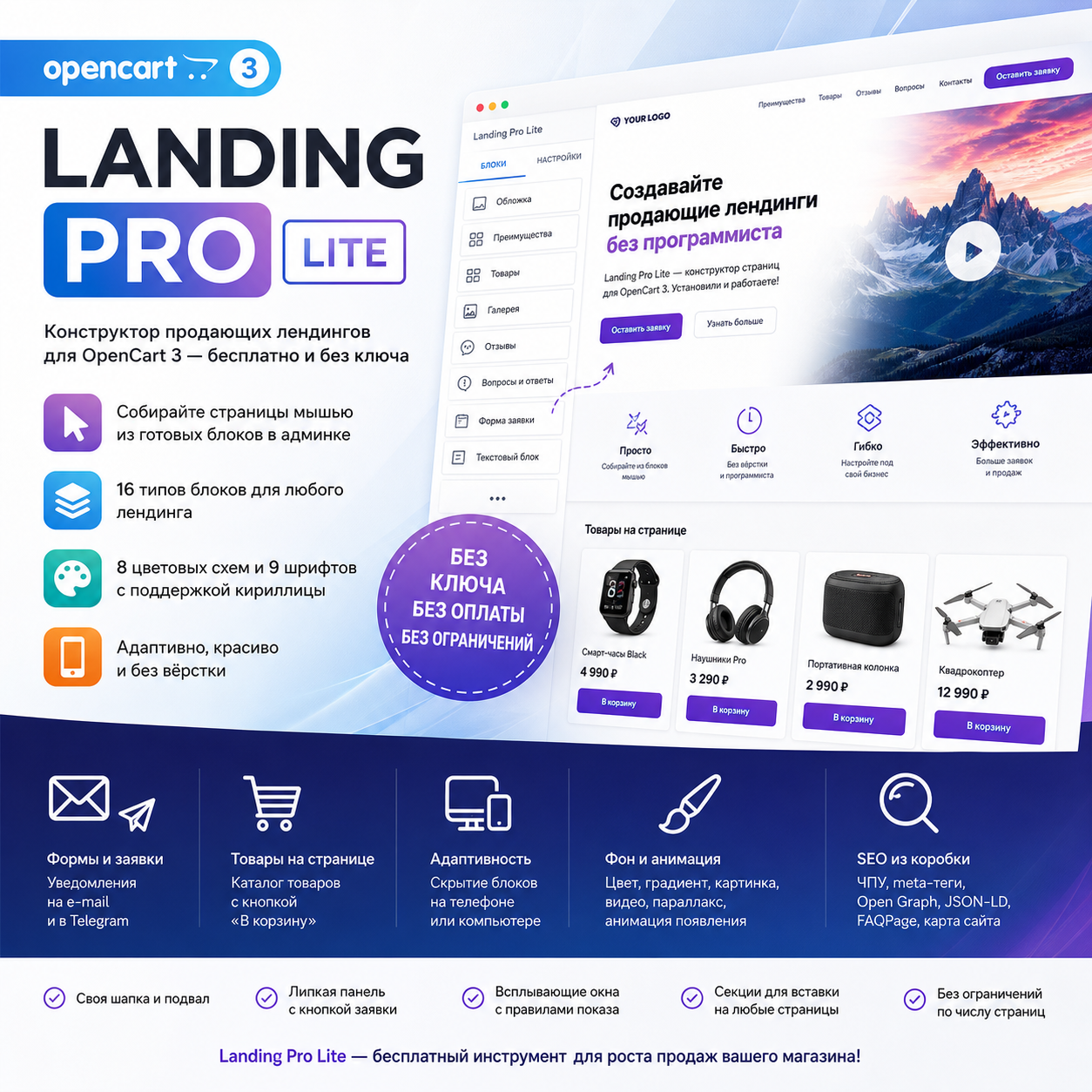
Landing Pro Lite is a free landing page and block builder for OpenCart 3.
Price: free
Author: KompMAN
Write to the author
Need paid help? Contact the site administration
Opencart version:
Need paid help? Contact the site administration
Opencart version:
LiveStore 3.*OCStore 3.*OpenCart 3.*
Landing Pro Lite — a free landing page and block builder for OpenCart 3
Problem
To create a landing page for advertising, store owners turn to a coder: the standard OpenCart editor isn't suitable. Every new promotion means another task, another wait, and more expenses.
Solution
Landing Pro Lite is the free version of the Landing Pro builder. The page is assembled from ready-made blocks in the admin panel using a mouse: cover page, benefits, questions and answers, reviews, gallery, store products with an "Add to Cart" button, and an order form. No coding, no license key, and no payment—just install and go.
——————————————————————————————————
DEMO of all blocks
(The demo shows all 37 blocks of the full version, 16 of which are included in Lite)
Full version Landing Pro
————————————————————————————————————
Not just landing pages - any block on any page
The assembled section lives not only on its own Page:
——————————————————————————————————
What's included in Lite for free
——————————————————————————————————
Lite Blocks — 16 types
Cover and Content
Trust and media
Sales and Orders
——————————————————————————————————
What the full version of Landing Pro adds
Upgrade to the full version without any loss: installLanding Proover Lite, and all your pages, sections, and applications will remain intact.
———————————————————————————————————
Nothing breaks
OpenCart core files are not modified. All edits are made through the official OCMOD mechanism, and each operation is marked as optional: if your build differs from the default, only one feature is disabled, not the entire update.
Requirements
————————————————————————————————————
Frequently Asked Questions
Is it really free?
Yes. No key is required, and there are no page or time limits.
Do I need layout skills?
No. Everything is assembled with a mouse in the admin panel.
Will the module break my theme?
No. All layout is isolated, colors and fonts are defined by variables on the specific page wrapper. The core files are not modified.
Can I place the block on a regular store page instead of a landing page?
Yes. The layout module allows you to place the block in any position on any page: homepage, category, product page, footer. You can use a shortcode to place it directly in the product or category description or in the text of the information page.
If I need more blocks, will I have to redo everything?
No. The full version of Landing Pro is installed on top of Lite, preserving everything you've built, and simply adding other blocks, pre-built kits, and service features.
Problem
To create a landing page for advertising, store owners turn to a coder: the standard OpenCart editor isn't suitable. Every new promotion means another task, another wait, and more expenses.
Solution
Landing Pro Lite is the free version of the Landing Pro builder. The page is assembled from ready-made blocks in the admin panel using a mouse: cover page, benefits, questions and answers, reviews, gallery, store products with an "Add to Cart" button, and an order form. No coding, no license key, and no payment—just install and go.
——————————————————————————————————
DEMO of all blocks
(The demo shows all 37 blocks of the full version, 16 of which are included in Lite)
Full version Landing Pro
————————————————————————————————————
Not just landing pages - any block on any page
The assembled section lives not only on its own Page:
- Layout module "Constructor Section".Using the standard OpenCart method—via Design → Layouts—any assembled section can be placed in any position on any store page: on the home page, in the product card, in the footer, or in the category header.
- Shortcodes in text.{landing id="5"} inserts a ready-made section directly into the product description, category, or information page text, {landing_form id="1"} inserts the application form.
- Insert module.And vice versa—any already installed store module can be placed inside assembled page.
——————————————————————————————————
What's included in Lite for free
- 16 block types—enough for a full-fledged selling landing page
- Three entities: a landing page with its own address, a section for insertion on any store page, a pop-up window with display rules
- 8 color schemes and 9 fonts with Cyrillic support
- Each section has its own background: color, gradient, image, video, Parallax
- Appearance animation, indents, block hiding on phone or computer
- Custom landing page header and footer, sticky panel with a request button
- Request form builder, email and Telegram notifications, spam protection
- Catalog products directly on the page, "Add to Cart" button
- Out-of-the-box SEO: friendly URLs, meta tags, Open Graph, JSON-LD, FAQPage markup, sitemap
- No license key, unlimited number Pages
——————————————————————————————————
Lite Blocks — 16 types
Cover and Content
| Cover | Main Screen: Overheader, Header, Text, Up to Two Buttons, Application Form Directly in the Block, Image on the Side or as a Background, Multiple Heights and layouts. |
| Header | Section header with adjustable size and decorative line - divides the page into semantic sections. |
| Text with image | Text and image on the left, right, top, or bottom, button - "tell me" Read more." |
| Columns | Multiple columns with text and height alignment - when a pre-built block isn't enough. |
| Benefits | List of benefits with icons, several card styles, custom icon color and shape. |
| Questions and Answers | Accordion with FAQPage microdata—questions can appear directly in the search results Search engine. |
| SEO text | The expanded text under the "read more" button contains search engine keywords and does not interfere with conversion. |
Trust and media
| Reviews | Customer reviews rating and link to the source - Yandex.Maps, 2GIS, any review site. |
| Gallery | Image grid in mosaic or even grid, full screen. |
| Banner | Full-width image link, separate image for Mobile. |
| Map and Contacts | Directions - Yandex.Maps, 2GIS, or Google Maps - next to the address. |
Sales and Orders
| Store Products | Products from the catalog with "Add to Cart" button — manually or by category, with a filter and a "View All" link. |
| Call to Action | Accent block with text, a button, and an image — "time to act" in the middle of the page. |
| Application Form | Form from the form builder directly in the block, with its own layout and image Next. |
| Contacts | Phone, email, address, and application form in one block. |
| Module insertion | Any installed store module within the page Constructor. |
——————————————————————————————————
What the full version of Landing Pro adds
| Feature | Lite | Landing Pro |
| Block Types | 16 | 37 |
| Ready-Made Page Sets with Text | — | 13 |
| Ready-Made Library Sections | — | 49 |
| Cost Calculator: Dependent Lists, Threshold Prices, Multiple Totals | — | Yes |
| Rates, Price List, Promotion Timer, Card Product | — | is |
| Slider, video, steps, tabs, command, numbers, documents, before and after, and others | — | yes |
| 301 Redirect Manager and Broken Link Log | — | yes |
| Saving your pages and sections in Templates | — | yes |
| Exporting and importing pages between stores | — | yes |
Upgrade to the full version without any loss: installLanding Proover Lite, and all your pages, sections, and applications will remain intact.
———————————————————————————————————
Nothing breaks
OpenCart core files are not modified. All edits are made through the official OCMOD mechanism, and each operation is marked as optional: if your build differs from the default, only one feature is disabled, not the entire update.
Requirements
- OpenCart 3.0.x, ocStore 3.x
- PHP 7.4 or 8.1 with ionCube Loader (available with most hosting providers, can be enabled in the control panel)
————————————————————————————————————
Frequently Asked Questions
Is it really free?
Yes. No key is required, and there are no page or time limits.
Do I need layout skills?
No. Everything is assembled with a mouse in the admin panel.
Will the module break my theme?
No. All layout is isolated, colors and fonts are defined by variables on the specific page wrapper. The core files are not modified.
Can I place the block on a regular store page instead of a landing page?
Yes. The layout module allows you to place the block in any position on any page: homepage, category, product page, footer. You can use a shortcode to place it directly in the product or category description or in the text of the information page.
If I need more blocks, will I have to redo everything?
No. The full version of Landing Pro is installed on top of Lite, preserving everything you've built, and simply adding other blocks, pre-built kits, and service features.
Distribution method:
Free
Opencart version:
LiveStore 3.*OCStore 3.*OpenCart 3.*
PHP verision:
PHP 7.2PHP 7.3PHP 7.4PHP 8.0PHP 8.1
Activation:
Automatic
Getting files:
On site, in the personal account
Protection system:
IonCube
VQmod:
No
Ocmod:
Yes
Events:
No
Uploaded:
26.09.2026
Updated:
26.09.2026
Viewed:
87
Write a review
Your Name:Your Review: Note: HTML is not translated!
Rating: Bad Good
Enter the code in the box below:





To download this free product, you do not need to order it, just log in.


