Your shopping cart is empty!

Live XML Manager
Price: 9 000 ₽
From 2 purchase of this product, the price is: 6 750 ₽

Additional from the author:
Author: liveopencart
Write to the author
Sales: 1 (Average rating 0 на основании 0 отзывов)
Need paid help? Contact the site administration
Opencart version:
Sales: 1 (Average rating 0 на основании 0 отзывов)
Need paid help? Contact the site administration
Opencart version:
LiveStore 3.*OCStore 3.*
A module for OpenCart 3 that allows you to create and maintain product feeds in XML, YML and CSV formats, load XML suppliers, update products and transfer the catalog between OpenCart stores.
With its help, you can upload products for marketplaces, advertising platforms, partners and client sites. Each export profile receives a permanent secure link with current prices, balances, characteristics, images and other information about the goods.
Export and import are combined in one manager. For each client, supplier or site, you can create a separate profile with its own set of products, filters, price formulas, field mappings and data processing rules.
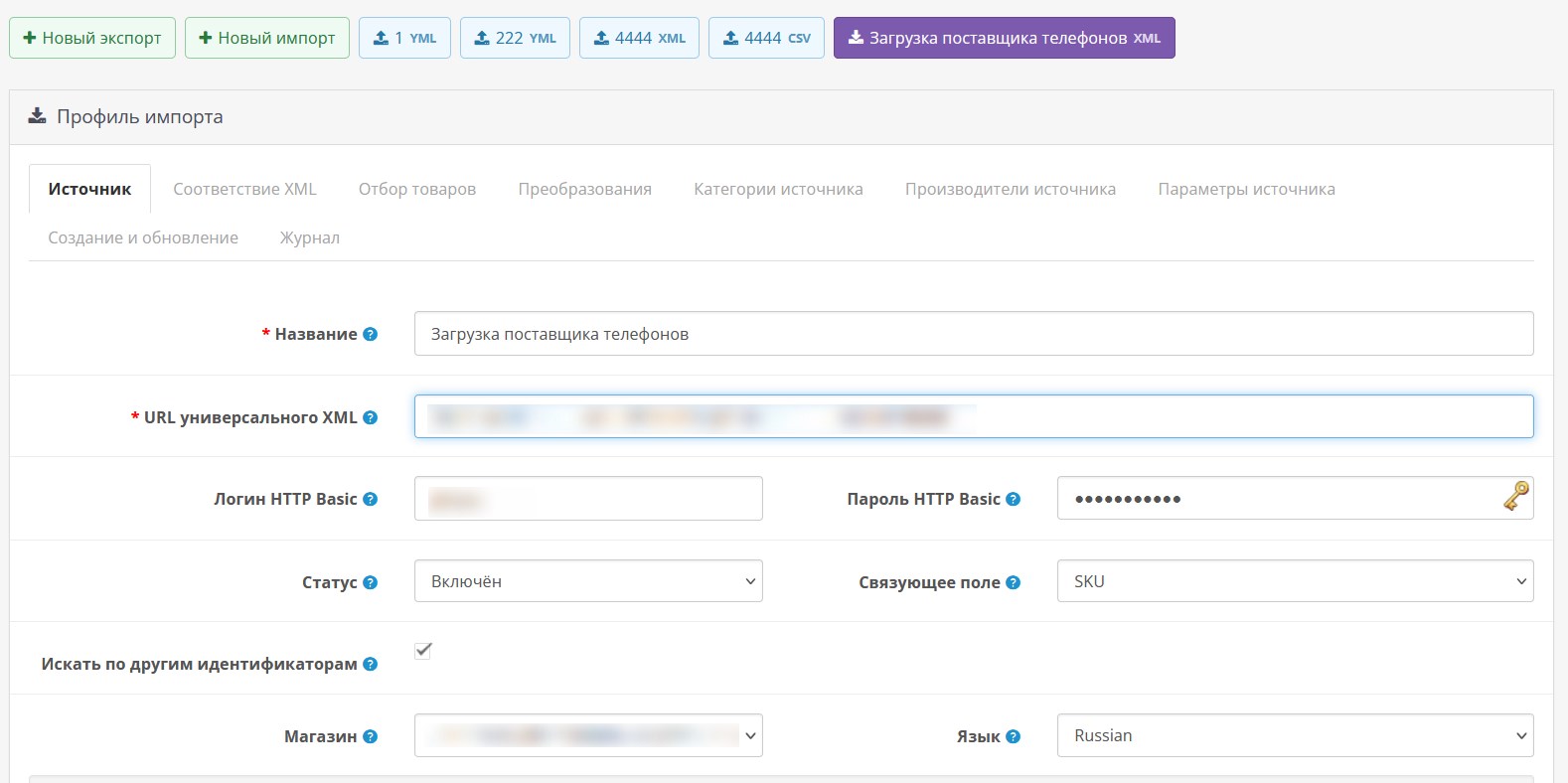
Profiles of both directions are available on one page and are visually separated by color: export profilesare displayed with blue marks, imported ones with purple marks. The interface adapts to the width of the screen and does not reduce the working area of the settings.
In fact, you get a single control center for the export and import of product data in the administrative panel of the store.
Please note:
Importing custom XML requires initial configuration of field correspondence to the structure of a specific provider. It is impossible to automatically determine the purpose of all non-standard elements. Import is performed manually from the profile; cron is used to update prepared export files. The XML source must be accessible via a direct HTTP/HTTPS link. Open sources and sources protected by HTTP Basic authorization are supported. The module does not represent a "magicwand", and setting it up requires time and knowledge. If you want, we can help you set it up to suit your needs. The estimated cost of setting it up for 1 feed is 5,000 rubles.
Examples of solved problems:
Exporter capabilities:
Importer capabilities:
Custom XML import constructor:
Example paths:
Cron setup:
The module generates a secure URL and ready-made commands, but the task itself must be added once to the hosting scheduler or server crontab.
Installation:
Download the ocmod file through the standard add-on installation.
Install the module.
Clear modifier cache.
Create an export or import profile.
Set up filters, price rules, field matches and data composition.
Save your profile.
To export, use the received permanent secure link.
To import, provide a direct HTTP/HTTPS link to the vendor's XML.
For large directories, enable file mode and configure cron.
Works on LiveStore 3, OCStore 3, Opencart 3. Standard template. For different admin panels and templates, modifications will be required, possibly for a fee.
If you want- we can install the module on your website for free. Send access after purchasing the module. You may need some work for the admin panel or for your template - this may be paid.
With its help, you can upload products for marketplaces, advertising platforms, partners and client sites. Each export profile receives a permanent secure link with current prices, balances, characteristics, images and other information about the goods.
Export and import are combined in one manager. For each client, supplier or site, you can create a separate profile with its own set of products, filters, price formulas, field mappings and data processing rules.
Profiles of both directions are available on one page and are visually separated by color: export profilesare displayed with blue marks, imported ones with purple marks. The interface adapts to the width of the screen and does not reduce the working area of the settings.
In fact, you get a single control center for the export and import of product data in the administrative panel of the store.
Please note:
Importing custom XML requires initial configuration of field correspondence to the structure of a specific provider. It is impossible to automatically determine the purpose of all non-standard elements. Import is performed manually from the profile; cron is used to update prepared export files. The XML source must be accessible via a direct HTTP/HTTPS link. Open sources and sources protected by HTTP Basic authorization are supported. The module does not represent a "magicwand", and setting it up requires time and knowledge. If you want, we can help you set it up to suit your needs. The estimated cost of setting it up for 1 feed is 5,000 rubles.
Examples of solved problems:
- Upload products of selected categories and manufacturers for the marketplace or individual client.
- Exclude products without reserve, products from certain manufacturers or items outside the specified price range.
- Add a markup to the export price, apply separate formulas for categories and manufacturers, then round the result.
- Create your own XML tags, nested elements, attributes and CSV columns to meet the requirements of a specific site.
- Create separate offers for product variants and upload characteristics, options and images.
- Provide each client with a permanent secure link with their own set of products and settings.
- Automatically update the prepared feed file via cron.
- Load a vendor catalog from YML or custom XML with non-standard structure, attributes and namespaces.
- Analyze XML, compare categories and manufacturers, and write parameters into product characteristics, options or fields.
- Transfer products, categories, images, characteristics, options and original currency prices between OpenCart stores.
- creating product feeds XML, YML and CSV for marketplaces, clients and partners;
- filtering the catalog and changing export prices using formulas and rules;
- creating a custom XML structure and additional CSV columns;
- import of new products and selective updating of existing ones;
- analysis and processing of arbitrary XML providers;
- transfer of catalogs and original currency prices between OpenCart stores;
- automatic generation of ready-made export files on a schedule.
Exporter capabilities:
- Unlimited number of independent profiles with permanent secure links.
- YML, Generic XML and CSV formats.
- Live generation when accessing a link or file mode for large directories.
- Separate Cron tab with ready-made schedules, protected URL, command for hosting panel and full crontab line.
- Select store, language, currency and customer group for each profile.
- Inclusion or exclusion of categories and manufacturers, filtering by price, stock and SKU.
- White and black lists of SKUs, including masks with the symbol *.
- Flexible selection rules by product fields and characteristicswith comparison, search, range and empty value checking conditions.
- Price formulas, step rules for ranges, categories and manufacturers, markups, discounts and mathematical operations.
- Flexible price rounding up, down or according to mathematical rules with a specified precision and ending.
- Consistent transformations of titles, descriptions, models, SKUs and characteristics: replacement, prefixes, suffixes, regular expressions, HTML removal, case changes and length restrictions.
- Unlimited number of custom XML tags and CSV columns with support for nesting, attributes and value templates.
- Uploading characteristics, main and additional images,options within a product or individual offers for combinations of options.
- Support for original currency prices from the module Liveopencart MultiCurrency.
- Export and import profile settings in JSON, generation log and stream directory processing in batches.
- Save large sets of categories, manufacturers and rules without losing data due to PHP max_input_vars.
- Multilingual (default languages: Russian, English, Kazakh, Ukrainian).
Importer capabilities:
- Separate profiles for generic XML, YML and custom XML providers.
- Direct downloadHTTP/HTTPS link, including with HTTP Basic authorization.
- Customize OpenCart product element and field paths with support for nested elements, XML attributes, alternate paths, XPath and namespaces.
- Comparison of ID, SKU, model, name, description, price, balance, manufacturer, barcodes, dimensions, weight, categories and images.
- Preview of the first products and analysis of the XML structure without changing the product catalog.
- Automatic search for categories, manufacturers and parameters with display of the number of related products.
- Automatic creation, manual matching or exclusion of supplier categories.
- Automatic creation,matching, renaming or excluding manufacturers.
- Assigning supplier parameters to characteristics, options, standard product fields or an ignore list.
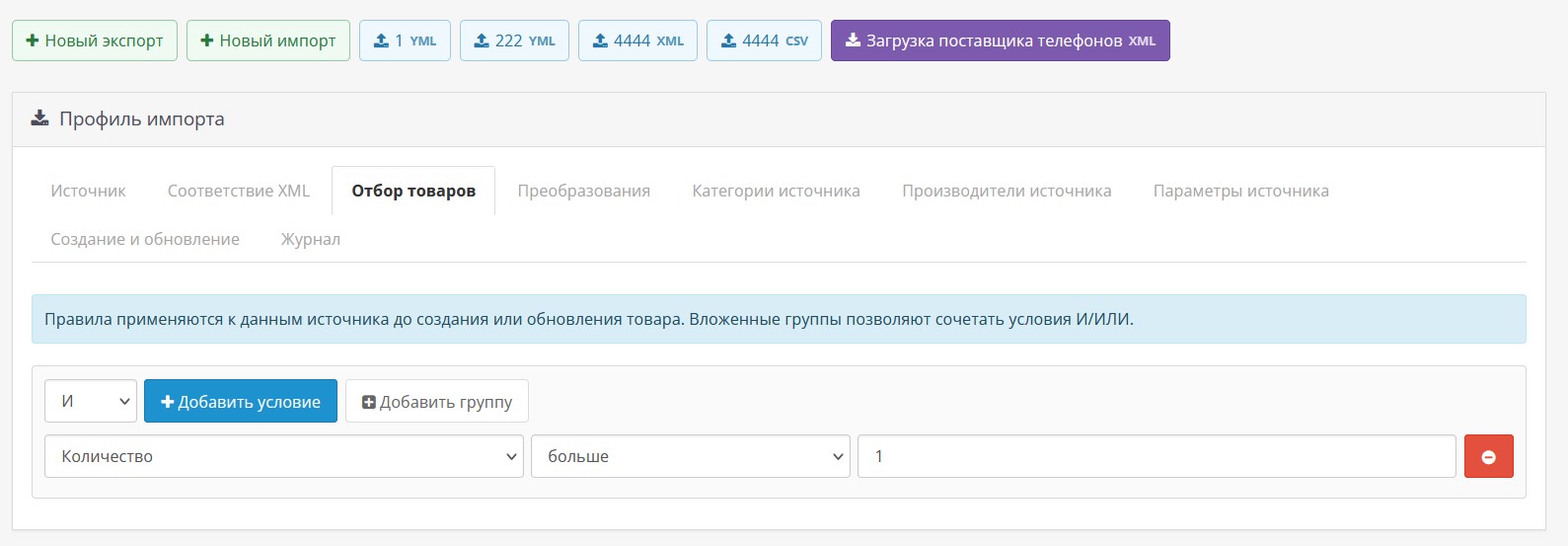
- Nested filter constructor with groups of AND/OR conditions for selecting products by fields, categories and XML parameters.
- Sequential transformations of input data: replacing text, regular expressions, adding text, removing HTML, changing case and stripping spaces.
- Input price formula and recognition of numbers with dot, comma and thousand separators.
- Match products by SKU, model, EAN, UPC or MPN with secure backup search by other identifiers.
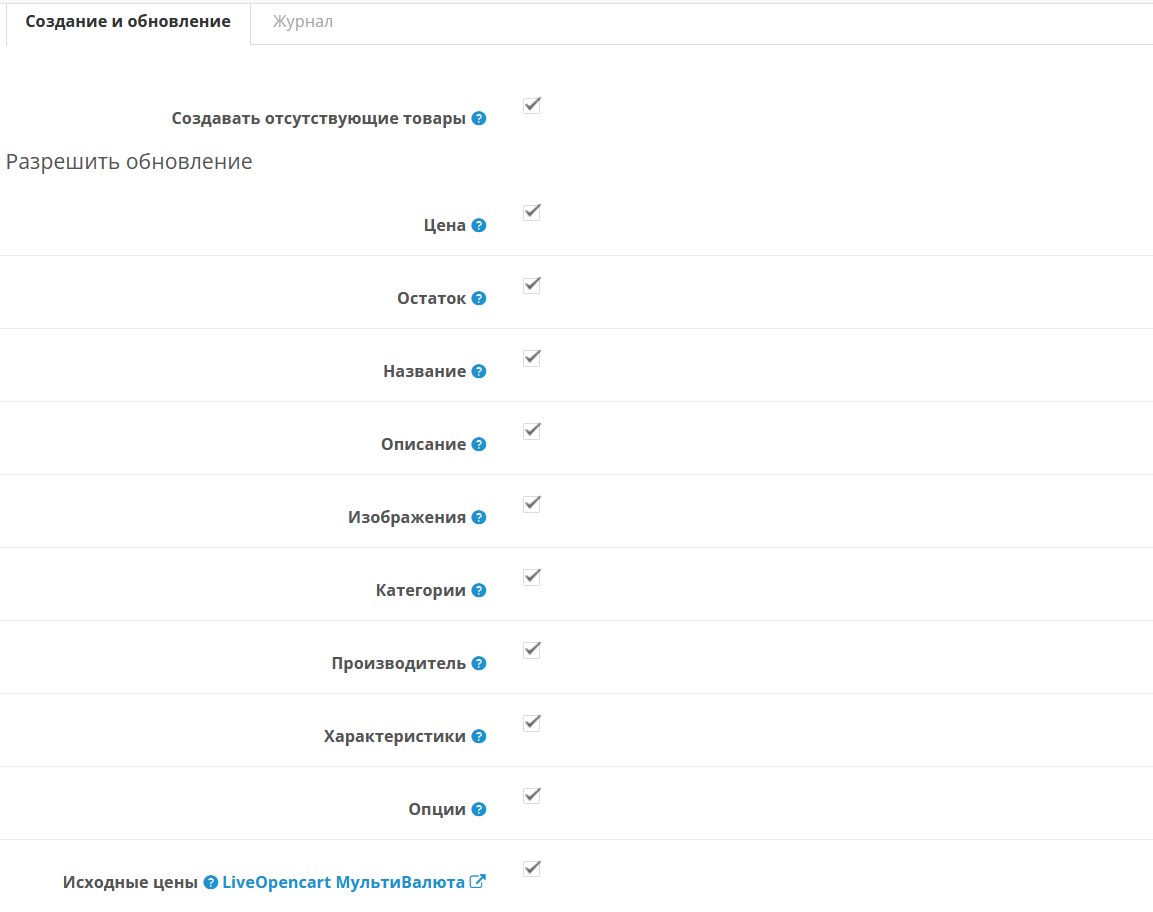
- Create new products and selectively update price, balance, name, description, manufacturer, categories, characteristics, options and images.
- Disable or reset product balances that have disappeared from the feed, with protection against erroneous or empty XML.
- XML streaming, file and image size limits, protection from local addresses and running one profile at a time.
- Launch of launches with the number of created, updated, missed products and errors.
- Transfer of calculated and original currency prices with the installed module Liveopencart MultiCurrency.
- Saving large maps of categories, manufacturers,parameters and rules without data loss due to PHP limitation max_input_vars.
- Multilingual (default languages: Russian, English, Kazakh, Ukrainian).
Custom XML import constructor:
- A separate profile is created for each supplier with its own link, filters and field matches.
- When using standard Live XML or YML, manual configuration of most paths is not required.
- For non-standard XML, you can specify the product element and path to each OpenCart field.
- Supports nested elements, XML attributes, alternative paths via ||, relative XPath and spacesnames.
- Categories, images and characteristics can return multiple values.
- Before importing, you can check the first products and analyze the found categories, manufacturers and parameters without changing the catalog.
Example paths:
@id
title
prices/price
prices/price/@value
sku || vendorCode || @id
xpath:p:prices/p:price/@value
Cron setup:
- Save the export profile and enable the “Ready file (cron)” mode.
- Open the Cron tab and select a ready-made or custom schedule.
- Copy the finished command to the hosting scheduler or the full line to the system onecrontab.
The module generates a secure URL and ready-made commands, but the task itself must be added once to the hosting scheduler or server crontab.
Installation:
Download the ocmod file through the standard add-on installation.
Install the module.
Clear modifier cache.
Create an export or import profile.
Set up filters, price rules, field matches and data composition.
Save your profile.
To export, use the received permanent secure link.
To import, provide a direct HTTP/HTTPS link to the vendor's XML.
For large directories, enable file mode and configure cron.
Works on LiveStore 3, OCStore 3, Opencart 3. Standard template. For different admin panels and templates, modifications will be required, possibly for a fee.
If you want- we can install the module on your website for free. Send access after purchasing the module. You may need some work for the admin panel or for your template - this may be paid.
Distribution method:
Paid
Opencart version:
LiveStore 3.*OCStore 3.*
PHP verision:
PHP 7.0PHP 7.1PHP 7.2PHP 7.3PHP 7.4PHP 8.0PHP 8.1PHP 8.2PHP 8.3
Activation:
AutomaticManually, upon request via private messagesManually, upon request via email
Getting files:
On site, in the personal account
Protection system:
No
VQmod:
No
Ocmod:
Yes
Events:
No
Uploaded:
24.07.2026
Updated:
01.08.2026
Viewed:
856
Sales:
1
Write a review
Your Name:Your Review: Note: HTML is not translated!
Rating: Bad Good
Enter the code in the box below:


Файлы будут доступны после покупки


