Your shopping cart is empty!

Filter Links as Tags for FilterVier_SEO
Price: 400 ₽ 750 ₽

Author: oc-vier
Write to the author
Need paid help? Contact the site administration
Opencart version:
Need paid help? Contact the site administration
Opencart version:
LiveStore 3.*OCStore 3.*OpenCart 3.*OCStore 2.3OpenCart 2.3OpenCart 2.2OCStore 2.1OpenCart 2.1OpenCart 2.0
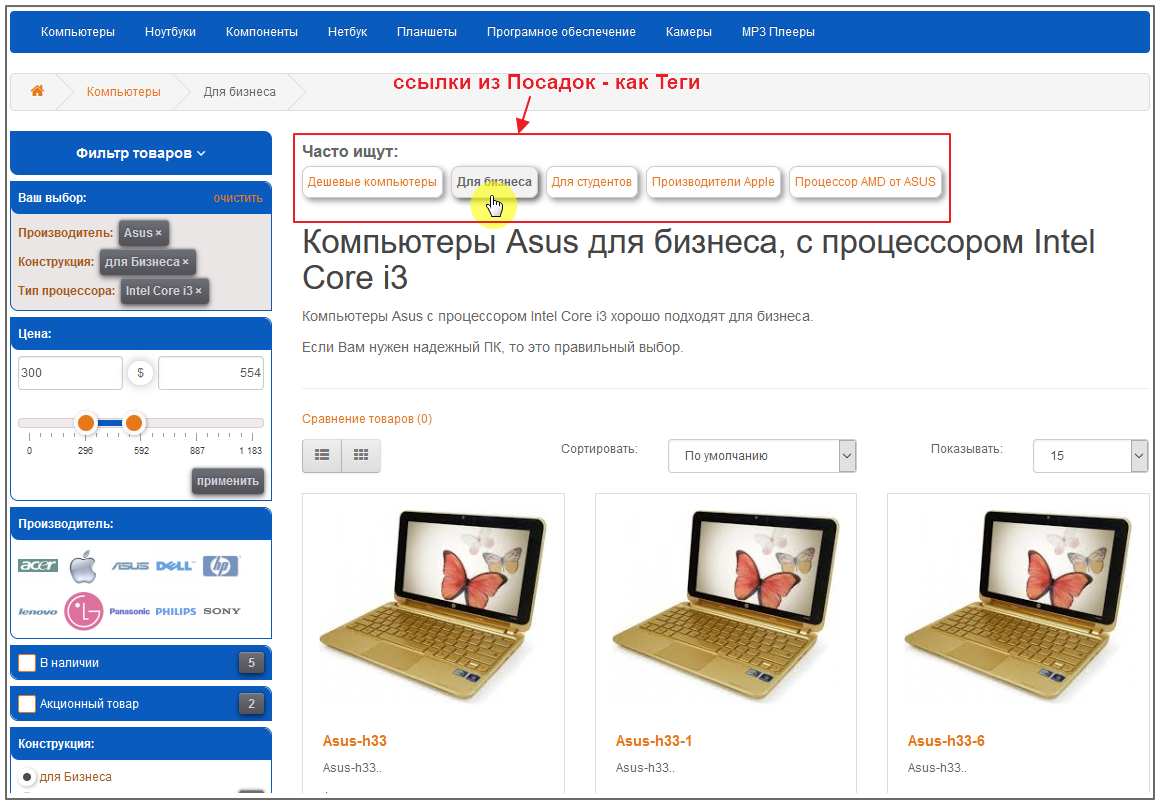
The modifier module allows to automatically create links on the Category page from the Landing Pages of the FilterVier_SEO filter version >=61.
These links include the output of: Meta Tags, H1 (Headline), Breadcrumbs, Descriptions specific to these Landing Pages.
Demo site
This modifier module works with the Product Filter - FilterVier_SEO
Filter Landing Page Settings - FilterVier_SEO
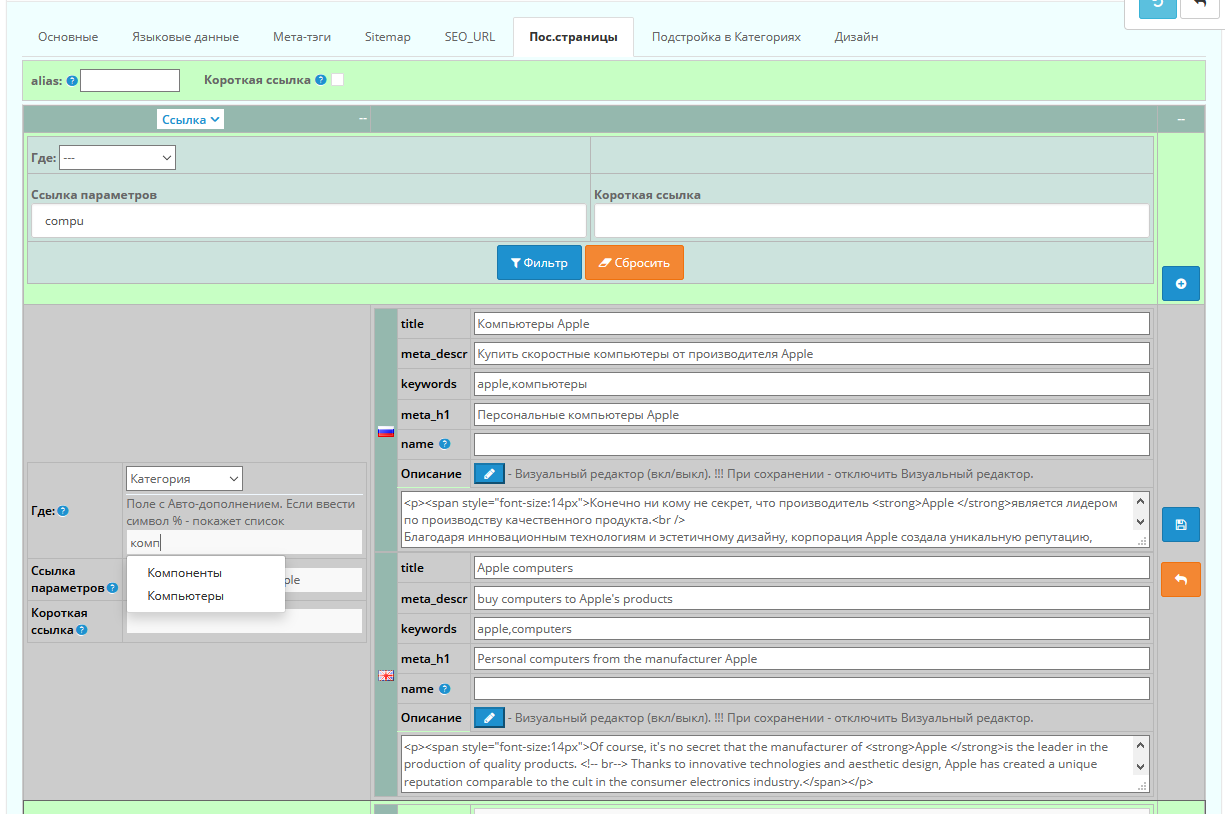 Module installation is standard. Opencart does not overwrite files. Used
modifier. (the module archive contains installation instructions - readme.txt)
3 easy installation steps:
1) Unpack the module archive
-> enter the upload folder and copy the catalog module folder to the /catalog/ folder of your site.
2) in the Admin panel in INSTALLING ADDITIONS/EXTENSIONS, upload the modifier file:
for Opencart 2 - links_filter_as_tags_2.ocmod.xml
for Opencart 3 - links_filter_as_tags_3.ocmod.zip
3) in MODIFIERS / ADD-ON MANAGER update the modifiers!!!
Installation and configuration of the module is not included in free support.
Additional information on the module.
The module folder /catalog/ contains only a style file to display the appearancelinks in the form of buttons by default.
You can change it to your own design, or not use it, but
create your own styles in any style (.css) file of your site.
I also remind you that your site’s styles can be cached using different methods.
+ clear the browser cache (by Ctrl+F5), and for Opencart 3 it is still possible
you will need to clear the cache in the developer settings - https://prnt.sc/lf0ywm
The output of the Links block in the HTML code (view file) of your Template is attached with a modifier after
variable named `content_top`
If you do not have this variable in the template or you want to display this block in another place, then
change the modifier to suit your requirements.
The modifier uses data for the Block Name for Russian and English languages. If you use other languages or want to change the Block Name, then
change/add this information to the modifier by analogy (or
remove unnecessary information so that there is no Block Name).
These links include the output of: Meta Tags, H1 (Headline), Breadcrumbs, Descriptions specific to these Landing Pages.
Demo site
This modifier module works with the Product Filter - FilterVier_SEO
Filter Landing Page Settings - FilterVier_SEO
Module installation is standard. Opencart does not overwrite files. Used modifier. (the module archive contains installation instructions - readme.txt)
3 easy installation steps:
1) Unpack the module archive
-> enter the upload folder and copy the catalog module folder to the /catalog/ folder of your site.
2) in the Admin panel in INSTALLING ADDITIONS/EXTENSIONS, upload the modifier file:
for Opencart 2 - links_filter_as_tags_2.ocmod.xml
for Opencart 3 - links_filter_as_tags_3.ocmod.zip
3) in MODIFIERS / ADD-ON MANAGER update the modifiers!!!
Installation and configuration of the module is not included in free support.
Additional information on the module.
The module folder /catalog/ contains only a style file to display the appearancelinks in the form of buttons by default.
You can change it to your own design, or not use it, but
create your own styles in any style (.css) file of your site.
I also remind you that your site’s styles can be cached using different methods.
+ clear the browser cache (by Ctrl+F5), and for Opencart 3 it is still possible
you will need to clear the cache in the developer settings - https://prnt.sc/lf0ywm
The output of the Links block in the HTML code (view file) of your Template is attached with a modifier after
variable named `content_top`
If you do not have this variable in the template or you want to display this block in another place, then
change the modifier to suit your requirements.
The modifier uses data for the Block Name for Russian and English languages. If you use other languages or want to change the Block Name, then
change/add this information to the modifier by analogy (or
remove unnecessary information so that there is no Block Name).
Added additional functionality that appeared in the new version of the Filter.
Distribution method:
Paid
Opencart version:
LiveStore 3.*OCStore 3.*OpenCart 3.*OCStore 2.3OpenCart 2.3OpenCart 2.2OCStore 2.1OpenCart 2.1OpenCart 2.0
PHP verision:
PHP 5.6PHP 7.0PHP 7.1PHP 7.2PHP 7.3PHP 7.4PHP 8.1PHP 8.2PHP 8.3
Activation:
Not required
Getting files:
On site, in the personal account
Protection system:
No
VQmod:
No
Ocmod:
Yes
Events:
No
Uploaded:
23.02.2021
Updated:
09.08.2026
Viewed:
12893
Sales:
230
Write a review
Your Name:Your Review: Note: HTML is not translated!
Rating: Bad Good
Enter the code in the box below:

Файлы будут доступны после покупки
Бастион / купил товар / 05 April 2026 18:39:59 #
Отличное дополнение к основному модулю FilterVier_SEO. Автор помог с адаптацией
Войдите, чтобы ответить
odinizvas / купил товар / 20 September 2025 22:57:11 #
Взял допом к фильтру, ни о чем не жалею:)
Войдите, чтобы ответить
OFFFFFFFFFFFFFFF / купил товар / 18 December 2024 19:02:26 #
Добрый день! А можно как-то прикрутить выбор какие посадочные выводить в модуль? А то если их много, то получается каша. или может сделать из него карусель
Войдите, чтобы ответить
collapse the branch
oc-vier / автор / 07 March 2025 13:51:26 #
можно в новой версии Фильтра-64 это указать - поставить галку в Посадке.
Войдите, чтобы ответить
yondo / купил товар / 04 December 2021 22:58:19 #
Отличный модуль. СЕОшники оценят)
Войдите, чтобы ответить
Showing 1 to 5 of 5 (1 Pages)


