Your shopping cart is empty!

Attribute Text Select

Price: 2 100 ₽

Author: oc-vier
Write to the author
Подписка: 24 месяца
Need paid help? Contact the site administration
Opencart version:
Подписка: 24 месяца
Need paid help? Contact the site administration
Opencart version:
LiveStore 3.*OCStore 3.*OpenCart 3.*OCStore 2.3OpenCart 2.3OpenCart 2.2OCStore 2.1OpenCart 2.1OpenCart 2.0
Attribute Text Select – module for working with Attributes for OpenCart versions 2.x.x and 3.0.x.
Demo admin panel
input: demo/demo
Installing and configuring the module
System requirements: Ioncube Loader; PHP version: 7.1 or higher
The purpose of writing this module is to facilitate the work of the manager in filling out Attributes and their Values in the Product Card, as well as to bring “order” to them (especially after Parsing)
What the module can do:
- work with multi-Valuesattribute; (for greater clarity in the selection of multi-Values, "natural" sorting is used - not10; 2; 5, a 2; 5; 10);
- Multi-language. (in the Product Card Attribute values use only "one admin language") -
- mass edit Attribute values;
- massively add/remove Attributes and their Values from Products;
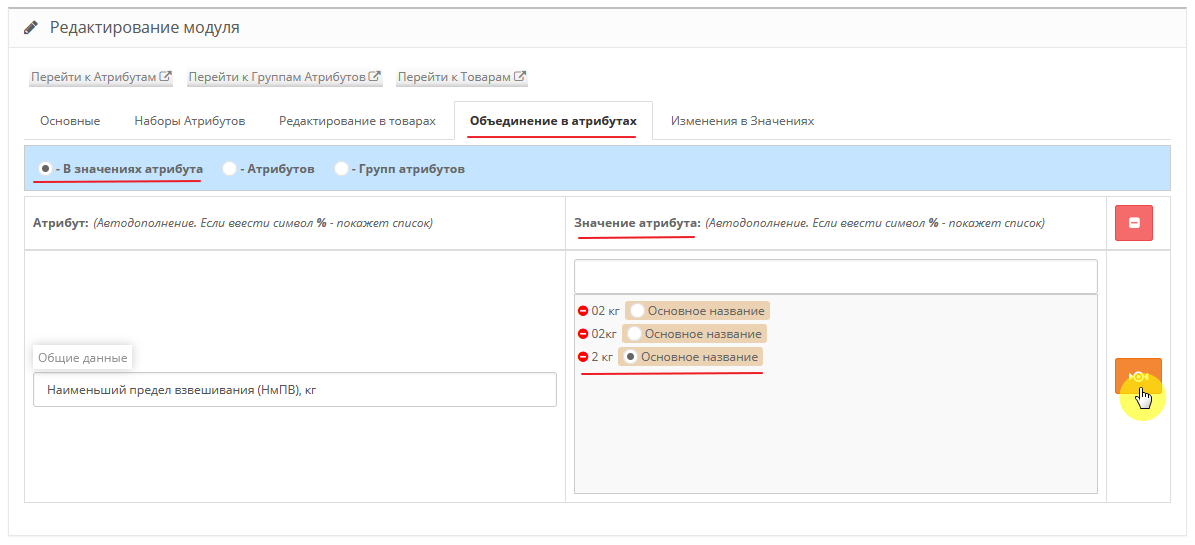
- combine Attribute Groups, Attributes and their Values into one whole, and at the same time not break the connection with the Products;
- remove html tags when generating new Attribute Values;
- use Sets (Blanks) of attributes to add themto the Goods;
- use Statistics on the quantity of Product for Attributes and their Values;
- create Perelinkova from the Product Card for the filter - FilterVier_SEO
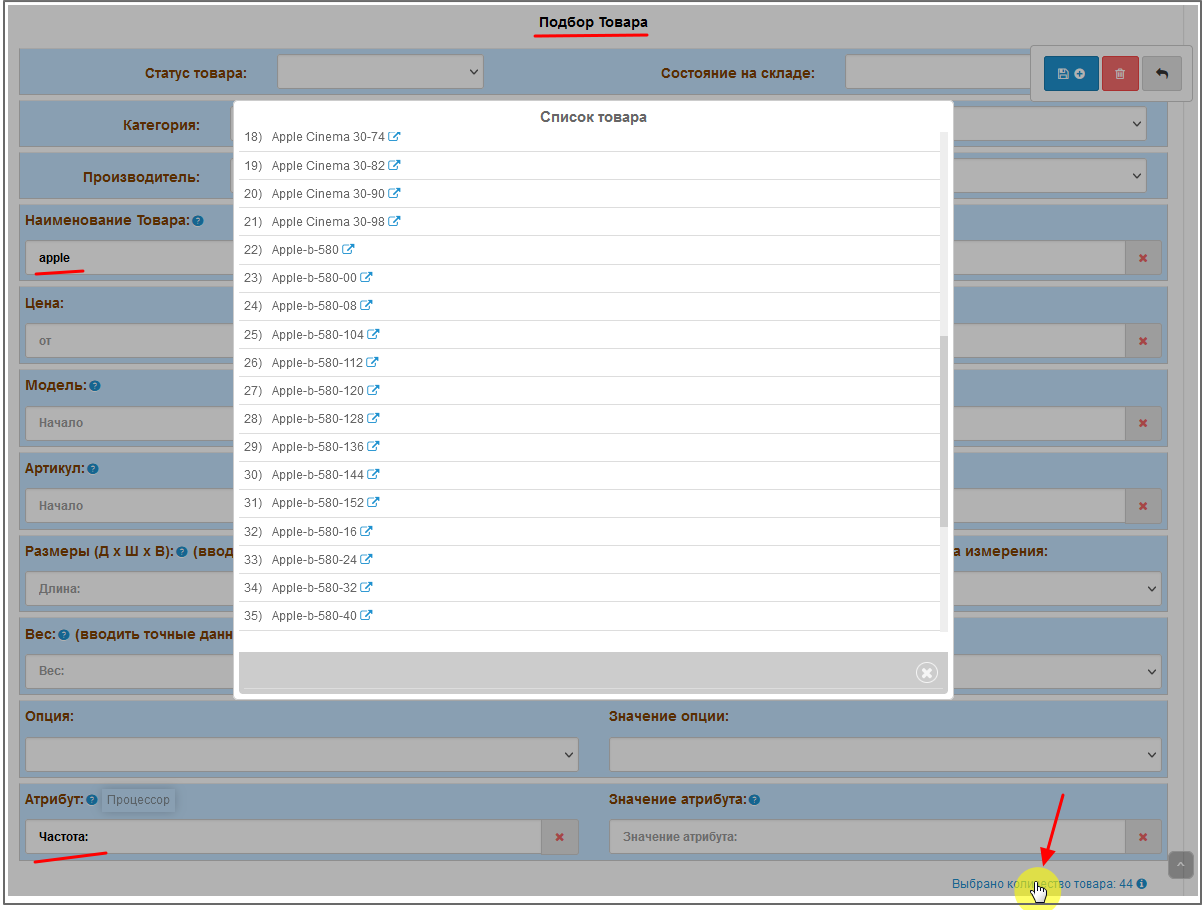
To add/remove Attributes (Values) to the desired Products, you can use “Product selection”, based on such general characteristics as:
Category, Manufacturer, Store, Product Status, Stock Condition, Dimensions and Units of Measurement, Weight and Weight Unit.
You can also select by exact or partial characteristics by:
Product Name, Model, Article Number, Price (price range), Options, Attributes and their Values.
For clarity and “beauty” in the Product Card, you can use an image for Attribute Values.
! The module controls all operations andreports either a Successful operation, a Warning, or an Error.
Duplicates or absence of Values in any of the languages will not be missed by the module.
! 'Revision' – during automatic processing of Attribute Values, and when duplicates are identified, the module groups them, observing all connections with the Products.
Technical support for the module is provided only to those persons who purchased it officially
It is prohibited to transfer the module to third parties without the consent of the author.
Some explanations on the functionality of the module.
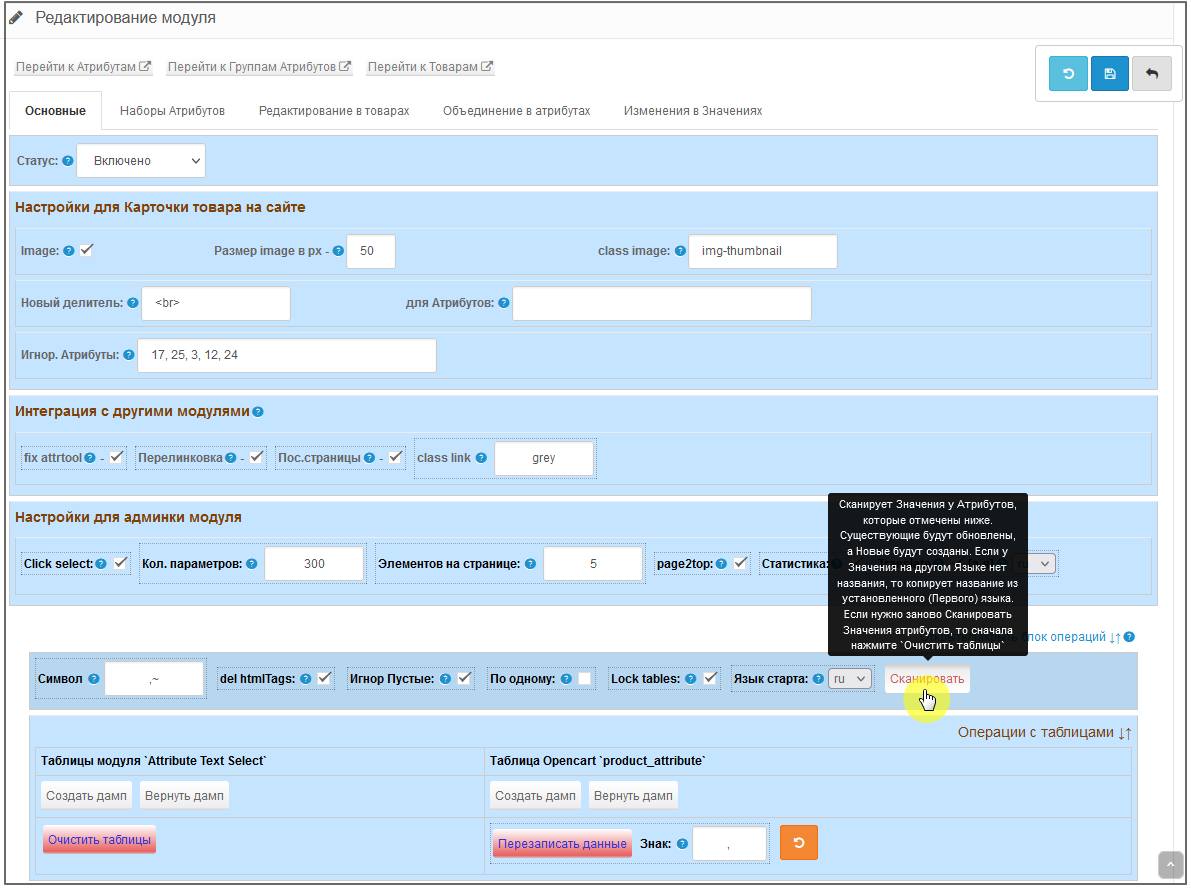
When Scanning (clicking the Scan button), identical Values are grouped and assigned a common id.
If the Value already exists, then it remains and is skipped, and the New one is added.!!!NEW
If, when adding a new Value, there is no value in another language, then the value from the main language is substituted - “Start Language”, which is specified before scanning.!!!NEW
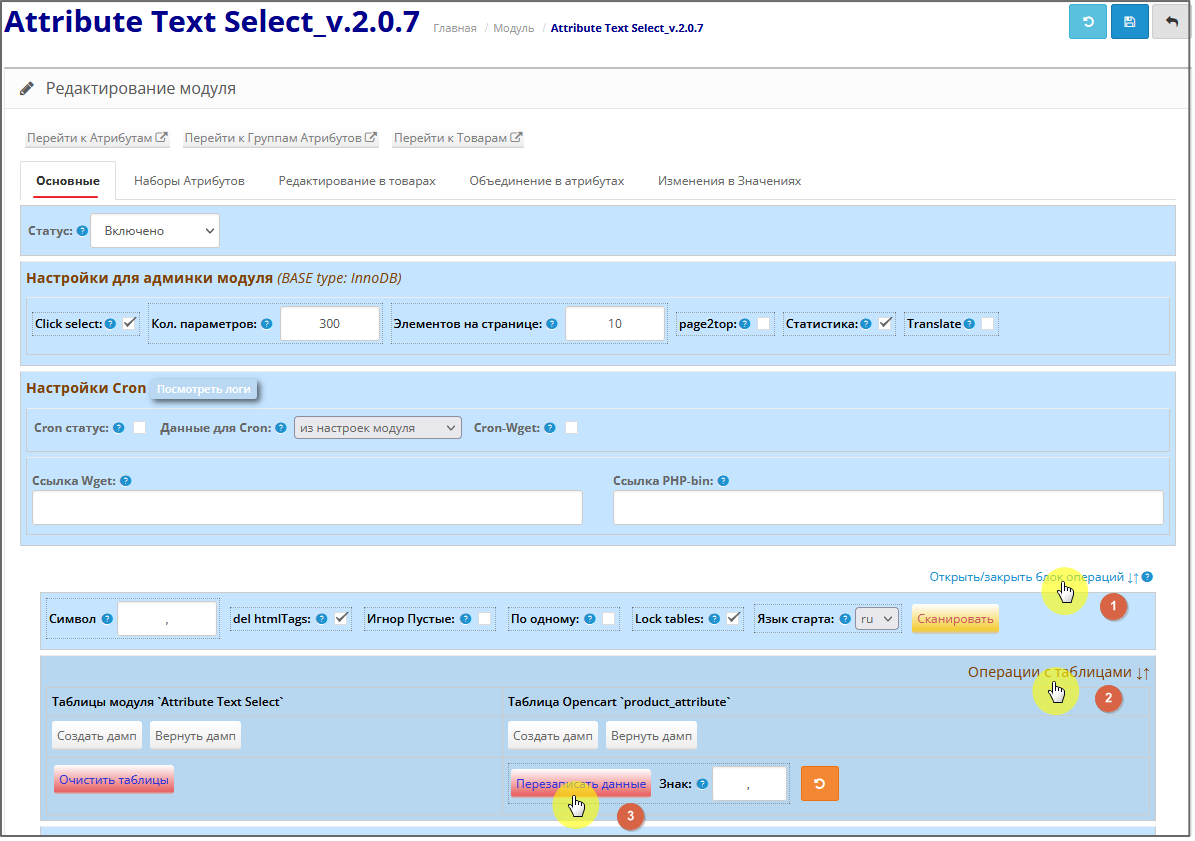
You can choose which Attributes to scan by.
If an Attribute has multiple Values, then they can be separated through Symbol/s to use them as Multi-Attribute Values.
When scanning and detecting html tags in Values, you can remove them.
Operations with tables ↓↑
Here you can create DUMP tables. !!!NEW
Rewrite into the `product_attribute` table frommodule tables. When rewriting, Multi-Language and Multi-Meanings are taken into account.
You can also roll back the last Overwrite. !!!NEW
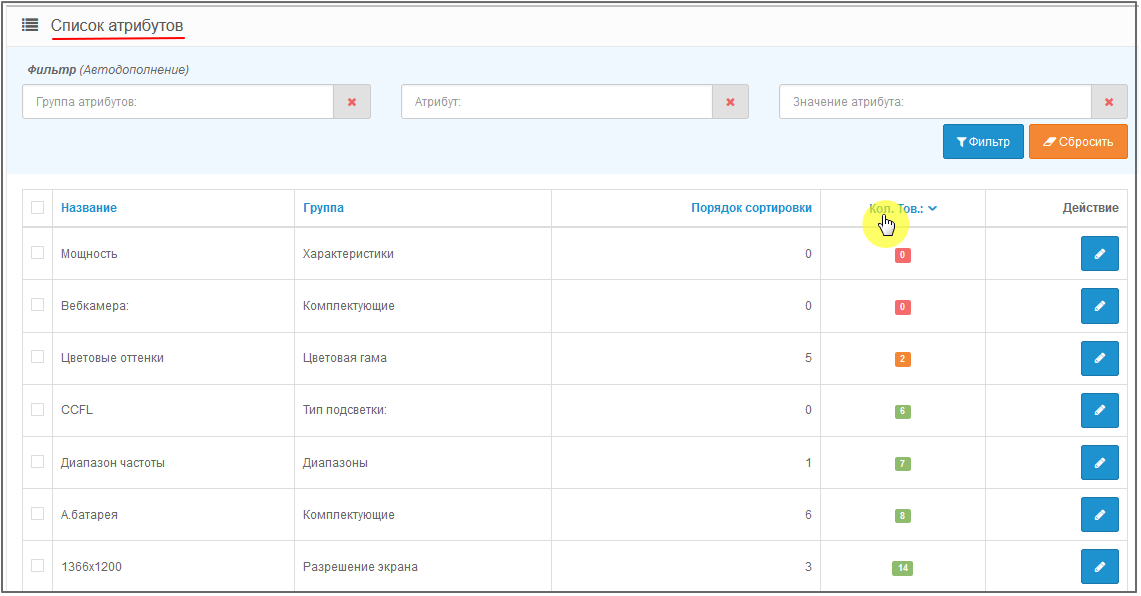
Page view - Attributes.
Filter for searching Attribute Groups, Attributes and their Values.
Also for clarity, Statistics - quantity of Goods for Attribute is shown. !!!NEW
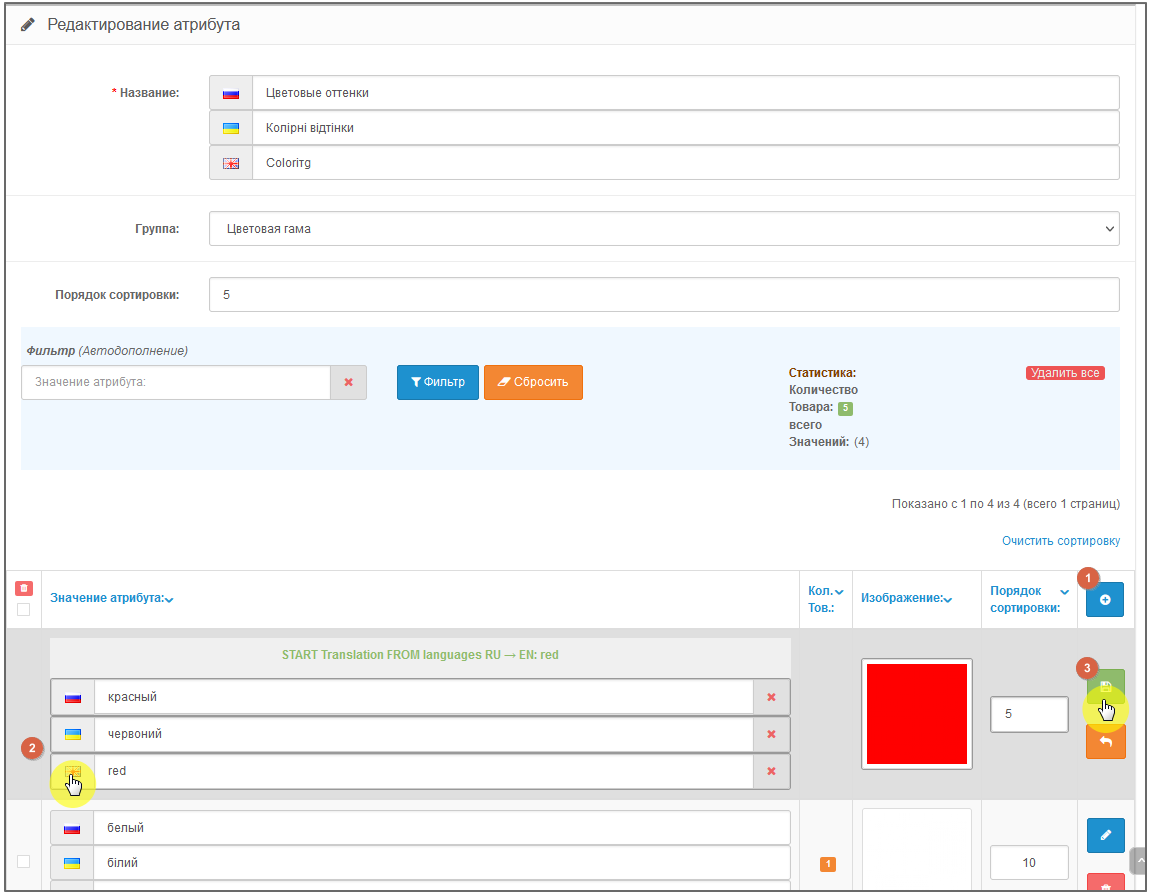
Page View - Attribute Editing.
HereAttribute values are created, deleted, assigned Image and Sorting.
When you enable the “Statistics” setting, you can analyze how many Products are assigned these Values. !!!NEW
For quick analysis, you can use sorting, both by the Values themselves and by the presence of the Quantity of Goods for these Values. !!!NEW
You can also use the built-in filter to search for Values. !!!NEW
The functionality for translating Values into other languages using a free service has been experimentally implemented.!!!NEW (Attention - machine translation may differ from human translation)
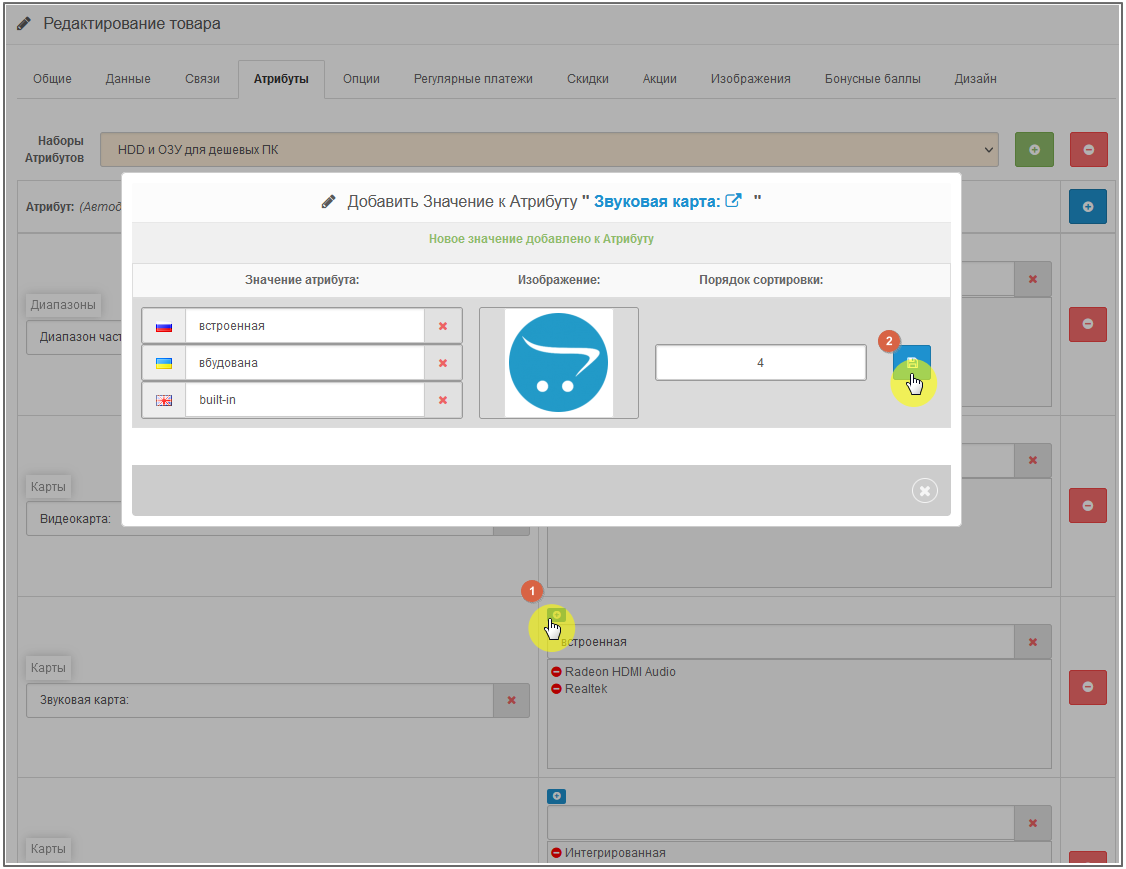
Page View - Edit Product.
In the “Characteristics” tab of the Product card, Attributes and their Values (if any) are added/removed.
For a multi-lingual site, you do not need to enter values in other languages - only one language is used for filling.
If the Attribute does not have the required Value, then you can Create it in the Product card, and then, after closing the pop-up block, select it from the drop-down list and add it to the Product.!!!NEW
In the pop-up block for creating new Values, as well as in “Editing Attributes,” you are asked to enter values for all languages (if there are several of them), you can immediately attach a picture and assign sorting. (functionality for translating Values into other languages has also been experimentally introduced).
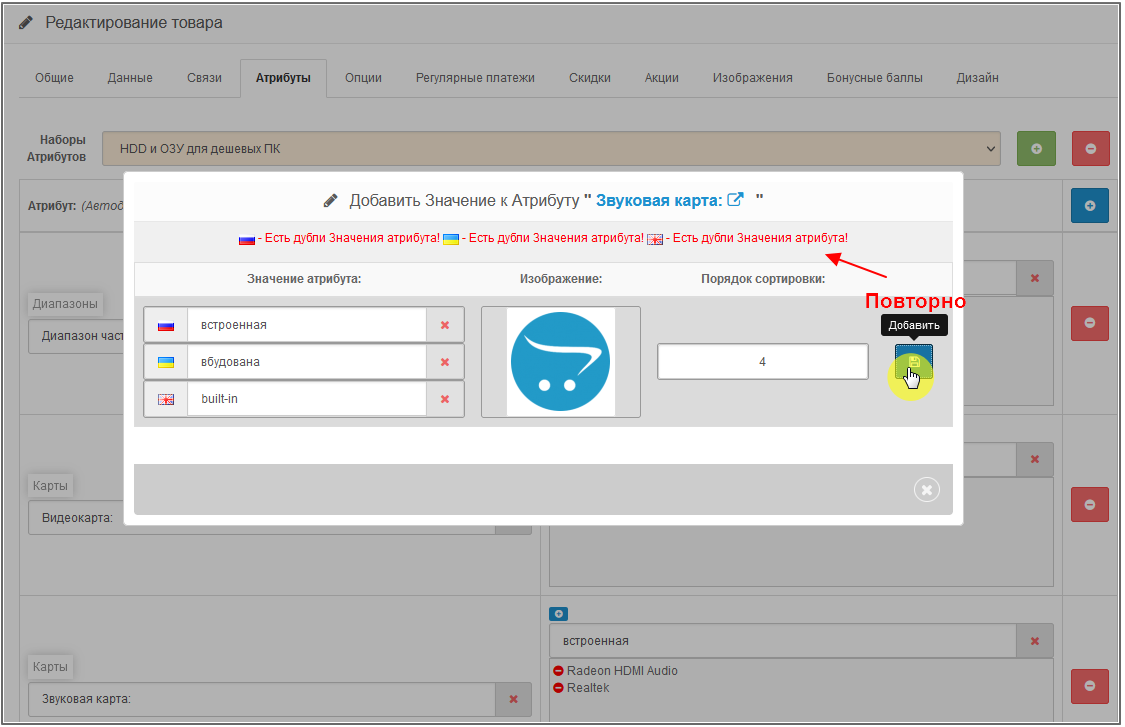
After clicking the “Add” button, you can immediately, without closing the pop-up block, clear the fields for entering a New Value and re-Create it. (The module will not skip duplicates and empty Values).
Module admin panel.
Merging in Attribute Values, Attributes, Attribute Groups -
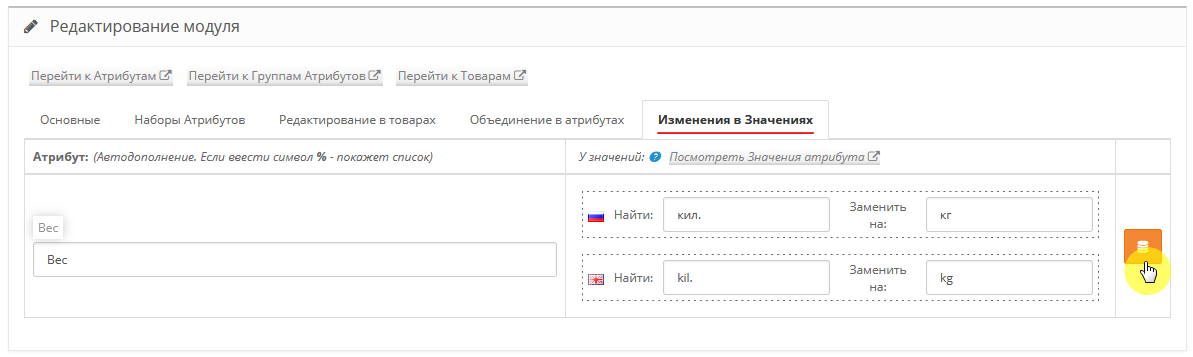
Mass change in Attribute Values -
Bulk editing of products:
Select products using filters based on many criteria,
to then bulk add/remove Attributes and their Values for selected Products.
Removes from the Products either completely all Attributes, or only those selected in the “Product Selection”. !!!NEW
Same beforeoperations you can see List of selected Products -
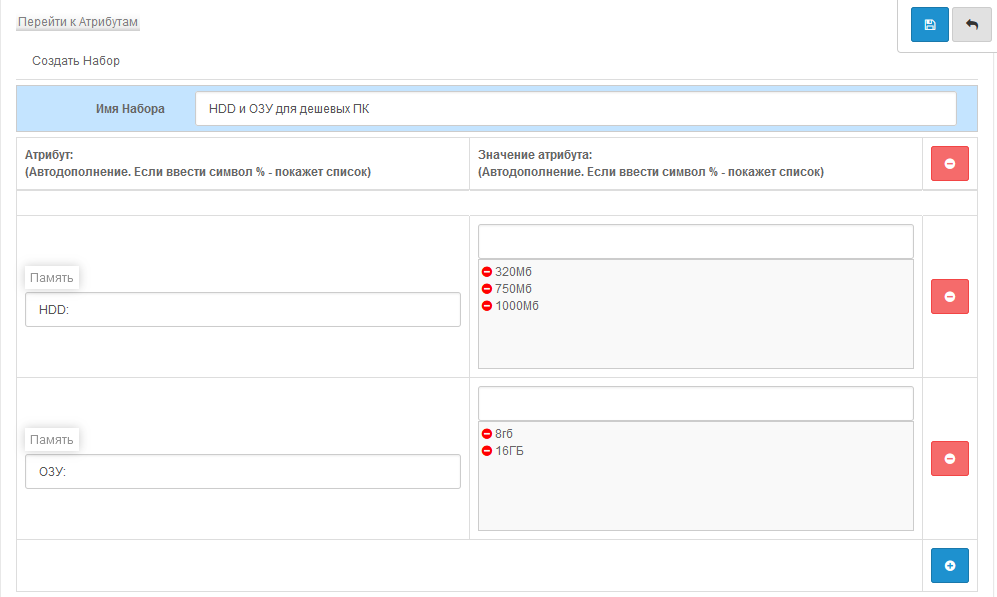
Insert ready Attribute Sets, which in turn can be edited before saving them for Products -
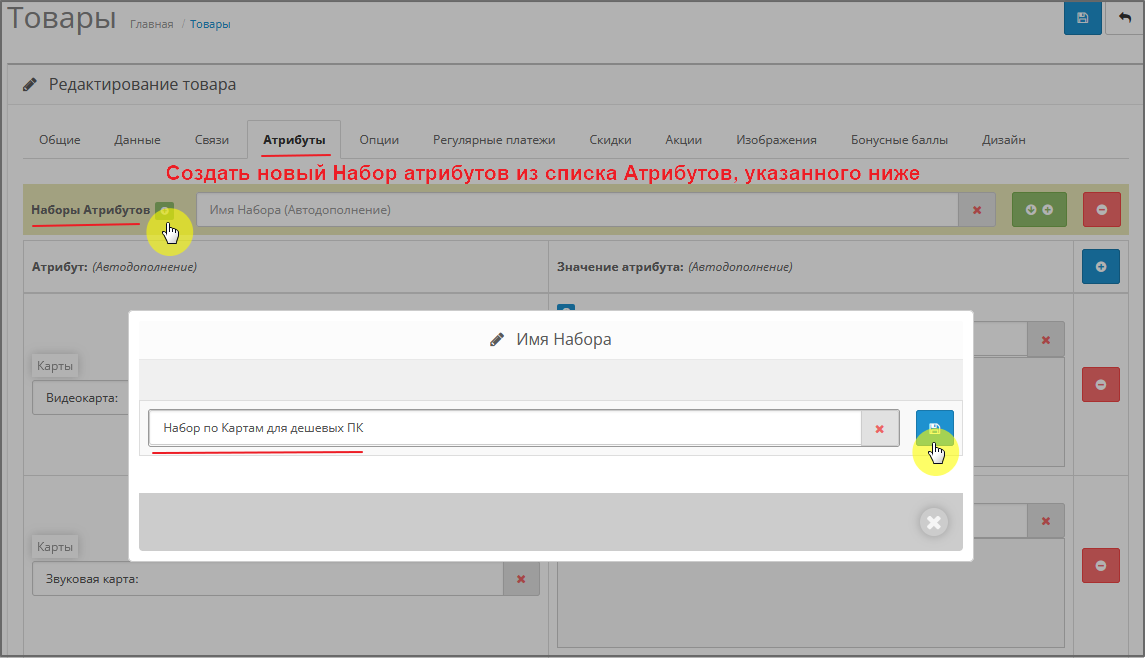
or Create a New Set directly from the Product Card -
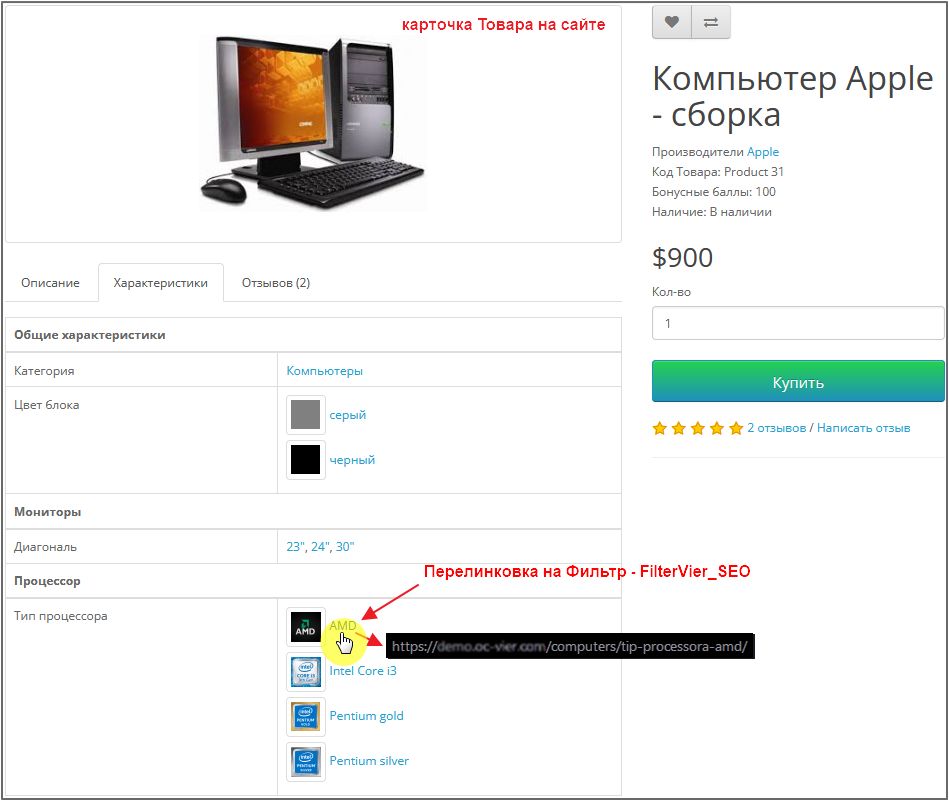
Using this module, you can give a special look to the Characteristics in the Product Card (Pictures, moving Values to the next line, Linking).Example of Linking (demo site) from the Product Card page to the Filter - FilterVier_SEO
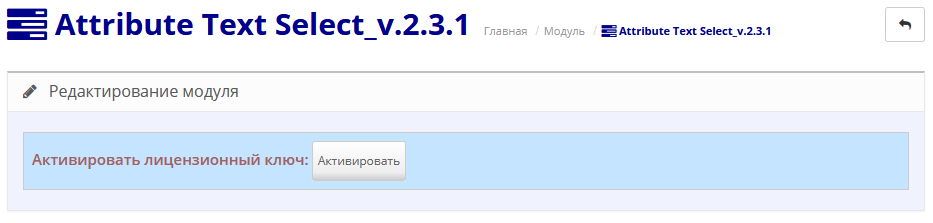
Activation of a legally purchased module occurs by clicking the Activate button (the module will check your version of the module and install the required license)
Instead of one standard table for 'product_attribute', where there was a "vinaigrette" of these attribute values,
The module creates and uses its own tables for Attribute Values, namely:
'attribute_text' – table of id-Values of attributes, Images and Sorting.
'attribute_text_lang' – table of Attribute Value Languages.
'attribute_text_product' is a table of connections between Attribute id and Value id -> with Product id (in this table, if the `text_id` field = 0, this is for Attributes with an empty Value) - this speeds up queries to the database and their processing.
There is also an extra. tables: 'attribute_text_gather' and 'attribute_text_gather_name' – for Attribute Sets.
If your Parsers or Exchangers (1C) use standard OpenCard methods for processing Products addProduct and editProduct (in the file /admin/model/catalog/product.php), then the ATS module will be automatically integrated with these Parsers/Exchangers.
Technical support for the module is provided only to those persons who purchased it officially.
Prohibitedtransfer the module to third parties without the consent of the author.
!!!ATTENTION: - if you use another module for Attribute Values on your site, then most likely they will not work in pairs.
Be sure to disable it in the admin panel, and remove/disable its modifier.
Also check the /system/ folder - it happens that the modifier may be located there. Then don’t forget to update the modifiers again in the admin panel.
The installation is standard (Opencart does not overwrite files, a modifier is used).
The module archive is signed for each version of Opencart.
The module archive contains installation instructions.
Installation and configuration of the module is not included in free support.
Demo admin panel
input: demo/demo
Installing and configuring the module
System requirements: Ioncube Loader; PHP version: 7.1 or higher
The purpose of writing this module is to facilitate the work of the manager in filling out Attributes and their Values in the Product Card, as well as to bring “order” to them (especially after Parsing)
What the module can do:
- work with multi-Valuesattribute; (for greater clarity in the selection of multi-Values, "natural" sorting is used - not
- Multi-language. (in the Product Card Attribute values use only "one admin language") -
- mass edit Attribute values;
- massively add/remove Attributes and their Values from Products;
- combine Attribute Groups, Attributes and their Values into one whole, and at the same time not break the connection with the Products;
- remove html tags when generating new Attribute Values;
- use Sets (Blanks) of attributes to add themto the Goods;
- use Statistics on the quantity of Product for Attributes and their Values;
- create Perelinkova from the Product Card for the filter - FilterVier_SEO
To add/remove Attributes (Values) to the desired Products, you can use “Product selection”, based on such general characteristics as:
Category, Manufacturer, Store, Product Status, Stock Condition, Dimensions and Units of Measurement, Weight and Weight Unit.
You can also select by exact or partial characteristics by:
Product Name, Model, Article Number, Price (price range), Options, Attributes and their Values.
For clarity and “beauty” in the Product Card, you can use an image for Attribute Values.
! The module controls all operations andreports either a Successful operation, a Warning, or an Error.
Duplicates or absence of Values in any of the languages will not be missed by the module.
! 'Revision' – during automatic processing of Attribute Values, and when duplicates are identified, the module groups them, observing all connections with the Products.
Technical support for the module is provided only to those persons who purchased it officially
It is prohibited to transfer the module to third parties without the consent of the author.
Some explanations on the functionality of the module.
When Scanning (clicking the Scan button), identical Values are grouped and assigned a common id.
If the Value already exists, then it remains and is skipped, and the New one is added.!!!NEW
If, when adding a new Value, there is no value in another language, then the value from the main language is substituted - “Start Language”, which is specified before scanning.!!!NEW
You can choose which Attributes to scan by.
If an Attribute has multiple Values, then they can be separated through Symbol/s to use them as Multi-Attribute Values.
When scanning and detecting html tags in Values, you can remove them.
Operations with tables ↓↑
Here you can create DUMP tables. !!!NEW
Rewrite into the `product_attribute` table frommodule tables. When rewriting, Multi-Language and Multi-Meanings are taken into account.
You can also roll back the last Overwrite. !!!NEW
Page view - Attributes.
Filter for searching Attribute Groups, Attributes and their Values.
Also for clarity, Statistics - quantity of Goods for Attribute is shown. !!!NEW
Page View - Attribute Editing.
HereAttribute values are created, deleted, assigned Image and Sorting.
When you enable the “Statistics” setting, you can analyze how many Products are assigned these Values. !!!NEW
For quick analysis, you can use sorting, both by the Values themselves and by the presence of the Quantity of Goods for these Values. !!!NEW
You can also use the built-in filter to search for Values. !!!NEW
The functionality for translating Values into other languages using a free service has been experimentally implemented.!!!NEW (Attention - machine translation may differ from human translation)
Page View - Edit Product.
In the “Characteristics” tab of the Product card, Attributes and their Values (if any) are added/removed.
For a multi-lingual site, you do not need to enter values in other languages - only one language is used for filling.
If the Attribute does not have the required Value, then you can Create it in the Product card, and then, after closing the pop-up block, select it from the drop-down list and add it to the Product.!!!NEW
In the pop-up block for creating new Values, as well as in “Editing Attributes,” you are asked to enter values for all languages (if there are several of them), you can immediately attach a picture and assign sorting. (functionality for translating Values into other languages has also been experimentally introduced).
After clicking the “Add” button, you can immediately, without closing the pop-up block, clear the fields for entering a New Value and re-Create it. (The module will not skip duplicates and empty Values).
Module admin panel.Merging in Attribute Values, Attributes, Attribute Groups -
Mass change in Attribute Values -
Bulk editing of products:
Select products using filters based on many criteria,
to then bulk add/remove Attributes and their Values for selected Products.
Removes from the Products either completely all Attributes, or only those selected in the “Product Selection”. !!!NEW
Same beforeoperations you can see List of selected Products -
Insert ready Attribute Sets, which in turn can be edited before saving them for Products -
or Create a New Set directly from the Product Card -
Using this module, you can give a special look to the Characteristics in the Product Card (Pictures, moving Values to the next line, Linking).Example of Linking (demo site) from the Product Card page to the Filter - FilterVier_SEO
Activation of a legally purchased module occurs by clicking the Activate button (the module will check your version of the module and install the required license)
Instead of one standard table for 'product_attribute', where there was a "vinaigrette" of these attribute values,
The module creates and uses its own tables for Attribute Values, namely:
'attribute_text' – table of id-Values of attributes, Images and Sorting.
'attribute_text_lang' – table of Attribute Value Languages.
'attribute_text_product' is a table of connections between Attribute id and Value id -> with Product id (in this table, if the `text_id` field = 0, this is for Attributes with an empty Value) - this speeds up queries to the database and their processing.
There is also an extra. tables: 'attribute_text_gather' and 'attribute_text_gather_name' – for Attribute Sets.
If your Parsers or Exchangers (1C) use standard OpenCard methods for processing Products addProduct and editProduct (in the file /admin/model/catalog/product.php), then the ATS module will be automatically integrated with these Parsers/Exchangers.
Technical support for the module is provided only to those persons who purchased it officially.
Prohibitedtransfer the module to third parties without the consent of the author.
!!!ATTENTION: - if you use another module for Attribute Values on your site, then most likely they will not work in pairs.
Be sure to disable it in the admin panel, and remove/disable its modifier.
Also check the /system/ folder - it happens that the modifier may be located there. Then don’t forget to update the modifiers again in the admin panel.
The installation is standard (Opencart does not overwrite files, a modifier is used).
The module archive is signed for each version of Opencart.
The module archive contains installation instructions.
Installation and configuration of the module is not included in free support.
!!! When updating the module, always disable all Caches that you may have on your site, as well as clear the browser cache (by Ctrl+F5), and for
Opencart 3 may still need to clear the cache in the developer settings.
===================================================================================
#.8.1.64
2025-03-07:
- adaptation to FilterVier_SEO 64 versions.
----------------------------
#.8.1
2023-09-20:
- When creating a Set (Blank) of Attributes, I removed the check for the presence of Values in these attributes, which “required”, when saving the Set, to enter a Value (if there were any in the Attribute).
- Changed the main modifier of the module!!! - We will definitely change it.
- For integration with Octemplates templates and its modifier oct_atributes_view.ocmod.xml, added a modifierfix_ats_oct_atributes_view.ocmod.zip (in the /use_fix_module_clients/for_octemplate/ folder). !!! Be sure to upload it in the Opencart admin panel in INSTALLING ADDITIONS/EXTENSIONS.
- a new folder /use_fix_module_clients/ has appeared in the module archive, which will contain additional modifiers for integration with third-party modules.
----------------------------
#.8
2023-01-29:
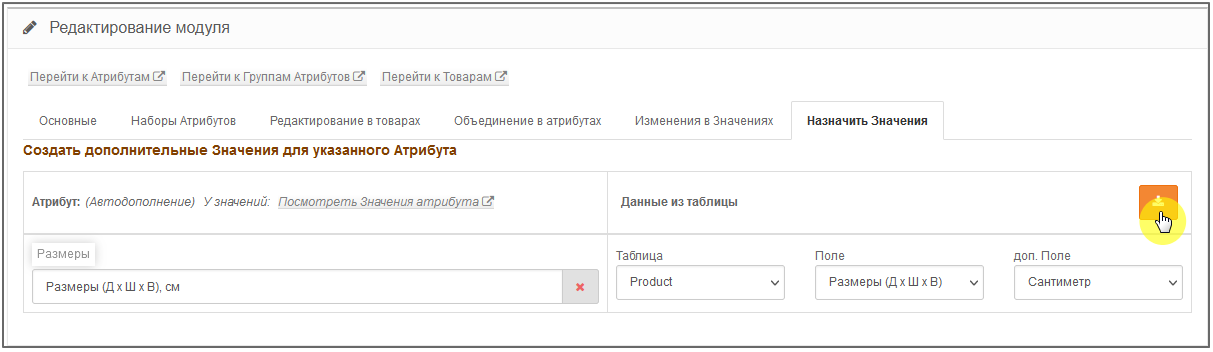
- added new functionality - a new tab “Assign Values”.
- module modifier changed!!! - We will definitely change it.
----------------------------
#.7
2022-12-22:
- added the ability to create New Attribute Sets directly from the Product Card.
- in the “Editing in Products” module tab added:
- A button to clear input fields for selecting Products,
- added selection of Products by Date,
- createNew Attribute Values and New Attribute Sets.
- added a control in the “Settings for the Product Card on the site” for Linking with several selections of attribute parameters - “multi-attrib”.
- added a control in the “Settings for the module admin” for Optimizing module tables – “OPTIMIZ.TABLES”, the Type of which is MyISAM (with a different Setting Type it will not be).
- added “tab.attrib.action” in the “Basic” tab to the “Settings for Administrator Product Card” block.
- in the “Changes in Values” module tab, added the ability to select a different encoding.
- module modifier changed!!! - We will definitely change it.
- added an additional (and optional) attribute_text_select_fix_multi_attrib modifier for “multi-attrib” - Linking with the FilterVier_SEO module.
----------------------------
#.62022-08-06:
- module modifier changed!!! - We will definitely change it.
- the logic of work for Scanning attributes has been changed (we leave existing values, create new ones).
- added “Ignore Empty”, “Lock tables” and “Start language” during Scanning.
- added the ability to create DUMP tables (Operations with tables).
- added the ability to add New Attribute Values directly from the Product Card.
- added Filter and Statistics in Editing Attributes. Added bulk delete Values.
- added a button to clear input fields.
- in the “Editing in Products” tab, when deleting Attributes, the presence of the selected Attribute and its Value is now taken into account.
- experimentally implemented code for translating attribute values into other languages.
- added (experimentally) the “Cron Settings” block.- added to “Product Card Settings” “Ignore. Attributes".
- added to “Integration with other modules”: for Linking “Last pages” and “class link”.
- added to the “Settings for the admin panel of the module”: “Elements on the page”, “page2top”, “Statistics”, “Translate”.
- for “Changes in Values” added the ability to apply a different encoding.
----------------------------
#.5
2021-08-22:
- added settings for the admin panel of the module “Click select” and “Number of parameters”.
- added selection by Options and Attributes to the “Product Selection” filter.
- the code of the controller and module models has been corrected.
- module modifier changed.
----------------------------
#.4
2020-06-21:
- added tabs “Combining in Attributes” and “Changes in Values”.
- added a “Rewrite data” button.
- added links forviewing Attribute Groups and Products.
- module modifier changed.
----------------------------
#.3
2020-06-04:
- added a search filter to the Opencart admin panel attributes.
- minor code correction.
- module modifier changed!
----------------------------
#.2
2020-05-30:
- added the “Attribute Sets” and “Editing in Products” tabs.
- added functionality for selecting “Attribute Sets” to the Product Card.
- added pagination and sorting for Attribute Values.
- added a button to clear module tables.
- module modifier changed!
----------------------------
#.1
2019-09-26:
- Start of the module.
----------------------------
Opencart 3 may still need to clear the cache in the developer settings.
===================================================================================
#.8.1.64
2025-03-07:
- adaptation to FilterVier_SEO 64 versions.
----------------------------
#.8.1
2023-09-20:
- When creating a Set (Blank) of Attributes, I removed the check for the presence of Values in these attributes, which “required”, when saving the Set, to enter a Value (if there were any in the Attribute).
- Changed the main modifier of the module!!! - We will definitely change it.
- For integration with Octemplates templates and its modifier oct_atributes_view.ocmod.xml, added a modifierfix_ats_oct_atributes_view.ocmod.zip (in the /use_fix_module_clients/for_octemplate/ folder). !!! Be sure to upload it in the Opencart admin panel in INSTALLING ADDITIONS/EXTENSIONS.
- a new folder /use_fix_module_clients/ has appeared in the module archive, which will contain additional modifiers for integration with third-party modules.
----------------------------
#.8
2023-01-29:
- added new functionality - a new tab “Assign Values”.
- module modifier changed!!! - We will definitely change it.
----------------------------
#.7
2022-12-22:
- added the ability to create New Attribute Sets directly from the Product Card.
- in the “Editing in Products” module tab added:
- A button to clear input fields for selecting Products,
- added selection of Products by Date,
- createNew Attribute Values and New Attribute Sets.
- added a control in the “Settings for the Product Card on the site” for Linking with several selections of attribute parameters - “multi-attrib”.
- added a control in the “Settings for the module admin” for Optimizing module tables – “OPTIMIZ.TABLES”, the Type of which is MyISAM (with a different Setting Type it will not be).
- added “tab.attrib.action” in the “Basic” tab to the “Settings for Administrator Product Card” block.
- in the “Changes in Values” module tab, added the ability to select a different encoding.
- module modifier changed!!! - We will definitely change it.
- added an additional (and optional) attribute_text_select_fix_multi_attrib modifier for “multi-attrib” - Linking with the FilterVier_SEO module.
----------------------------
#.62022-08-06:
- module modifier changed!!! - We will definitely change it.
- the logic of work for Scanning attributes has been changed (we leave existing values, create new ones).
- added “Ignore Empty”, “Lock tables” and “Start language” during Scanning.
- added the ability to create DUMP tables (Operations with tables).
- added the ability to add New Attribute Values directly from the Product Card.
- added Filter and Statistics in Editing Attributes. Added bulk delete Values.
- added a button to clear input fields.
- in the “Editing in Products” tab, when deleting Attributes, the presence of the selected Attribute and its Value is now taken into account.
- experimentally implemented code for translating attribute values into other languages.
- added (experimentally) the “Cron Settings” block.- added to “Product Card Settings” “Ignore. Attributes".
- added to “Integration with other modules”: for Linking “Last pages” and “class link”.
- added to the “Settings for the admin panel of the module”: “Elements on the page”, “page2top”, “Statistics”, “Translate”.
- for “Changes in Values” added the ability to apply a different encoding.
----------------------------
#.5
2021-08-22:
- added settings for the admin panel of the module “Click select” and “Number of parameters”.
- added selection by Options and Attributes to the “Product Selection” filter.
- the code of the controller and module models has been corrected.
- module modifier changed.
----------------------------
#.4
2020-06-21:
- added tabs “Combining in Attributes” and “Changes in Values”.
- added a “Rewrite data” button.
- added links forviewing Attribute Groups and Products.
- module modifier changed.
----------------------------
#.3
2020-06-04:
- added a search filter to the Opencart admin panel attributes.
- minor code correction.
- module modifier changed!
----------------------------
#.2
2020-05-30:
- added the “Attribute Sets” and “Editing in Products” tabs.
- added functionality for selecting “Attribute Sets” to the Product Card.
- added pagination and sorting for Attribute Values.
- added a button to clear module tables.
- module modifier changed!
----------------------------
#.1
2019-09-26:
- Start of the module.
----------------------------
Distribution method:
Paid
Opencart version:
LiveStore 3.*OCStore 3.*OpenCart 3.*OCStore 2.3OpenCart 2.3OpenCart 2.2OCStore 2.1OpenCart 2.1OpenCart 2.0
PHP verision:
PHP 7.1PHP 7.2PHP 7.3PHP 7.4PHP 8.1PHP 8.2PHP 8.3
Activation:
Automatic
Getting files:
On site, in the personal account
Protection system:
IonCube
VQmod:
No
Ocmod:
Yes
Events:
No
Uploaded:
26.09.2019
Updated:
22.10.2026
Viewed:
18481
Sales:
231
Write a review
Your Name:Your Review: Note: HTML is not translated!
Rating: Bad Good
Enter the code in the box below:

Файлы будут доступны после покупки


Хотелось бы отдельно отметить что с новой версией стало очень удобно пользоваться модулем, огромное спасибо, теперь можно записать набор атрибутов непосредственно из карточки товара, что крайне удобно, экономит много сил и времени. раньше нужно было идти в модуль и накликивать все атрибуты с нуля.
Теперь же в случае с новым товаром достаточно сделать копию товара, внести изменения в нескольких атрибутах и прямо из карточки записать набор атрибутов. это очень удобно!
Пишу с задержкой отзыв, но точно все протестил и все супер.
Внешний вид стал симпотичнее, мелочь но работать всеже приятнее;)
Стараюсь )
- Удаление атрибутов( и./или) их значений на вкладке "редактирование товаров"
- Замена значений атрибутов на вкладке "редактирование товаров" - необязательно, если пункт выше есть.
По-мойму это единственное чего может не хватать модулю до идеала, чтобы можно было прикрепить "атрибут" = "Полноценный кухонный комбайн для Атрибутов", хотя и без этого он такой и есть.
P.S Ну это уже для совсем замороченных, в подавляющем большинстве случаев это не нужно, просто решил написать что еще можно сделать и с чем иногда приходится сталкиваться.
! при удалении Атрибута и его Значение надо выбирать/подбирать только из выпадающего списка - кликать по нему (так определяются их id).
если же тупо сразу копировать в поля названия Атрибута или Значения, то модуль не видит их id, и соответственно не учитывает данные поля. - то есть как-будто их нет. (Вы так же не увидите Группу атрибута, при тупо-копированию в поле Атрибута) и соответственно - удаляются все Атрибуты со Значениями у Подобранных товаров.
разработчик всегда помогает
Вышла новая версия модуля - #.8
Все предыдущие настройки Модуля сохраняются.
Что нового:
- добавил новый функционал – новая вкладка «Назначить Значения».
Вышла новая версия модуля - #.7
Все предыдущие настройки Модуля сохраняются.
Что нового (из основных):
- добавил возможность создавать Новые Наборы атрибутов непосредственно из Карточки товара.
- на странице "Список атрибутов" добавил колонку по Наличию/Количеству Товара у данного Атрибута. (при использовании настройки модуля "Статистика")
- во вкладке модуля «Редактирование в Товарах» добавил:
- Кнопку для очистки полей ввода подбора Товара,
- добавил подбор Товара по Дате,
- создавать Новые Значения атрибута и Новые Наборы атрибутов.
- добавил управление в «Настройки для Карточки товара на сайте» для Перелинковки с несколькими выборами параметров атрибутов - «multi-attrib».
- добавил управление в «Настройки для админки модуля» по Оптимизации таблиц модуля – «OPTIMIZ.TABLES», Тип которых MyISAM (при другом Типе настройки не будет).
- добавил во вкладке «Основные» в блок «Настройки для Карточки товара Админки» «tab.attrib.action».
- во вкладке модуля «Изменения в Значениях» добавил возможность выбирать другую кодировку.
- изменен модификатор модуля!!! – обязательно его меняем.
- добавлен дополнительный (и не обязательный) модификатор attribute_text_select_fix_multi_attrib для «multi-attrib» - мульти-Перелинковка с модулем FilterVier_SEO.
[size=150]Некоторые пояснения.
Оптимизация таблиц модуля – «OPTIMIZ.TABLES» и кнопка "OPTIMIZE TABLES".
Изначально (из коробки по дефолту) таблицы Опенкарта имеют Тип таблиц MyISAM (и соответственно, таблицы модуля писались под данный Тип).
Но как показывает практика, некоторые пользователи изменяю данный Тип на другой (в основном это InnoDB), при котором не нужно делать Оптимизацию таблиц.
Сама же Оптимизация при больших объемах занимать много времени на обработку данных. Вот из-за этого и было принято решение сделать для неё настройки - включать/отключать Оптимизацию таблиц после выполнения операций с таблицами БД.
Управление Оптимизацией в настройках модуля появляются тогда, когда Таблицы Модуля имеют Тип MyISAM
Так же рекомендую, если Таблицы Модуля по Типу отличаются от Типа остальных таблиц Опенкарта (это можно увидеть в настройках - BASE type, то привести их к одному Типу (в самой Вашей базе - по доступ к PhpMyAdmin).
(при установке новой #7 версии модуля с нуля, модуль сможет сам определить Ваш Тип Базы, и установить для него таблицы с данным Типом).
[/size]
Страница "Список атрибутов" - добавил колонку по Наличию/Количеству Товара у данного Атрибута. (при использовании настройки модуля "Статистика")
Если поле `Найти` изменяет цвет рамки, значит - в начале строки есть пробел.
Добавил одну общую кнопку по очистке Полей для изменений.
Добавил выбор кодировки, когда при некоторых случаях по замене требуется другая кодировка.
Модуль вещь в себе - пишет атрибуты в свою собственную таблицу, и прочие модули и компоненты которые ориентируются на атрибуты товаров (например OC Filter или один из видов расширенного поиска по атрибутам) которые будут читать данные по стандартной таблице, соответственно ничего прочесть не смогут. Именно по этой причине мне модуль не подошел.
Ну и пара мелочей по не удобству работы которые снижают удобство, но не сильно напрягают...
P.S. Кстати неплохо сделать поиск по товарам по любым фразам из названия и по данным в текстовом описании.
касательно поиска по Описанию - подумаю, - актуально ли это.