Your shopping cart is empty!

Refund Request

Price: 750 ₽ 990 ₽

Additional from the author:
Author: Serbulenko
Write to the author
Need paid help? Contact the site administration
Opencart version:
Need paid help? Contact the site administration
Opencart version:
LiveStore 3.*OCStore 3.*OpenCart 3.*
The module "Refund Request" simplifies the processing of return requests in the online store.
Instead of the standard cumbersome OpenCart return form (RMA), where you need to indicate the product, quantity and reason for the return, the client submits a short request - just the order number and a few basic fields. The administrator receives the request and processes it manually, without unnecessary steps on the part of the buyer.
The module does not replace the standard OpenCart returns system, but complements it, offering an alternative and faster scenario for working with requests.
Both systems can work in parallel - you choose the appropriate option depending on the business process.
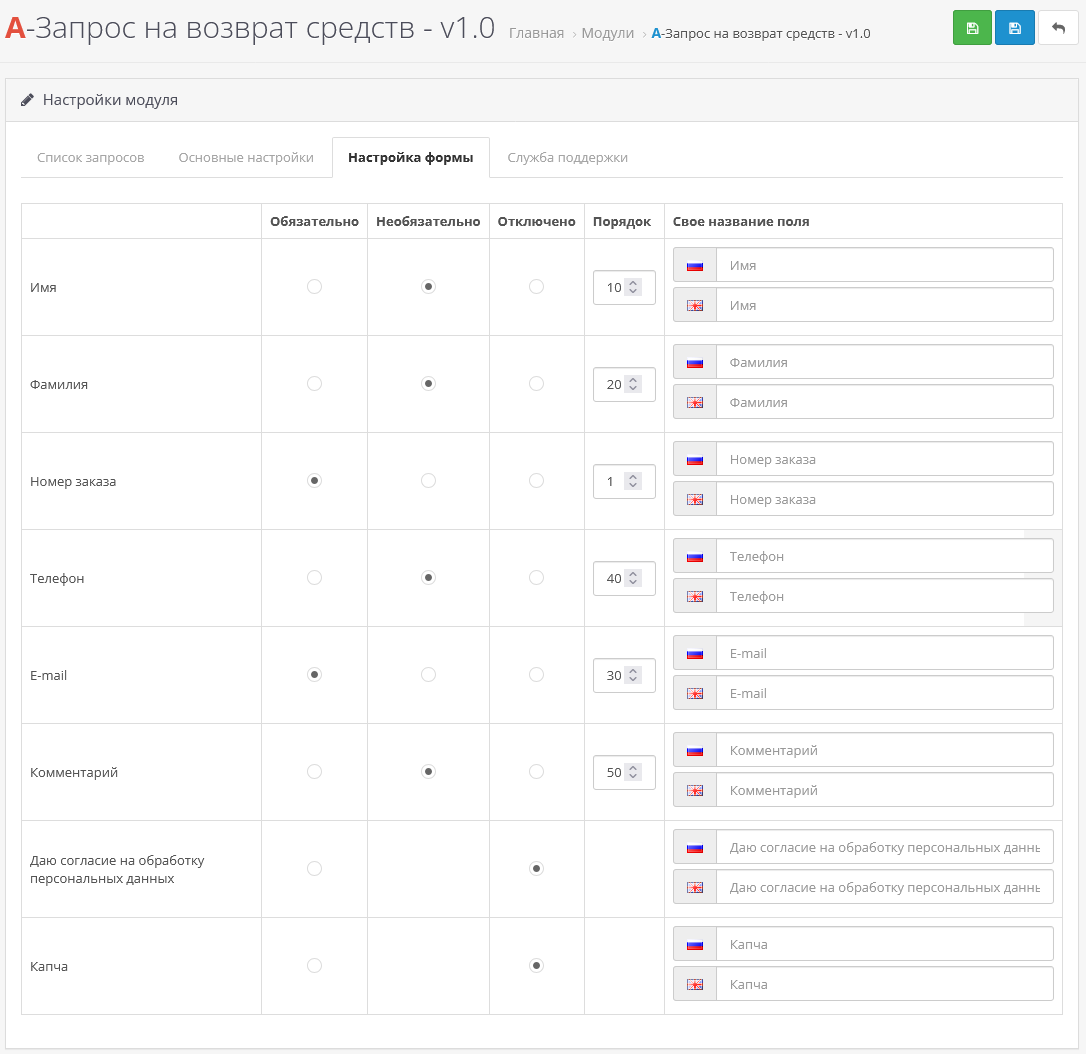
The form is fully customizable: you can turn fields on and off, change their order, and set your ownnames and mark the required ones. Multilingual support.
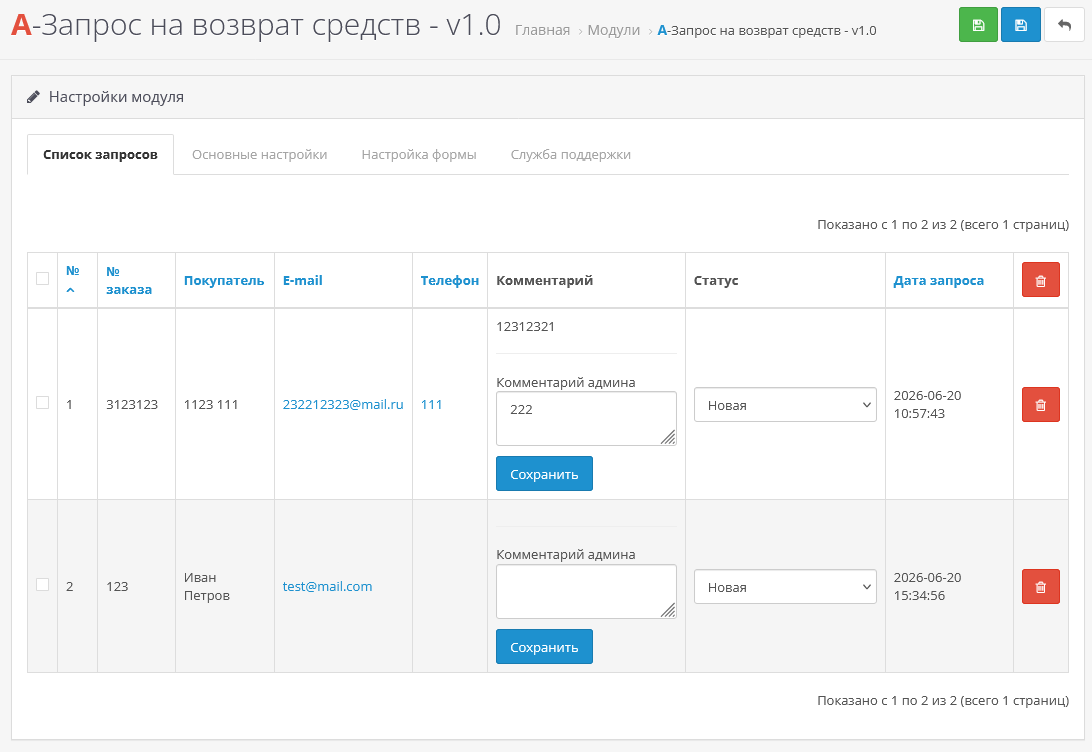
In the admin panel, applications are displayed in a compact table: order number, customer data and current status. Internal comments and quick change of application status are available.
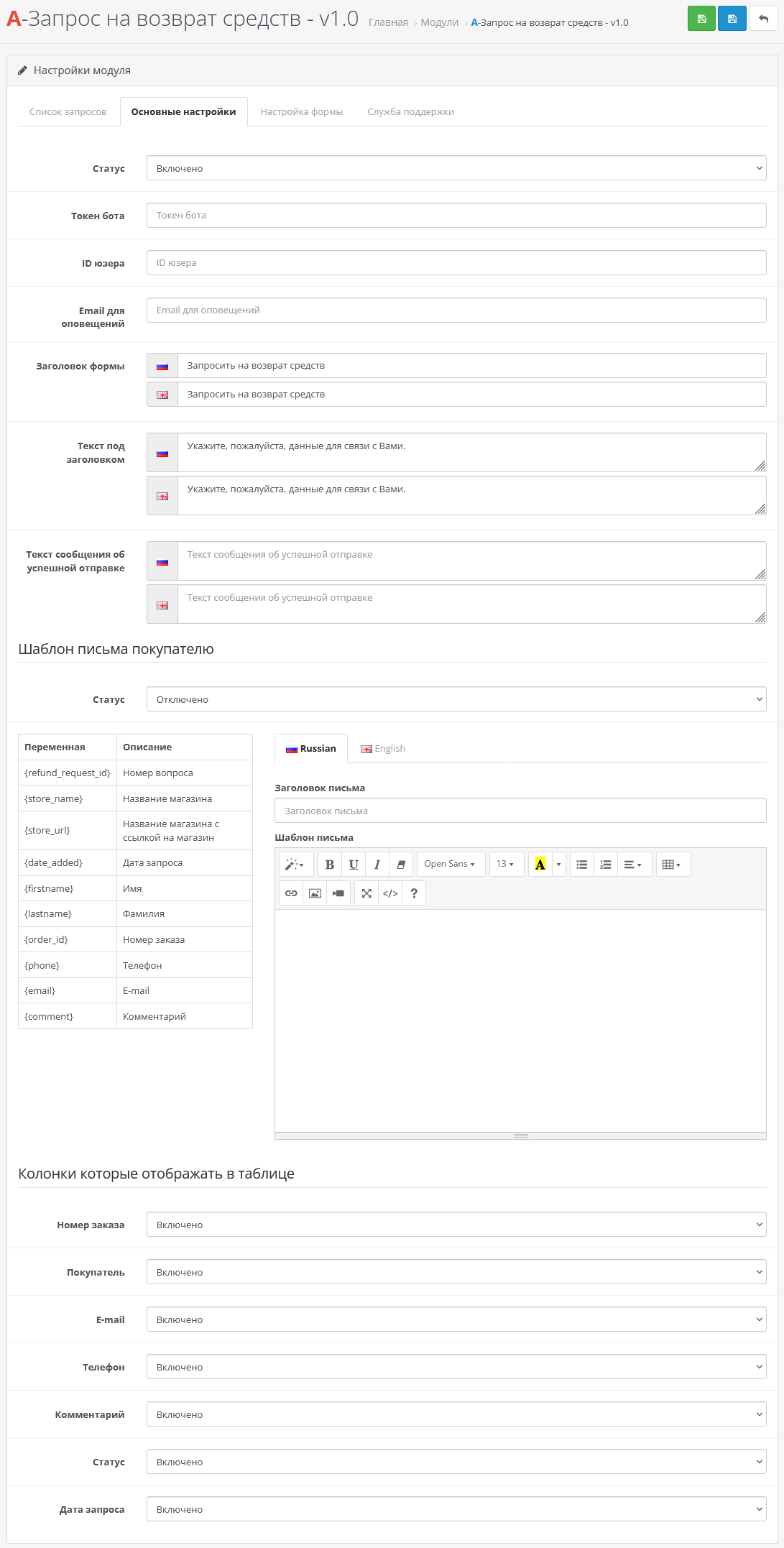
The module supports notifications of new applications via e-mail and Telegram, so that the manager immediately receives information about a new application.
Additionally, you can set up an automatic letter to the client at the e-mail specified in the application.
DEMO - the form can be displayed on any page and in any position through layouts
Possible fields in the form:
Installation instructions:
Technical support is provided to all users who legally purchased the module on official websites or from the author himself.
License:
Each copy of the module affects 1 domain and its subdomain.
Therefore, if you want to install the module on another domain, you must purchase another copy of the module.
For all questions and suggestions write to serfbots@gmail.com
Instead of the standard cumbersome OpenCart return form (RMA), where you need to indicate the product, quantity and reason for the return, the client submits a short request - just the order number and a few basic fields. The administrator receives the request and processes it manually, without unnecessary steps on the part of the buyer.
The module does not replace the standard OpenCart returns system, but complements it, offering an alternative and faster scenario for working with requests.
Both systems can work in parallel - you choose the appropriate option depending on the business process.
The form is fully customizable: you can turn fields on and off, change their order, and set your ownnames and mark the required ones. Multilingual support.
In the admin panel, applications are displayed in a compact table: order number, customer data and current status. Internal comments and quick change of application status are available.
The module supports notifications of new applications via e-mail and Telegram, so that the manager immediately receives information about a new application.
Additionally, you can set up an automatic letter to the client at the e-mail specified in the application.
DEMO - the form can be displayed on any page and in any position through layouts
Possible fields in the form:
- Name;
- Last name
- Phone;
- Email;
- Order number;
- Comment;
- Consent to the processing of personal data;
- CAPTCHA.
Installation instructions:
- Install the art_refund_request_3.x.ocmod.zip archive via the standard add-on manager;
- Update OCMOD cache;
- Then go to extensions->modules and find “A-Refund Request” activate it;
- Go to the module settings and configure it for yourself;
- Add the module via layouts to the desired position and page where you want the form to be displayed.
Technical support is provided to all users who legally purchased the module on official websites or from the author himself.
License:
Each copy of the module affects 1 domain and its subdomain.
Therefore, if you want to install the module on another domain, you must purchase another copy of the module.
For all questions and suggestions write to serfbots@gmail.com
Distribution method:
Paid
Opencart version:
LiveStore 3.*OCStore 3.*OpenCart 3.*
PHP verision:
PHP 5.4PHP 5.5PHP 5.6PHP 7.0PHP 7.1PHP 7.2PHP 7.3PHP 7.4PHP 8.0PHP 8.1PHP 8.2
Activation:
Automatic
Getting files:
By email, after a request to the author
Protection system:
Custom
VQmod:
No
Ocmod:
Yes
Events:
No
Uploaded:
20.06.2026
Updated:
24.06.2026
Viewed:
1464
Write a review
Your Name:Your Review: Note: HTML is not translated!
Rating: Bad Good
Enter the code in the box below:











Файлы будут доступны после покупки


